Business Challenge
Every post since #31 has been about narrowing standing access, and #52 ended on the idea that expiry beats revocation because it turns an urgent action into a default. This is the service that implements that properly: you can use Privileged Access Manager (PAM) to control just-in-time temporary privilege elevation for select principals. It is the most straightforwardly good thing in this part of the platform, and it is worth understanding what it is made of.
Neither end is instant. Privileged Access Manager manages temporary access by adding and removing role bindings from resources, and these role bindings use time-based IAM Conditions to help ensure that access is temporary. Consequently the activation and revocation of temporary access depend on standard access change propagation — the same minutes-to-longer delay #52 measured.
Correct approachPlan for a lag at both ends. Tell on-call responders their grant is not usable the instant it is approved, and do not treat grant expiry as an instantaneous containment control.
You cannot. PAM supports predefined roles, custom roles and the Admin, Writer and Reader basic roles, but it does not support legacy basic roles (Owner, Editor, and Viewer). The broadest standing grants in most estates are precisely the ones that cannot be made temporary this way.
Correct approachReplace Owner and Editor with predefined or custom roles first, then put those behind an entitlement. The migration is the work; PAM is the easy part afterwards.
Only if you configure it to. If these role bindings are modified by something other than Privileged Access Manager, then Privileged Access Manager might not work as expected — and the specific guidance is to use non-authoritative resources instead of authoritative resources so that Terraform does not remove live grants.
Correct approachAudit your IAM Terraform for authoritative resources before enabling PAM, exactly as #48 required for service agent bindings. It is the same defect with a different third writer.
It is, and it is Preview, and this feature is available with either the Enterprise or Premium tier of Security Command Center. The capability is real — up to two sequential levels, up to five approvals per level — but it is neither generally available nor included.
Correct approachDesign for what is GA today, which is a single approver who cannot approve your own request, and treat multi-party approval as a funded upgrade rather than an assumed control.
Architecture
An entitlement is the configuration object and it is pleasingly complete: the principals who may request, whether a justification is required, the roles to grant with optional IAM conditions, the maximum duration, optionally who must approve and whether they must justify their approval, and optionally who else to notify. A requester asks for a grant, and if successful they are granted the roles listed in the entitlement until the end of the grant duration, after which the roles are revoked by Privileged Access Manager.
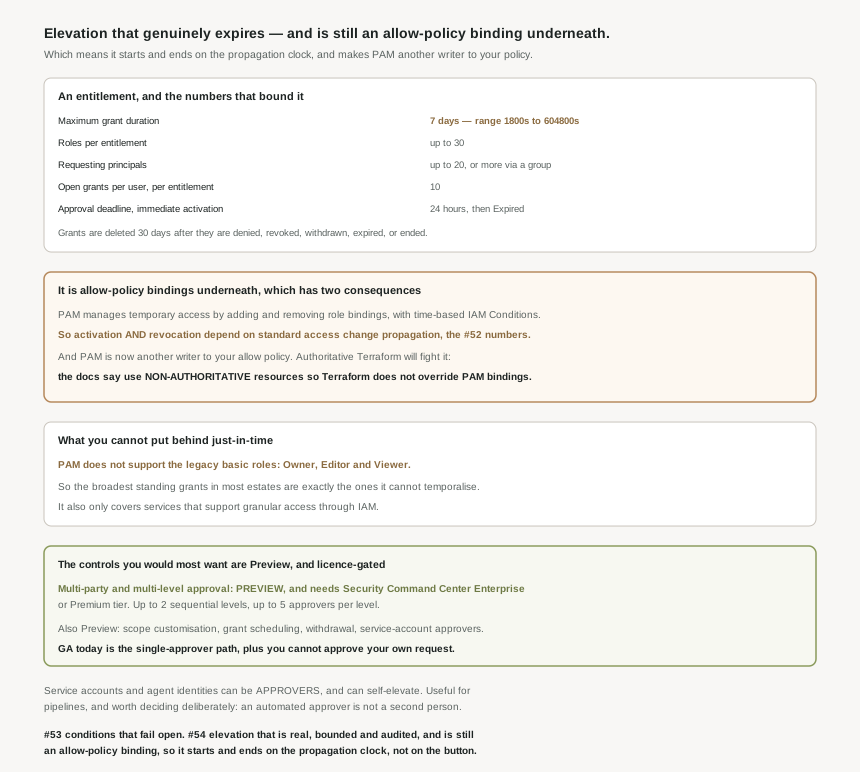
The numbers, because they shape what you can model
| Limit | Value |
|---|---|
| Maximum grant duration | 7 days — the supported range is between 30 minutes (1800s) and 168 hours (604800s) |
| Roles per entitlement | Up to 30 roles to be granted on the organization, folder, or project |
| Requesting principals | Up to 20, and you can add more than 20 identities by adding them to a group |
| Open grants, per user per entitlement | A maximum of 10, across Active, Scheduled and Approval awaited |
| Approval deadline | Immediate activation: Within 24 hours of the request, then Expired |
| Grant retention | Deleted 30 days after they are denied, revoked, withdrawn, expired, or ended |
Two of those are worth a second look. The 30-minute floor means PAM is not a mechanism for a single API call — the shortest window you can offer is half an hour. And the "more than 20 via a group" escape hatch quietly makes a group the requester list, which means #52 applies again: who may ask for elevation is then governed by group membership, outside the entitlement, with its own propagation delay.
Scope is organisation, folder or project: Privileged Access Manager supports creating entitlements and requesting grants for projects, folders, and organizations. Narrower than that is an IAM condition on the role, and PAM accepts the same condition attributes as ordinary role bindings. Identity coverage is broad — Privileged Access Manager supports all types of identities, which includes the workload and workforce federation of #44 and #45, and all principal types are supported except allUsers and allAuthenticatedUsers, which is the right exclusion.
One structural constraint that decides whether it is usable at all
Privileged Access Manager only supports services that support granular access through IAM because it uses IAM conditions to manage temporary access. That sentence is doing a lot of work. PAM is not a separate enforcement system; it is a scheduler for conditional role bindings, so wherever conditional bindings do not work, neither does PAM. Check the service before designing the entitlement.
Why This Architecture Holds Up
The implementation note is short and it explains both of the surprises in this post. PAM adds and removes ordinary role bindings carrying time-based IAM conditions. Everything follows from that.
Because the mechanism is a role binding, the activation and revocation of temporary access depend on standard access change propagation, and the request page says the same thing from the other side: successful grant requests take time to propagate through the system because Privileged Access Manager uses time-based IAM Conditions subject to standard access change propagation. So a one-hour grant is approximately an hour of access, with a ragged edge at both ends. For the emergency-response use case the lag at the start is the one people notice; for the security case, the lag at the end is the one that matters, and it is the direction #52 noted is slower.
#48 found the allow policy had an author you cannot see. PAM is a second one you can, and it leaves live bindings in the policy that your source of truth did not put there. The documentation is explicit about both halves of the fix: if these role bindings are modified by something other than Privileged Access Manager, then Privileged Access Manager might not work as expected, so do not hand-edit them — and if you manage IAM with Terraform, use non-authoritative resources instead of authoritative resources so a reconciling apply does not revoke somebody mid-incident. This is #48 and #50 for a third time, and by now it is less a gotcha than a design rule: the allow policy is shared, and any tool that asserts total ownership of it will eventually delete something it did not create.
What is GA, and what is not
This is the part I would want to know before writing a design document, because a surprising amount of the feature set is Preview. The following are all currently Preview: multi-level and multi-party approvals, scope customisation, service account and agent identity approvals, inheritance from parent resources, notification preference customisation, grant scheduling, and grant withdrawal. Two of those additionally require a licence: multi-party approval and scope customisation are available with either the Enterprise or Premium tier of Security Command Center.
That matters most for approvals, because approval is the control that carries the security argument. Google states it plainly: with multi-party approvals, you can require a second approver for grant requests, and this approach reduces the risk of a single administrator or a compromised account approving malicious access. Agreed — which is exactly why it is awkward that the mechanism is Preview and gated. What is GA is a single approver, with one solid guardrail: you cannot approve your own request.
The shape of the multi-party feature is good when you have it: Privileged Access Manager administrators can mandate more than one approval level per entitlement, allowing up to two levels of sequential approvals for each entitlement, and administrators can mandate up to five approvals per level. Two levels, five per level, sequential — enough to express a real separation-of-duties rule.
Automated approvers, which deserve a deliberate decision
One capability cuts both ways and is worth naming rather than discovering. Privileged Access Manager administrators can enable service accounts and agent identities as eligible approvers, intended for pipelines that validate a ticket in an ITSM system and approve programmatically. For a well-run change process that is genuinely better than a human rubber-stamping at 03:00, because the ticket check is real and consistent.
But hold it next to the sentence justifying multi-party approval. The stated benefit is reducing the risk of a single administrator or a compromised account approving malicious access. An automated approver is not a second person; it is a second system, and its security is the security of whatever can make it say yes. Both things can be true — this is a real improvement to throughput and consistency, and it is not the control that the two-person rule describes. Decide which of the two you are buying, and if it is the automation, keep the human level as well. The feature supports two sequential levels precisely so you can.
The parts that quietly make it operable
Three smaller features are the difference between a mechanism and a workflow. Requesters can schedule grant requests up to seven days in advance, which aligns access with an on-call shift or a maintenance window instead of a scramble. Grant withdrawal lets a requester end an active grant when the task is done, which is the behaviour you actually want and cannot get from a fixed timer. And scope customisation lets a requester narrow a request within the entitlement, with up to five resource filters. All three are Preview, and all three are the reason to keep watching this service rather than adopting it once and filing it.
On the audit side the promise is kept: entitlement and grant events go to Cloud Audit Logs, grants themselves are automatically deleted 30 days after they are denied, revoked, withdrawn, expired, or ended while the logs persist for the retention of the _Required bucket. So the record of who elevated, when, why and who approved outlives the grant object — which is the right way round, and is the thing #48 through #53 kept wishing for.
Key Architecture Decisions
| Decision | Choose this | Because |
|---|---|---|
| Terraform managing IAM alongside PAM | Non-authoritative resources | Authoritative ones revoke live grants on apply. |
| Owner and Editor standing grants | Replace with predefined or custom roles first | PAM does not support the legacy basic roles. |
| Expecting instant revocation at expiry | Do not | Revocation rides on standard access change propagation. |
| Grant duration | The shortest the task allows, above the 30-minute floor | The range runs from 1800s to 604800s. |
| Requester lists above 20 | A group, knowingly | Eligibility then lives in group membership, per #52. |
| Approval design | Build for one approver, fund two if you need them | Multi-party approval is Preview and needs SCC Enterprise or Premium. |
| Service accounts as approvers | Add a human level alongside | An automated approver is a second system, not a second person. |
| Ending access early | Withdraw the grant, do not wait for the timer | It is the only way to shorten access already granted. |
| Planned maintenance access | Schedule it, up to seven days ahead | It removes the approval scramble from the window itself. |
| Choosing a service to protect | Confirm it supports granular IAM access | PAM works through IAM conditions and nothing else. |
The one to look at today
Pick your most privileged standing grant and check whether PAM could hold it at all. If it is roles/owner or roles/editor, the answer is no, and the actual task is a role migration that has nothing to do with PAM — which is useful to know before a quarter is spent planning entitlements around it. If it is a predefined or custom role, then the only remaining question is the duration, and the honest answer is usually far shorter than the standing grant it replaces.
Closing Thought
This is the first service in this stretch of the series where my summary is mostly approval. The design is coherent, the audit trail is genuine, the quotas are sensible, the one guardrail that is GA — you cannot approve your own request — is the right one to have made non-optional, and the documentation tells you how it works underneath instead of presenting it as magic. Set against the alternative of permanent administrative roles held by people who need them four times a year, there is no argument.
The thing worth carrying is that it does not escape the properties of the layer it is built on. Because temporary access is a timed role binding, it inherits the propagation behaviour of #52 at both ends, and it joins the Service Agent Manager of #48 as another writer to a policy your pipeline may believe it owns. Fifty-four posts in, that is the most reliable pattern this series has found: a well-built control on top of a shared, eventually-consistent document, and nearly every surprise coming from the layer underneath rather than the feature itself. The feature is usually the part that works.
#55 closes this block with the problem every post since #48 has been circling: organization-level roles, and the super admin problem — what cannot be delegated, what cannot be denied, and who ends up holding it.
Comments