Business Challenge
#53 was about partners in your own directory. This is about the other external population entirely: the people who use your product. They are not guests, they are not invited, and they should not be anywhere near the tenant that holds your employees — which is exactly what Microsoft now enforces by making it a separate tenant configuration.
“When you want to use External ID to add customer identity and access management (CIAM) to your apps, you create a new tenant in an external configuration. This tenant is distinct and separate from your workforce tenant.”
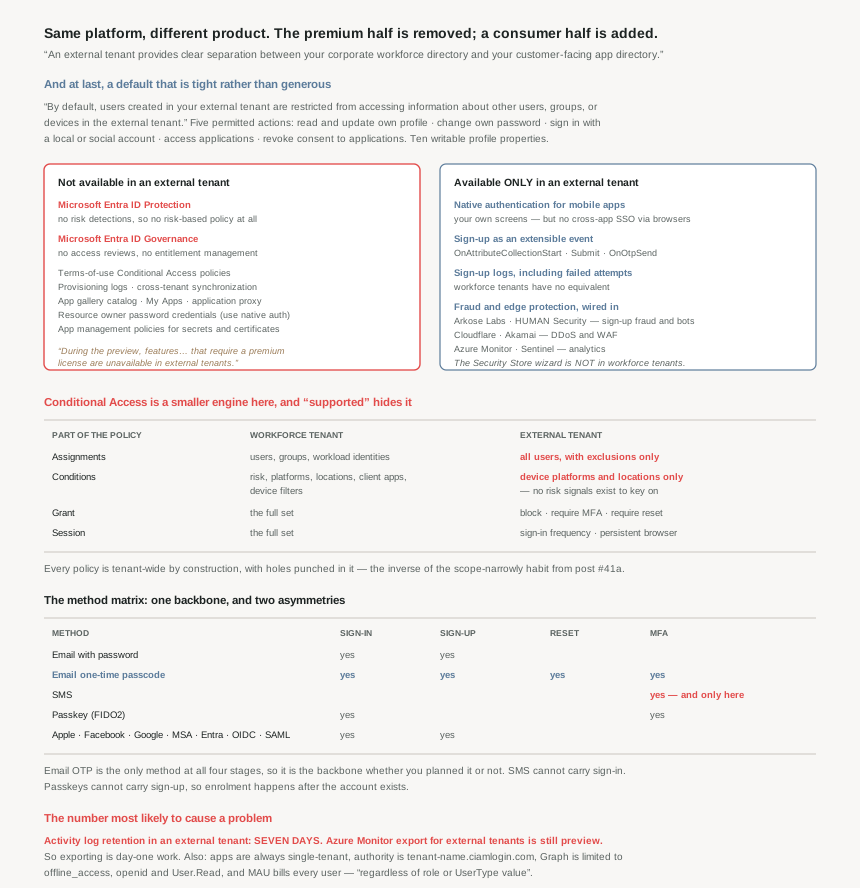
The first thing worth saying is that the separation does what you want. After five posts of finding defaults that reveal more than anybody chose, here is one that does the opposite:
“By default, users created in your external tenant are restricted from accessing information about other users, groups, or devices in the external tenant.”
And the permission list is genuinely short: read and update their own profile, change their own password, sign in, access applications, and — a nice touch — “revoke consent to applications”. Ten profile properties are writable and nothing else. Compare that with #53’s workforce guest, who can read the name and email of every group they are in.
The second thing is the part that decides architectures, and it is not a tuning question. An external tenant runs on the same platform and does not have the same product in it. Two absences stand out, stated flatly in the comparison table:
“Microsoft Entra ID Protection… Not available.” and “Microsoft Entra ID Governance… Not available.”
Everything this series spent posts #48, #45 and #46 on — risk detections, risk-based policy, PIM, access reviews — does not exist for your customers. The documentation gives the reason in a one-line note that is easy to skim and worth not skimming: “During the preview, features or capabilities that require a premium license are unavailable in external tenants.”
Architecture
A second tenant, a different authority URL, a smaller Conditional Access engine, and a set of capabilities the workforce tenant does not have.
What is absent, and what it costs you
The absences are not random. They are, almost without exception, the premium identity-governance stack plus the enterprise-IT plumbing that a consumer app has no use for:
| Not available in an external tenant | What you do instead |
|---|---|
| Microsoft Entra ID Protection | Nothing equivalent. No risk detections, so no risk-based policy. |
| Microsoft Entra ID Governance | Nothing equivalent. No access reviews, no entitlement management. |
| Terms-of-use Conditional Access policies | A required checkbox attribute on the sign-up page, with a custom hyperlink. |
| Provisioning logs | Audit and sign-in logs only — plus sign-up logs, which workforce lacks. |
| Resource owner password credentials (ROPC) | Native authentication, for mobile apps. |
| Cross-tenant synchronization | Nothing — the external tenant does not sync with your workforce one. |
| App gallery catalog, My Apps self-service, application proxy | Nothing. These are workforce concepts. |
| Application management policies for secrets and certificates | Nothing — so secret hygiene is your process, not an enforced policy. |
That last row deserves a flag. In a workforce tenant you can enforce secret and certificate restrictions centrally; in an external tenant that enforcement is “Not available”, while the apps living there are your production customer-facing apps. Rotation remains supported and documented — it is the policy that cannot be enforced for you.
Conditional Access is a smaller engine here
This is the single difference most likely to be discovered after a design is finished, because “Conditional Access is available” is true and misleading. Compare what you can actually express:
| Part of the policy | Workforce tenant | External tenant |
|---|---|---|
| Assignments | Users, groups, workload identities | “Include all users, and exclude users and groups” |
| Conditions | Sign-in risk, user risk, device platforms, locations, client apps, device filters | Device platforms and locations only |
| Grant | The full set of grant controls | Block access, require MFA, require password reset |
| Session | The full set of session controls | Sign-in frequency, persistent browser session |
Read the assignments row carefully: you cannot target a policy at a group, only exclude groups from an all-users policy. Every policy is tenant-wide by construction, with holes punched in it. That inverts the design habit from #41a, where the advice was to scope narrowly and expand.
And the conditions row is the honest consequence of ID Protection being absent: there are no risk signals to condition on, because nothing is generating them. The step-up-on-risk pattern that is the centrepiece of workforce identity design simply is not available for customer sign-ins.
What exists only here
The trade is not one-sided, and the additions are the reason this is a product rather than a cut-down tenant:
- Native authentication. “Not available” in a workforce tenant; here it “gives you full control over the design of your mobile application's sign-in experiences” — no browser redirect, your own screens. With one documented limit worth designing around: “Cross-app SSO through system browsers isn't available with native authentication.” Your own UI or SSO across apps, not both.
- Sign-up as an extensible event. Three custom-extension events exist only in external tenants —
OnAttributeCollectionStart,OnAttributeCollectionSubmitandOnOtpSend. The first fires “before the attribute collection page renders” and supports “prefilling values and displaying a blocking error”; the second validates what the user typed; the third hands OTP delivery to your own email provider. That is a real extensibility story for the part of the funnel that matters commercially. - Sign-up logs. “Microsoft Entra External ID logs all self-service sign-up events, including both successful sign-ups and failed attempts” — and this is “Not available” in a workforce tenant. Failed sign-ups are the signal that tells you whether your funnel or an attacker is the problem.
- Fraud and edge protection as first-class integrations. Arkose Labs and HUMAN Security for sign-up fraud and bots; Cloudflare and Akamai for DDoS and WAF; Azure Monitor and Sentinel for analytics. Notably the Security Store wizard for these is “isn't available” in a workforce tenant, so this is the opposite of a cut-down experience.
- Passkeys for customers. The MFA methods are email OTP, SMS and “Passkey (FIDO2)”, which makes #44’s material directly applicable to a consumer product.
The authentication-method matrix has one asymmetry to design around
The methods table repays a close read, because a method being “supported” does not mean supported everywhere in the journey:
| Method | Sign-in | Sign-up | Password reset | MFA |
|---|---|---|---|---|
| Email with password | yes | yes | — | — |
| Email one-time passcode | yes | yes | yes | yes |
| SMS | — | — | — | yes, only |
| Passkey (FIDO2) | yes | — | — | yes |
| Apple, Facebook, Google, MSA, Entra ID, OIDC, SAML | yes | yes | — | — |
Email one-time passcode is the only method that works at every stage, which makes it the backbone of a CIAM design whether or not you intended that. SMS is MFA only — you cannot build phone-number sign-in on it. And passkeys cannot be the registration method, only a sign-in and MFA method, so enrolment has to happen after an account exists.
Application registration is narrower, deliberately
Three constraints that change how you set the app up: it is “Always… accounts in this organizational directory only (single tenant)”; the authority URL is always <tenant-name>.ciamlogin.com; and Graph permissions are limited to “offline_access, openid, and User.Read, along with your My APIs delegated permissions”, with only an admin able to consent for the organisation.
Administratively there is exactly one role in play: “Only the Cloud Application Administrator role can be used for apps in external tenants.”
Which is a coherent design. The tenant exists to serve your own apps to your own customers, so multi-tenant app registration, broad Graph scopes and a wide role model would all be surface with no purpose.
Why This Architecture Holds Up
Because seven days of logs is a compliance decision disguised as a table row
The single number in this whole comparison most likely to cause a problem is in the activity-logs section, and it is stated without comment: retention for activity logs in an external tenant is “Seven days.”
Seven days. For the directory that authenticates your customers — the system of record for “who signed in, from where, and what failed”. Any incident investigation that starts more than a week after the event has no primary evidence, and any retention obligation measured in months is unmet by default.
The remedy exists and is explicitly a preview: “Azure Monitor for external tenants (preview)”. So exporting logs is not an optimisation to schedule later — it is day-one work, and it is the first thing I would build after the tenant itself. Compare the deliberate contrast one row above: “Provisioning logs… Not available”, and one row below, user-activity reports “retiring August 31, 2026” — a date that has already passed. The observability story here is young and moving, and planning around it is part of the design.
Because the billing model is a different shape, not a different price
Workforce and external tenants both use monthly active user pricing, and the scope is the difference that matters:
- Workforce: MAU “for external guests through B2B collaboration (
UserType=Guest)” — your employees are licensed, your guests are metered. - External: MAU “for all users in the external tenant regardless of role or
UserTypevalue”.
So in an external tenant the admins you create are metered alongside the customers. The amounts are small; the modelling consequence is not, because your identity bill is now a function of product engagement rather than headcount. A successful marketing campaign is an identity cost event. That is normal for CIAM and it is a line most infrastructure budgets are not shaped for.
Because the thing that looks like a shortcut is explicitly not one
There is an inviting-looking feature here that is fenced off with unusual firmness. You can invite external users into an external tenant — and:
“You can invite external users for administrative purposes only. You can't use this feature to invite customers to sign in to your apps. This feature isn't compatible with customer identity and access management (CIAM) user flows.”
Three sentences to close one door, which is usually a sign that people keep walking through it. The honest reading is that invitation is the B2B mechanism from #53 and user flows are the CIAM mechanism, and the two do not compose. If your customers need to be invited rather than to sign themselves up, you are describing a B2B scenario in a workforce tenant, not a CIAM one.
Because B2C is closed to new customers, and that changes the default answer
For a decade the answer to “customer identity on Azure” was Azure AD B2C. It is not any more: “Effective May 1, 2025, Azure AD B2C will no longer be available to purchase for new customers.”
Existing deployments are untouched — “the new workforce and customer tenant model doesn't affect your existing Azure AD B2C tenants” — so this is a greenfield constraint rather than a migration deadline. But it does mean that any design document, blog post or internal standard written before mid-2025 is recommending something a new project cannot buy. If you inherit a plan that says B2C, that is the first thing to check.
Because separation of directories is the actual feature
It is worth ending the architecture argument where the documentation starts it: “An external tenant provides clear separation between your corporate workforce directory and your customer-facing app directory.”
Everything else on this page is a consequence. Your customers cannot enumerate your staff because they are not in the same directory as your staff. A compromised customer account is not a foothold in the tenant that holds your Global Administrators. The blast-radius argument is the same one #52 made for a managed domain, applied one level up — and here it is not a trade-off against capability for the workforce side, because the workforce tenant keeps everything it had.
What you are accepting is a weaker security toolkit for the customer population specifically: no risk detection, no governance lifecycle, a two-condition Conditional Access engine, and a week of logs unless you export them. For most consumer products that is an acceptable trade, which is the point. For a product whose users hold something genuinely sensitive, it is a list of things to compensate for deliberately — and the compensations are exactly the integrations Microsoft put here: fraud detection at sign-up, a WAF in front, and your logs in Sentinel.
Key Architecture Decisions
| Situation | Decision | Why |
|---|---|---|
| Publishing an app to consumers or business customers | A new tenant in external configuration | It is the first resource you create; the separation is the feature. |
| Inherited a design that specifies Azure AD B2C | Re-plan on External ID | B2C can no longer be purchased by new customers. |
| Creating the tenant | Use the Entra admin center | The Azure portal only creates workforce tenants. |
| Any compliance or forensic requirement | Export logs on day one | Retention in an external tenant is seven days. |
| Relying on risk-based step-up for customers | Redesign — it does not exist | ID Protection is unavailable, so there are no risk conditions. |
| Planning access reviews over customer accounts | Build it yourself or do without | ID Governance is unavailable. |
| Expecting to target CA policies at groups | Design all-users-with-exclusions instead | Assignments only include all users and exclude. |
| Wanting phone-number sign-in | Not possible; SMS is MFA only | The methods matrix allows SMS for MFA and nothing else. |
| Choosing a backbone method | Email one-time passcode | The only method supported at all four stages. |
| Offering passkeys | Enrol after account creation | Passkeys cover sign-in and MFA, not sign-up. |
| Fully branded mobile sign-in | Native authentication — and give up cross-app SSO | System-browser SSO is unavailable with native auth. |
| Validating or enriching sign-up data | OnAttributeCollectionStart and Submit | These events exist only in external tenants. |
| Sending OTPs from your own domain | OnOtpSend with your email provider | Custom OTP delivery is an external-tenant event. |
| Terms of use at registration | A required checkbox attribute on sign-up | Terms-of-use CA policies are unavailable. |
| Bot and credential-stuffing exposure | Arkose or HUMAN at sign-up; Cloudflare or Akamai at the edge | These are the documented compensations for the missing risk engine. |
| Watching funnel health and attacks together | Sign-up logs | They record failed attempts, and workforce tenants have no equivalent. |
| Customers need to be invited, not to sign up | That is B2B in a workforce tenant | Invitation is for admins only and is incompatible with user flows. |
| Forecasting the identity bill | Model MAU against product engagement | Every user is metered, regardless of role or UserType. |
| Secret and certificate hygiene for customer-facing apps | Own it as a process | Application management policies cannot enforce it here. |
Closing Thought
The clean way to hold this is that External ID is not Entra ID with customers in it. It is a separate product sharing a platform, and the two halves of the difference point in opposite directions. Removed: the premium governance stack, the risk engine, most of the Conditional Access grammar, and all but a week of log retention. Added: native authentication, an extensible sign-up pipeline, sign-up telemetry including failures, and fraud and edge protection wired in as first-class integrations. One list is enterprise IT; the other is a consumer product team. The tenant knows which one it is for.
The decision therefore is not “do we need CIAM”. It is whether the customer population can be secured with what is on the second list, given that nothing from the first list is coming. For a retail app or a self-service SaaS tier, comfortably yes — and the separation is a genuine security win that the workforce tenant pays nothing for. For a product where a customer account reaches something regulated, the honest answer is that you are compensating for a missing risk engine with a WAF and a fraud vendor, and you should decide that deliberately rather than discover it.
And the pattern this phase has been tracking finally turns over. For eleven posts the defaults have revealed a little more than anybody chose — an unapplied filter, an unenforced denial, a discarded account, a skipped member, a disabled feature reporting itself enabled, group names leaking to contractors. Here the default is tight, the separation is real, and the thing that will catch you out is the opposite failure: a capability you assumed was in the platform because it was in the platform last time. The habit that has served every post in this block still applies, just pointed the other way. Go and check what is actually there.
#55 is the setting that governs everything between two Entra tenants: cross-tenant access settings — inbound and outbound trust, and what it means to accept another organisation’s MFA claim as your own.
Official Azure Reference
- Supported features in workforce and external tenants — the full comparison: what is absent, the reduced Conditional Access grammar, the authentication-method matrix, log retention and the MAU scope
- Workforce and external tenant configurations — what each tenant type is for, how an external tenant is created, and the Azure AD B2C end-of-sale date
- User default permissions in external tenants — the restricted default, the five permitted actions, and the ten writable profile properties
Comments