Business Challenge
Naming looks like the cheapest decision in a platform build and it is the one with the longest half-life. Four things go wrong, and all four are discovered long after the standard was agreed.
Frequently impossible. Google states plainly that you cannot change the name of an existing bucket — the remedy is to create a new bucket with the name you want and move the contents across. A project ID is permanent after creation. Most names on Google Cloud are set once, and the cost of a bad one is a migration rather than an edit.
Correct approachTreat every name as immutable until proven otherwise, and design the standard as though nothing in it can ever be corrected. That assumption is right often enough to be the safe default.
There is no character set legal across Google Cloud. Compute Engine resource names must comply with RFC 1035 and match ^[a-z]([-a-z0-9]*[a-z0-9])? — hyphens are fine, underscores are not. BigQuery dataset names allow letters, numbers and underscores, and reject hyphens. A convention built on either separator is illegal in the other service.
Define the standard as an ordered list of fields, not as a literal string with a fixed separator. Then bind the separator per service — hyphens in Compute, underscores in BigQuery — so the same information survives translation.
dev but it is production now"
The classic failure, and it is structural rather than careless. Environment, owning team, cost centre and application name are the four fields everybody wants in a name, and all four change on a timescale shorter than the resources they label. The name is the one place they cannot follow.
Correct approachPut changeable attributes where they can change. Environment belongs in a tag if policy reads it, and a label if only reports do — each resource can carry up to 64 labels, and editing one costs nothing.
You cannot. A project ID cannot be in use or previously used, and Google states explicitly that this includes deleted projects. The identifier is spent permanently the first time it is claimed. Bucket names sit in a namespace shared by every Cloud Storage user, so a name may simply be unavailable because a stranger took it.
Correct approachAssume collision, and design for it. This is precisely why Google's own blueprint appends a random suffix to project names rather than trusting a tidy deterministic one.
Architecture
A naming standard is really three separate decisions that get bundled together and should not be: what a name is allowed to contain, what it ought to contain, and what must never go in one.
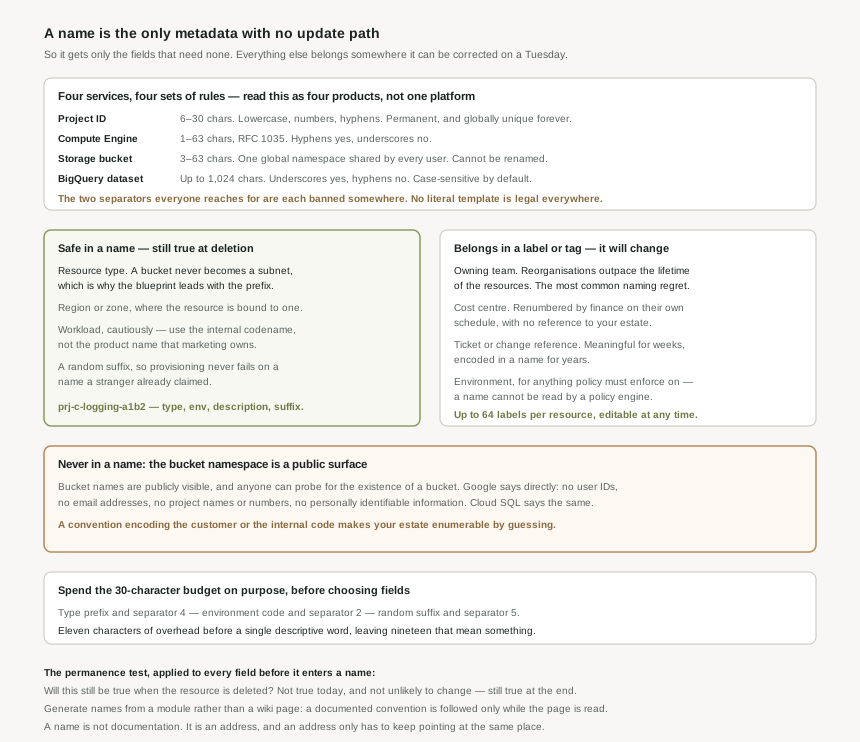
The rules are not the same anywhere
| Resource | Length | Character set | Unique within |
|---|---|---|---|
| Project ID | 6 to 30 characters | Lowercase letters, numbers and hyphens. Must start with a letter, cannot end with a hyphen. | All of Google Cloud, permanently — including deleted projects. |
| Compute Engine resources | 1 to 63 characters | RFC 1035: ^[a-z]([-a-z0-9]*[a-z0-9])?. No underscores. |
A location within a project, generally. |
| Cloud Storage bucket | 3 to 63 characters, or up to 222 with dots, each component at most 63 | Lowercase letters, numerics, dashes, underscores and dots. Must start and end with a number or letter. | A single global namespace shared by all Cloud Storage users. |
| BigQuery dataset | Up to 1,024 characters | Letters (uppercase or lowercase), numbers and underscores. No hyphens. | Each project. Case-sensitive by default. |
Read that table as four different products rather than one platform, because that is how it behaves. The length limits span 30 to 1,024. One service is case-sensitive and three are effectively lowercase-only. The two separators most people reach for are each banned somewhere. And the uniqueness scope ranges from "this zone" to "the entire internet, forever".
A house style of app_env_region is unusable for anything in Compute Engine, where underscores are illegal. A house style of app-env-region is unusable for a BigQuery dataset, where hyphens are. There is no third option that satisfies both, so a standard written as a literal template will be violated by whichever service it was not written for — usually silently, by an engineer who just needs the resource to exist. Specify the fields and their order, and let the separator be a per-service detail.
What Google's own blueprint encodes
The enterprise foundations blueprint publishes a naming convention, and it is worth reading as evidence of what survives rather than as a template to copy:
| Resource | Pattern | Example |
|---|---|---|
| Folder | fldr-environment | fldr-production |
| Project | prj-environmentcode-description-randomid | prj-c-logging-a1b2 |
| VPC network | vpc-environmentcode-vpctype | vpc-p-svpc |
| Subnet | sn-environmentcode-vpctype-region | sn-p-svpc-uswest1 |
| Cloud Router | cr-environmentcode-vpctype-region | cr-p-svpc-useast1-cr1 |
| Service account | sa-description@projectid.iam.gserviceaccount.com | sa-terraform-net@prj-b-seed-a1b2... |
| Bucket | bkt-projectid-description | bkt-prj-c-infra-pipeline-a1b2-app-artifacts |
Three things stand out. Every name carries a type prefix — prj, vpc, sn, sa, bkt — which is the one field guaranteed never to change. Environment is compressed to a single character, because a 30-character project ID budget does not survive spelling out "production". And the project pattern ends in a four-character random suffix.
It exists because project IDs are globally unique and can never be reused, including after deletion. A deterministic ID like prj-p-logging is claimable exactly once across all of Google Cloud — and quite possibly already taken by someone you will never meet. The suffix trades a small amount of readability for the guarantee that provisioning does not fail on a name collision, and that a project rebuilt after deletion can carry the same meaning without needing the same string. Any convention that produces deterministic project IDs has a failure mode it has not met yet.
The bucket namespace is a security surface
Bucket names are publicly visible, and Google's guidance is unusually direct: do not use user IDs, email addresses, project names, project numbers or any personally identifiable information in them, because anyone can probe for the existence of a bucket. Cloud SQL carries the same instruction for instance names.
This is a real constraint on a naming standard rather than a footnote. A convention that encodes the owning team, the customer, or the internal project code produces globally probeable names, and a competitor can enumerate your estate by guessing. The blueprint's bkt-projectid-description is safe only because the project ID it embeds is itself opaque — environment code, short description and a random suffix. Names are also barred from beginning with the goog prefix or containing google or close misspellings.
Why This Architecture Holds Up
The whole problem reduces to one test, and it is the same test as the previous post's but with a harder threshold.
A field belongs in a name only if it will still be true when the resource is deleted. Not "true today", and not "unlikely to change" — still true at the end. Everything else belongs in a label, or in a tag if a policy reads it. The name is the one piece of metadata with no update path, so it gets only the fields that need none.
The fields, sorted by whether they hold
| Field | Where it goes | Why |
|---|---|---|
| Resource type | Name | A bucket never becomes a subnet. The only genuinely permanent field, which is why the blueprint leads with it. |
| Region or zone | Name, where the resource is bound to one | A regional resource cannot move regions; a new region means a new resource anyway. |
| Workload or system | Name, cautiously | Stable in practice, but renames happen after acquisitions and rebrands. Use the internal codename, not the product name. |
| Environment | Name for project and network scaffolding; tag for policy | Stable for the hierarchy, which is rebuilt rather than promoted — but a tag is what a policy can actually enforce on. |
| Owning team | Label | Reorganisations are more frequent than resource lifetimes. This is the single most common naming regret. |
| Cost centre | Label, or tag for hierarchy-wide attribution | Renumbered by finance on their own schedule, with no reference to your estate. |
| Ticket, request or change reference | Label | Meaningful for weeks; encoded in a name for years. |
| Anything identifying a person or customer | Neither | Bucket names are publicly probeable, and Google says explicitly not to put PII in them. |
Why the standard has to be generated, not documented
A naming convention written in a wiki page is a convention for as long as someone reads the wiki page. Given four different character sets, a 30-character ceiling on the most important identifier, and a random suffix that a human cannot produce reliably, the only version that holds is one a module emits.
That also makes the standard revisable in the one way that matters. You cannot rename what exists, but you can change what gets created next, and a generated name means the change is a module version rather than a memo. The estate then carries two conventions, old and new — which is not a failure, it is the honest record of a standard that changed. A wiki page just makes the old names look like mistakes.
Reserve the budget before you spend it
Thirty characters is the constraint that quietly decides everything else, because the project ID is both the shortest identifier and the one most often embedded in others — the blueprint's bucket pattern contains a whole project ID inside it. Count the fixed costs first: a type prefix and separator is four characters, a single-character environment code and separator is two, a four-character random suffix and separator is five. That is eleven characters of overhead before a single descriptive word, leaving nineteen for the part that means something.
Teams discover this at the point where a perfectly reasonable name is rejected, and the usual fix is to abbreviate the descriptive part until it is unreadable. Doing the arithmetic first produces a better answer: fewer fields, spelled properly.
Key Architecture Decisions
| Decision | Choose this | Because |
|---|---|---|
| The standard's format | An ordered field list, separator bound per service | Compute forbids underscores and BigQuery forbids hyphens; no literal template is legal everywhere. |
| Project IDs | Always append a random suffix | An ID cannot be in use or previously used, including deleted projects, and the namespace is global. |
| Owning team in a name | Never — use a label | Reorganisations outpace resource lifetimes, and nothing renames a bucket. |
| Environment | In the hierarchy's names, and in a tag for policy | Names cannot be read by policy engines; tags can, and inherit down the hierarchy. |
| Bucket names | No PII, no customer names, no internal codes | They are publicly visible and anyone can probe for the existence of a bucket. |
| Character budget | Do the arithmetic before choosing fields | A project ID is capped at 30 characters and is embedded inside other names. |
| Environment codes | One character | What the blueprint does, and the only way a meaningful description fits in 30. |
| Type prefix | Always, and first | The only field guaranteed never to change. |
| Enforcement | A module that generates names | A documented convention is followed only while the document is read. |
| Changing the standard | Version the module, leave existing names alone | Renaming is a migration; two conventions side by side is an honest record, not a defect. |
| BigQuery datasets | Fix the case explicitly | Dataset names are case-sensitive by default, so Sales and sales can both exist. |
Closing Thought
Every naming standard is a prediction about what will still be true in three years, written by people who have been at the company for six months. The prediction is almost always too optimistic in the same direction: it assumes the organisation is more stable than the infrastructure, when the reverse is true. Teams reorganise, cost centres are renumbered, products are renamed, environments are promoted. Buckets simply sit there.
Which suggests a modest and slightly deflating conclusion. The best naming standard is the one that encodes the least — type, place, a stable identifier, and a random suffix to keep the namespace honest. Everything a name is tempted to say about ownership, purpose or lifecycle is better said in metadata that can be corrected on a Tuesday afternoon. A name is not documentation. It is an address, and the only thing an address has to do is keep pointing at the same place.
#19 moves from describing the estate to constraining it: the Organization Policy Service — what a constraint is, how it inherits down the hierarchy, and what happens when a policy set at the organization meets a different one on a folder underneath.
Comments