Business Challenge
An architecture review asks a platform team a reasonable question: which Google Cloud services does your platform use? They expect to answer it from Terraform, and they cannot.
Not drift in the usual sense — nobody edited anything by hand. Some services were on the moment the project was created. Others switched on because an engineer opened a console page while debugging, and the platform enabled the service in order to render it.
Correct approachKeep enablement explicit and in code even though the console will do it for you. A service enabled in Terraform carries an author, a date and a reason; one enabled by opening a page carries none of the three.
Disabling a service’s API does not delete your data, and you continue to be billed for it. The data is what was being charged for, and it is still there.
Correct approachDelete the data first, then disable the API. The intuitive order leaves you paying for data you can no longer reach.
Attempting to disable a service that other enabled services depend on fails and returns an error. That is a real safety property, but it is a refusal rather than a map — the order to unpick things is written nowhere.
Correct approachExpect failures and retry in a different order. Do not assume a clean dependency graph exists to plan a decommission from.
It records what has been switched on, not what the project is permitted to reach. A service enabled by default that nobody uses is on the list and harmless; one somebody genuinely needs is on the list and unconstrained.
Correct approachGovern with gcp.restrictServiceUsage, which controls runtime access and applies immediately to resources that already exist. Keep the enabled list as a cost inventory.
Six weeks later the review is still open, the enabled list is now forty-one rather than forty-three, and the only thing anybody has learned is that the list was never the answer to the question.
Enabled does not mean chosen. Some services are enabled by default when the project is created, and others are automatically enabled when somebody uses them in the console. Only the third route — an explicit call — records that anyone decided anything.
Disabled does not mean stopped. Disabling a service's API does not delete your data and you continue to be billed for it. The order is the opposite of the intuitive one: delete the data first, then disable the API.
Architecture
Service Usage is an infrastructure service of Google Cloud that lets you list and manage APIs and services in your projects. It is the thing that holds the answer to "what is this project able to do", and it is worth understanding as state with three writers rather than as a settings page.
Why anything needs enabling at all
To use most Google Cloud APIs and services you must first enable them in a project. Enabling associates the service with the project and enables billing for it where billing is enabled on the project.
That second clause is the one that makes this a governance topic rather than a mechanical one. Enabling is not merely unlocking an endpoint; it is the point at which a service becomes something the project can be charged for. A project's enabled list is therefore closer to a list of open accounts than a list of installed features.
The three ways a service ends up enabled
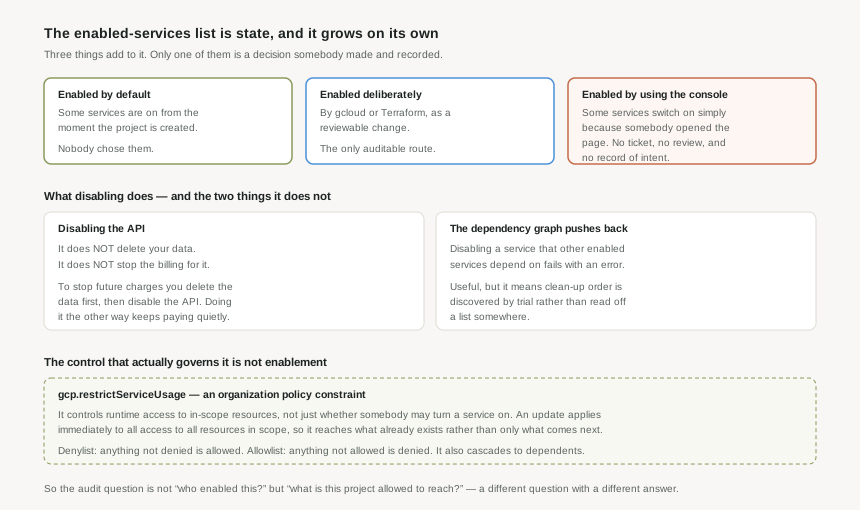
By default. Some APIs and services are enabled when you create a project. Nobody selected them, and they are the reason a brand-new empty project already reports a double-digit enabled count.
By explicit call. Through gcloud, the API, or Terraform. This is the only route that produces a reviewable artefact — a line in a repository somebody approved.
By using the console. Some services are automatically enabled when you use them in the Google Cloud console. An engineer looking at a page can enable a service as a side effect of looking, with no ticket, no review and no record of intent beyond an audit log entry nobody is reading.
That third route is not a flaw — it removes real friction, and most of the time it is what you want. But it means the enabled list drifts upward on its own, and that drift is indistinguishable in the final state from a deliberate decision.
Enabling is not always a single step
The process to enable a service can vary: some APIs require you to accept their Terms of Service first, and some are in preview and require approval before you can use them.
For automation this matters more than it looks. A pipeline that enables a list of services and assumes each call is equivalent will work for most of the list and stop on the one that wanted a Terms acceptance or an approval that no service account can give. That is a human step in the middle of an automated sequence, and it is better discovered while designing than at three in the morning during a region build-out.
What disabling actually does
You can disable an API for a project at any time, but you are still charged for pending fees and billable API use. More consequentially: disabling a service's API does not delete your data, and you continue to be billed for it. To stop future charges and discontinue using a service, you delete all associated data before disabling its API.
Read in the order most people act, that is a trap. Disabling first feels like the safe, reversible step — turn it off, see if anything breaks, clean up later. What it actually produces is a service you can no longer call, holding data you are still paying for, in a project whose enabled list now understates what it costs.
The dependency graph refuses some clean-ups
Attempting to disable a service that other enabled services depend on fails and returns an error. That is a genuine safety property and it is doing you a favour.
Its limitation is that it is a refusal, not a map. You discover the order to unpick things by attempting it and reading errors, rather than by consulting a dependency list up front. For a one-off tidy-up that is tolerable. For a scripted decommission across many projects it is worth accepting that the script will need to tolerate failures and retry in a different order, rather than assuming a clean topological sort exists to be computed.
Who can do any of this
Enabling and disabling services requires the Service Usage Admin role, roles/serviceusage.serviceUsageAdmin. Worth placing deliberately: it is the permission that decides which services a project may begin to be charged for.
Why This Architecture Holds Up
The instinct, once the drift is visible, is to govern the list — review it, prune it, alert on additions. That is worth doing for tidiness, and it is not a security control, for a reason worth being precise about.
The enabled list answers "what has been switched on here". The question you usually care about is "what is this project permitted to reach". Those come apart immediately: a service enabled by default that nobody uses is on the list and harmless, while a service somebody genuinely needs is on the list and unconstrained.
Google Cloud has a separate mechanism for the second question, and it is not enablement. The gcp.restrictServiceUsage organization policy constraint controls runtime access to all in-scope resources. Three properties make it the right tool:
- It governs access, not enablement. A service being switched on stops being the thing that decides whether it can be used.
- It applies to what already exists. When a policy containing the constraint is updated, it immediately applies to all access to all resources within the scope of the policy — so it is not limited to future enablement the way a review process is.
- It inherits down the hierarchy from post #1, so it can be set once at a folder and cover projects nobody has created yet.
The polarity is worth stating plainly because it is easy to get backwards. Under a denylist, resources of any service that is not denied are allowed. Under an allowlist, resources of any service that is not allowed are denied. A regulated environment wants the allowlist and should expect the work that comes with it; a general-purpose estate usually wants a short denylist and a reason for each entry.
When a service is restricted by this constraint, some services with a direct dependency on the restricted service are restricted as well. That is correct — restricting something while leaving a path to it through a dependency would be theatre. It also means the blast radius of an allowlist is larger than the list you wrote, which is the argument for testing it in dry-run mode before enforcing, and the reason post #21 covers exactly that.
What to actually do about the drift
Treat the enabled list as inventory rather than policy. It is genuinely useful for the question "what might this project be charged for", which is a cost and audit question worth answering monthly. Cloud Asset Inventory, in post #23, is how you answer it across an estate rather than a project at a time.
And keep explicit enablement in code even though the console will happily do it for you. Not because the console route is dangerous — it usually is not — but because a service enabled in Terraform carries a reason, an author and a date, and a service enabled by opening a page carries none of those. When the review in the opening story asks its question a year from now, the difference between eleven and forty-three is entirely a difference in what was written down.
Key Architecture Decisions
| Decision | Choose this | Because |
|---|---|---|
| How services get enabled | Explicitly, in Terraform or gcloud, as a reviewed change | It is the only route that records who decided and when. Default and console-triggered enablement produce the same end state with no author and no reason. |
| Governing which services may be used | gcp.restrictServiceUsage, not review of the enabled list | The constraint governs runtime access and applies immediately to resources that already exist. A list review only ever catches what was added since the last review. |
| Allowlist or denylist | Denylist by default; allowlist only where regulation requires it | Anything not denied is allowed, and anything not allowed is denied. An allowlist is defensible and expensive, and its blast radius is wider than its entries because restriction cascades to dependents. |
| Rolling out a restriction | Dry-run first, always | It applies immediately to all in-scope access, and restricting a service also restricts services that depend on it. Those two together mean the effect is larger than the change. |
| Decommissioning a service | Delete the data, then disable the API | Disabling deletes nothing and does not stop billing. The intuitive order leaves you paying for data you can no longer reach. |
| Scripting a decommission | Expect failures and retry in a different order | Disabling a service other enabled services depend on returns an error. The platform refuses, but it does not hand you the dependency graph to plan from. |
| Who holds Service Usage Admin | The platform team, deliberately and narrowly | roles/serviceusage.serviceUsageAdmin decides which services a project can begin incurring charges for. That is a spending decision wearing a technical name. |
| Answering "what does this project use?" | Cloud Asset Inventory, with the enabled list as a cost inventory | The enabled list says what is switched on, not what is used. Conflating the two is what makes the review in the opening story unanswerable. |
Some APIs need their Terms of Service accepted; some are in preview and need approval. A provisioning pipeline that treats every enablement as equivalent will stop on the first one that wants a human, and it will do so in whatever environment you build next rather than the one you tested in.
Closing Thought
Enablement looks like the most trivial topic in this phase and produces two of its most durable misunderstandings: that the enabled list reflects decisions, and that disabling something stops it costing money. Neither is true, and both are documented plainly by Google — they are assumptions people bring with them rather than things the platform claims.
The useful reframing is that a project has two different surfaces. There is what it is able to do, which grows on its own and is best read as an inventory. And there is what it is permitted to do, which only changes when somebody writes a policy, applies immediately when they do, and is the one worth governing.
Posts #19 to #22 are about that second surface in full. This one exists so that when they arrive, it is already clear why the enabled list was never going to be the answer.
#5 covers project IDs, numbers and names: which of the three is permanent, which is globally unique and can never be reused even after deletion, which one generated bindings and audit records will show you, and why a naming convention has to exist before the first project rather than after the tenth.
Comments