Business Challenge
A team has a Bicep file that has deployed storage accounts cleanly for three years. Someone reads the documentation for a property that hardens the account, adds it, and deploys. The deployment succeeds. The property is not set.
No error, no warning, no line in the log. They add it again with different casing, then in a different place in the file, then start suspecting policy is stripping it. Two hours later somebody notices the top of the resource declaration: an apiVersion from three years ago, pinned when the file was written, faithfully doing exactly what it was told.
The property they are trying to set was introduced in a later version of the storage provider's REST API. The template is not calling that version. It is calling the one it has always called, which has no such property — so Resource Manager passes the request to a contract in which that field does not exist.
Almost every other pinned dependency in software should be kept current. This one should not. Microsoft's own guidance is to set the latest version when you write the template and then keep using it — because staying put is what minimises the risk of a new version changing how your template behaves. The cost of that advice is exactly the failure above, and it is a cost worth paying.
Architecture
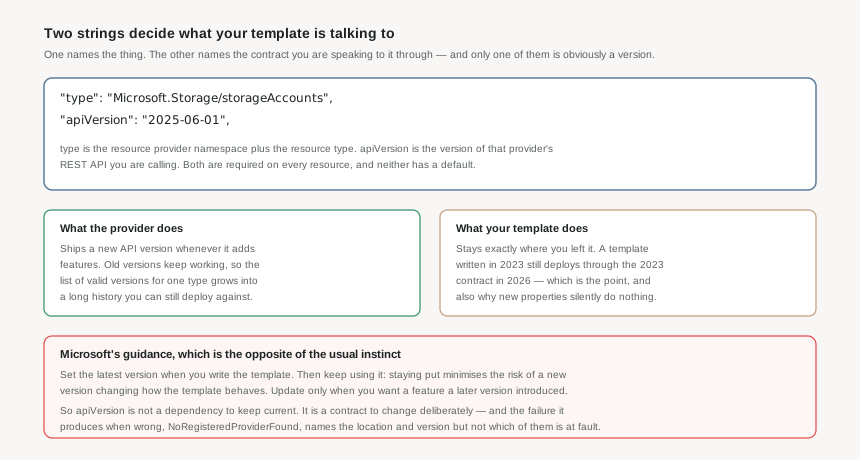
Every resource in a template carries two strings that decide what it is talking to. type is the resource provider namespace plus the resource type — Microsoft.Storage/storageAccounts, in the shape established in #4. apiVersion is the version of that provider's REST API you want to use to create the resource. Both are required, and neither has a default.
What an API version actually is
It is not a version of Azure, or of the service, or of the resource. It is a version of the resource provider's REST API operations — and a provider releases a new one as it enables new features. Old versions keep working, so the list of valid versions for a single type is a long history, all of it still deployable.
This is also why a template's properties block looks the way it does. The values there are the same values you would put in the request body of the REST API PUT operation that creates the resource. A template is a description of an API call, and apiVersion is which version of that call you are making.
Why pinning is the recommendation
Because a template is infrastructure that must behave identically every time it runs. If the version floated to whatever was newest, a file that had not been edited in months could start behaving differently, on a schedule set by Microsoft rather than by you — new defaults, changed validation, altered response shapes. Pinning makes deployments reproducible, which is the entire point of writing them down.
So the guidance has three parts, and the middle one is the one people skip: set the latest version when you create the template; keep using it as long as the template works; update it only when you want a feature a later version introduced. Updating for its own sake buys nothing and risks something.
The escape hatch for multi-environment templates
There is an alternative for one specific problem. apiProfile is an API version that stands for a collection of API versions across resource types: set it once at the template level, omit apiVersion on the resources, and Resource Manager uses the version that profile defines for each type.
Its purpose is environments that do not move together — deploying the same template to Azure Stack and to global Azure, where the newest version available differs. If you are deploying only to global Azure, it solves a problem you do not have.
Why This Architecture Holds Up
A wrong API version fails in two ways, and only one of them looks like a failure.
Loud, and misattributed
An API version that is not supported for the resource type is one of the documented causes of NoRegisteredProviderFound — the same error produced by an unregistered provider and by an unsupported location. The message names a location and a version, so it points at three possible problems at once.
Silent, and expensive
A property introduced in a later version, set in a template pinned to an earlier one, is simply not applied. The deployment succeeds. Nothing reports that a field was ignored. The setting you believe is on is off, which for a security property is the worst possible shape of wrong.
The loud one has a fast diagnosis that is worth knowing: the error message suggests the supported locations and API versions. If your region and version appear in that list, registration is the problem rather than the version. If your version is absent, you have found it.
For the silent one there is no error to read, so the habit has to replace the tooling. When adding a property you found in the documentation, check the API version the documentation is describing against the one your resource declares. Resource Explorer lists the valid API versions for a type, which is the fastest way to see how far behind you are.
A single template is limited to 800 resources, 256 parameters, 256 variables and 64 outputs. Those numbers are generous for a workload and small for an estate — which is why large deployments are composed from modules rather than grown into one enormous file. That composition question is #26 and #28; the limits are worth knowing now, because they are the reason the answer is not one template for everything.
Key Architecture Decisions
| Decision | Choose this | Because |
|---|---|---|
| Which API version for a new template | The latest available for that resource type | It is Microsoft's stated advice, and it buys the longest run before you need a newer feature than the contract offers. |
| Whether to keep versions current | No — leave them until you need something | Staying on a working version minimises the risk of a new version changing behaviour. This is the opposite of how you treat library dependencies, and it is deliberate. |
| When to bump a version | When you want a feature the later version introduced, as its own change | A version bump is a behaviour change to the whole resource, not a line edit. It deserves its own deployment and its own what-if, rather than riding along with a feature commit. |
| A property that will not apply | Check the API version before anything else | It is the only failure in this area that produces no error at all, and every other theory — policy, casing, ordering — takes longer to disprove. |
| Templates deployed to Azure Stack and global Azure | apiProfile rather than per-resource versions | That is precisely what it is for: one profile resolves to versions supported in both environments. |
| Templates deployed only to global Azure | Explicit apiVersion per resource | An apiProfile adds indirection to solve a problem you do not have, and makes the version an indirect fact rather than one you can read. |
Closing Thought
apiVersion is the most consequential line in a template that nobody reviews. It is copied from an example, it never changes, and for years that is exactly right — until the day it quietly costs an afternoon because a documented property does nothing.
The habit worth forming is small: when the documentation and the deployment disagree about whether a feature exists, look at the contract before looking for a bug.
#6 moves outward from the request to the place it lands: regions, geographies and sovereign clouds — what a region actually is, what a geography guarantees about where data stays, and why some Azure clouds are separate deployments of Azure entirely.
Comments