Business Challenge
The last six posts were about mechanisms you choose. This one is about a mechanism that gets created on your behalf, usually by somebody clicking "private IP" on a database, and whose consequences surface weeks later in a different team.
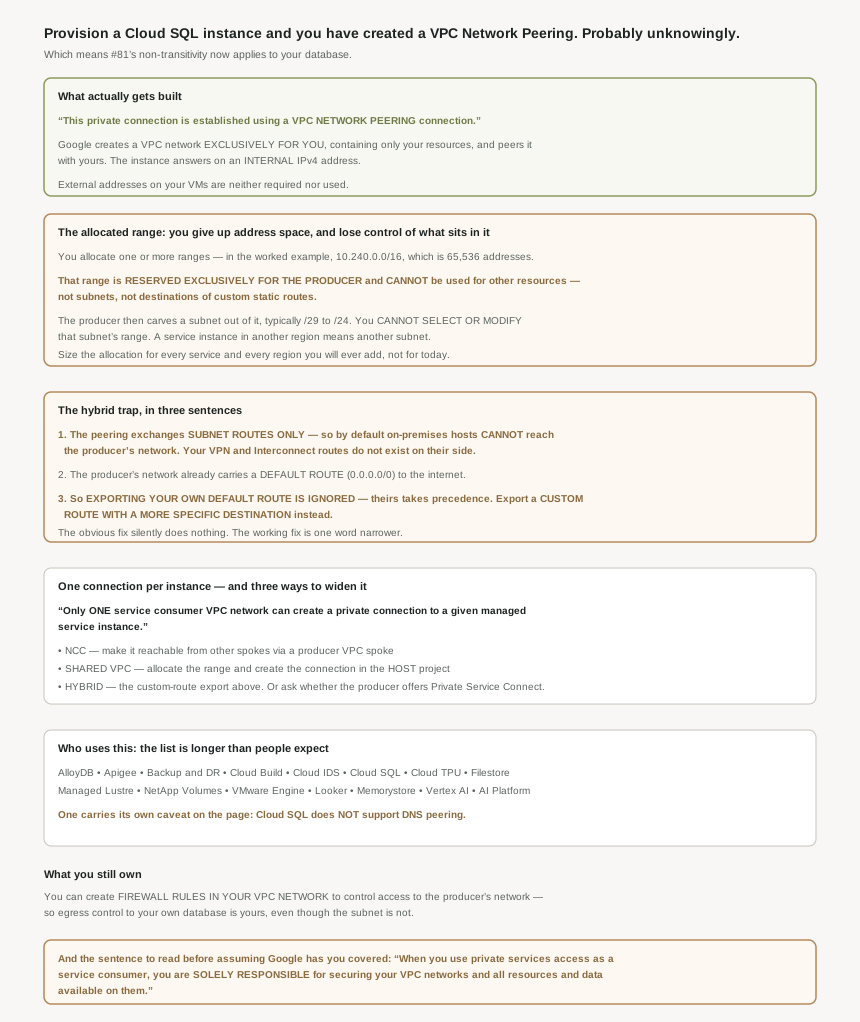
Private services access lets you reach VPC-hosted services-services running on Compute Engine instances within a VPC network-without exposing traffic to the public internet. Fine. The sentence that matters is the next one: private services access creates a private connection between your VPC network and the VPC network of the service producer, who can be Google or a third party. And then, plainly: this private connection is established using a VPC Network Peering connection.
So everything #81 established about peering now applies to your managed database, including the parts people find surprising.
The VPN is fine; the peering is the problem. By default, on-premises hosts can't reach the service producer's network by using private services access. The reason is #81's rule in a new setting: when you create a private connection, the VPC network and service producer network exchange subnet routes only. Your carefully built hybrid routes do not exist on their side — however, the service producer's network doesn't contain those same routes.
Correct approachExpect to export routes explicitly, and expect it when you design the hybrid estate rather than when an application team reports a timeout. This is the same shape as #91's one-way failure: the request has somewhere to go and the reply does not, so what you observe is a hang rather than a refusal.
That is documented as ineffective, and this is the sharpest sentence on the page: if you export a default route to the service producer's network, it is ignored because the service producer network's default route takes precedence. Their network already has one — the service producer's network contains a default route ( 0.0.0.0/0 ) that goes to the internet.
Correct approach
Instead, define and export a custom route with a more specific destination. More specific than 0.0.0.0/0, which is to say your actual on-premises ranges. The trap is that exporting the default route produces no error and no warning — the export succeeds, the route is there, and it simply never wins. Anyone debugging by checking "is the route exported" gets a yes and moves on.
You will not. When you allocate a range in your VPC network, that range can't be used for other resources, such as subnets or destinations of custom static routes. It is gone: this allocated range is reserved exclusively for the service producer.
Correct approachSize the allocation against every managed service and every region you might ever add, and record it in whatever document governs address planning — because it will not appear in your subnet list, and the next person doing IP planning will see unused space that is not actually available. In the documentation's own example the consumer allocated the 10.240.0.0/16 address range for Google services, which is 65,536 addresses withdrawn from use in exchange for a few instances.
Architecture
A network you do not own, peered to yours, holding a subnet you cannot choose.
What gets built, and who owns it
The producer side is a real VPC network, not an abstraction: the service producer's network is created exclusively for you and contains only your resources. From your side it behaves like any other peered network — it's reachable through internal IP addresses by other resources in your VPC network, and instances in your VPC network can reach the service by using their internal IPv4 addresses.
Note what is not required: while your instances can have external IP addresses, they aren't required for or used by private services access. Unlike #90's subnet flag, external addresses neither help nor hinder here.
The division of control inside the allocated range is worth stating carefully, because it is finer than "Google manages it". You choose the allocation. The producer chooses the subnet within it — the service producer typically chooses a /29 to /24 CIDR block — and that choice is not negotiable: you can't select or modify the service producer's subnet IP address range. Each region brings another: because the instance is in a different region, a new subnet is required, with the example creating a new subnet that uses the IP address range 10.240.10.0/24 and assigns the service instance the IP address 10.240.10.2.
You can also create firewall rules in your VPC network to control access to the service producer's network. So although the subnet and its addresses are not yours to set, the traffic reaching them is still governed by your own egress rules. For an estate that controls database access by network policy rather than only by credentials, that is the lever — and it sits on your side of the peering, where you can audit it.
Worth pairing with the page's own disclaimer, which is blunter than most: when you use private services access as a service consumer, you are solely responsible for securing your VPC networks and all resources and data available on them.
One connection per instance
The constraint that shapes multi-network estates: only one service consumer VPC network can create a private connection to a given managed service instance. One network gets the peering; everyone else needs a route to it. The page offers three, and to make the service instances available from other VPC networks, consider the following options:
Shared VPC, which is the cleanest if you already run one — if you are using Shared VPC , create the allocated IP range and private connection in the host project, and typically, a network administrator in the host project must do these tasks. That puts this squarely in #80's split again: the host project's network admin allocates the range and owns the connection, and service project teams consume it without being able to create it.
Network Connectivity Center, by making the producer network a spoke on a hub, which is #82's model extended to a network Google created for you.
Hybrid connectivity, which is the custom-route export above and the one most likely to be attempted without reading first.
Why This Architecture Holds Up
It is worth being explicit about the inheritance, because the posts are two months apart and nobody holds both in their head at once.
#81 established that VPC Network Peering is non-transitive and that peers exchange subnet routes. Here the mechanism is identical — this private connection is established using a VPC Network Peering connection — and the consequence is restated in the hybrid section as the VPC network and service producer network exchange subnet routes only.
From that single fact, everything else in this post follows. On-premises hosts cannot reach the service, because your hybrid routes are not subnet routes of yours that the peering would carry. Other VPC networks cannot reach it, because peering does not chain. The allocated range must not overlap anything, because the two networks must use distinct IP address ranges and peered networks cannot have conflicting space. And the fix for the hybrid case is a route export, because that is the only mechanism peering gives you for carrying anything beyond subnets.
If you remember one thing: a managed service with a private IP is a peered network, and should be drawn as one on your network diagram. Most estate diagrams show Cloud SQL as a box inside the VPC, which is wrong in exactly the way that matters — it hides the peering, and therefore hides why on-premises cannot reach it and why another VPC cannot either.
Drawing it correctly also makes the address planning visible. The allocated range is not a subnet, appears in no subnet list, and is invisible to most inventory tooling, but it is permanently spoken for. A diagram that shows it as a peered network with its own address space is the one that stops somebody proposing to use 10.240.0.0/16 for something else next quarter.
Who actually uses this
The supported list is longer than most people expect and includes a lot of things nobody thinks of as networking: AlloyDB for PostgreSQL, Apigee, Backup and DR Service, Cloud Build, Cloud Intrusion Detection System, Cloud SQL, Cloud TPU, Filestore, Google Cloud Managed Lustre, NetApp Volumes, VMware Engine, Looker, both Memorystore variants, Vertex AI and AI Platform Training.
One carries its own caveat right in the list — Cloud SQL (doesn't support DNS peering ) — which is the sort of parenthetical that costs an afternoon if you were planning to resolve the instance by name across the peering.
The length of that list is the real point. An estate running Cloud SQL, Memorystore and Filestore has three of these peerings, each with allocated space, each non-transitive, each invisible on a subnet list. If the hybrid problem has appeared once, it will appear again for every service added — and if the allocation was sized for the first one, it is being shared by all of them.
Key Architecture Decisions
| Situation | Decision | Because |
|---|---|---|
| Drawing the network diagram | Show managed services as a peered network, not a box inside yours | The private connection is a VPC Network Peering connection. |
| Planning address space | Record the allocated range as permanently spoken for | It cannot be used for subnets or custom static route destinations. |
| Sizing the allocation | Size for every service and region you may add | Each region needs another producer subnet from the same allocation. |
| Wanting a specific subnet for the instance | You cannot have one | The producer's subnet range is not selectable or modifiable. |
| On-premises hosts cannot reach the service | Export routes to the producer network | The peering exchanges subnet routes only, so your hybrid routes are absent there. |
| Tempted to export a default route | Export a more specific custom route instead | A default route is ignored; theirs takes precedence, with no error. |
| A second VPC network needs the service | NCC producer spoke, or Shared VPC | Only one consumer network can hold the private connection. |
| Running Shared VPC | Allocate and connect in the host project | That is where the documentation puts it, and it needs a network admin. |
| None of the three options fit | Ask whether the producer offers Private Service Connect | The page names it as the alternative for exactly this case. |
| Controlling who may reach the database | Firewall rules in your own VPC network | That lever stays on your side of the peering. |
| Planning to resolve a Cloud SQL instance by name over the peering | Check first | Cloud SQL does not support DNS peering. |
| Assuming Google secures the consumer side | It does not | You are stated to be solely responsible for your networks and data. |
| Adding a third managed service | Re-check the allocation has room | They share the range you allocated for the first one. |
The one to look at today
List your allocated IP ranges for service networking and put them next to your subnet list, because they will not be in it. Then check the remaining space against the managed services you plan to add this year. Separately, if any on-premises system needs a managed service, look at what routes are actually exported to the producer network — and specifically whether somebody exported a default route and considered the job done, because that configuration looks complete and does nothing.
Closing Thought
This is the post in the block with the widest gap between how a thing is created and how it behaves. Everything else here was deliberate: you enabled a flag, chose a VIP, reserved an address, published a service. This one gets created by a database provisioning wizard, and what it creates is a peered VPC network with its own address space, its own routing rules, and a non-transitivity that will surprise somebody in six weeks.
The default-route detail is the one I would put on a wall. Exporting a default route to the producer network is the obvious response to the obvious problem, it succeeds, and it does nothing — because a route you cannot see, in a network you do not own, already wins. That is a hard failure to reason your way to from your own side of the peering, and the only reason anyone would know is that one sentence in the documentation says so.
#97 starts a new block on name resolution, beginning at the outside: Cloud DNS public zones — and what it takes to actually be authoritative for a domain.
Official Google Cloud Reference
- Private services access
- Configure private services access
- VPC Network Peering
- Producer VPC spokes
- Private access options for services
- Private Service Connect
- Shared VPC overview
- Routes overview
- VPC firewall rules
- Subnets
- Cloud SQL: configure private services access
- Service Infrastructure: enable private services access
Comments