Business Challenge
#50 covered provisioning: getting accounts into Cloud Identity from an on-premises directory. This is the other half of the same pattern. The SAML mechanics are well documented and unsurprising; what repays attention is how narrow the check at the end of the exchange is, and which accounts are deliberately outside it.
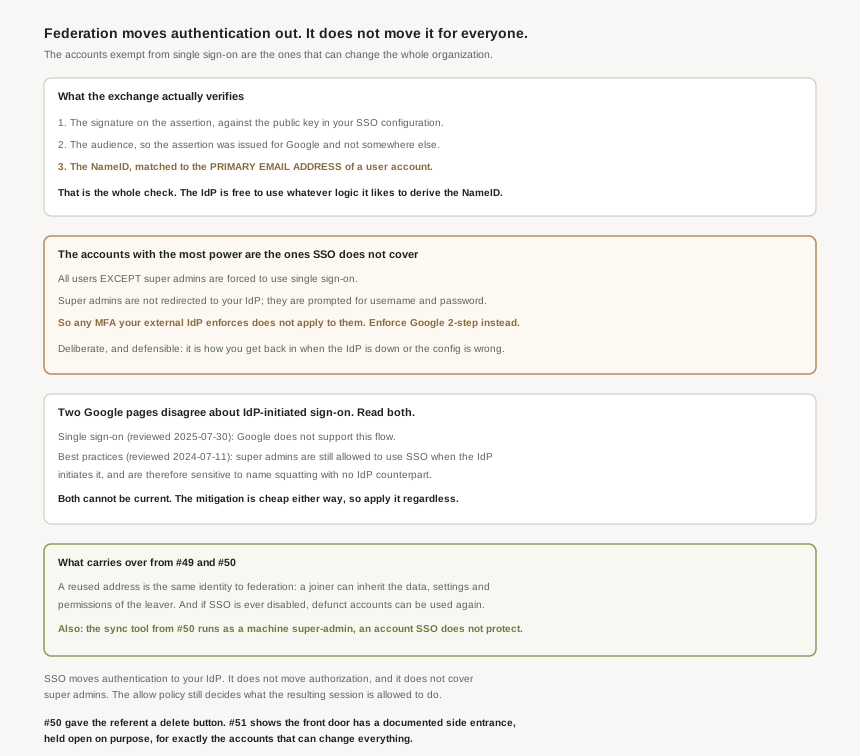
Almost nobody. When you enable single sign-on in Cloud Identity or Google Workspace, all users (with the exception of super admins) are forced to use single sign-on. Super-admin users are not redirected to your external IdP at all — instead, they are prompted to authenticate by username and password.
Correct approachTreat super admins as a separate authentication system with its own controls, because that is what they are.
Not for the accounts you would most want it on. Because super-admin users can authenticate by username and password, they are not subject to any multi-factor authentication policies that your IdP might enforce. The documentation states it twice, on two different pages, which is a reasonable signal of how often it is missed.
Correct approachEnforce Google 2-step authentication for all super-admin users. It is a Google-side control because the gap is on the Google side.
It proves that your IdP said so, and that is a different claim. All that is required to establish a mapping is an assertion containing a NameID whose value matches the primary email address of an existing user — and the IdP is free to use whatever mapping or logic is applicable to derive a suitable NameID claim for its existing users. Google verifies the signature and the audience. It cannot verify that your IdP picked the right person.
Correct approachTreat the IdP side NameID derivation as a security-critical mapping, reviewed and change-controlled, not as a field mapping in a wizard.
It makes them unusable, which is not the same as retired. If at some point single sign-on is temporarily or permanently disabled, the user account can be used again — and this might enable a former employee to sign in and access corporate resources. SSO is a gate in front of accounts, not a change to them.
Correct approachSuspend or delete the accounts as well. Lean on #50 to drive the lifecycle rather than relying on the gate.
Architecture
Cloud Identity and Google Workspace support SAML 2.0 for single sign-on, with your external IdP as the SAML IdP and Google as the SAML service provider. Google implements SAML 2.0 HTTP POST binding. When SSO is enabled, users are not asked for a password — they are redirected to an external identity provider to authenticate.
The prerequisite that explains why #50 came first
To use SSO, a user must have a user account in Cloud Identity or Google Workspace and a corresponding identity in the external IdP. Both sides must already exist. Federation authenticates against an account; it never creates one. That is the whole reason provisioning is a separate mechanism with its own tooling, and why the order of these two posts is the order of the work.
What the exchange verifies, and what it leaves to the IdP
| Check | What it establishes | Who it trusts |
|---|---|---|
| Digital signature | The assertion came from the configured IdP and was not tampered with. | The IdP signing key in your SSO configuration. |
| Audience | The assertion was issued for Google, not replayed from elsewhere. | The SSO configuration. |
| NameID | Which account the session becomes. | Entirely the IdP. Matched against the primary email address. |
That third row is the one to sit with. The ACS endpoint looks up your user account by matching the NameID of the SAML assertion to the primary email address of the user. Which means federation inherits, wholesale, everything #49 established about that address: it is the username a user must provide when signing in, it is mutable, and an administrator can move it between accounts. A signed assertion naming an address resolves to whichever account currently holds it.
In this binding the IdP and service provider never talk to each other — everything is relayed through the browser. The consequence is a real architectural win: it is not necessary for the IdP to be exposed over the internet, or to even have internet access, as long as users are able to access it from your corporate network. You can federate Google Cloud to an identity provider that has no inbound path from the internet at all, which is a stronger position than most SaaS integrations allow.
Why This Architecture Holds Up
Users with super-admin privileges can bypass single sign-on. The reason is given immediately and it is a good one: this ensures that super admins can access the account even if the SSO configuration is incorrect or the external IdP is unavailable.
That is the right design. Federation creates a hard dependency on a system outside Google, and a configuration you can lock yourself out of with one wrong certificate is a configuration nobody should deploy. The bypass is the recovery path, and a platform without one would be worse.
Because super admins can bypass SSO, any multi-factor authentication enforced by your external IdP does not apply to these users. So the standard enterprise story — "we federated to Google, our IdP enforces MFA, therefore Google access requires MFA" — is false for precisely the accounts that can reassign every role in the organization, add domains, change the SSO configuration itself, and appoint other super admins. The remedy is not on the IdP side and cannot be: enforce Google 2-step authentication for all super-admin users, as a Google-side control, because the gap is Google-side. And avoid network masks, because they could be abused as a way to sidestep multi-factor authentication for users.
Two pages that cannot both be current
Here the documentation disagrees with itself, and it matters because one reading describes a concrete attack. I am reporting both verbatim rather than picking, because picking would be a guess.
| Page | Last reviewed | What it says about IdP-initiated sign-on |
|---|---|---|
| Single sign-on | 2025-07-30 | Describes the IdP-initiated flow, then: Google does not support this flow. |
| Best practices for federating | 2024-07-11 | Super-admin users are exempt from the requirement to use single sign-on, but they are still allowed to use single sign-on when sign-on is initiated by the IdP. |
The older page builds a specific risk on its version: the ability to use IdP-initiated single sign-on makes super-admin users sensitive to name squatting if they lack a counterpart in your external IdP. Its worked example is a super admin with no identity in the IdP, where somebody who can create an IdP user mapping to that same address can then authenticate as the super admin — without ever knowing the password, because the password is not what is being checked.
If the newer page is authoritative and the flow is simply unavailable, that particular path is closed. I could not verify which page reflects current behaviour from the documentation alone, and I am not going to assert it from the review dates, because a newer review date is evidence about when a page was read, not about which statement is right.
The mitigation is the same under either reading, and it is worth doing on its own merits: to mitigate this name-squatting risk, make sure that your Cloud Identity or Google Workspace identities are a subset of the identities in your external IdP. That is a statement about lifecycle hygiene — no Google account should exist without an IdP counterpart — and it is exactly what #50 built the machinery for. Combined with Google 2-step on every super admin, you are covered whichever page is current. This is the useful shape for an unresolved vendor discrepancy: find the action that is correct under both branches, take it, and do not pretend the ambiguity is resolved.
The reused-address problem, now stated by Google rather than inferred
#49 argued that an IAM binding names a mutable address rather than a person. The federation guidance makes the consequence explicit for joiners and leavers. The name of the deleted user account might be reused, and from a federation perspective, the two user accounts are considered the same if they both map to the same primary email address in Cloud Identity or Google Workspace. The result is that a new employee signing in may inherit existing data, settings, and permissions from the former employee.
Note how this interacts with #50. There, re-creating a deleted account produced a new identity that inherited nothing, which was the recovery hazard. Here, re-using an address on an account that still exists hands over everything. Same string, opposite outcomes, and which one you get depends on whether the account was deleted or merely renamed. The address is not the thing; the account is.
And the super-admin accounts you did not choose to have
One line in the best-practices guidance connects directly back to #50. On machine super-admin users: they are sometimes necessary to enable tools such as Cloud Directory Sync. So the sync whose default is to delete users, from #50, authenticates as one of the accounts that single sign-on does not cover and that your IdP MFA does not reach. The advice is to limit their number and enable 2-step verification where possible — and to note that a service account, as covered in #39 to #48, is the right answer for a machine identity wherever the tool permits one.
Key Architecture Decisions
| Decision | Choose this | Because |
|---|---|---|
| MFA for super admins | Google 2-step verification, enforced | IdP-enforced MFA does not apply to accounts that bypass SSO. |
| Everyday administration | A separate non-super-admin account | Only a few activities need super-admin privileges. |
| Accounts with no IdP counterpart | Remove them, do not rely on the SSO gate | If SSO is disabled the account can be used again. |
| Scope of your Google directory | A subset of the IdP identities | It is the documented mitigation for name squatting. |
| Network masks in the SSO config | Avoid | They can be abused to sidestep multi-factor authentication. |
| The NameID mapping in your IdP | Change-control it | The IdP alone decides which account a session becomes. |
| Exposing the IdP to the internet | Do not | The browser relays everything; the IdP needs no internet access. |
| Machine super admins for tooling | Minimise, and prefer a service account | They are outside SSO and outside your IdP MFA policy. |
| Reusing a leaver email address | Do not, on a surviving account | The joiner inherits the data, settings and permissions. |
The one to look at today
Count your super admins, then check 2-step verification on each one. That list is the set of accounts for which your federation story does not hold: they authenticate with a username and password against Google, outside whatever your IdP enforces, and they can change anything in the organization including the SSO configuration that governs everyone else. If the count is larger than you expected, the second task is the one the guidance actually recommends — split each one into a routine account and a dedicated admin account, so the powerful credential is not the one used all day.
Closing Thought
The SAML design here is sound, and the one property I did not expect to admire is the networking one: because the whole exchange is relayed through the browser, you can federate a cloud platform to an identity provider that is not reachable from the internet. That is a better arrangement than most integrations offer, and it is easy to miss while reading past the XML.
The pattern across the last four posts is not that any of this is broken. It is that each layer answers a narrower question than its name suggests. #48: the allow policy has an author you cannot see. #49: it names a referent you cannot name directly, joined by a mutable address. #50: that referent can be deleted by the shape of an LDAP result. #51: the front door you built to control authentication has a documented exemption, held open deliberately, for exactly the accounts that can rewrite all of the above. Every one of those is a reasonable engineering decision. The thing that is not reasonable is reading any single layer as the whole answer, and the super-admin count is the cheapest place to find out whether you have been doing that.
#52 closes the identity block with the unit this has all been pointing at: Google Groups as the unit of access — why group membership rather than direct bindings, and what that moves out of the allow policy.
Comments