Business Challenge
#50 ended on the writeback direction. This post is about a feature that goes the other way again and is easy to dismiss, because it is free, it is a checkbox in a wizard, and when it works nobody notices it. Seamless SSO signs a user in at the Entra sign-in page without asking for a password, using the Kerberos ticket their Windows session already has.
The thing worth understanding is where the trust sits. Enabling it creates one computer account per forest — AZUREADSSOACC — and “the computer account's Kerberos decryption key is shared securely with Microsoft Entra ID.” That account represents Microsoft Entra ID inside your directory. Every seamless sign-in is a Kerberos ticket issued for it and decrypted by Microsoft with the copy of the key you handed over.
Which concentrates the risk into one object, and Microsoft says so plainly rather than leaving it to be inferred:
“The Kerberos decryption key on a computer account, if leaked, can be used to generate Kerberos tickets for any synchronized user. Malicious actors can then impersonate Microsoft Entra sign-ins for compromised users.”
That is a Golden-Ticket-shaped problem scoped to cloud sign-in. The documented mitigation is not a setting — it is a recurring manual task: “roll over the Kerberos decryption key at least every 30 days.”
So the architecture question is not whether to enable Seamless SSO. For a tenant on password hash sync or pass-through authentication it is nearly always worth having, and it costs nothing. The question is whether you have an operational practice for the account it creates — because a 30-day cadence on a PowerShell cmdlet, run by hand on the Connect server, is exactly the kind of task that gets done once during deployment and never again.
Architecture
Two flows, one key, and a set of client-side conditions that all have to hold or the whole thing silently does nothing.
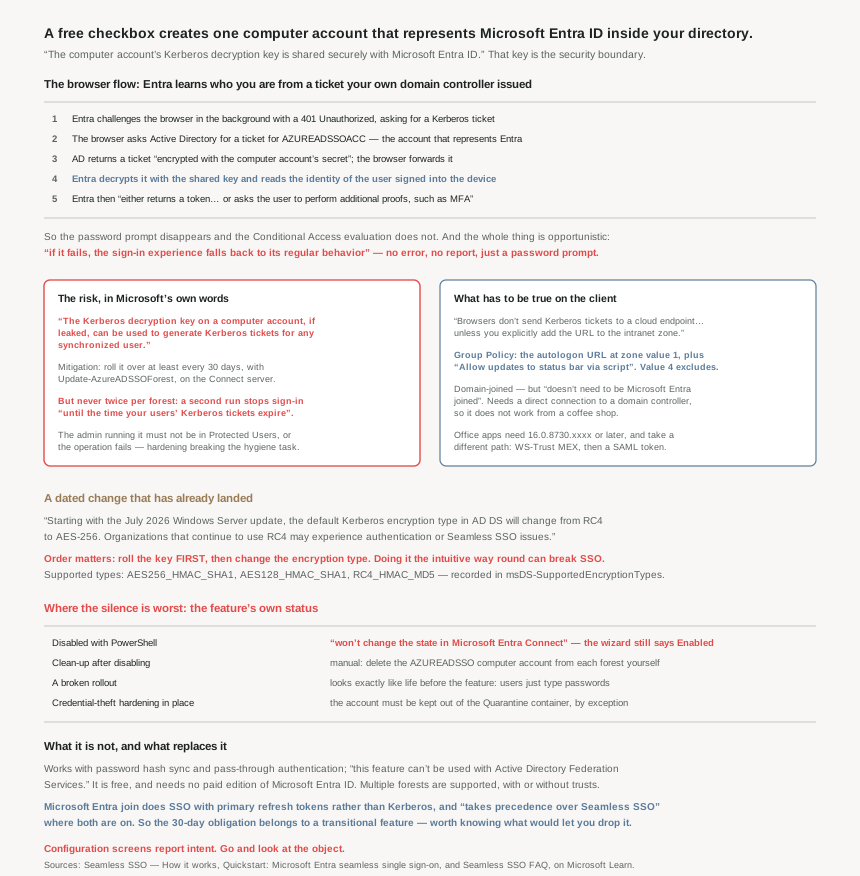
What enabling it actually does
Three things, and the third is the one that matters: a computer account AZUREADSSOACC is created “in each AD forest that you synchronize to Microsoft Entra ID”; “a number of Kerberos service principal names (SPNs) are created for use during the Microsoft Entra sign-in process”; and the account’s Kerberos decryption key is shared with Entra. Where there are several forests, “each computer account will have its own unique Kerberos decryption key” — so the blast radius of one leaked key is one forest, not the tenant.
The Domain Admin credentials the wizard asks for are not retained: “The Domain Administrator credentials are not stored in Microsoft Entra Connect or in Microsoft Entra ID. They're used only to enable the feature.” Worth knowing before a security review asks.
And after setup there is nothing exotic running: “Seamless SSO works the same way as any other sign-in that uses integrated Windows authentication (IWA).” That single sentence explains most of its behaviour, including every way it fails.
The browser flow, and the one step people do not expect
The sequence is short. The user types a username at the Entra sign-in page; then “using JavaScript in the background, Microsoft Entra ID challenges the browser, via a 401 Unauthorized response, to provide a Kerberos ticket.” The browser “requests a ticket from Active Directory for the AZUREADSSOACC computer account (which represents Microsoft Entra ID)”, AD returns one “encrypted with the computer account's secret”, the browser forwards it, and “Microsoft Entra ID decrypts the Kerberos ticket, which includes the identity of the user signed into the corporate device, using the previously shared key.”
Two things follow from that shape. First, Entra learns who the user is from a ticket your domain controller issued — the authentication happened on-premises, at Windows logon, possibly hours earlier. Second, and this is the step that surprises people: Conditional Access still runs. After decryption, Entra “either returns a token back to the application or asks the user to perform additional proofs, such as multifactor authentication.” Seamless SSO removes the password prompt. It does not remove the policy evaluation from #41a.
Third, and most useful operationally: “Seamless SSO is opportunistic. This means that if it fails, the sign-in experience falls back to its regular behavior.” A broken deployment does not produce errors. It produces password prompts, which users attribute to the cloud, and which nobody reports as a fault.
The native client flow is a different protocol entirely
Outlook and the Office apps do not do the browser dance. The app reads the username from the Windows session, then “retrieves your tenant's WS-Trust MEX endpoint. This WS-Trust endpoint is used exclusively by the Seamless SSO feature, and isn't a general implementation of the WS-Trust protocol on Microsoft Entra ID.”
From there it is a token exchange rather than a sign-in: Entra “signs the user in, and issues a SAML token to the app”, the app “submits the SAML token to Microsoft Entra ID OAuth2 token endpoint”, and Entra returns “an access token, a refresh token for the specified resource, and an ID token”. A WS-Trust endpoint and a SAML assertion, in the middle of an OAuth world, kept alive for this one purpose — which is a fair signal of how old the feature’s foundations are, and it is also why Microsoft 365 clients need to be at 16.0.8730.xxxx or later for the silent experience.
Why the client side is where deployments fail
The feature depends on a browser being willing to hand a Kerberos ticket to a Microsoft endpoint, and by default no browser will: “Browsers don't send Kerberos tickets to a cloud endpoint, like to the Microsoft Entra URL, unless you explicitly add the URL to the browser's intranet zone.”
So the rollout is a Group Policy exercise, not a tenant one. https://autologon.microsoftazuread-sso.com goes into the Site to Zone Assignment List with a value of 1, and the intranet zone setting “Allow updates to status bar via script” has to be enabled too. The same mechanism is also the documented way to deny the feature: setting the value to 4 puts the URL in the restricted zone, and “Seamless SSO fails for the users all the time” — which is how you exclude shared kiosks.
The conditions on the device are worth stating precisely, because two of them are commonly misremembered:
- The device must be joined to Windows Server AD, and “the device doesn't need to be Microsoft Entra joined.”
- It needs “a direct connection to your domain controller, either on the corporate wired or wireless network or via a remote access connection, such as a VPN connection.” No DC, no ticket — this is not a feature that works from a coffee shop.
- It works with password hash sync and pass-through authentication, and “this feature can't be used with Active Directory Federation Services.”
- It is free: “Seamless SSO is a free feature and you don't need any paid editions of Microsoft Entra ID to use it.”
Why This Architecture Holds Up
Because the mitigation for its central risk is a recurring manual task
The 30-day rollover is the whole security story, and the mechanics make it easy to get wrong in both directions. It is Update-AzureADSSOForest, run on the Connect server, once per forest — and that last part is load-bearing: “ensure that you don't run the Update-AzureADSSOForest command more than once per forest. Otherwise, the feature stops working until the time your users' Kerberos tickets expire and are reissued by your on-premises Active Directory.”
So the hygiene task that protects you has a self-inflicted outage one keystroke away, and the outage is not immediate — it waits for ticket lifetimes, which means the person who ran the command twice will probably not connect the two events. Several smaller traps sit alongside it:
- The credential must be in SAM account name format (
contoso\johndoe), because “we use the domain portion of the username to locate the Domain Controller… using DNS.” - The account used “must not be a member of the Protected Users group. If so, the operation fails.” The hardening you did for privileged accounts breaks the rollover, and this is the second time this phase has found that shape — #50’s password writeback cannot touch protected groups either.
- For any forest other than the Connect one, you need “connectivity to the global catalog server (TCP 3268 and TCP 3269)”.
- It is not needed on “servers running Microsoft Entra Connect in staging mode” — which, per #49, is the one supported second server.
None of that is hard. All of it is the sort of thing that needs an owner and a calendar entry, and a feature enabled by a checkbox rarely gets either. If you cannot commit to the cadence, that is worth knowing as a deliberate accepted risk rather than discovering it during an incident.
Because an encryption-type change has already landed
This one is time-sensitive rather than theoretical. The supported Kerberos encryption types are AES256_HMAC_SHA1, AES128_HMAC_SHA1 and RC4_HMAC_MD5, with the choice recorded in msDS-SupportedEncryptionTypes on the account. And:
“Starting with the July 2026 Windows Server update, the default Kerberos encryption type in AD DS will change from RC4 to AES-256. Organizations that continue to use RC4 may experience authentication or Seamless SSO issues after this update is applied.”
The ordering of the fix is the part to read carefully, because doing it in the intuitive order breaks the feature: if the account is on RC4_HMAC_MD5, “you must first roll over the Kerberos decryption key… Failing to roll over the key before changing the encryption type can prevent Seamless SSO from functioning correctly.” Roll the key, then change the encryption type. Not the other way round.
Because this account is exactly what credential-theft hardening is designed to quarantine
There is a quiet prerequisite that only bites the organisations doing the most to protect themselves: “If you're using Pass-the-Hash and Credential Theft Mitigation architectures in your on-premises environment, make appropriate changes to ensure that the AZUREADSSOACC computer account doesn't end up in the Quarantine container.”
That is a genuinely awkward interaction. A tiered-administration model exists to isolate accounts with directory-wide reach, and this account has directory-wide reach by design — so the hardening model and the feature disagree about where it belongs, and the documented answer is to make an exception for it. Which raises the standard the surrounding controls have to meet: the protections Microsoft actually names are ordinary AD ones. “Only Domain Admins should be able to manage the computer account”, “Kerberos delegation on the computer account is disabled”, no other account holding delegation permissions on it, and an OU “where they are safe from accidental deletions”.
Because its failures and its removal are both silent
Opportunistic fallback means a misconfigured rollout looks like normal cloud sign-in. There is no error surface, no report, and no alert: the only symptom is that users type passwords they should not have to, which is indistinguishable from the behaviour they had before the feature existed. The test procedure matters for that reason — it is a specific URL in a clean private session, because a cached session proves nothing.
Disabling it is worse, and this is the trap most likely to mislead someone auditing a tenant: “Disabling Seamless SSO using PowerShell won't change the state in Microsoft Entra Connect. Seamless SSO shows as enabled in the Change user sign-in page.” The wizard will report a feature that is off. And the clean-up does not finish itself either — the last step is to “manually delete the AZUREADSSO computer account from each AD forest that you see listed”, so a decommissioned deployment leaves a privileged account with a shared key behind unless somebody removes it.
That is the same pattern this phase keeps producing, in its most consequential form yet. #41a’s filter that did not apply, #46’s denial that was recorded and not enforced, #49’s discarded duplicate account, #50’s skipped group member — and now a disabled feature that reports itself as enabled, with a live key left in the directory. Verify the object, not the screen.
Because Entra join quietly supersedes it
If the estate is moving to Entra joined devices, the relationship is worth getting right rather than guessing: “Microsoft Entra join provides SSO using primary refresh tokens or PRTs, and not Kerberos… If both features are turned on, then SSO from Microsoft Entra join takes precedence over Seamless SSO.”
They are documented as complementary, and they are — but the direction of travel is clear. Seamless SSO is the bridge for domain-joined devices that have not moved; PRT-based SSO is the mechanism for devices that have. Which means the 30-day rollover obligation is attached to a transitional feature, and the honest plan for most tenants is to run it properly and know what would let them turn it off.
Key Architecture Decisions
| Situation | Decision | Why |
|---|---|---|
| On PHS or PTA, domain-joined fleet | Enable it — and assign an owner for the account | Free and genuinely useful; the account needs an operational practice. |
| Running AD FS | Not available | Explicitly cannot be used with AD FS. |
| Key rollover cadence | Every 30 days, scheduled and owned | A leaked key mints tickets for any synchronised user. |
| Running the rollover | Once per forest — never twice | A second run breaks sign-in until Kerberos tickets expire. |
| The admin account doing the rollover | Not a member of Protected Users; SAM format | Protected Users makes the operation fail outright. |
| Account still on RC4 after the July 2026 update | Roll the key first, then move to AES-256 | Changing the type before rolling can break the feature. |
| Tiered admin or credential-theft hardening in place | Explicitly exempt the account from Quarantine | Otherwise the hardening model breaks the feature. |
| Protecting the account | Domain Admins only, delegation disabled, dedicated OU | These are the only protections documented, so they have to hold. |
| Rolling out to users | Group Policy: the URL at zone value 1, plus the status-bar setting | Browsers will not send a Kerberos ticket to a cloud URL otherwise. |
| Shared kiosks or machines to exclude | Same policy, zone value 4 | Restricted zone makes it fail deliberately and consistently. |
| Users report password prompts | Suspect the client config, not the tenant | Fallback is opportunistic and produces no error anywhere. |
| Testing it | A clean private session against a tenant-specific URL | A cached session cannot distinguish success from fallback. |
| Remote users without VPN | Expect it not to work | A direct connection to a domain controller is required. |
| Silent sign-in for Office apps | Client at 16.0.8730.xxxx or later | Older clients do not take the native-client path. |
| Decommissioning the feature | Verify in AD, then delete the account manually | PowerShell disable leaves the wizard showing Enabled and the account in place. |
| Moving to Entra joined devices | Keep both; plan the exit | PRT-based SSO takes precedence, and carries no 30-day chore. |
Closing Thought
Seamless SSO is the cheapest user-experience improvement in hybrid identity and the one with the least proportionate risk profile. There is no licence, no extra server, no new protocol to learn — and the price is a single computer account whose key, by Microsoft’s own description, can be used to impersonate any synchronised user, protected by nothing more than ordinary Active Directory permissions and a rollover someone has to remember.
That asymmetry is the lesson rather than a reason to avoid the feature. A control whose cost is one recurring task tends to be underweighted precisely because enabling it was free: nothing about the deployment experience suggests you have taken on an obligation. The useful habit is to treat “what does this create, and who owns it afterwards” as part of enabling anything, not as a post-incident question.
And the pattern that has run through this whole phase closes on its sharpest example. Eleven posts in, the platform has handled edge cases by doing less and saying nothing — an unapplied filter, an unenforced denial, a discarded account, a skipped member — and here the silence extends to the feature’s own status: disable it one way and the console still says Enabled, with the key still sitting in your directory. Configuration screens report intent. Go and look at the object.
#52 compares Microsoft Entra Domain Services with running domain controllers on VMs — what the managed service will and will not let you do, and which of the two a lift-and-shift application actually needs.
Official Azure Reference
- Seamless Single Sign-On: How it works — what setup creates, the browser and native-client flows, the supported encryption types and the July 2026 AD DS default change
- Quickstart: Microsoft Entra seamless single sign-on — prerequisites, the intranet zone Group Policy, browser considerations, the test procedure and the key-rollover warning
- Seamless single sign-on: Frequently asked questions — the rollover cmdlet and its constraints, the relationship with Entra join, and the full disable and clean-up sequence
Comments