📋 In This Post
Why — The Problem This Solves
Last week's guardrail was a deny. A deny is a gate: it decides
what may enter and has no opinion whatsoever about what is already inside. Point
one at an estate that has been running for two years and nothing changes — every
existing violation stays exactly where it is, permanently non-compliant and
permanently ignored.
The effects that do reach inside are modify and
deployIfNotExists. They rewrite tags and deploy missing
configuration on your behalf. And that phrase — on your behalf — is the
whole of this week, because work done on your behalf needs an identity, and an
identity that can change your estate needs a role assignment.
This is where policy stops being about policy. A deny needs no permissions, because refusing is not an action. The moment an effect acts, you are designing an access model — and the interesting question becomes not "what does this rule enforce" but "how much power did I have to hand over to enforce it".
What You Need to Know — Skills & Tools
- Policy effects that act —
modifyanddeployIfNotExists, and why both carry a managed identity whiledenyandauditdo not. roleDefinitionIds— the field inside a definition that declares which roles its identity will need. It is set by the definition author, not the person assigning it.- User-assigned versus system-assigned managed identity, and what changes about ordering when the principal ID exists before the thing that uses it.
- Remediation tasks — the job that applies an effect to resources that already exist, as distinct from evaluation, which only decides whether they comply.
- Azure RBAC scope — granting at a management group so the identity reaches everything the assignment governs, and nothing else.
Architecture — How It Fits Together
Two rules, one initiative, assigned once at the dev landing zone management
group. deployIfNotExists sends a storage account's diagnostics to a
Log Analytics workspace when no such setting exists. modify copies a
cost-center tag down from the resource group.
How We Built It — Step by Step
0. How any of this gets deployed
Everything below is Terraform. There is no portal click anywhere in this week — the screenshots are the result of an apply, not a record of someone configuring things by hand.
State lives in HCP Terraform; the apply runs locally:
terraform {
  required_providers {
    azurerm = { source = "hashicorp/azurerm", version = "~> 5.2" }
  }

  cloud {
    organization = "Katta"
    workspaces {
      name    = "azure-week-02-dev"
      project = "Azure Platform Lab"
    }
  }
}
The workspace is set to local execution deliberately. HCP
defaults a new workspace to remote, which fails immediately here because
there are no Azure credentials stored in the workspace — the apply authenticates
with whatever az login session is on the machine. So HCP holds the
state file and its version history, and the plan and apply run locally. There are
no HCP run logs for this week, because there were no HCP runs.
User-assigned, and the ordering that follows from it
A policy assignment holds exactly one managed identity either way, so this is not a question of how many. It is a question of when its principal ID exists.
A system-assigned identity does not exist until the assignment that owns it exists. Its principal ID cannot be known before then, so the role assignment can only be created afterwards — and Azure begins evaluating the moment the assignment appears. The window between "the assignment exists" and "its identity can do anything" is real, and every remediation that starts inside it fails. Replace the assignment later and every grant attached to the old principal is orphaned, naming an object ID that no longer resolves.
A user-assigned identity inverts that: create it, grant it, then hand it over.
resource "azurerm_user_assigned_identity" "remediation" { ... }

resource "azurerm_role_assignment" "remediation" {
  for_each     = var.grant_remediation_roles ? local.roles : {}
  scope        = var.lz_dev_management_group_id
  principal_id = azurerm_user_assigned_identity.remediation.principal_id
}

resource "azurerm_management_group_policy_assignment" "dev" {
  identity {
    type         = "UserAssigned"
    identity_ids = [azurerm_user_assigned_identity.remediation.id]
  }
  depends_on = [azurerm_role_assignment.remediation]
}
The depends_on is not decoration. Terraform sees the assignment
reference the identity, not the grants, so without it the assignment is
free to be created first — reintroducing exactly the race that user-assigned was
chosen to remove.
Three stages, and the middle one is meant to fail
./scripts/deploy.sh audit       auditIfNotExists, no grants
./scripts/deploy.sh no-grants   deployIfNotExists — identity attached, holding nothing
./scripts/deploy.sh remediate   the same, with the three grants in place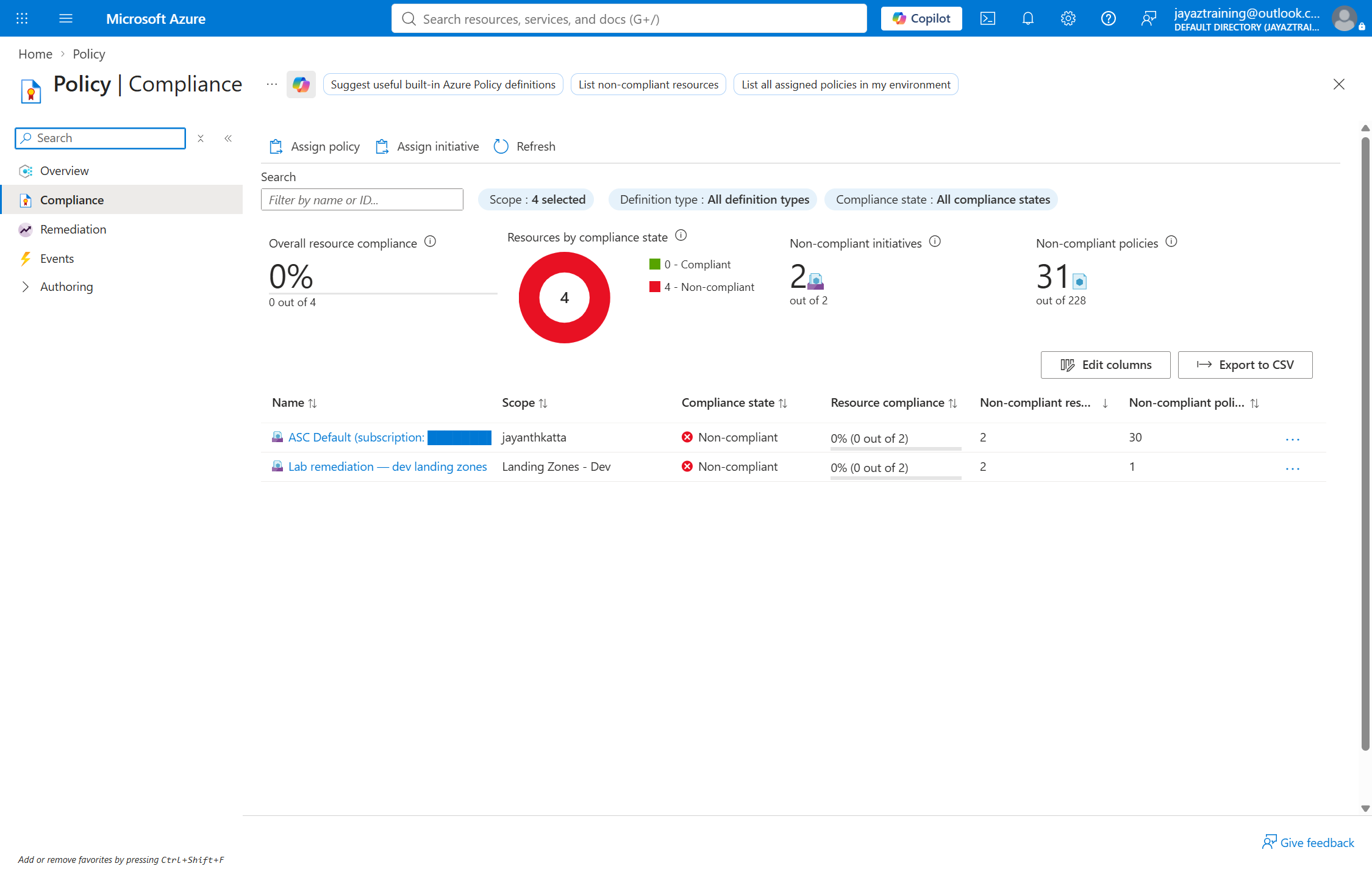
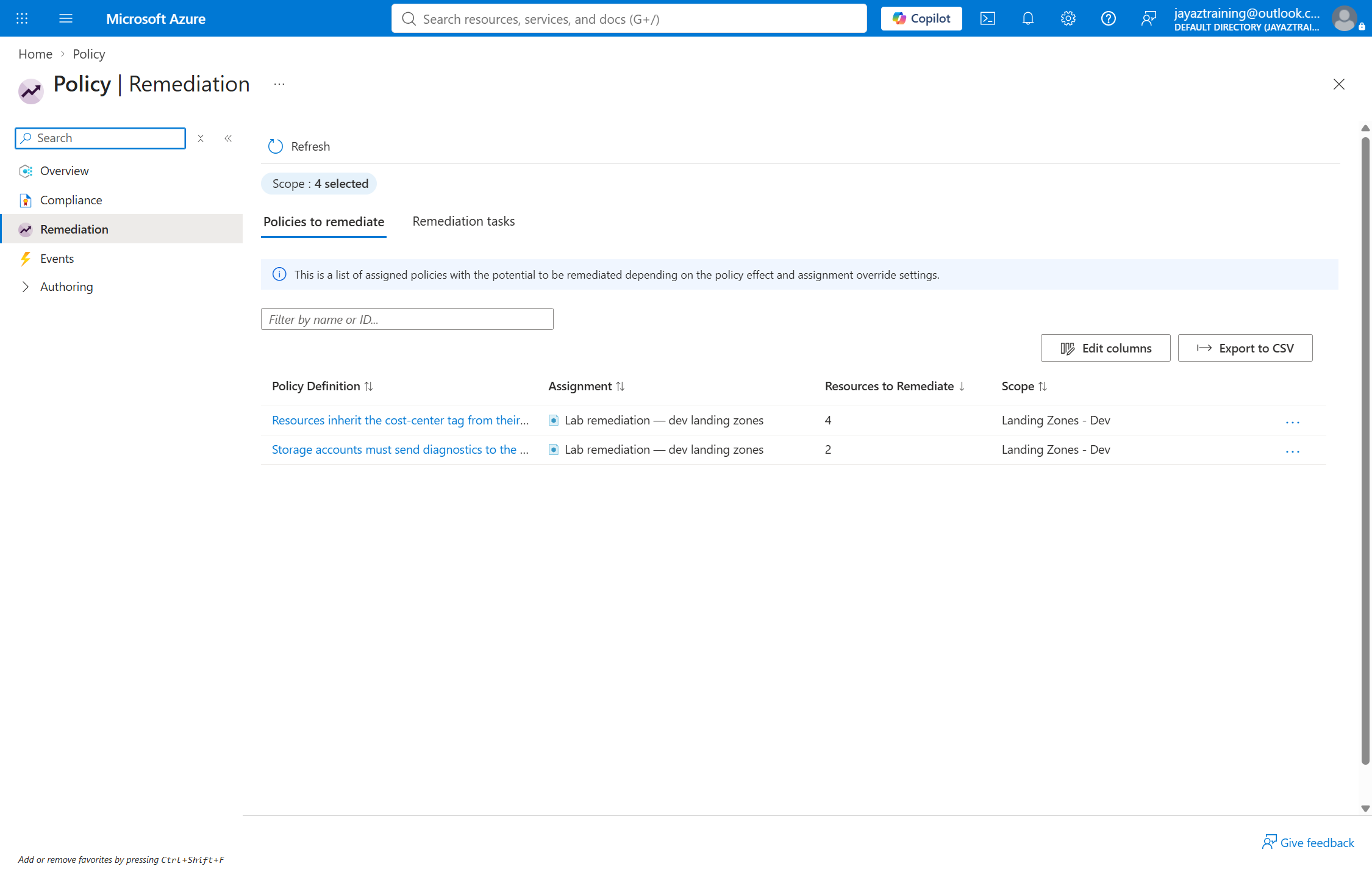
Four for the tag, not two. The Log Analytics workspace and the remediation identity are resources in that group too, and they are missing the tag exactly as the storage accounts are. A policy at management group scope does not exempt the lab's own machinery from itself.
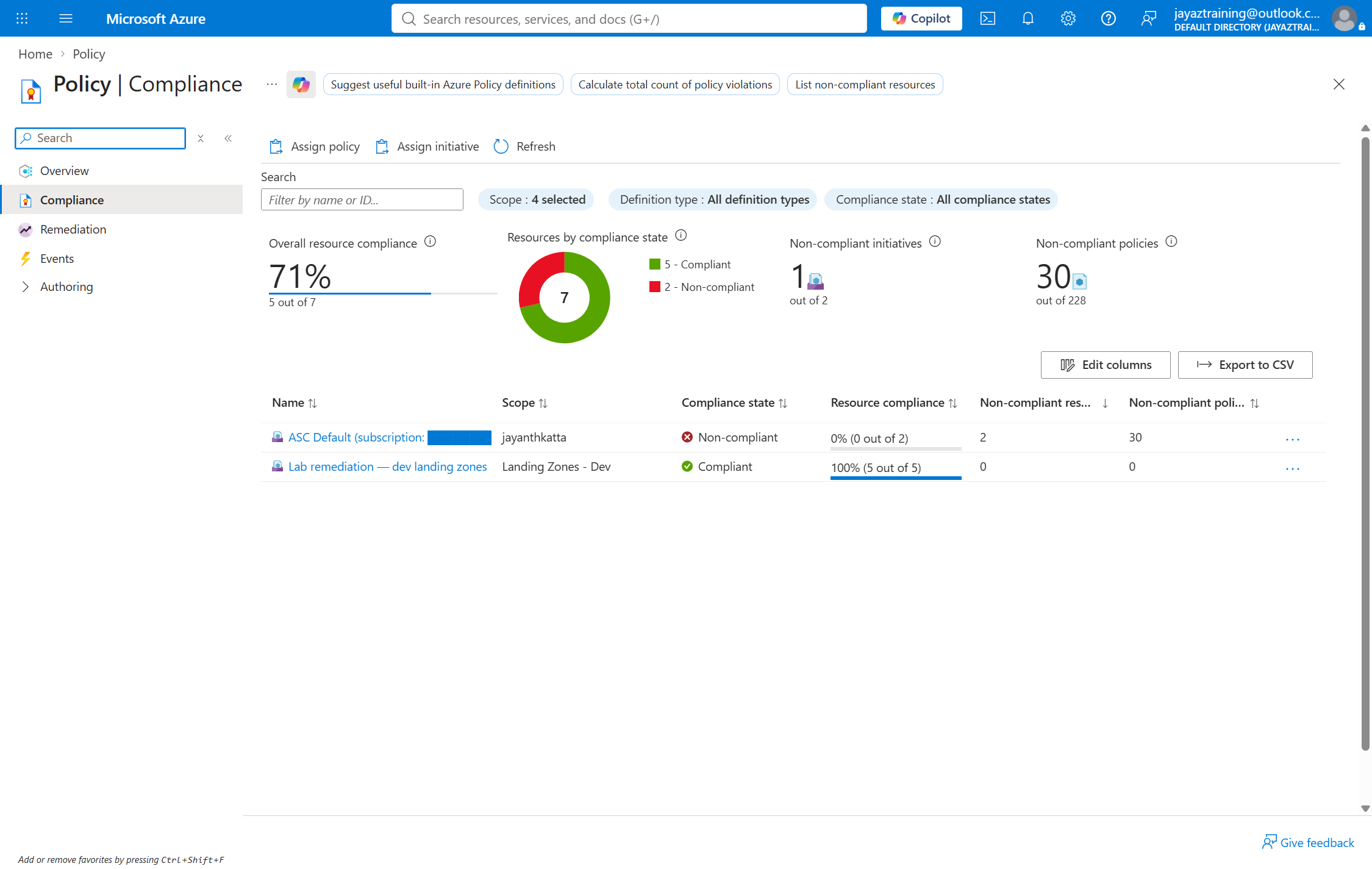
Stage 2 fails every deployment. Stage 3 changes nothing but the three role assignments — same definitions, same initiative, same assignment, same identity — and the same rules that could not write a single tag now finish the job:
Challenges — What Actually Went Wrong
Only one of the two failures tells you anything
Both effects failed for the same reason — an identity holding no roles — and they reported it completely differently.
modify names the missing permission and the principal:
The 'PATCH' request failed with status code: 'Forbidden'. Inner Error: 'The
client '…' with object id '…' does not have authorization to perform action
'Microsoft.Resources/tags/write' over scope '…/providers/Microsoft.Resources/
tags/default' or the scope is invalid.
deployIfNotExists says only that something is missing:
Evaluation of DeployIfNotExists policy was unsuccessful. The policy assignment
'…/assign-remediation-dev' resource identity does not have the necessary
permissions to create deployment '…/PolicyDeployment_12003642577558566238'.
Not which permission. Not at which scope. Not which of the two roles is absent. It points at a deployment name, so it gets debugged as a deployment problem — and the fault is a role assignment that was never made.
An audit-only assignment still carries an identity
Assigning the initiative with every effect set to
AuditIfNotExists and Disabled was refused outright:
ResourceIdentityRequired: … must include a 'managed identity' when assigning
'DeployIfNotExists' policy definitions or policy definitions that contain a
deployment in the effect details
The definition decides whether an identity is required, not the effect you assign it with. So "it is only auditing, there is no identity" is false. What separates a safe audit stage from a dangerous one is not the identity's presence — it is whether that identity holds any role assignments.
One remediation at a time, per assignment, per rule, per scope
A second request while one is running is refused:
InvalidCreateRemediationRequest: … are already running for policy assignment
'…/assign-remediation-dev', definition reference ID 'storage-diagnostics' on a
scope conflicting with requested scope.
Worth knowing before you write a loop that fans out remediation across rules, and worth knowing if two people are working the same subscription.
The task reports failure before it reports what failed
A remediation task's provisioningState reaches
Failed while successfulDeployments and
failedDeployments are both still 0. Read at that
instant it says "failed without attempting anything", which is not what
happened — the counters fill in afterwards.
Any script that polls for a terminal state and immediately reads the counters will publish a number that is wrong for a few seconds and wrong forever in your notes.
Security — Controls at Every Layer
The definition decides how much power you hand over. Azure
ships a built-in that does exactly what this week's tag rule does — Inherit a
tag from the resource group if missing — and its roleDefinitionIds
names Contributor. Assign that built-in and you have granted
Contributor over every subscription beneath the scope, permanently, in order to
write a tag.
An assignment cannot grant less than its definition demands. So the only place that decision can be made is the definition, and this week ships its own copy — identical rule, one line different:
"roleDefinitionIds": [
  "/providers/Microsoft.Authorization/roleDefinitions/4a9ae827-6dc8-4573-8ac7-8239d42aa03f"
]
Tag Contributor. Write tags, nothing else.
Two roles for diagnostics, not one. Monitoring Contributor writes the diagnostic setting on the storage account; Log Analytics Contributor writes to the workspace it points at. One grants the write on the source, the other on the destination, and dropping either produces a remediation that fails on the half you did not grant.
Granted at the assignment's own scope. All three roles sit at
mg-lz-dev — the same management group the initiative is assigned at,
so the identity reaches everything the policy governs and nothing beyond it.
Cost
Under $1 while running, $0 now. Policy definitions, assignments, compliance evaluation and remediation tasks are free at any scale. The test bed was a Log Analytics workspace and two Standard LRS storage accounts holding nothing, up for a few hours.
The workspace is the only part that can bill: it ingests a few MB of storage metrics against a 5 GB per month free allocation, and retention was left at the 30-day free floor. Retention beyond that floor is the part of Log Analytics that costs money, and it is easy to raise without noticing.
Cleanup
Three kinds of thing were created and only one dies with the resource group.
The workspace, the storage accounts, the identity and the diagnostic settings the policy itself deployed all live in the group. The definitions, the initiative and the assignment live on the management group tree. And the three role assignments live on the tree too — which is the part that bites.
Deleting the resource group deletes the identity, but not its
grants. What remains is three role assignments at mg-lz-dev
naming a principal ID that no longer resolves — which the portal renders as
"Identity not found". They grant nothing and they accumulate: every re-run of
the week leaves three more. Cleanup has to check by principal ID, because
checking by name finds nothing to check.
Verified after teardown: resource group gone, zero orphaned role assignments, no assignments left on the tree.
One thing is deliberately not deleted. The remediation task records survive the assignment they ran against — six of them, three failed and three succeeded. They are history rather than infrastructure: no cost, no permissions, no effect. They are also the only surviving evidence of what this week actually did, and a teardown that quietly removes its own audit trail is worse than one that leaves it.
References
- Azure Policy deployIfNotExists effect
- Azure Policy modify effect
- Remediate non-compliant resources
- Get compliance data — evaluation triggers
- Azure built-in roles
Key Takeaways
- Read the definition's
roleDefinitionIdsbefore you assign it. That field is the permission bill, written by whoever authored the rule. A built-in that looks harmless can demand Contributor over everything below the scope. - An assignment cannot grant less than its definition demands. If the bill is too high, the fix is a custom definition — not a narrower assignment, which is not a thing that exists.
- A missing role does not announce itself.
deployIfNotExistsreports a failed deployment and names the deployment. Check the identity's role assignments first, before you debug anything about the template. - Audit-only does not mean identity-free. A definition containing a deployment demands an identity whatever effect you assign. The safety comes from withholding the grants, not from withholding the identity.
- Grants outlive the identity they were made for. Delete the resource group and the role assignments remain, naming a principal that no longer exists. Check by principal ID at teardown, or they accumulate silently.
- Policy at a management group governs your own tooling too. Four resources needed the tag, not two — the workspace and the remediation identity among them. Nothing is exempt for being infrastructure.
Next week: the module factory — Azure Verified Modules, a private registry, and what it takes for a module to be worth depending on.
Comments