📋 In This Post
Why — The Problem This Solves
Week 1 built a resource hierarchy by running terraform apply on my
laptop. That works exactly once, for exactly one person, and leaves no record of
what was proposed before it happened. Every week after it would inherit the same
arrangement, and every one of them would need retrofitting later.
So the second week is the pipeline. The question is how a CI system proves who it is to Google Cloud.
The conventional answer is a service account key: a JSON file holding a private key, pasted into a CI variable. It is the default because it is the obvious thing, and it is the source of a large share of cloud compromise — a credential that does not expire, sitting in a file, copied wherever it is convenient.
Then I looked at what the organization already enforced
Before writing anything, I listed the organization policy. I expected an empty result — a new organization, nothing configured. Instead there were seven constraints already enforced, none of which I had created:
$ gcloud org-policies list --organization=ORG_ID
iam.allowedPolicyMemberDomains
storage.uniformBucketLevelAccess
essentialcontacts.managed.allowedContactDomains
iam.managed.disableServiceAccountKeyCreation
compute.managed.restrictProtocolForwardingCreationForTypes
iam.automaticIamGrantsForDefaultServiceAccounts
iam.disableServiceAccountKeyUpload
These are Google's security baseline constraints, applied
automatically to every organization created on or after 3 May 2024.
Two of them matter here:
iam.managed.disableServiceAccountKeyCreation and
iam.disableServiceAccountKeyUpload. A key cannot be created, and a
key cannot be uploaded.
The week I planned was already unnecessary. I was going to apply that constraint myself as the opening move, then build federation as the only remaining option. The platform had done it first. What was left was more useful: find out what has already been decided for you, prove it, and build inside it.
Why this matters beyond one lab
If your organization predates May 2024, none of this is on. The constraints
exist and are one terraform apply away, but nothing turned them on
for you — and the tutorial you are following almost certainly still tells you to
download a key.
Worth checking which side of that date your organization is on before assuming either way.
What You Need to Know — Skills & Tools
Google Cloud
- Organization Policy — and specifically that a baseline may already be enforced
- Workload Identity Federation — pools, providers, attribute mapping and conditions
- Security Token Service — the exchange endpoint
- IAM Service Account Credentials — impersonation
- Liens — deletion protection enforced by the API
Tooling
- HCP Terraform dynamic provider credentials
- CEL — the expression language attribute conditions are written in
- OIDC — enough to know what a claim is and who signs it
Concepts to understand before starting
The one that reframes everything: the issuer is public.
https://app.terraform.io signs tokens for every HCP Terraform
customer in the world. Configuring it as a trusted issuer does not, by itself,
trust your runs. It trusts all of them.
Architecture — How It Fits Together
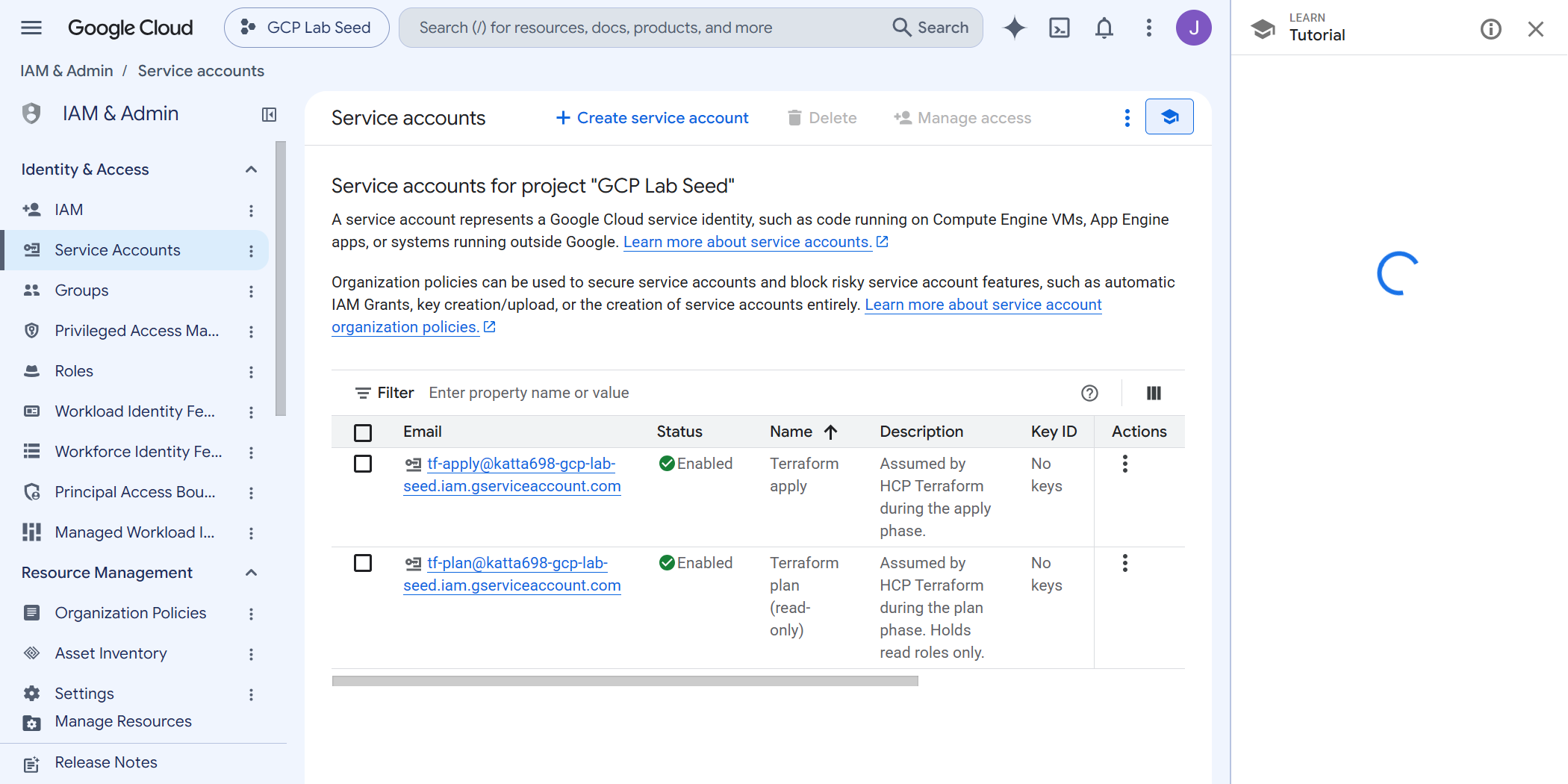
No credential is stored on either side. Each run mints a token, exchanges it, uses it, and lets it expire.
How We Built It — Step by Step
Step 1 — Read the organization policy before writing any
Covered above, and worth stating as a habit rather than a step. The
gcloud org-policies list call took two seconds and removed an entire
planned section of this week.
Step 2 — The pool and the provider
A workload identity pool holds external identities. A provider inside it declares which issuer those identities come from.
resource "google_iam_workload_identity_pool_provider" "hcp" {
  workload_identity_pool_id          = google_iam_workload_identity_pool.hcp.workload_identity_pool_id
  workload_identity_pool_provider_id = "hcp-terraform-oidc"

  oidc {
    issuer_uri = "https://app.terraform.io"
  }

  attribute_mapping = {
    "google.subject"                        = "assertion.sub"
    "attribute.terraform_organization_name" = "assertion.terraform_organization_name"
    "attribute.terraform_project_name"      = "assertion.terraform_project_name"
    "attribute.terraform_workspace_name"    = "assertion.terraform_workspace_name"
    "attribute.terraform_run_phase"         = "assertion.terraform_run_phase"
  }
}
allowed_audiences is deliberately unset. Left alone, Google
expects its own default audience — the provider's full resource name — which is
exactly what HCP sends unless TFC_GCP_WORKLOAD_IDENTITY_AUDIENCE
overrides it. Setting one side by hand only creates a second place for the two
ends to disagree.
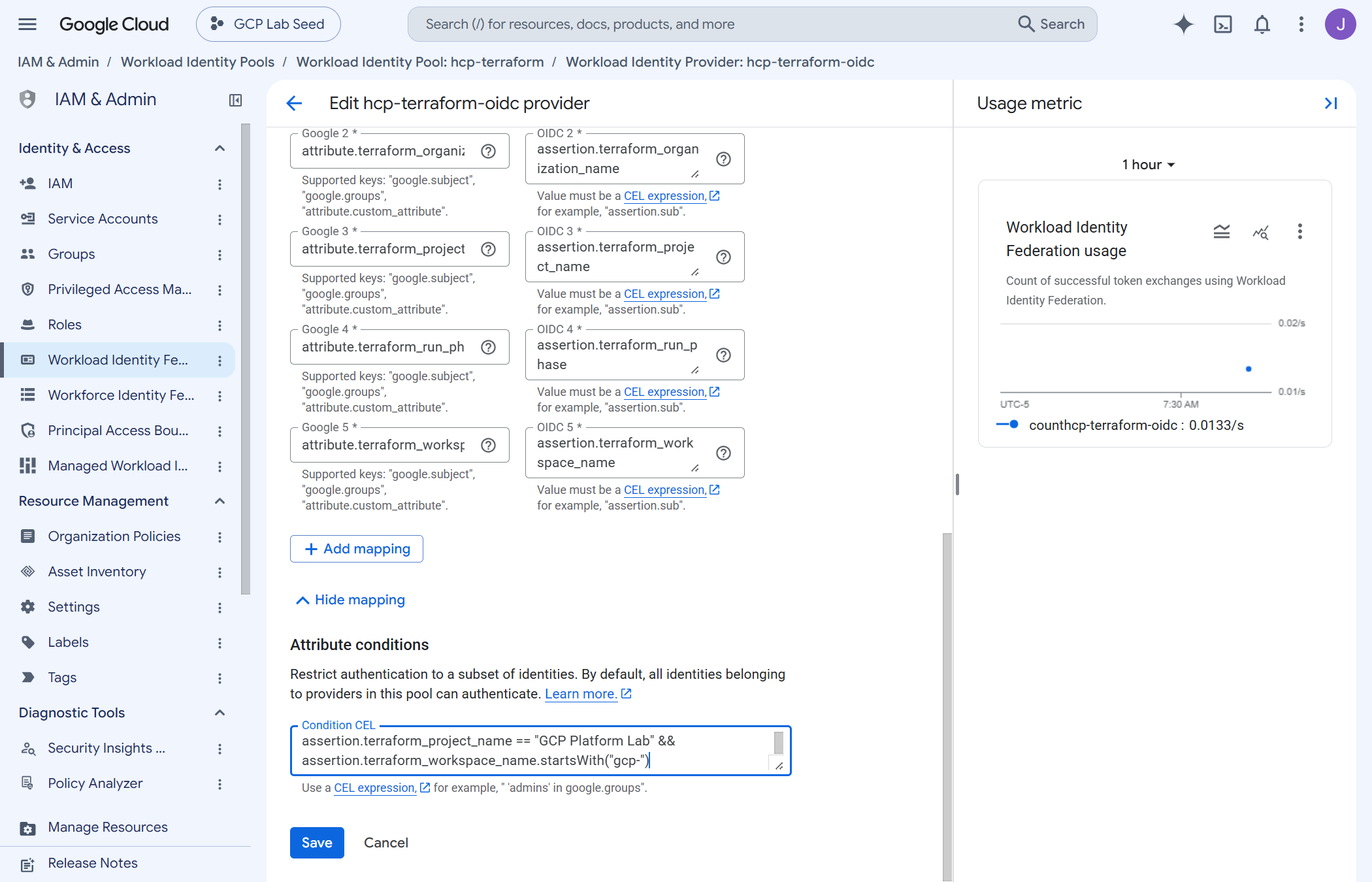
Step 3 — The attribute condition, which is the actual security control
Everything above trusts an issuer. The issuer is public. Without a condition, the only thing between any HCP Terraform user on earth and this organization is that they have not guessed the provider's resource name — which is not a secret and is printed in plan output.
attribute_condition = join(" && ", [
  "assertion.terraform_organization_name == \"katta\"",
  "assertion.terraform_project_name == \"GCP Platform Lab\"",
  "assertion.terraform_workspace_name.startsWith(\"gcp-\")",
])
Three claims, narrowing in turn. The third is not decoration: my AWS lab's workspaces live in the same HCP organization and carry tokens from the same issuer. The project and prefix checks are what keep them out of this organization.
Step 4 — Two identities, split by run phase
HCP issues a token per phase and names the plan and apply identities
separately. The token carries a terraform_run_phase claim, so the
split can be bound in IAM rather than trusted as convention:
resource "google_service_account_iam_member" "plan_federation" {
  service_account_id = google_service_account.plan.name
  role               = "roles/iam.workloadIdentityUser"
  member             = "principalSet://iam.googleapis.com/${pool}/attribute.terraform_run_phase/plan"
}
An apply-phase token cannot assume the plan account, and a plan-phase token cannot assume the apply account. The binding does not match, so Google refuses the impersonation. A speculative plan on a pull request cannot mutate anything — not because a policy forbids it, but because the identity it can reach holds no role that could.
Verifying it actually works
Three checks, and the third is the one that matters.
1. A remote plan actually runs remotely. This is easy to get wrong: a workspace can be set to remote while your plan quietly executes locally against your own credentials, and the output looks identical. The tell is the first line.
terraform plan
# Running plan in HCP Terraform. Output will stream here.
If that line is absent, nothing has been proven about the CI identity.
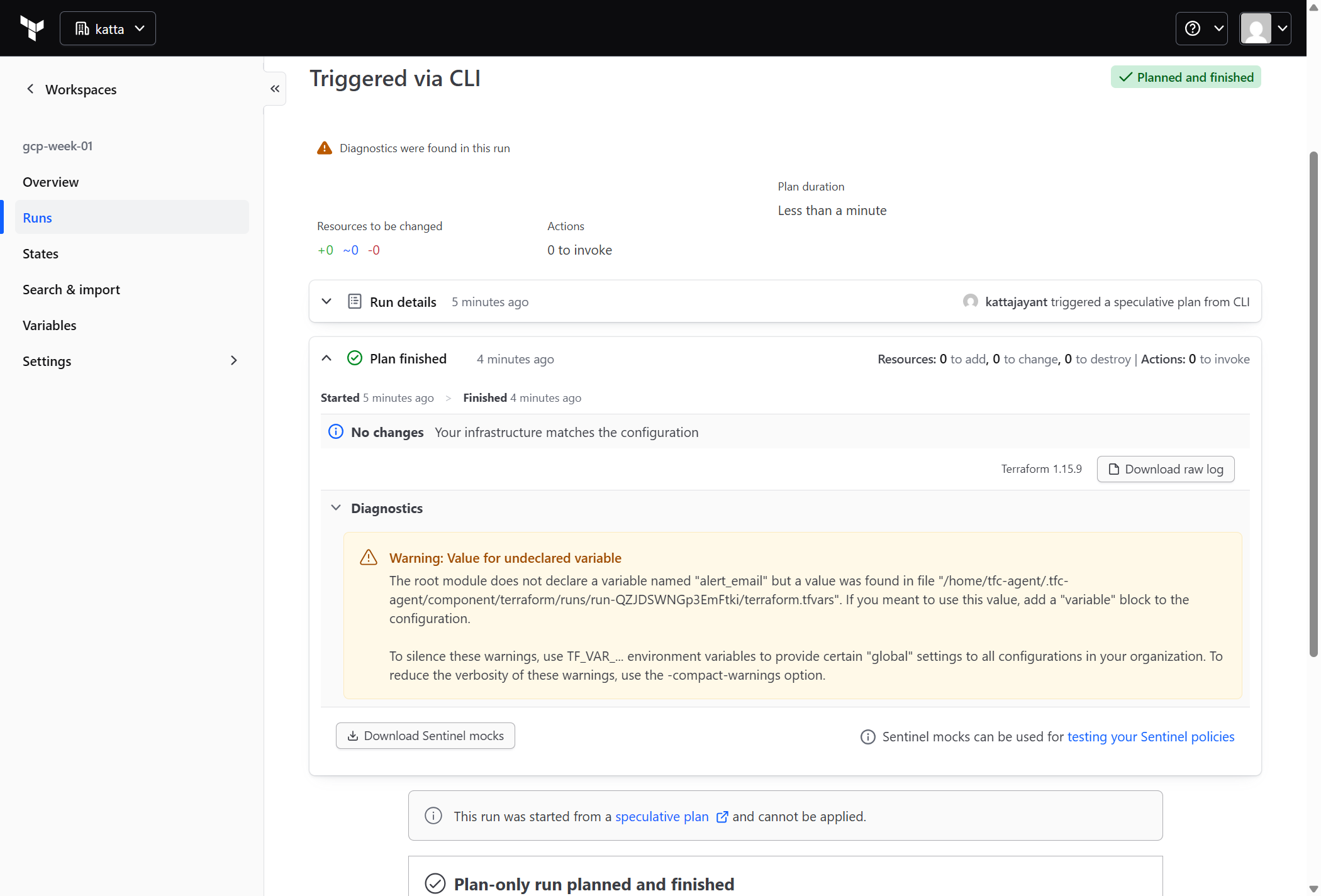
tf-plan, refreshing every
resource in Week 1's hierarchy through federation, finishing with no changes.2. The identities hold what you think. Read the roles back from the organization rather than from your configuration.
3. The shortcut still fails. The week's entire claim is that
no key can exist. That is a testable statement, so the validation script tests
it — it attempts to create a key on tf-apply and fails the run if
one appears.
Two details in that test are deliberate. It counts user-managed keys before and after, because every service account carries Google-managed keys it never asked for and counting those reports a failure on a healthy system. And it asserts on that count rather than on the wording of the error, because matching error text turns a reworded message into a silent pass.
A test must not be able to create the thing it disproves.
The obvious way to write this check is to send the key to /dev/null.
That discards the key material — but if the constraint ever failed to
hold, the key itself would still exist server-side, on the identity that can
change the estate, created by the test meant to prove none could exist. The
failure branch has to clean up after itself, or the check is a liability on
exactly the day it finally fires.
Challenges — What Actually Went Wrong
1. A read-only role that could read every object in the estate
The plan identity was first given roles/viewer at the
organization, reasoning that a plan only reads, so breadth costs nothing.
That reasoning is wrong, and the documentation says why: a principal granted
roles/viewer gains roles/storage.legacyObjectReader on
buckets. So it was not "read the hierarchy". It was read every object in
every project in the organization, including projects that did not
exist yet — reachable by any workspace satisfying the attribute condition.
Replaced with five specific read roles. Google's guidance is blunter than I had internalised: in production, do not grant basic roles unless there is no alternative.
2. roles/viewer cannot read a folder
Found the other way round, and it is a good illustration of why basic roles
are a poor fit here. roles/viewer does not include
resourcemanager.folders.get. Basic roles predate the resource
hierarchy: they describe a project's contents, not the structure a project
hangs from. So an organization-level grant of viewer inherits all the way down
and still cannot read a folder. roles/browser is the role that
can.
3. A guard that lived in the wrong place
The seed project carries prevent_destroy. That felt like
protection until tf-apply was granted
roles/resourcemanager.projectDeleter at the organization — which
includes the project holding the pool, the provider and both identities.
prevent_destroy refuses a destroy in one configuration.
It says nothing to a gcloud call, a console click, or a different
configuration running as the same identity. The guard lived in the state file
while the risk lived in the cloud.
A lien is the same intent enforced by Google: deletion is refused at the API, whoever asks, until the lien is deliberately removed.
4. A required variable that is not required in practice
HashiCorp documents TFC_GCP_PRINCIPAL_TYPE as required
alongside TFC_GCP_PROVIDER_AUTH. The workspace does not have it,
and authentication works anyway — it evidently defaults sensibly when the plan
and apply service account emails are set.
Working by undocumented default is not the same as working. It is set explicitly now.
Security — Controls at Every Layer
- No key exists, and none can be created. Enforced by organization policy, not by discipline. The validation script proves it on every run by attempting the thing that must fail.
- The trust boundary is the attribute condition, not the issuer. A public issuer plus no condition means trusting every customer of that issuer. Three claims narrow it to one project's workspaces.
- Plan and apply are different identities, bound to different run phases, so a pull-request plan cannot reach a role that writes.
- Least privilege on the read side too. Read-only is not the same as harmless — the plan identity holds five specific read roles rather than a basic role that would have included object data.
- Deletion protection at the API, via a lien, not only in Terraform state.
- Billing IAM is deliberately not managed here. The apply identity spends against a billing account; it does not manage roles on it. That grant is made once, by a human, out of band. An identity that can widen its own access to money is a different kind of identity.
Cost
Zero. Workload identity pools, providers, service accounts, IAM bindings and liens are all free. Token exchanges are free. Nothing in this week bills per hour, and HCP Terraform's free tier covers the runs.
Which is the uncomfortable part: the keyless path costs nothing, takes an afternoon, and is still not what most tutorials teach.
Cleanup
None. This is permanent infrastructure — every later week runs through it.
One thing deliberately resists cleanup: the lien on the seed project. Removing
it is a separate, explicit act requiring
resourcemanager.projects.updateLiens. That is the point of it.
References
Key Takeaways
- Read the organization policy before you write any. A two-second command removed a planned section of this build. If your organization was created on or after 3 May 2024, service account keys are already impossible — and if it predates that, nothing turned the constraints on for you.
- The issuer is public; the claims are the boundary.
Trusting
app.terraform.iowithout an attribute condition trusts every HCP Terraform customer alive. That expression is the security control, not the configuration around it. - Read-only is not harmless.
roles/viewerreads object data. Basic roles are the wrong tool at organization scope, in both directions — too much power over data, and not enough over the hierarchy. - A Terraform guard is not a cloud guard.
prevent_destroyprotects one configuration. A lien protects the resource. - Check where your plan actually ran. A remote workspace can still be planned locally, and the output looks the same. "Running plan in HCP Terraform" is the only proof the CI identity was involved at all.
What I’d do differently in production
- Scope the write roles below the organization.
tf-applyholdsfolderAdmin,projectCreatorandserviceAccountAdminat the organization because a lab creates folders directly under it. In production those belong on a folder, andserviceAccountAdminat organization scope is worth avoiding specifically — it permits setting IAM policy on any service account, including the apply identity itself, which is a route to widening who may impersonate it. - Use a variable set, not per-workspace variables. Four
TFC_GCP_*variables copied into every workspace is four chances to mistype a provider name in a way that fails at the next apply rather than now. - Separate the identity per environment. One apply identity spanning dev and prod means a dev workspace holds production write access. The attribute condition already carries a workspace name — production would key on it.
- Alert on token exchanges. The usage chart in the console is pleasant to look at and nobody is watching it. A failed exchange is either a misconfiguration or somebody else trying, and both are worth an alert.
Next week: organization policy — writing constraints of my own onto the folders Week 1 created, now that there is a pipeline to write them through.
Comments