📋 In This Post
Why — The Problem This Solves
An internal tool gets used nine times a day, all of them between 9am and 5pm, all of them by the same four people. On a virtual machine it costs the same at 3am as it does at noon. Most internal software looks like this, and most of it is billed as though it were busy.
The alternative is to run nothing when nobody is asking. That is free, and it is not free — somebody has to wait while a container starts. This week deploys that trade and measures both ends of it.
What You Need to Know — Skills & Tools
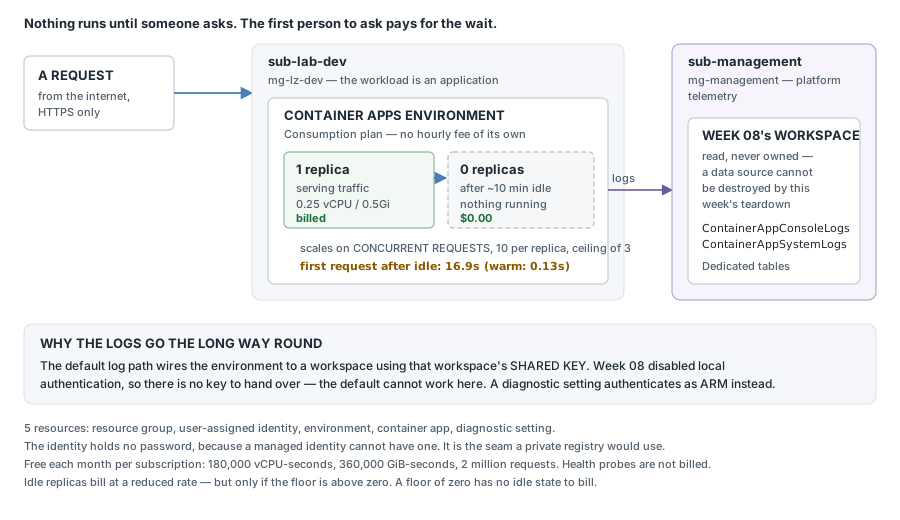
Azure Container Apps runs containers without you running the servers underneath them. You hand Azure an image and a few numbers; it decides how many copies to run and when to stop them. Four ideas carry the rest of this post:
- A replica is one running copy of your container. You are billed per second for the CPU and memory each copy is allocated — so the replica count is the bill.
- The environment is the box the apps live in — shared network, and one log destination for everything inside it. You create one per environment-per-region, not one per app, and it costs nothing by itself.
- A scale rule is the signal Azure watches to decide it needs another replica: CPU, a queue, or here, how many HTTP requests are in flight at once. You give it a floor and a ceiling. A floor of zero means that when nobody is asking, nothing runs and nothing is charged.
- A diagnostic setting is a forwarding rule — "send this resource's logs to that workspace". It authenticates as Azure Resource Manager, with no key. That matters here, because the other way to ship these logs needs a shared key this workspace no longer hands out.
Architecture — How It Fits Together
How We Built It — In Deployment Order
The goal: a workload that serves real traffic from the internet, runs nothing when idle, and reports to week 8's workspace across a subscription boundary. You need an Azure subscription, an HCP Terraform account, and a Log Analytics workspace to point at.
Five resources, and the shape of the week is in the last one:
| Resource | Count | Its job |
|---|---|---|
| Resource group | 1 | what dies together at teardown |
| User-assigned managed identity | 1 | the seam a private registry would authenticate through |
| Container Apps environment | 1 | the boundary — network and log destination |
| Container app | 1 | the workload — a Microsoft-published sample image, 0 to 3 replicas, HTTPS only |
| Diagnostic setting | 1 | routes logs into week 8's workspace, in another subscription |
1. The HCP workspace, created first and deliberately
POST /api/v2/organizations/Katta/workspaces
{ "name": "azure-week-09-dev", "execution-mode": "local" }

created: azure-week-09-dev | execution-mode: local
A new HCP workspace defaults to remote execution, which runs the plan on HCP's servers where there is no Azure CLI. Setting it at birth is one line; discovering it afterwards costs a confusing failure on the wrong machine.
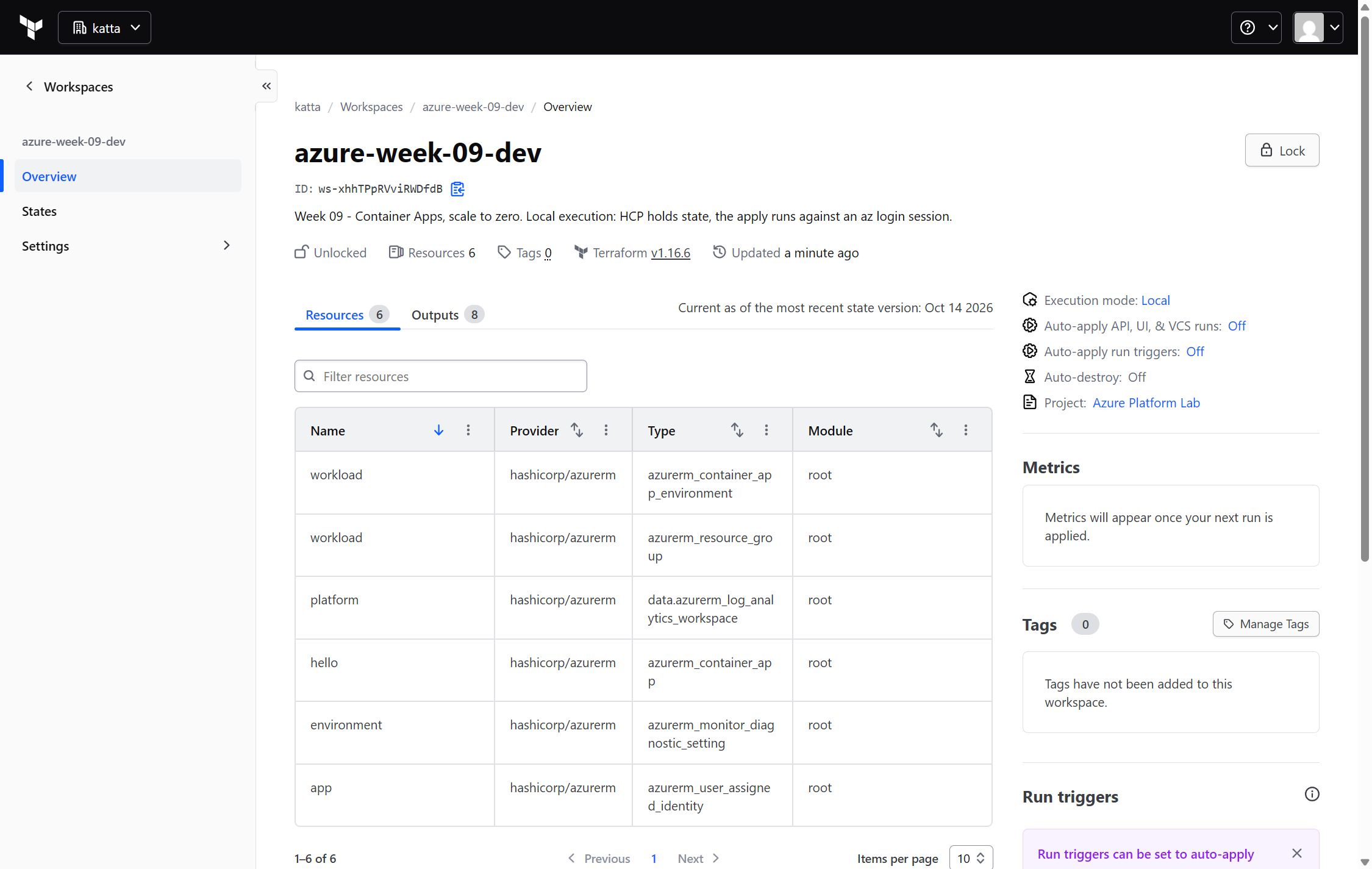
Six resources there, not five — the sixth is the data source reading week 8's workspace. Terraform tracks what it reads as well as what it owns.
2. The Terraform
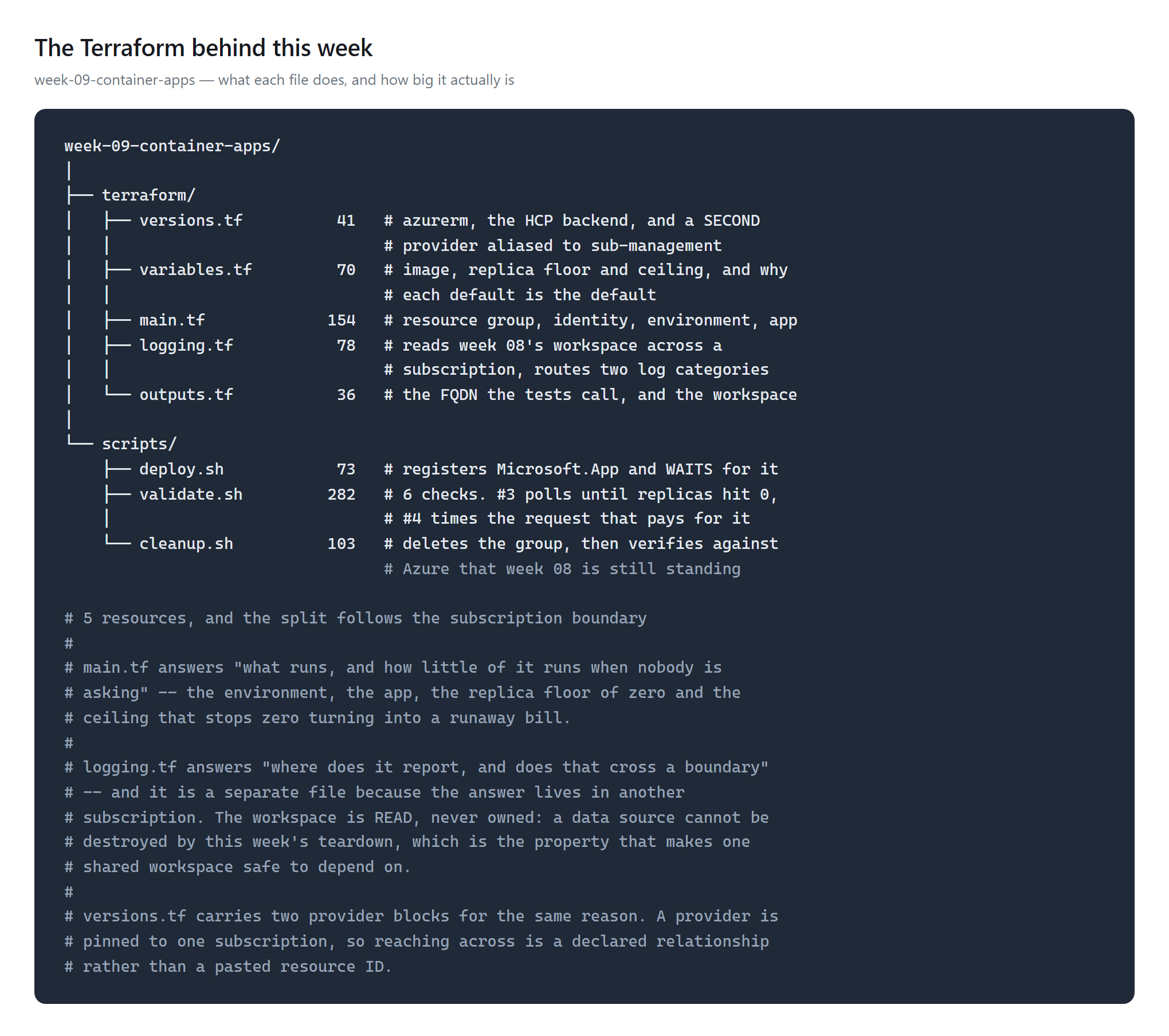
main.tf answers "what runs, and how little of it runs when nobody
is asking". logging.tf is separate because its answer lives in
another subscription.The replica floor is the week in one argument:
template {
  min_replicas = 0      # the whole point
  max_replicas = 3      # a ceiling, not a target

  cooldown_period_in_seconds = 300

  http_scale_rule {
    name                = "http-concurrency"
    concurrent_requests = 10
  }
}
3. Deploy
$ ./scripts/deploy.sh
   registering Microsoft.App (currently NotRegistered)
   attempt 1: Registered
...
azurerm_container_app_environment.workload: Creation complete after 14m55s
azurerm_container_app.hello: Creation complete after 18s

Apply complete! Resources: 5 added, 0 changed, 0 destroyed.
The environment took 14 minutes 55 seconds. The app on top of it took 18. Provider registration lives in the deploy script rather than in Terraform, because registration is subscription-wide shared state and one week's destroy must not unregister what another week still needs.
4. It answers — and only over HTTPS
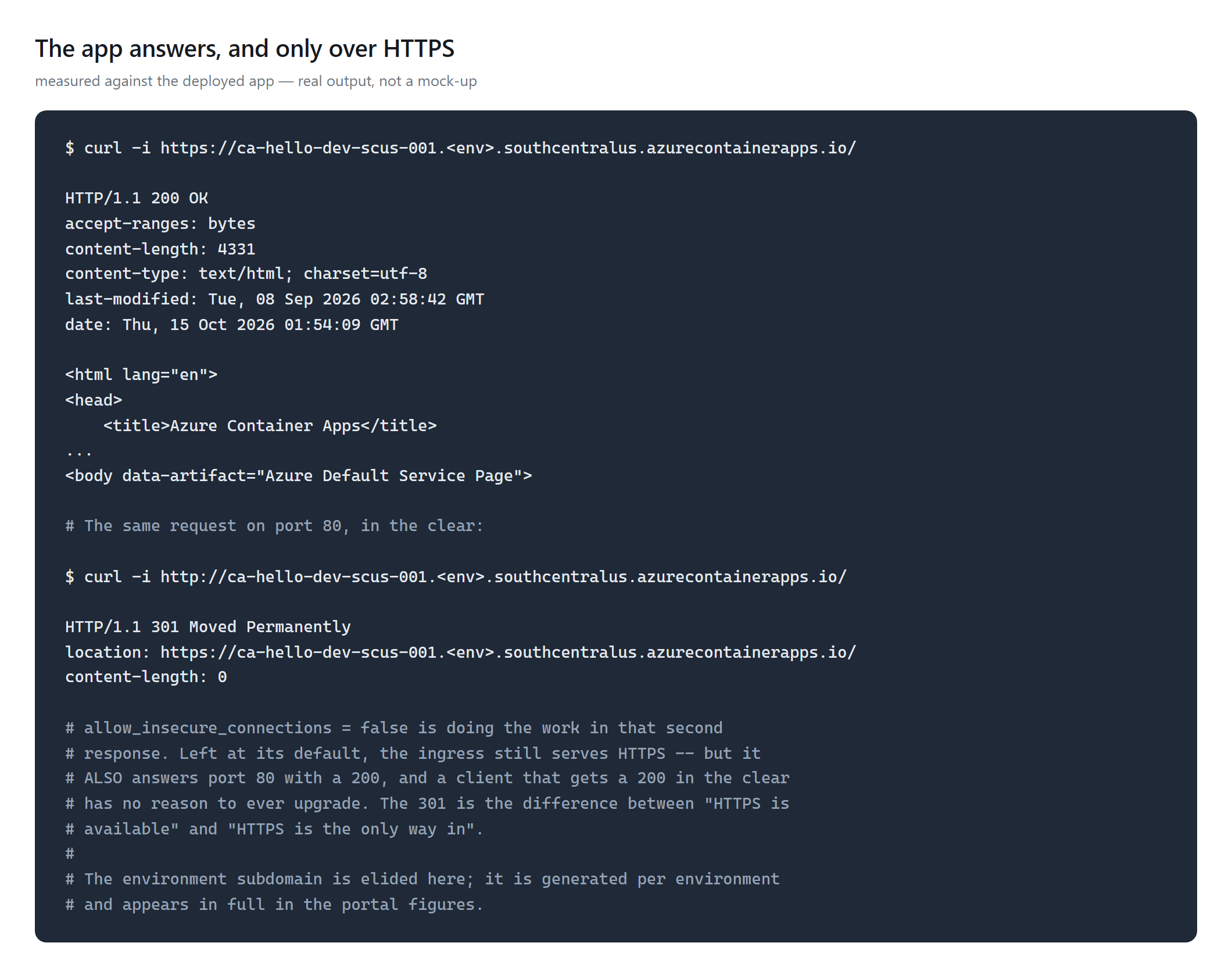
allow_insecure_connections left at its default the ingress also
answers port 80 with a 200 — and a client that gets a 200 in the clear has no
reason to ever upgrade.5. And then it stops
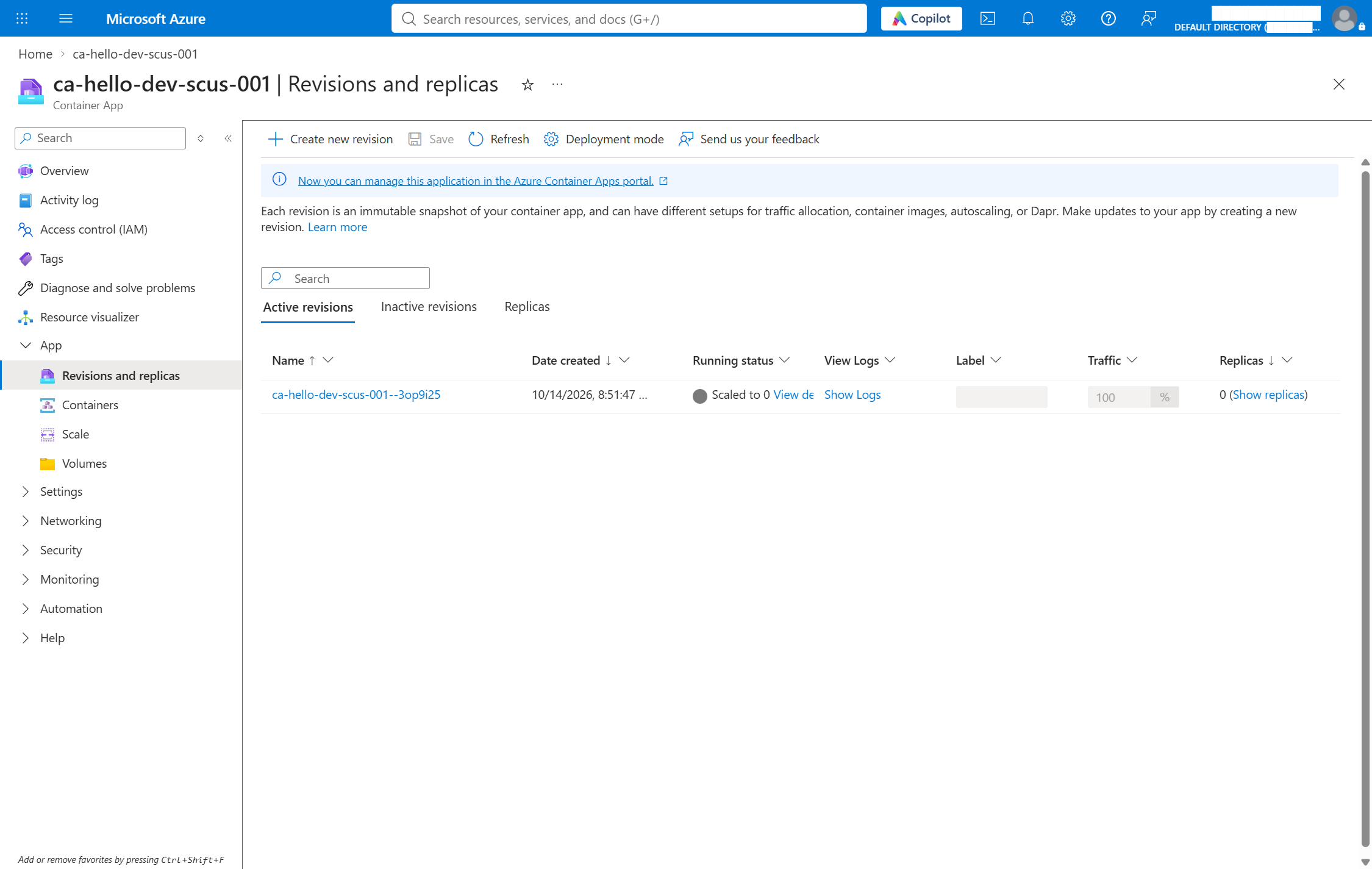
6. The logs land in last week's workspace
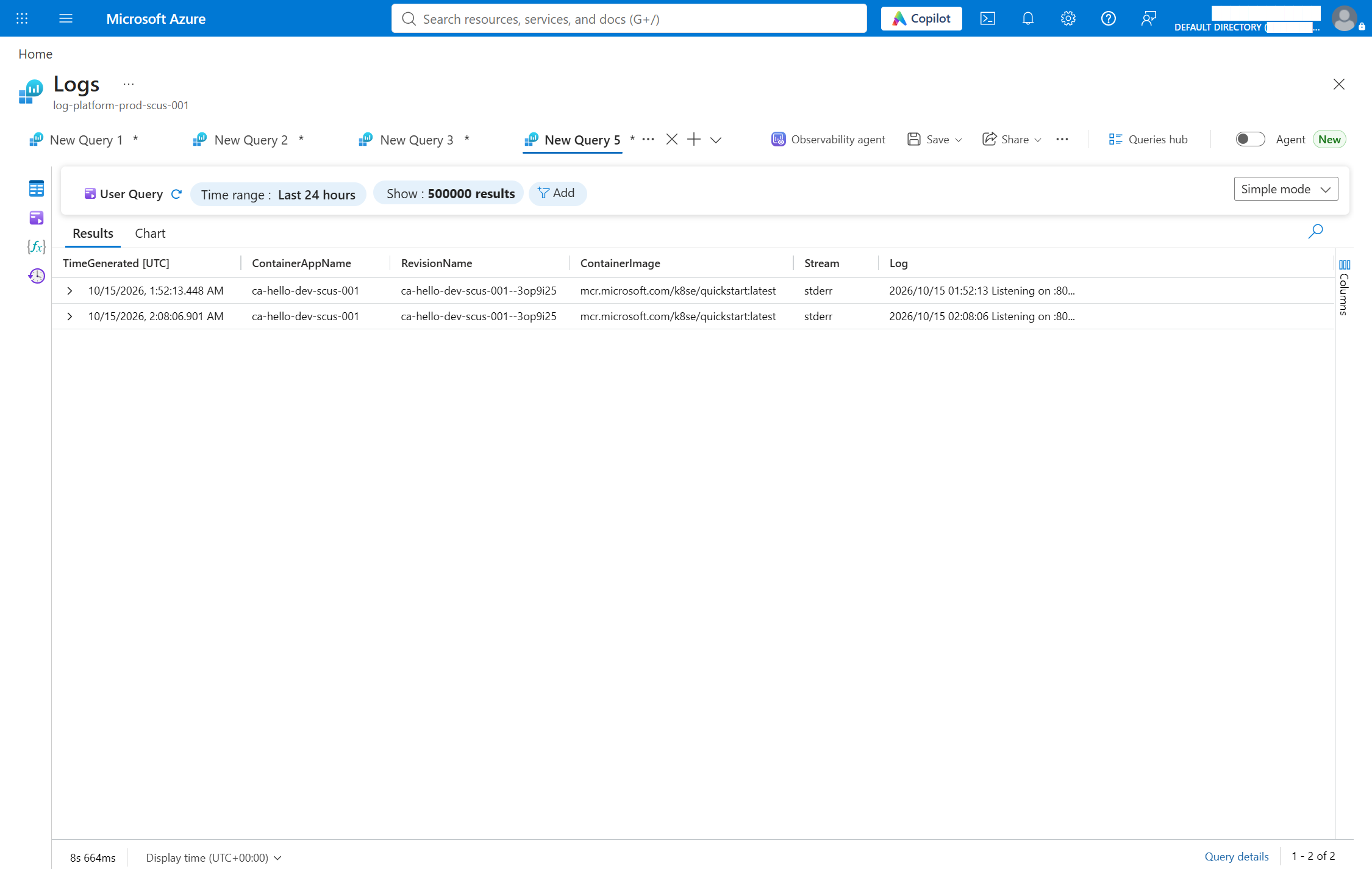
What production does differently
- A private registry. This pulls a Microsoft sample anonymously. Production builds its own image into ACR — which adds a registry block pointing at that managed identity, not a password.
- Builds in CI, on week 7's federated credential, not on a laptop.
- Something in front of the ingress. External ingress straight to the app is right for a demonstration and rare in production.
How It's Tested
validate.sh — 6 checks, 8 assertions, 8 passed / 0
failed:
| What | Measured |
|---|---|
HTTPS GET / | 200 |
| Plain HTTP on port 80 | 301 — never served in the clear |
| Warm request, average of 3 | 0.13 s |
| Idle before replicas reached 0 | 602 s |
| First request after idle | 16.94 s, still a 200 |
| The penalty, stated plainly | 16.81 s on one request |
| Log rows in week 8's workspace | 3 |
Rows in shared AzureDiagnostics | 0 |
That last pair is the test that the logs went to dedicated tables rather than the shared one — which is what makes week 8's per-table cost design apply to them at all.
Challenges — What Actually Went Wrong
The default logging path was impossible. The default
destination wires the environment to a workspace using that workspace's
shared key. Week 8 disabled local authentication, so there is no key
to hand over. The fix is azure-monitor plus a diagnostic setting,
which authenticates as ARM. A security decision made one week became an
architecture constraint the next.
A configuration that never converged. The obvious way to get
dedicated tables is log_analytics_destination_type = "Dedicated".
ARM does not persist that field here, so it returns null and every plan wants to
set it again, forever. Removed — these logs are resource-specific anyway, proven
by AzureDiagnostics holding zero rows. A plan that is never empty
trains you to ignore the diff that matters.
The cooldown is not the whole wait.
cooldown_period_in_seconds was 300; replicas reached zero at
602 seconds. The setting governs when the scaler starts
counting, not when the last replica goes.
Security — Controls at Every Layer
- No password exists. The app carries a user-assigned managed identity, and a managed identity cannot hold a secret — that is a property of the object, not a discipline anyone keeps.
- HTTPS only, proven by a 301 rather than assumed from a setting.
- Named log categories, not
allLogs— which is defined by Azure and silently grows when Azure adds a category. - The image comes from MCR, so there is no registry credential to hold in the first place.
Cost
The free grant is 180,000 vCPU-seconds, 360,000 GiB-seconds and 2 million requests per subscription per month. This week used roughly 600 vCPU-seconds. A Consumption-only environment carries no fixed hourly fee — though private endpoints and planned maintenance do attract a management charge on either plan, and this week uses neither.
Measured: $0.00. Read from Cost Management after teardown,
not from a rate card — sub-lab-dev shows no charges at all for the
days this ran. The free grant absorbed the whole week.
Idle replicas bill eight times cheaper than active — but only if the floor is above zero. A floor of zero has no idle state to bill. Keeping one replica warm is the other defensible answer, and the one to pick if 17 seconds is unacceptable.
Cleanup
$ ./scripts/cleanup.sh
   resource groups named rg-containerapps-lab-dev-scus-001 : 0
   Container Apps environments                             : 0
   container apps                                          : 0
   wk09 managed identities                                 : 0
   week 08's workspace still there                         : log-platform-prod-scus-001
That last line is deliberate. Week 8's workspace is read through a data source, never owned, so this week's teardown cannot destroy it — and the teardown checks that it didn't.
References
- Billing in Azure Container Apps
- Log storage and monitoring options
- Set scaling rules
- The code for this week
Key Takeaways
- Scale-to-zero is not free, it is cheap and slow. 16.81 seconds, paid by one user, invisible in any average. Put that number in front of whoever decides whether it is acceptable.
- A ceiling matters as much as a floor. Zero protects you
from idle cost;
max_replicasprotects you from a runaway one. - Last week's security decision is this week's constraint — which is what good security does, and better found in week 9 than in an incident.
Comments