Security Hub now ranks exposures by how critical the affected resource is. Most of the announcement is about the automation rule you can write. The sentence that changed something yesterday is the one about what happens if you write nothing:
“Security Hub also infers criticality from resource tags and resource names, with no configuration required, and records which source determined the value.”
Executive summary
Resource criticality joins exposure prioritisation, “helping central security teams focus on the exposures that threaten their most business-critical resources”. You can set it explicitly with an automation rule — AWS's example is “marking every compute resource in a specific account as Very High”.
If you set nothing, Security Hub infers it from tags and names. And this is not opt-in: “included with Security Hub Essentials at no additional cost and is always on for all customers”, requiring “no new enablement”.
So as of yesterday, the names you gave your resources are an input to how your security findings are ranked.
What changed
| Aspect | What AWS says |
|---|---|
| Explicit control | An automation rule, e.g. “marking every compute resource in a specific account as Very High” |
| Scope of a rule | “applies to resources already in your inventory and to new resources as Security Hub discovers them” |
| Default behaviour | “infers criticality from resource tags and resource names, with no configuration required” |
| Provenance | “records which source determined the value” |
| Where it shows | A column on the Resources page, and the “Impact assessment tab of an exposure finding” |
| Cost and enablement | “no additional cost… always on for all customers”, “requires no new enablement” |
The rule scope is the genuinely good part and easy to skim past. A rule covering “resources already in your inventory and to new resources as Security Hub discovers them” does not go stale the way a static list does — which is the failure mode #49 described for a selected-list Config recorder and #50 for a per-model budget. Here AWS got it right by default.
Architecture
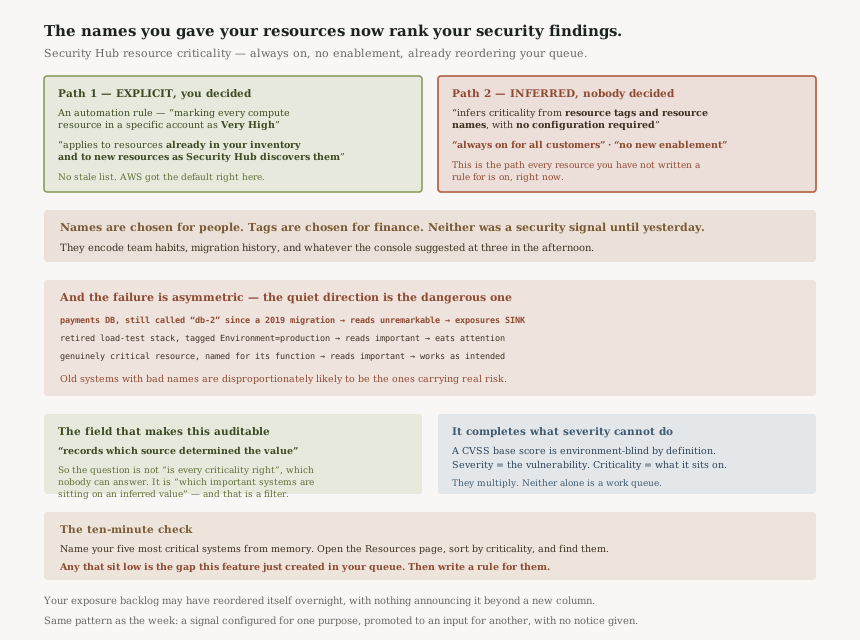
There are two ways a resource gets a criticality, and only one involves a decision.
Explicit — an automation rule you write. Deterministic, auditable, and it covers future resources as they appear.
Inferred — from “resource tags and resource names”, with “no configuration required”. This is the path every resource you have not written a rule for is on, right now.
Why that matters more than it sounds
Resource names are chosen for human convenience. They encode team habits, migration history, and whatever the console suggested at three in the afternoon. Tags are chosen for cost allocation and ownership. Neither was designed to carry a security signal, and both now do.
The failure runs in both directions, and the under-ranking one is worse:
| Situation | What inference is likely to conclude | Consequence |
|---|---|---|
Your payments database, named db-2 from a 2019 migration | Unremarkable | Exposures on it sink in the queue |
A retired load test stack still tagged Environment=production | Important | Consumes attention that belongs elsewhere |
| A genuinely critical resource named for its function | Important | Works as intended |
A prioritisation system that is right most of the time and quietly wrong about your oldest, worst-named systems is a specific hazard, because old systems with bad names are disproportionately likely to be the ones carrying real risk.
AWS does the right thing here: it “records which source determined the value”. So an inferred criticality is distinguishable from one an automation rule set.
That makes the audit tractable. The question is not "is the criticality correct" across every resource, which nobody can answer, but "which of my most important systems are sitting on an inferred value" — and that is a filter.
Business value
Genuine, and it addresses a real gap in everything this series has covered about prioritisation. #77 found that the severity column an Inspector finding sorts by comes from a CVSS base score that “assumes the reasonable worst-case impact across different deployed environments” — environment-blind by definition. Criticality is the missing half: a severity is about the vulnerability, criticality is about what it is attached to.
Multiplying the two is how triage should work, and having it as a sortable column rather than a mental model is the improvement. “Criticality appears as a column on the Resources page for sorting, filtering, and grouping” is a small sentence describing a workflow change.
Security considerations
The thing to internalise is that resource naming is now a security control surface, and nobody decided that it would be.
That has a mirror worth stating. If names influence how findings are ranked, then a name is a lever — and anyone able to create or rename resources can influence where their exposures land in a queue. I am not claiming an attacker can hide behind a dull name; the ranking is one input among several and AWS does not document inference as authoritative. But "who can name resources" has acquired a security-adjacent consequence it did not have on Monday, and that is worth knowing.
The sturdier framing: for the systems you actually care about, do not rely on an inference you cannot inspect. Write the rule.
Cost considerations
“Included with Security Hub Essentials at no additional cost.” Nothing to model.
What "always on for all customers" does mean is that this arrived without a change on your side, in the same shape as #49's Config resource types: coverage that expands by itself. There the automatic part moved your bill. Here it moves your queue order, which is cheaper and harder to notice.
Operational considerations
Your exposure backlog may have reordered itself. If somebody works it top-down, they worked a different list this morning than last week, and nothing in the console announces why beyond a new column.
The “Impact assessment tab of an exposure finding” is where the per-finding view lives. Worth opening on a finding you know well, to see what Security Hub concluded about a resource whose real importance you can judge — that single comparison tells you more about whether to trust inference in your estate than any amount of reasoning about it.
Tradeoffs
| Choice | Gains | Costs |
|---|---|---|
| Rely on inference | Nothing to do; already running | Your oldest, worst-named systems are the likeliest to be mis-ranked |
| Write automation rules for key systems | Deterministic, auditable, covers future resources | Requires knowing which systems matter, and keeping that current |
| Improve names and tags instead | Fixes the input, helps everything else too | Renaming production resources is rarely cheap or safe |
Implementation guidance
- Open the Resources page and sort by criticality. Read the top and the bottom. The bottom is where the interesting mistakes are.
- Name your five most critical systems from memory, then find them in that list. If any sits low, you have found the gap this feature creates.
- Filter on the provenance field to separate inferred values from rule-set ones.
- Write an automation rule for the systems that genuinely matter. Explicit beats inferred, and it survives future changes to how inference works.
- Check for retired resources still tagged as production — they will now pull attention as well as cost.
- Tell whoever works the exposure queue that the ordering changed and why.
Best practices
- Treat inference as a default, not an answer. It is a reasonable guess about resources nobody has described.
- Be explicit about what matters. The list of genuinely critical systems is short; write it down somewhere the tooling reads.
- Use the provenance field in any audit. It is the only thing separating a value that was decided from one that was guessed.
- Remember that names now travel further than you intended — the same lesson as identifiers reaching CloudTrail in #79.
- Re-check after any large migration, since newly created resources inherit whatever their names imply.
Who should adopt this and when
You already have it. That is the point — “always on for all customers”, no enablement. The adoption question is only whether you verify it or let it run.
Verify this week if you run Security Hub at organisation scale. The more accounts, the more naming conventions, and the more likely that inference is confidently wrong somewhere that matters.
Write rules now if you have a defined crown-jewels list. You already know the answer the inference is guessing at; encoding it takes minutes.
Key takeaways
- Criticality joins exposure prioritisation, settable by automation rule and otherwise “inferred… from resource tags and resource names, with no configuration required”.
- It is “always on for all customers” with “no new enablement” — so it is already shaping your queue.
- Rules cover “resources already in your inventory and… new resources as Security Hub discovers them”, which is the right default and avoids the stale-list problem.
- Security Hub “records which source determined the value” — that field makes the audit tractable.
- The risk is asymmetric: a critical system with a dull name gets under-ranked, and old badly-named systems carry disproportionate real risk.
- It pairs with severity rather than replacing it — severity is about the vulnerability, criticality about what it sits on.
Official AWS references
- AWS Security Hub now supports resource criticality for prioritization — the automation rule and its scope over existing and newly discovered resources, the inference from tags and names, the recorded source of each value, where criticality is surfaced, and the cost and enablement statement
- What is AWS Security Hub — further reading on the service; no claims in this post are drawn from it
Comments