📋 In This Post
Why — The Problem This Solves
Every project in Google Cloud quietly comes with a login attached. You do not ask for it, you are not told about it, and it stays there for as long as the project exists.
After nine weeks this organization had five of these machine logins. Three I built on purpose. Two I had never heard of. An unused credential is not dramatic — it is just a door nobody checks, in a building where everything else is locked.
So this week is a tidy-up: find every machine identity, prove which have never been used, and close those — carefully enough that nothing breaks.
What You Need to Know — Skills & Tools
Google Cloud
- IAM service accounts — an identity software signs in as: an email address, no password, and permissions attached exactly as they would be to a person
- Default service accounts — one Google creates in every project automatically, so a virtual machine has something to run as before you have configured anything
- Activity Analyzer — part of Policy Intelligence; reports when an identity last authenticated, which is the evidence that decides what is safe to close
- Organization Policy Service — the organization-wide rules engine, used here to block service account key creation on both generations of the constraint
- Resource Manager — the project hierarchy, walked end to end so the key sweep covers every project rather than the ones I remembered
Tooling
- Terraform —
hashicorp/google~> 6.0; one resource type this week,google_project_default_service_accounts - HCP Terraform — runs the plan and the apply on
Hashicorp's machines, workspace
gcp-week-09, so nothing is applied from my laptop - Workload Identity Federation — how that remote run authenticates to Google: a short-lived token exchanged for an identity, never a key
- gcloud CLI — four jobs here: list accounts, read org policy, enumerate projects, query last authentication
What these actually are
A service account is an identity for software, and that is the
point of it. When this lab's pipeline creates a folder, it is not me
doing it — it is tf-apply, and Google's audit log says so.
The action has an owner you can name, and there is no password anywhere to
leak.
A default service account is the one you did not ask for. In most organizations it is also granted Editor automatically, which is what makes it a well-known risk — though not here, because this organization's baseline switched that behaviour off on day one. What was left was two credentials that existed for no reason: a smaller problem than the usual one, and still a problem.
"Last authenticated" is the evidence that settles it. Activity Analyzer records when an identity last proved who it was. An account quiet for a month might be seasonal; an account that has never authenticated has never done anything at all, and that is a much safer thing to act on.
Organization policy constraints currently exist in two
generations — an older name and a newer managed one.
The same rule can be enforced under one and simply absent under the other, and
absent reads identically to switched off. That detail costs me twenty minutes
later in this post.
The tools, and what each is for. Terraform describes the end state you want and works out the calls to get there — here, unusually, managing accounts Google created rather than ones I made. HCP Terraform is where that code runs, on Hashicorp's machines rather than mine, which is what lets the pipeline hold no credentials locally; and Workload Identity Federation is what makes that safe, trading a short-lived token for the identity instead of storing a key anywhere. Of the four, Activity Analyzer is the only one that answers a question rather than making a change — and it is the one the whole week turns on.
Architecture — How It Fits Together
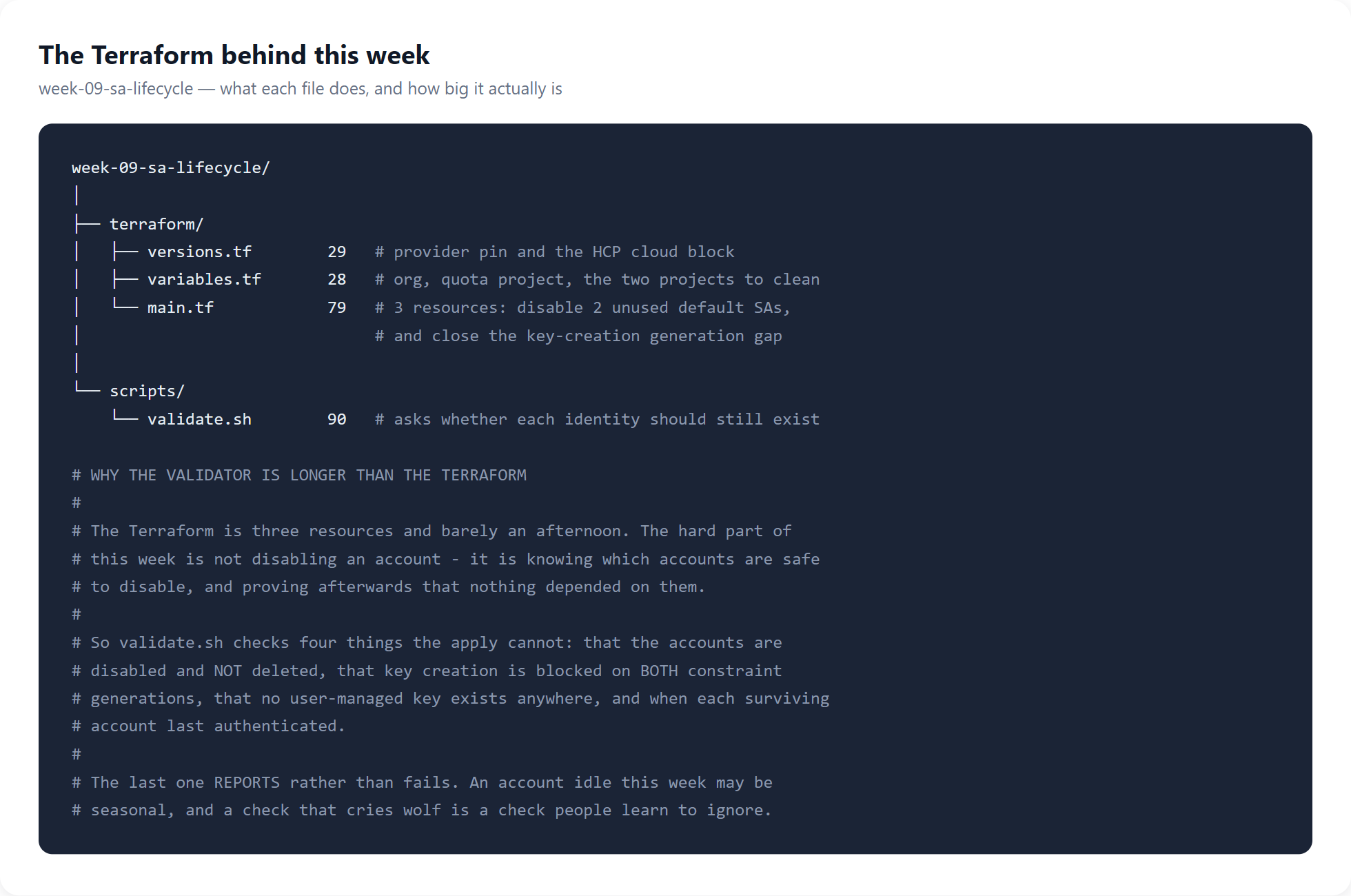
Everything below is that tree applied to five accounts.
How We Built It — Step by Step
What we deployed
| Resource | Count | Its job |
|---|---|---|
google_project_default_service_accounts | 2 | disable the unused default login in each project |
google_org_policy_policy | 1 | block key creation on the second constraint generation |
How we wrote it
Before writing any of it, I asked when each account last authenticated:
finops-reader@…        2026-10-09
tf-plan@…              2026-10-05
tf-apply@…             2026-10-05
398884169348-compute@  NEVER AUTHENTICATED
851623897121-compute@  NEVER AUTHENTICATED
The two at the bottom are default Compute Engine service accounts. They hold no role anywhere, and this organization's baseline already blocks the automatic grant that usually makes them dangerous. What is left is two credentials existing for no reason.
How we deployed it
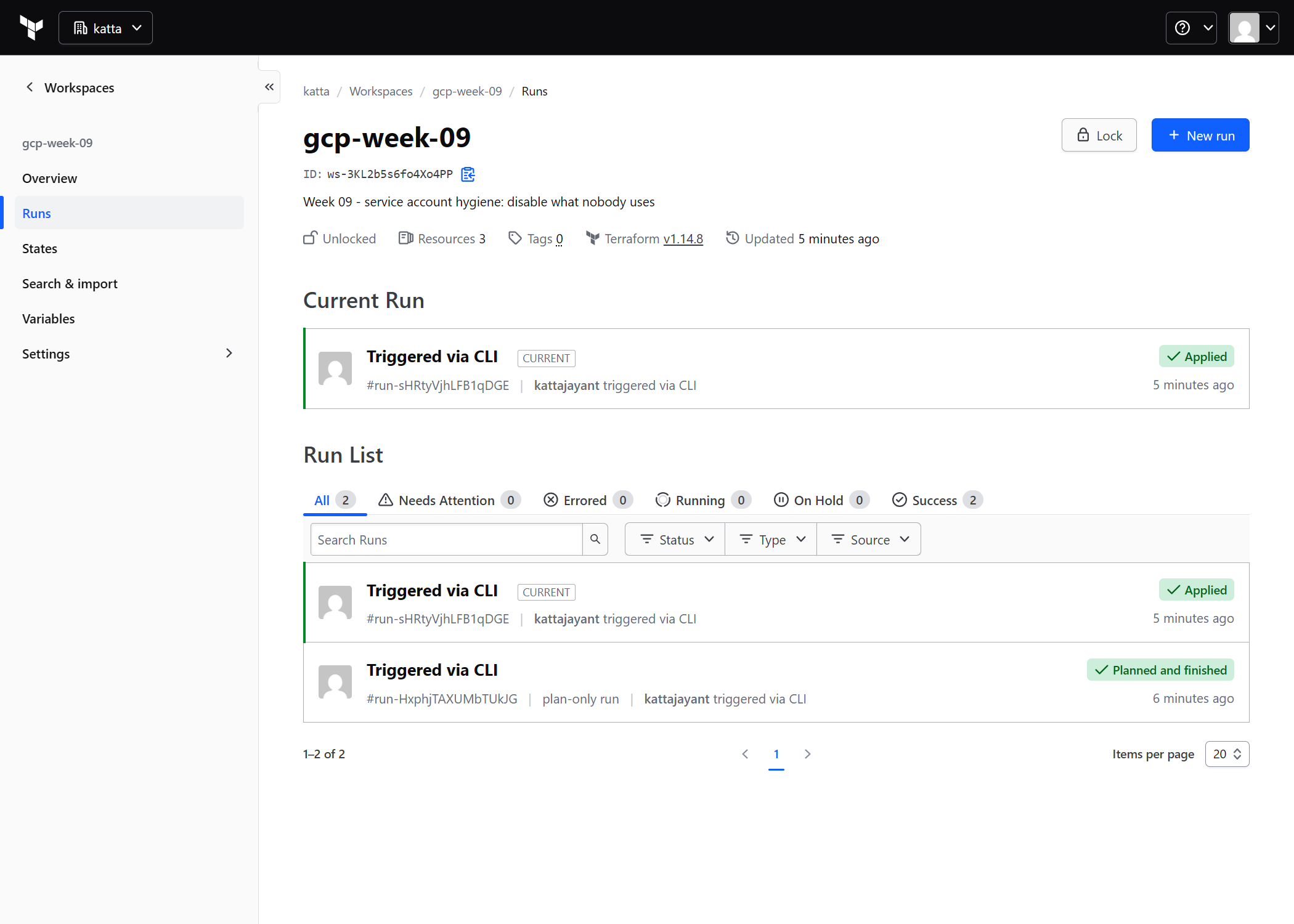
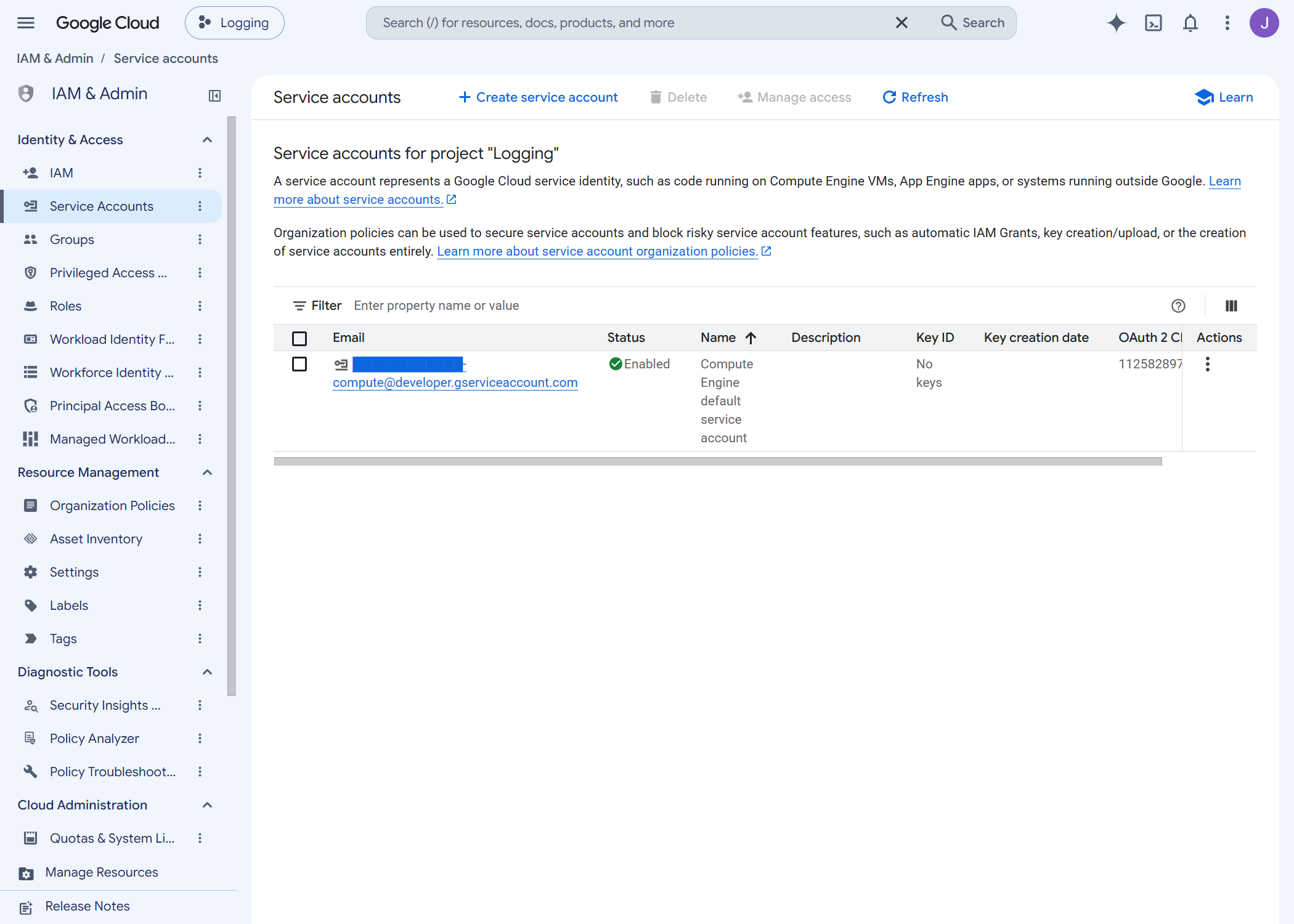
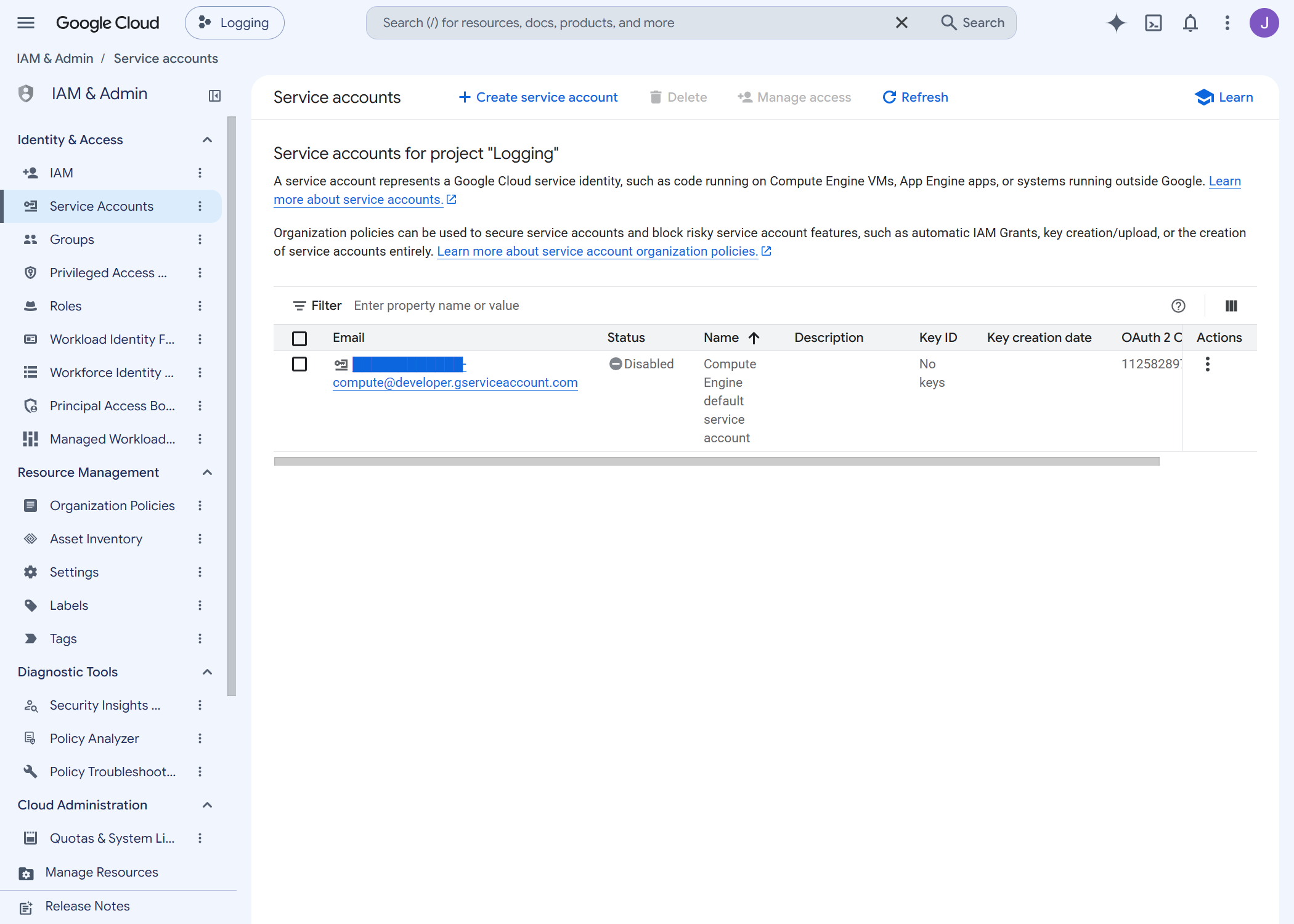
What changed in the console
How we tested it, and what success looked like
Disabling a login is only safe if nothing depended on it. The honest test is not "did the resource apply" but "does everything built in the previous three weeks still work":
All Week 06 checks passed.
All Week 07 checks passed.
All Week 08 checks passed.
Plus this week's own: both accounts disabled, both still present rather than deleted, and zero downloadable keys anywhere in the organization.
Challenges — What Actually Went Wrong
1. I briefly believed a security rule had been switched off
This lab's first rule is that service account keys are never created. I
checked the organization policy and got enforce: false, and for a
few minutes I thought the rule had been off for weeks.
It had not. The rule is enforced under a second name — Google is migrating these constraints to a new generation, and this organization's baseline uses the new name for one key rule and the old name for another. A constraint with no policy attached reads as "not enforced", which looks identical to "switched off". This week sets both names.
2. The account that looked dormant was not
finops-reader was one I had forgotten creating, and I was ready
to call it unused. It had authenticated five days earlier. Looking idle and
being idle are different things, and only one of them is measurable.
3. Deleting is worse than it sounds
The obvious tidy-up is to delete. But a deleted account's email can be reused while IAM keeps tracking a hidden internal ID — so the permissions attached to the old one never apply to the replacement. A rebuild looks identical and quietly is not. Disabling avoids the whole class of problem.
Security — Controls at Every Layer
Reversible first. Disable, confirm nothing breaks, and only consider deleting after a quiet period. This week deliberately stops at disable.
Teardown restores rather than abandons. The Terraform sets
restore_policy = "REVERT", so destroying this week re-enables the
accounts instead of leaving them disabled with nothing managing them.
Defence in depth on the key rule. Setting the second constraint name is redundant while the baseline holds. That is what redundancy is for, and it removes a trap for the next person who checks.
Cost
$0. Identities, policies and usage analysis are all free, and nothing here runs.
Read from the billing export rather than a rate card: this organization has cost $0.006 since 1 July, total.
Cleanup
Exempt from teardown, with one caveat worth knowing: because
of restore_policy = "REVERT", destroying this week puts the accounts
back to enabled. That is deliberate — an account left disabled by a
configuration that no longer exists is a mystery for someone later.
References
- Service accounts overview — disable before delete, why a recreated account is not the old one, and the two tools that report last use.
- Service account organization policies — key creation and key upload as separate constraints.
Measured, not documented: which accounts were actually unused, and that this organization enforces the two key constraints on different generations.
Key Takeaways
- Every project hands you a login you did not ask for. Go and look at yours.
- Idle-looking is not idle. One command tells you when an identity last authenticated; guessing does not.
- Disable, then wait, then delete. Deleting breaks permissions in a way that a rebuild does not restore.
- A rule can be enforced under a name you did not check. "Not enforced" and "no policy attached" read identically and mean very different things.
Next week: Cloud Identity and group-based access — giving permissions to groups rather than to people, and what that fixes.
Comments