Business Challenge
Every post since #61 has referred to Network Security Groups without explaining them. This is that post, and it opens on the detail that is almost never taught first even though everything else depends on it.
An NSG can be attached to a subnet, to a network interface, or to both. Attached to both, people reasonably assume the two sets of rules combine the same way in each direction. They do not. The order is specified per direction, and the two directions run opposite ways:
“For inbound traffic, Azure first processes the rules in a network security group associated with a subnet if one exists. Azure then processes the rules in a network security group associated with the network interface if one exists.”
“For outbound traffic… Azure evaluates the rules in any network security group associated with a network interface. Then, Azure processes the rules in any network security group associated with the subnet.”
Because processing stops at the first match, running the stack in opposite directions produces opposite logic. The documentation states both conclusions explicitly, and they are not symmetric:
| Direction | Order | To let traffic through | To block traffic |
|---|---|---|---|
| Inbound | Subnet NSG → NIC NSG | “both… must include a rule that allows port 80” | Either one denying is enough |
| Outbound | NIC NSG → Subnet NSG | Both must permit | “either one of or both… must have a rule that denies port 80” |
So an allow is an AND across both NSGs, and a deny is an OR. That is the whole trap. An engineer who adds an allow rule to the NIC's NSG and sees nothing change has usually hit the subnet NSG's DenyAllInbound first, and the rule they just wrote was never reached: “NSG2, associated with the network interface NIC1, doesn’t evaluate the blocked traffic.”
Microsoft's own conclusion from this is blunter than most people expect, and it is a design instruction rather than a tip:
“For optimal security configuration, avoid associating network security groups with both a subnet and its network interfaces at the same time. Choose to associate your network security group with either the subnet or the network interface, but not both. When you apply network security groups at multiple levels, the rules can conflict with each other. This overlap in security rules often leads to unexpected traffic filtering problems that are difficult to troubleshoot.”
Which is worth noticing: the platform offers two attachment points, documents the order precisely, and then advises you to use one of them. The asymmetry above is why.
Architecture
Seven properties per rule, a priority band, a first-match stop, and an order that reverses by direction.
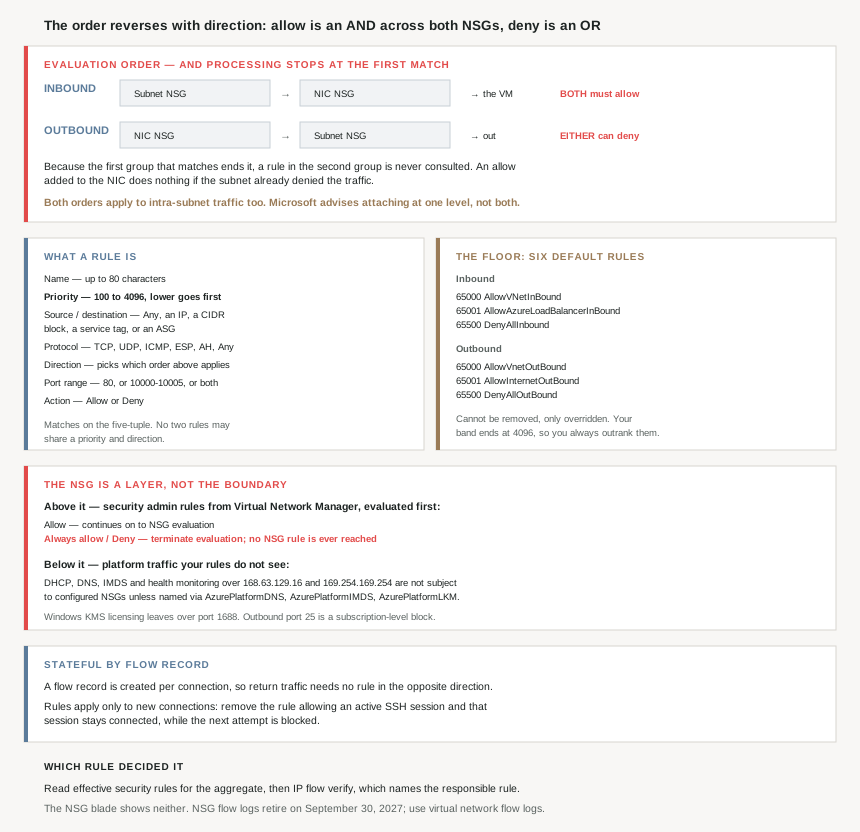
What a rule is made of
Seven properties, and two of them carry more weight than the rest:
| Property | Detail worth knowing |
|---|---|
| Name | “up to 80 characters long… must begin with a word character” |
| Priority | “A number between 100 and 4096” — lower is evaluated first |
| Source / destination | “Any, an individual IP address, a CIDR block… a service tag, or an application security group” |
| Protocol | “TCP, UDP, ICMP, ESP, AH, or Any” — ESP and AH are ARM-template only |
| Direction | Inbound or outbound — and this selects which evaluation order applies |
| Port range | “80 or 10000-10005… separate them with commas” |
| Action | Allow or Deny |
Matching is on “the five-tuple information of source, source port, destination, destination port, and protocol” — so a rule is not “this machine”, it is a shape of traffic. And a small constraint with a useful consequence: “You can’t create two security rules with the same priority and direction”, because that would make the processing order ambiguous. Priority is therefore a total ordering per direction, not a hint.
Priority, and the stop that makes it matter
The mechanic is one sentence: “Rules are processed in priority order, with lower numbers processed before higher numbers because lower numbers have higher priority. Once traffic matches a rule, processing stops.”
The consequence the docs spell out is the one that produces dead rules nobody notices: “any rules that exist with lower priorities (higher numbers) that have the same attributes as rules with higher priorities aren’t processed.” A rule can be present, syntactically fine, visible in the portal, and unreachable. Nothing flags it.
The defaults sit deliberately at the bottom of that ordering. Azure creates them in every NSG and numbers them in the 65000s, far above the 4096 ceiling on your own rules:
| Priority | Inbound | Outbound |
|---|---|---|
65000 | AllowVNetInBound | AllowVnetOutBound |
65001 | AllowAzureLoadBalancerInBound | AllowInternetOutBound |
65500 | DenyAllInbound | DenyAllOutBound |
The reason for the gap is stated outright: “Azure default security rules are given the lowest priority (highest number) to ensure your custom rules are always processed first.” And they are permanent furniture — “You can’t remove the default rules, but you can override them by creating rules with higher priorities.” Since your band stops at 4096 and theirs starts at 65000, any custom rule you write already outranks all of them. #65 takes these six rules apart properly; here they matter only as the floor the stack lands on.
One reading note on those tables, because it changes what they mean: “VirtualNetwork, AzureLoadBalancer, and Internet are service tags rather than IP addresses”, and “0.0.0.0/0… represents all IP addresses.”
Stateful by flow record, which decides what a rule change does
NSGs do not need paired rules for return traffic, and the reason is a connection table rather than a rule: “A flow record is created for existing connections. Communication is allowed or denied based on the connection state of the flow record. The flow record allows a network security group to be stateful.”
So “If you specify an outbound security rule to any address over port 80… it’s not necessary to specify an inbound security rule for the response… You only need to specify an inbound security rule if communication is initiated externally.”
The same mechanism produces an operational behaviour worth knowing before you rely on a rule change: “When you remove a security rule that allowed a connection, existing connections remain uninterrupted. Network security group rules only affect new connections.” The documented example is the one that matters during an incident: “if you have an active SSH session… and then remove the security rule allowing that SSH traffic, your current SSH session remains connected and functional.”
Why This Architecture Holds Up
Because where you attach the NSG decides what a rule can express
A subnet NSG and a NIC NSG are not two copies of the same control at different scopes. They differ in blast radius: “Traffic is either allowed or denied to all resources in the same subnet when a network security group is associated to a subnet.” A NIC NSG can say something about one machine that the subnet cannot say without saying it about every machine beside it.
That is the real decision, and Microsoft's “not both” advice forces it rather than softening it. Pick the subnet when the policy is a property of the tier, and the interface when it is a property of the instance — and if you find yourself wanting both, that is usually a signal the subnet boundary is drawn in the wrong place, which is a #62 problem rather than an NSG one.
Because intra-subnet traffic is filtered too, and that surprises people
The reversed-order rule carries a clause that is easy to skim past: in both directions, “this same order of evaluation applies to intra-subnet traffic.” A subnet NSG is not a perimeter around the subnet. It is applied to traffic between two machines inside it as well.
So the default that makes same-subnet communication work is a rule, not an exemption: “By default, virtual machines in the same subnet can communicate based on a default network security group rule allowing intra-subnet traffic. If you add a rule to NSG1 that denies all inbound and outbound traffic, VM1 and VM2 can’t communicate with each other.” Writing a tidy deny-all at a low priority number and expecting it to apply only at the edge will quietly cut the tier in half.
Because “no NSG” is two different defaults, not one
This is the asymmetry underneath the asymmetry. With no NSG on either the subnet or the NIC, the two directions behave oppositely:
| Direction | With no NSG anywhere |
|---|---|
| Inbound | “Traffic is blocked… All network traffic is blocked through a subnet and network interface if they don’t have a network security group associated to them.” |
| Outbound | “Traffic flows freely… because no network security group is associated with the virtual machine’s network interface or Subnet3.” |
The inbound half is framed as a security property rather than an accident — “The virtual machine with a standard public IP address is secure by default” — and the practical reading is that an NSG is what you add to permit inbound, while it is what you add to restrict outbound. The same object, used for opposite purposes depending on direction.
Because the NSG is not the top of the stack
Treating the NSG as the final word on a flow is wrong in two directions, and both are worth knowing before diagnosing anything.
Above it sit security admin rules from Virtual Network Manager, which “always have a higher priority than network security group rules and thus are evaluated first.” Their three actions behave differently, and two of them end the conversation:
| Security admin action | What reaches the NSG |
|---|---|
| Allow | “continue for evaluation by matching network security group rules” |
| Always allow | Nothing — “send traffic directly to the resource, bypassing potentially conflicting network security group rules” |
| Deny | Nothing — “block the traffic without delivering it to the destination” |
The docs flag why this matters for anyone reading a rule set and drawing a conclusion: “traffic matching security admin rules of ‘Always allow’ or ‘Deny’ action types don’t reach network security group rules for further evaluation.” A perfectly correct NSG can be irrelevant to the flow you are debugging.
Below it sits platform traffic that your rules do not see by default. “Basic infrastructure services like DHCP, DNS, IMDS, and health monitoring are provided through the virtualized host IP addresses 168.63.129.16 and 169.254.169.254… By default, these services aren’t subject to the configured network security groups unless targeted by service tags specific to each service.” That is 168.63.129.16 again — the address #61 noted you cannot put in a VNet — and the only way to touch it here is deliberately, via AzurePlatformDNS, AzurePlatformIMDS and AzurePlatformLKM.
Because an NSG on a subnet holding a PaaS service is a different risk
This lands directly on #63. Injected services need specific ports, and the warning is unambiguous: “Before applying a network security group to the subnet, familiarize yourself with the port requirements for each service. If you deny ports required by the service, the service doesn’t function properly.”
There are platform ports in the same category that have nothing to do with your application at all. Windows licensing goes out over one: “The request is made outbound through port 1688” to the Key Management Service hosts. A deny-all-outbound written without it produces machines that work and then stop being licensed, which is not a failure mode anyone looks for in a firewall rule.
Because one restriction is not a rule you can write at all
Outbound SMTP is the odd one out, and it is worth knowing so it is not debugged as an NSG problem. Microsoft's recommendation is a relay — “authenticated SMTP relay services (typically connected via TCP port 587…)” — because direct port 25 is governed by the subscription, not the NSG. For pay-as-you-go: “Outbound port 25 communication is blocked from all resources. No requests to remove the restriction can be made, because requests aren’t granted.”
No allow rule fixes that. It is the clearest example in the subject of a block that lives outside the thing you are configuring.
Because the tooling that answers “which rule did this” is not the rule list
Given dead rules, a reversed order, admin rules above and platform traffic below, reading the NSG blade is not a reliable way to answer why a packet was dropped. Two things are: “the effective security rules for a network interface”, which is the aggregate rather than any one NSG, and IP flow verify, which “identifies which network security rule is responsible for allowing or denying the traffic.” #67 is about exactly that workflow.
One forward-looking note for anyone building on the logging side: “Network security group (NSG) flow logs retire on September 30, 2027… it no longer supports new NSG flow logs creation”, with virtual network flow logs as the replacement. New work should not start on the retiring one.
Key Architecture Decisions
| Decision point | Choose | Because |
|---|---|---|
| Attaching an NSG to subnet and NIC both | Don’t — pick one | Microsoft advises against it; the levels conflict. |
| Policy that belongs to a whole tier | The subnet NSG | It applies to all resources in the subnet. |
| Policy that belongs to one machine | The NIC NSG | The subnet cannot say it without saying it to all. |
| Allowing traffic inbound through two NSGs | Add the allow to both | Inbound, both must allow for traffic to pass. |
| Blocking traffic outbound through two NSGs | One deny is enough | Either NSG denying stops it. |
| Picking a priority number | Low number for rules that must win | Lower is processed first and matching stops there. |
| Available priority band | 100 to 4096 | Defaults live in the 65000s and cannot be reached. |
| Trying to delete a default rule | Override it instead | Defaults can't be removed, only outranked. |
| Two rules you want at the same priority | Renumber one | Same priority and direction is not allowed. |
| Writing a return-path rule | Don’t | Flow records make the NSG stateful. |
| Expecting a removed allow rule to drop sessions | It won’t | Rules apply only to new connections. |
| A deny-all rule on a subnet NSG | Expect it to cut intra-subnet traffic | Evaluation applies to intra-subnet traffic too. |
| Reducing rule count | Augmented rules, service tags, ASGs | Multiple addresses, ranges and ports per rule. |
| Wanting two service tags in one rule | Use two rules | Multiple service tags in one rule aren't allowed. |
| Applying an NSG to a delegated subnet | Check the service's port requirements first | Denying a required port breaks the service. |
| Writing deny-all outbound on Windows VMs | Leave port 1688 open | KMS licensing goes out over it. |
| Debugging blocked outbound SMTP on port 25 | Stop looking at the NSG | It is a subscription-level block; use a relay on 587. |
| Diagnosing why a packet was dropped | Effective security rules, then IP flow verify | It names the responsible rule; the blade doesn't. |
| An NSG that looks correct but has no effect | Check for security admin rules | Always allow and Deny never reach the NSG. |
| Starting new flow logging work | Virtual network flow logs | NSG flow logs retire 30 September 2027. |
Closing Thought
The NSG is usually introduced as a simple thing: a list of allow and deny rules, lowest number wins, defaults at the bottom. All of that is true and none of it is the part that costs people afternoons. The part that costs afternoons is that the list is evaluated twice, in opposite orders, depending on which way the packet is going — so the same pair of NSGs implements an AND for allowing and an OR for denying, and a rule you can see in the portal may never be consulted.
That is why the documentation's recommendation is to attach at one level rather than two, and why it is a design instruction rather than a preference. Choosing between the subnet and the interface is choosing whether a policy is a property of the tier or of the instance. Attaching at both does not add defence in depth so much as it adds a second place to look, and the order you have to hold in your head to interpret what you find there reverses halfway through the round trip.
The rest of the subject is a reminder that the NSG is a layer rather than the boundary. Virtual Network Manager can decide a flow before any NSG rule is read. The platform's own DHCP, DNS and IMDS traffic is exempt unless you name it. A required port on a delegated subnet will break a managed service rather than your application. Windows licensing leaves over 1688 whether you planned for it or not. And outbound port 25 is settled by what kind of subscription you bought, which no rule in any NSG will change.
#65 goes through the six default rules one at a time — what each one actually permits, which of them people assume is doing something it is not, and why AllowVNetInBound is the single most load-bearing default on the list.
Official Azure Reference
- Azure network security groups overview — the seven rule properties, the 100–4096 priority band, the six default rules, augmented rules, security admin rules, and the platform considerations including port 1688 and port 25
- How network security groups filter network traffic — the inbound and outbound evaluation orders, the four worked VM scenarios, intra-subnet filtering, and the recommendation not to attach at both levels
- Azure service tags overview — further reading on the tags used in the default rules and in the platform overrides (no claims drawn from it)
- IP flow verify overview — further reading on identifying the rule responsible for a decision (no claims drawn from it)
Comments