📋 In This Post
Why — The Problem This Solves
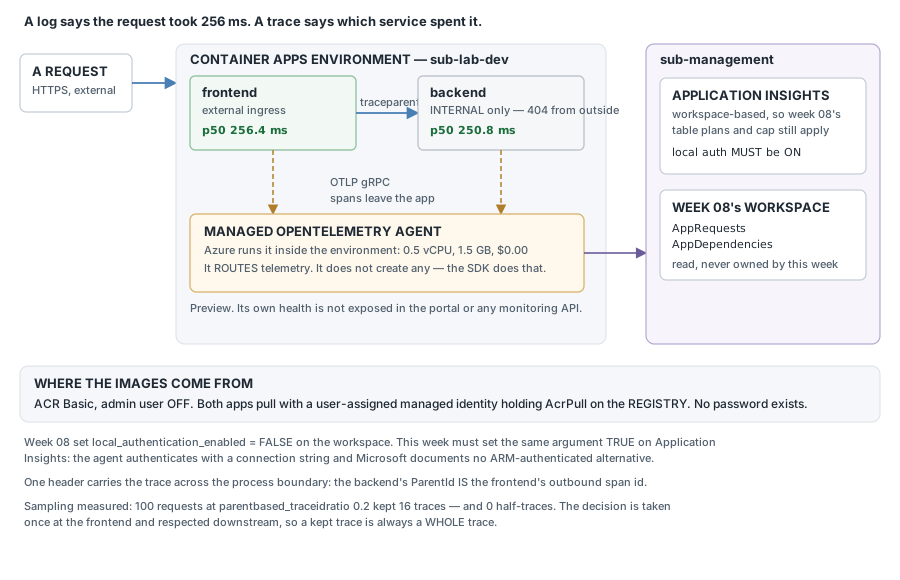
A page is slow. The log says the request took 256 milliseconds. That is true and almost useless: the request passed through three services on its way, and the log was written by one of them.
Logs record what each service did separately. A trace records what happened to one request as it moved between them — and the moving between is where the time usually goes.
What You Need to Know — Skills & Tools
The services this week deploys:
- Azure Container Apps runs containers without you running the servers underneath. An environment is the box they live in — shared network, shared telemetry — and each app scales on its own.
- Azure Container Registry (ACR) is a private store for container images. Its Basic tier is the cheap one; ACR Tasks lets you build an image in Azure rather than on your machine, so no Docker daemon is needed locally.
- A managed identity is an Azure identity attached to a resource with no password anywhere — Azure holds and rotates the credential. Here it is what lets the apps pull from the registry without a stored secret.
- Application Insights is Azure's application monitoring service: it receives traces and requests and draws the maps and charts over them. Workspace-based means it stores nothing itself — the data lands in a Log Analytics workspace you already own, so that workspace's retention, table plans and cost controls still apply.
- The managed OpenTelemetry agent is a collector Azure runs inside the Container Apps environment for free. Your apps send telemetry to it; it forwards to the destinations you configure. It is a router — it does not produce telemetry, which is the trap this week walks into.
And the four ideas they move around. OpenTelemetry is a vendor-neutral standard for producing telemetry: your app emits in its format, and where the data ends up stays somebody else's decision.
- A span is one timed piece of work — a request handled, a database called, a function you chose to measure. It records a start, a duration, and an id.
- A trace is the spans for one request, linked by parent. Each span records the id of the span that caused it. Follow the parents back and you have the whole journey, in order, with timings.
- Context propagation is how a trace survives a network hop.
The caller puts its span id into a
traceparentHTTP header; the callee reads it and makes its own spans children of it. That header is the entire mechanism by which two separate processes end up in one trace. - Sampling is how you afford it. Traces are billed like any other telemetry, so busy systems keep a fraction. The fraction must be decided once per trace, not per service — otherwise you keep half a journey, which looks complete and misleads.
Architecture — How It Fits Together
How We Built It — In Deployment Order
The goal: one request produces one trace across two services, with the time attributed correctly, and no password anywhere in the image pull. You need an Azure subscription, an HCP Terraform account, and a Log Analytics workspace.
| Resource | Count | Its job |
|---|---|---|
| Resource group | 1 | what dies together at teardown |
| Container registry (Basic) | 1 | holds the two images we build |
| Managed identity + AcrPull | 2 | pulls images — no password exists |
| Application Insights | 1 | trace destination, stored in week 8's workspace |
| Container Apps environment | 1 | the boundary, and where the agent lives |
| OpenTelemetry agent config | 1 | azapi — azurerm cannot express it |
| Container apps | 2 | frontend (external), backend (internal only) |
| Diagnostic setting | 1 | console logs to week 8's workspace |
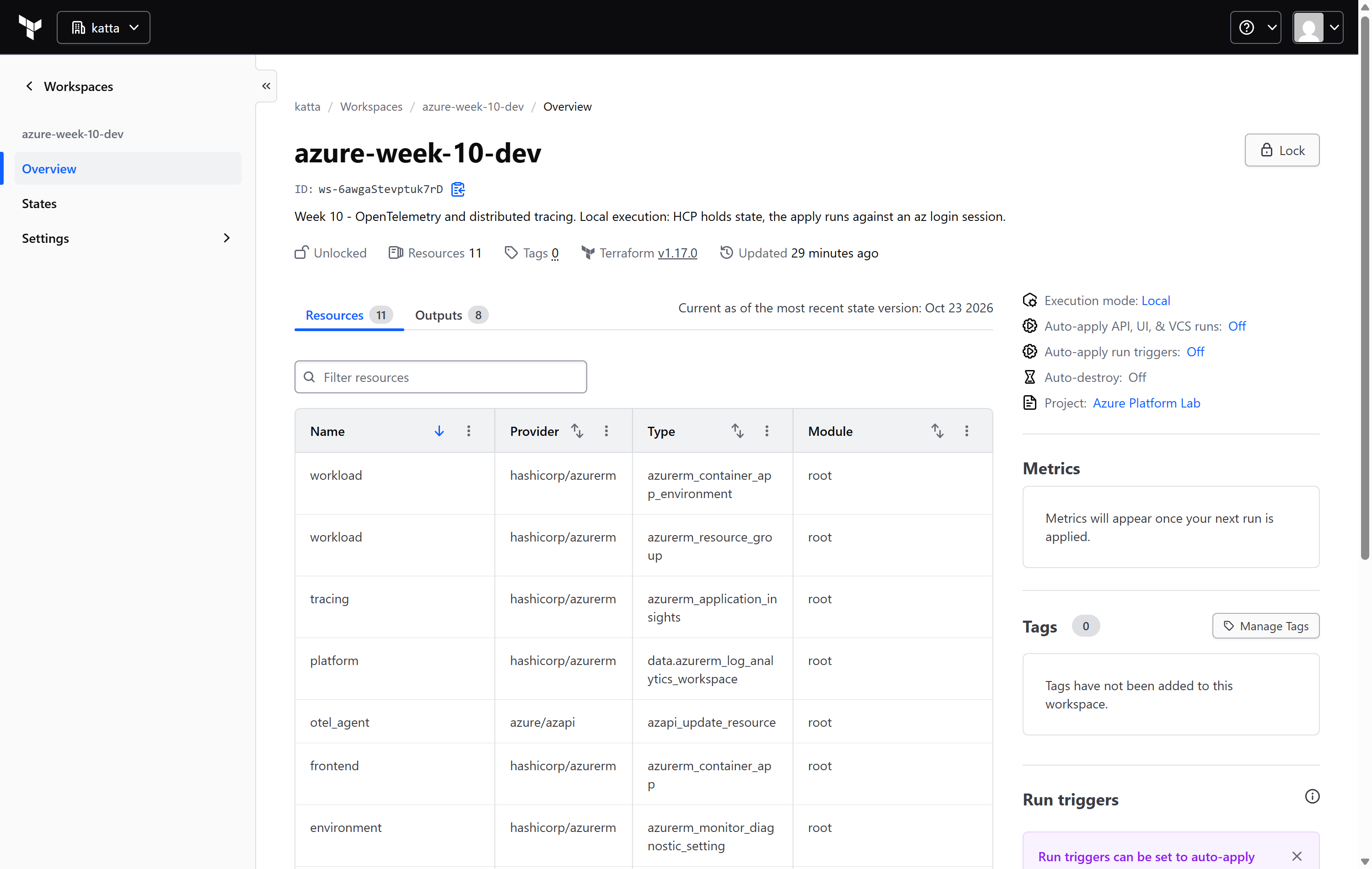
1. The HCP workspace, created first and deliberately
2. The code
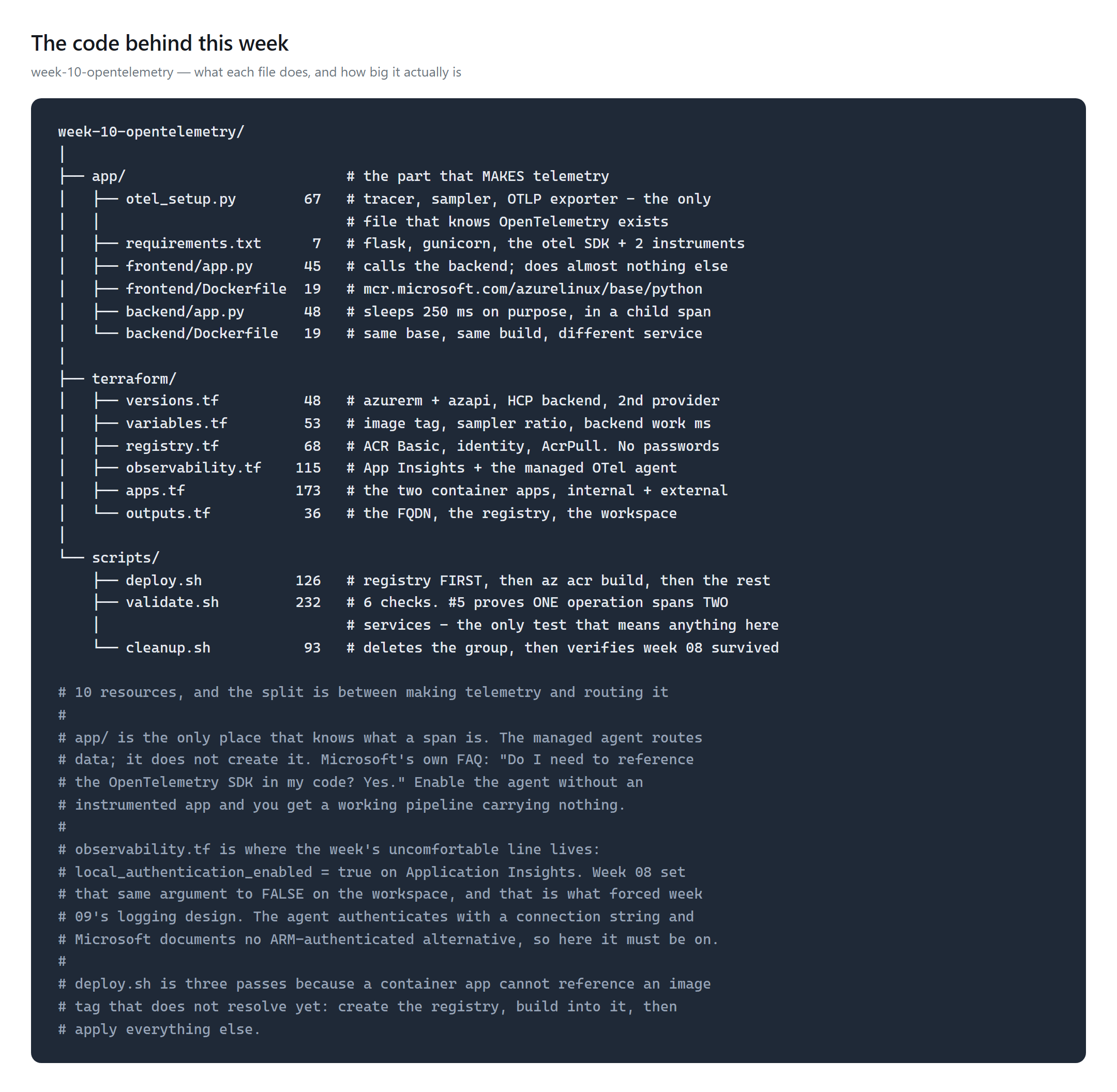
app/
is the only place that knows what a span is. The managed agent routes
telemetry; it does not create any.The sampler is the one setting worth reading twice:
provider = TracerProvider(
    resource=Resource.create({"service.name": service_name}),
    sampler=ParentBasedTraceIdRatio(ratio),      # parentbased, deliberately
)
provider.add_span_processor(BatchSpanProcessor(OTLPSpanExporter()))
OTLPSpanExporter() takes no endpoint. It reads one the platform
injects — which is the next step.
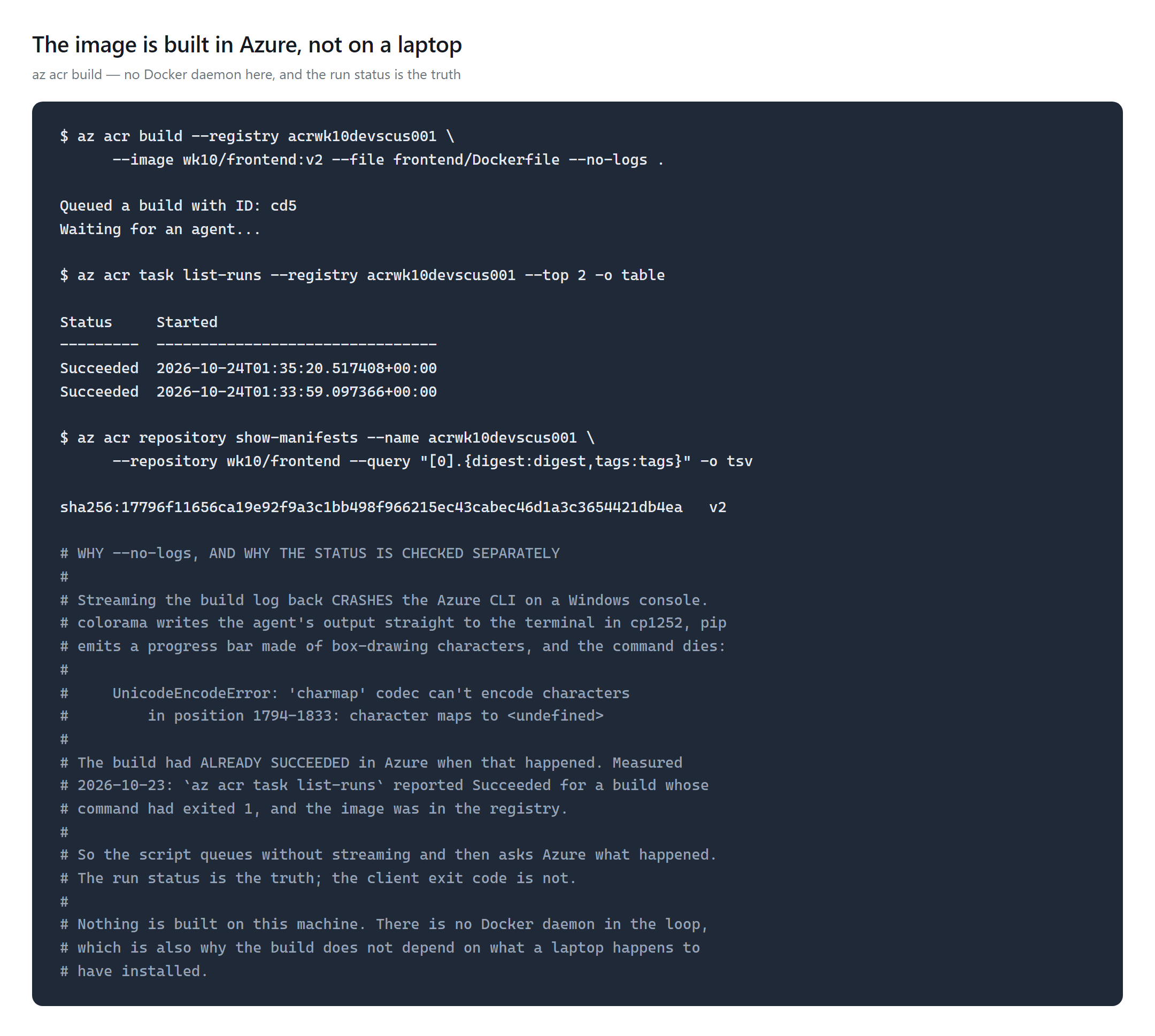
3. Build the images in Azure
4. The agent hands the app its destination
Enabling the agent is a property on the environment, set through
azapi because azurerm has no argument for it. What it does is
visible from inside the container:
$ curl https://frontend.<env>.azurecontainerapps.io/otel-config

OTEL_EXPORTER_OTLP_ENDPOINT   http://k8se-otel.k8se-apps.svc.cluster.local:4317
OTEL_EXPORTER_OTLP_PROTOCOL   grpc
OTEL_RESOURCE_ATTRIBUTES      service.instance.id=frontend--0000001-…
The app is handed its telemetry destination. Setting
OTEL_EXPORTER_OTLP_ENDPOINT yourself would override the agent's
address and send spans nowhere.
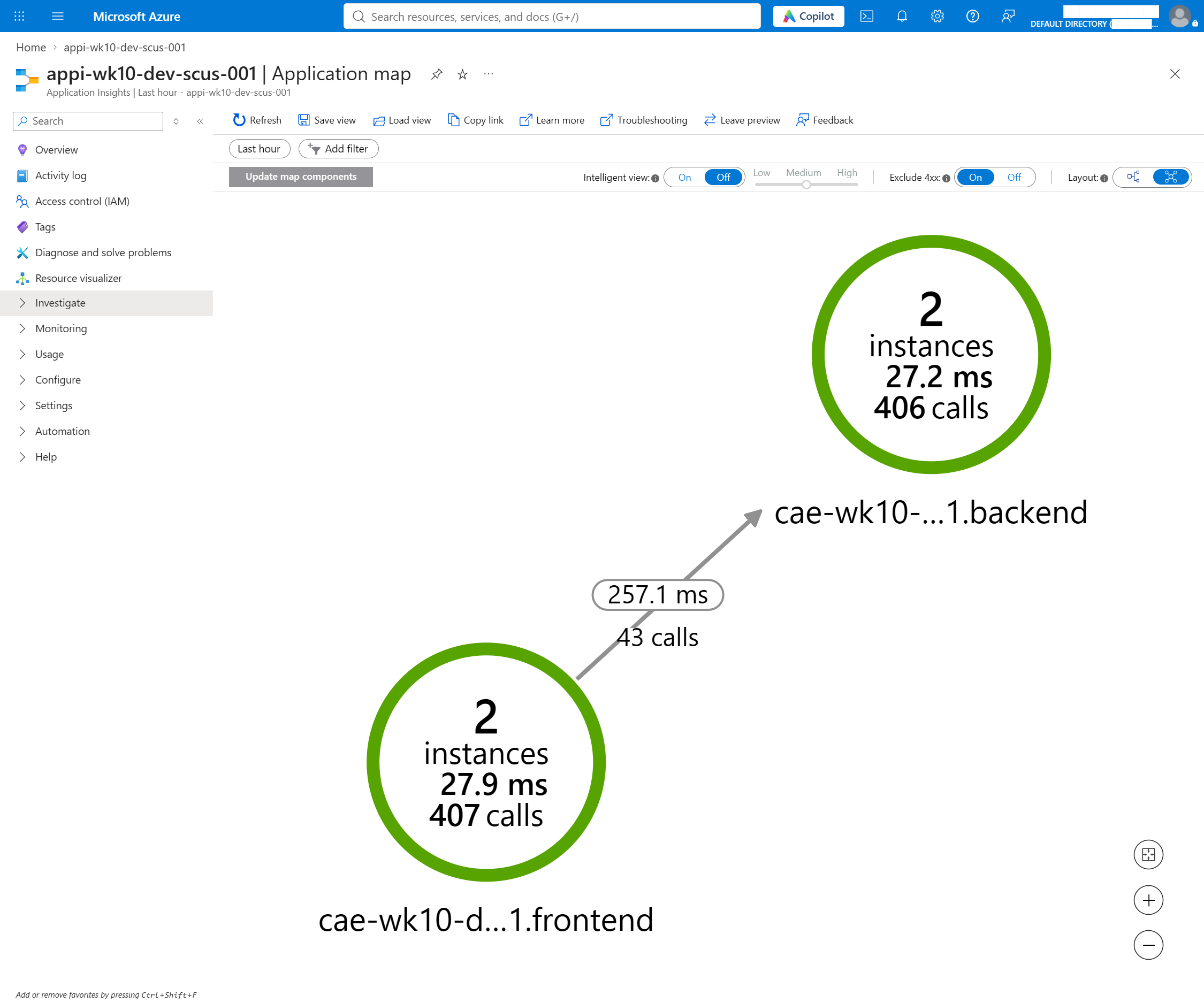
5. Two services, one trace
6. And where the time went
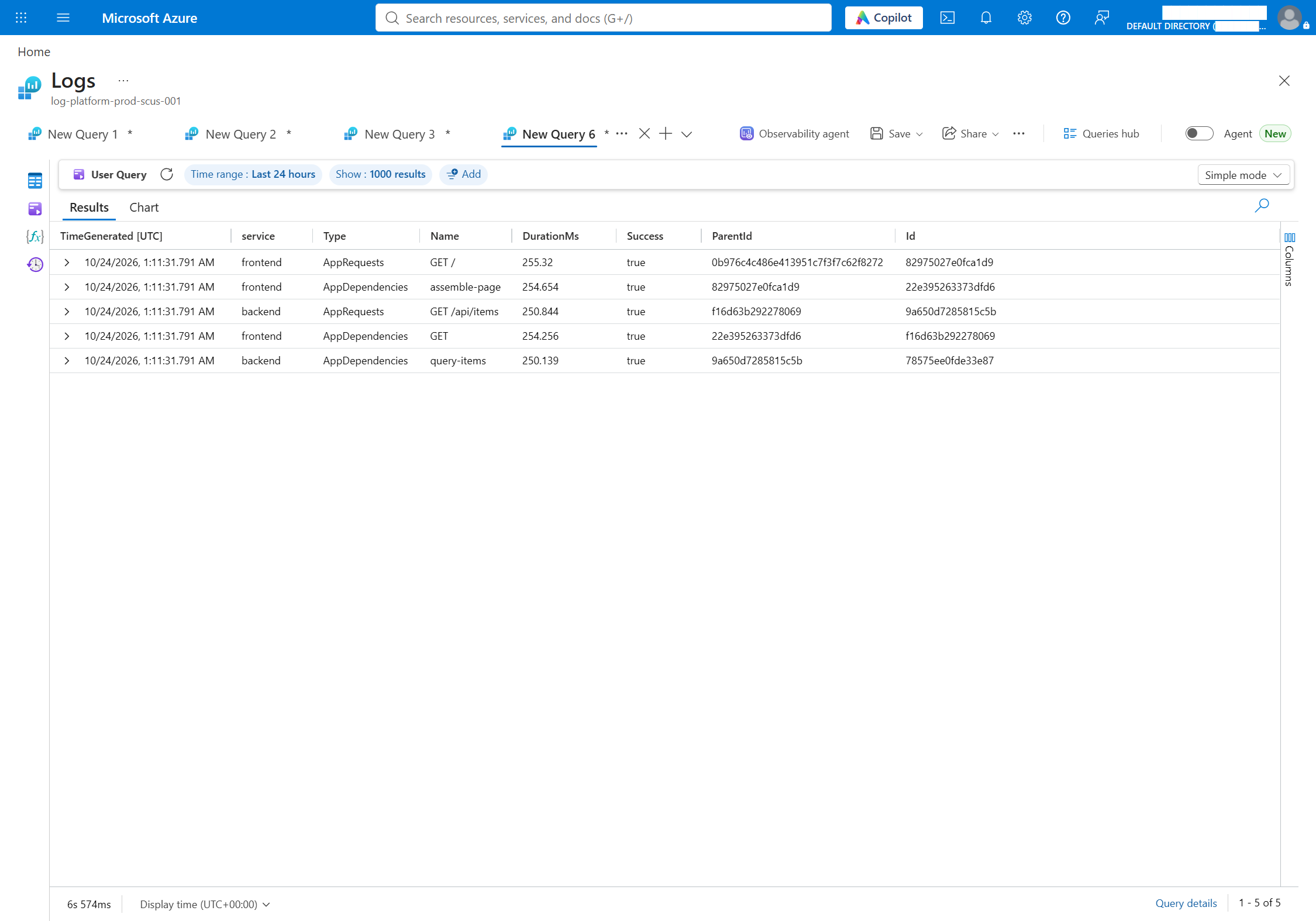
ParentId is the frontend's outbound span Id.
That is context propagation, as data rather than as a diagram.How It's Tested
validate.sh — 6 checks, 9 assertions, 9 passed / 0
failed:
| What | Measured |
|---|---|
Frontend GET / | 200, carrying the backend's payload |
| Backend from the internet | 404 — internal ingress |
| Registry admin user | disabled |
| App's registry credential | none — identity only |
| Request spans in week 8's workspace | 663 |
| Operations containing both services | 74 |
Frontend GET / p50 | 256.4 ms |
Backend GET /api/items p50 | 250.8 ms |
| Traces kept at sampler 0.2 | 16 of 100 |
| Half-traces at sampler 0.2 | 0 |
Of the 256.4 ms a user waits, 250.8 is the backend. The frontend's own work is about 5.6 ms. That difference is the entire argument for tracing over logging.
And sampling keeps whole traces: 100 requests at a 0.2 ratio kept
16, every one containing both services, none half-captured. That is
parentbased working — the decision is taken once at the frontend
and respected downstream.
Challenges — What Actually Went Wrong
A full table that read as empty. Validation reported zero
traces for twenty minutes while 663 spans sat in the workspace. The managed
agent writes AppRoleName as
<environment>.<service>, not the bare
OTEL_SERVICE_NAME, so filtering on 'frontend' matched
nothing. The filter looked obviously correct, and an empty result from a
correct-looking query is indistinguishable from no telemetry. I theorised a
gunicorn fork bug and rebuilt both images before running
AppRequests | summarize count() with no filter — which would have
settled it in thirty seconds.
A build that succeeded and reported failure.
az acr build streams the agent's log back through colorama to a
Windows console; pip's progress bar is not cp1252, and the CLI dies with
UnicodeEncodeError — after the build has finished and pushed.
az acr task list-runs said Succeeded for a command
that exited 1. Use --no-logs and ask Azure for the status.
A latency number about the health probe. The first p50 came out at 0.7 ms for a service that sleeps 250 ms on purpose. Liveness probes were 78% of all requests at 0.6 ms each and dominated the percentile. Excluding them is not tidying up; including them was measuring the wrong thing.
Security — Controls at Every Layer
- No password exists in the image pull. The registry's
admin user is off, and the apps reference a managed identity rather than a
credential — verified by asserting
passwordSecretRefis absent. - AcrPull at the registry, not the subscription, and pull
only — the push happens from
az acr build. - The backend has no public ingress, so the service-to-service hop is genuinely internal.
- One deliberate exception: Application Insights has local authentication enabled. Week 8 disabled exactly that on the workspace. The managed agent authenticates with a connection string and Microsoft documents no ARM-authenticated alternative, so this is a trade taken knowingly rather than a default left alone.
Cost
The agent itself is free — Microsoft provisions 0.5 vCPU and 1.5 GB inside the environment at no compute charge. You pay for the destination. ACR Basic is $0.1666/day, measured from the retail price API, and it is the only standing charge here.
Traces land in week 8's workspace at its rates, which is why sampling is a cost control and not a detail. No total yet — Azure posts charges about a day in arrears, and this lab reads cost from the bill.
Cleanup
$ ./scripts/cleanup.sh
   resource groups named rg-tracing-lab-dev-scus-001 : 0
   Microsoft.ContainerRegistry/registries            0
   Microsoft.App/managedEnvironments                 0
   Microsoft.Insights/components                     0
   week 08's workspace still there                   log-platform-prod-scus-001
Deleting the group deletes the registry and the images in it. They are
rebuildable from app/ with one command, which is the test of
whether a registry is holding anything irreplaceable.
References
- Collect and read OpenTelemetry data in Azure Container Apps
- Enable Azure Monitor OpenTelemetry
- ACR Tasks
- The code for this week
Key Takeaways
- The agent routes; the SDK creates. Enable the managed agent against an uninstrumented app and every component reports healthy while nothing arrives.
- Sample per trace, not per service. 16 of 100 kept, and not one of them half — because the decision was taken once and propagated.
- An empty result is not evidence of an empty table. Twenty minutes went into a bug I invented because I trusted a filter instead of counting rows first.
Comments