📋 In This Post
Why — The Problem This Solves
Somebody joins the team and needs to read logs. Somebody else changes role and should stop. In most organizations both of those are a two-minute job, and neither of them involves editing a security policy.
Not here. After nine weeks every permission in this organization was attached to a named thing — my own account, or one of three service accounts. I checked before writing any of this, and the organization held zero grants to any group. So every change of responsibility would have meant editing the policy that governs the whole estate, which is a heavier and more dangerous act than the change deserves.
This week moves one permission behind a group, and then tries to prove the indirection actually works.
What You Need to Know — Skills & Tools
Google Cloud
- Cloud Identity — the directory that holds your people and groups; a different product from IAM, with its own API and its own administrators
- Google Groups — an address that contains members, and that IAM will accept as a principal in a policy
- Security groups — groups labelled as being for access control, so the ones that grant power are distinguishable from the ones that are mailing lists
- Cloud IAM at a folder — the binding that actually hands the group its permission
- Resource Manager — the folder the grant lands on, inherited by every project inside it
Tooling
- Terraform —
google_cloud_identity_group, its membership, andgoogle_folder_iam_member - HCP Terraform — remote runs, with separate plan and apply identities
- Google Admin console — where Workspace admin roles are granted; there is no gcloud for this
- gcloud identity groups and the Cloud Identity REST API — reading back what was built
What these actually are
Cloud Identity is not part of IAM, and that is the whole shape of this week. IAM answers "what may this principal do to this resource". Cloud Identity answers "who exists, and who belongs to what". They meet at exactly one point: an IAM policy will accept a group address as a principal. Everything on the IAM side of that line is managed with GCP roles; everything on the Cloud Identity side is managed with Workspace admin roles, granted in the Admin console, which no amount of GCP permission will substitute for.
A group used for access is a different animal from a mailing list, even though Google Cloud will let you use either. Google's own guidance splits groups four ways and gives them different rules. Organizational groups mirror the org chart and may be nested. Access groups carry permissions and typically should not be nested, because once groups contain groups, "who can read the logs" stops having a short answer. Enforcement groups, which attach restrictions, must not be nested at all. And collaboration groups — the ones people create for themselves to talk to each other — should never be used for access control, because nobody is curating who is in them.
The tools, and what each is for. Terraform describes the end state; here that is a group, one membership, and one IAM binding. HCP Terraform runs it remotely with two different service accounts — one for the plan, one for the apply — which is a security property established in Week 2 and which this week collided with head-on. The Admin console is the only place a Workspace admin role can be granted; there is no command-line path, which makes it the one step a pipeline cannot bootstrap for itself. And gcloud plus the Cloud Identity REST API are how the result gets read back — with a caveat about gcloud that cost me an hour and is in Challenges.
Architecture — How It Fits Together
How We Built It — Step by Step
What we deployed
| What | How many | Its job |
|---|---|---|
google_cloud_identity_group | 1 | the access group that carries the permission |
google_cloud_identity_group_membership | 1 | puts the test subject in it, as MEMBER |
google_folder_iam_member | 1 | grants the group roles/logging.viewer on the platform folder |
google_service_account | 1 | the test subject, deliberately holding nothing |
google_service_account_iam_member | 1 | lets the operator mint a token as the subject, to run the test |
google_project_service | 1 | the Cloud Identity API |
Four of those six exist only so the test means something. A revocation test run as a principal that can reach the permission another way proves nothing, and in this organization my own account holds Organization Administrator — nothing can be denied to it by removing a group membership. So the subject is a purpose-built service account with no roles of its own.
How we wrote it
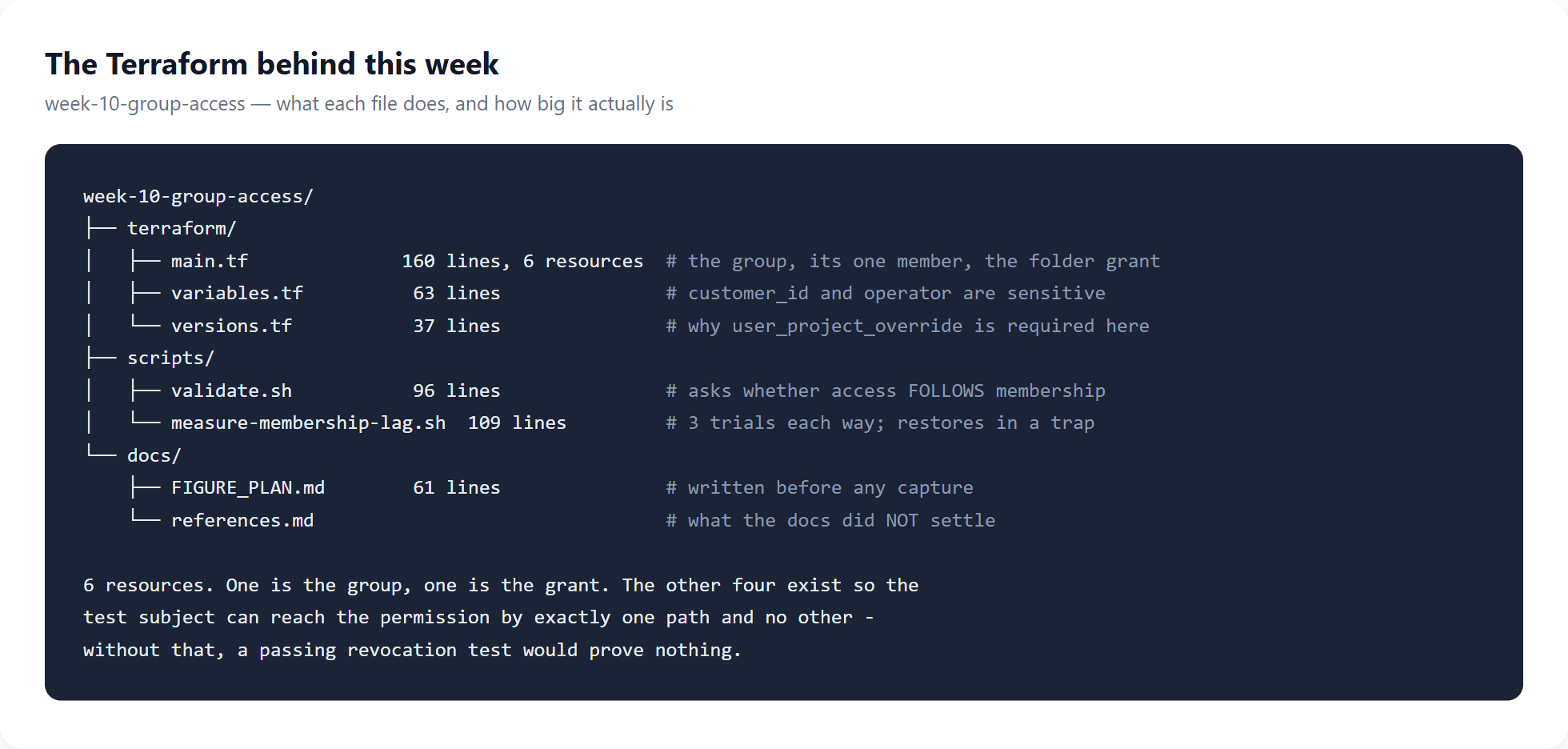
Two things in that code are not obvious. A group is parented to
customers/<id> — the directory — and not to the
organization, making it the only resource in this lab that does not hang off the
resource hierarchy. And the provider needs
user_project_override, because Cloud Identity bills the caller's
project rather than the resource's, and the resource has no project at all.
The IAM binding is google_folder_iam_member and never
_binding. The _binding form is authoritative for the
whole role: applying it would remove every other holder of
roles/logging.viewer on that folder, and Terraform would report it
as a tidy one-line change.
How we deployed it
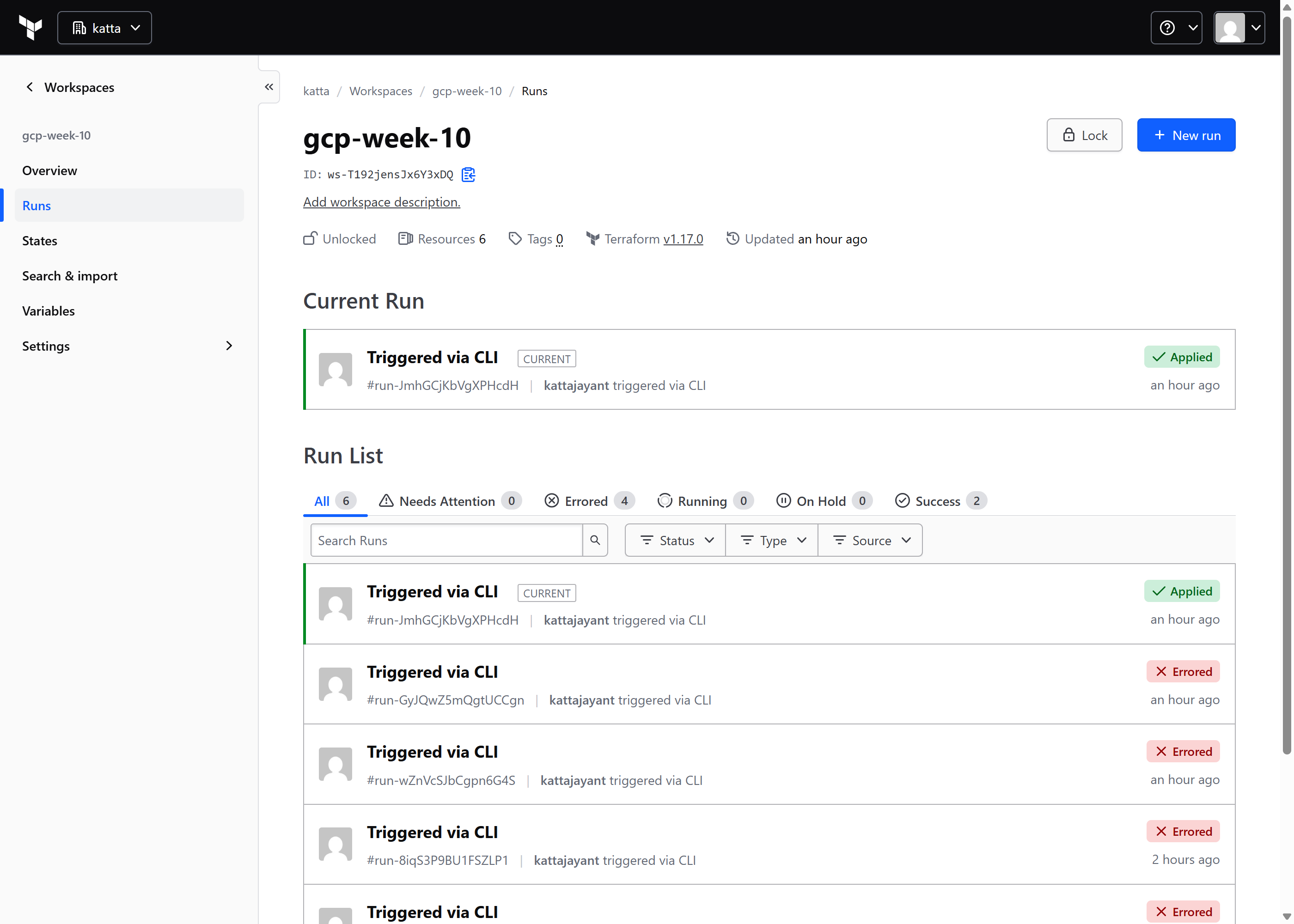
What appeared in the console
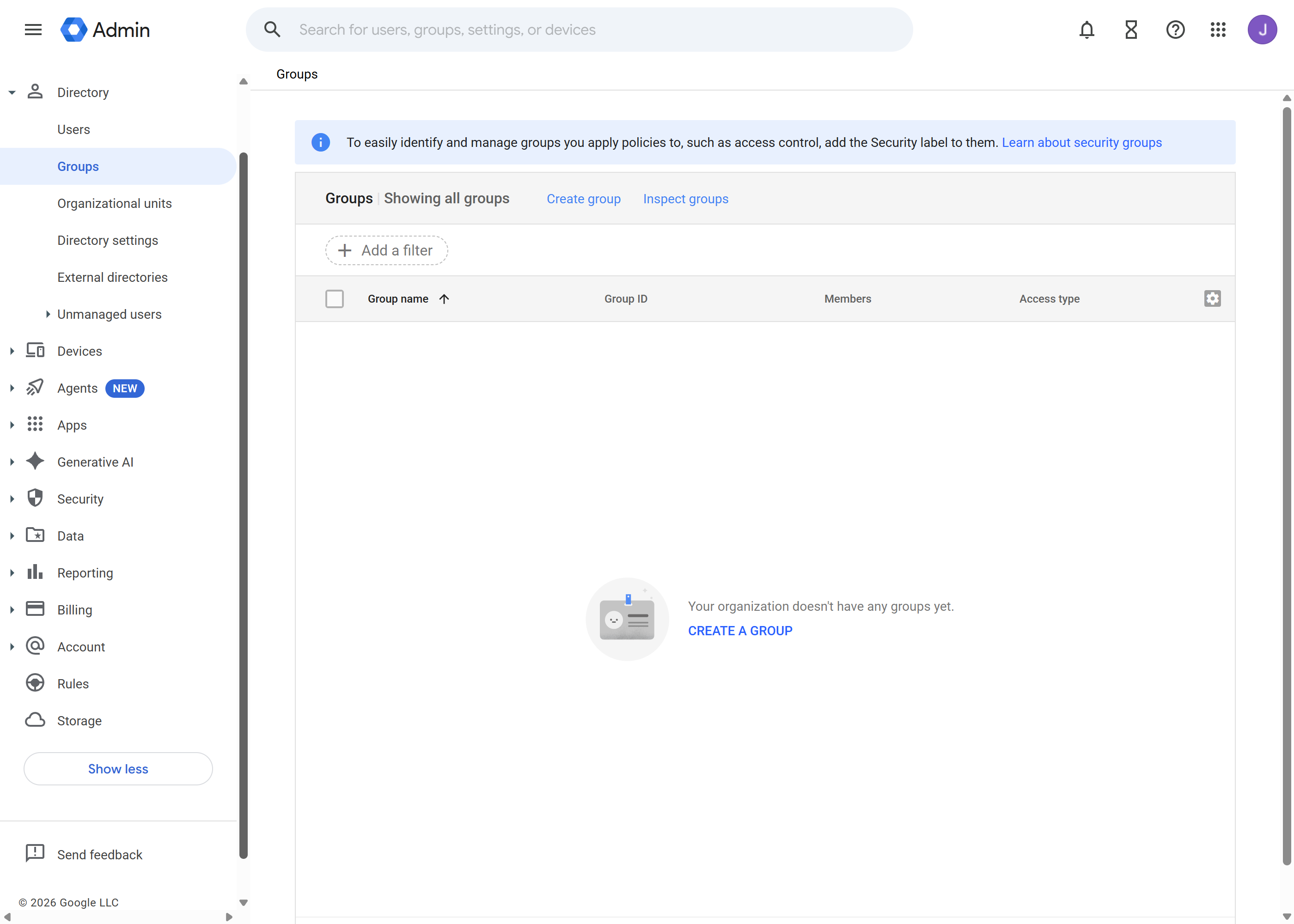
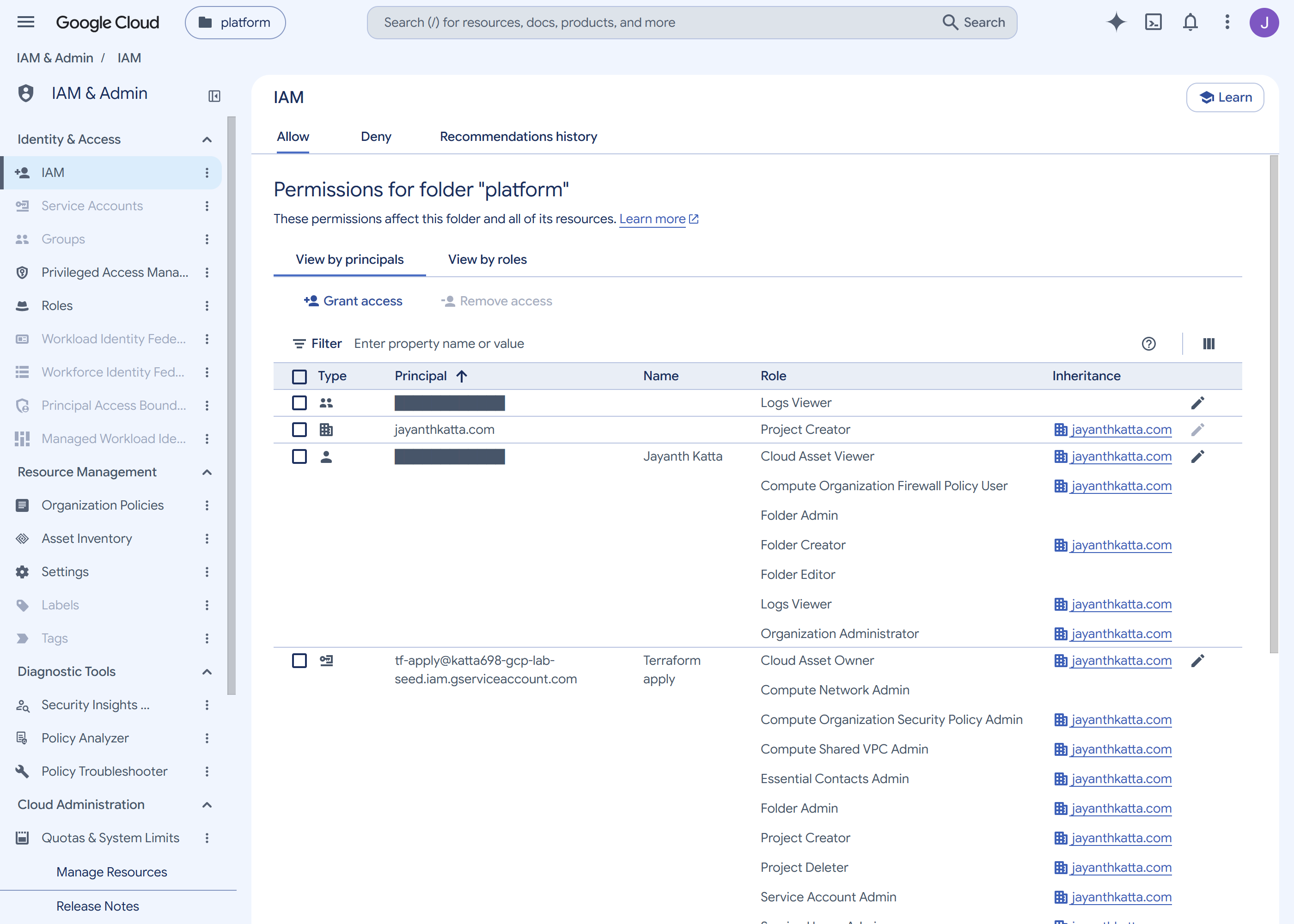
Logs Viewer on this folder is a group, not a person. The address itself is masked — the capture tooling publishes service identities and redacts everything else.How we tested it
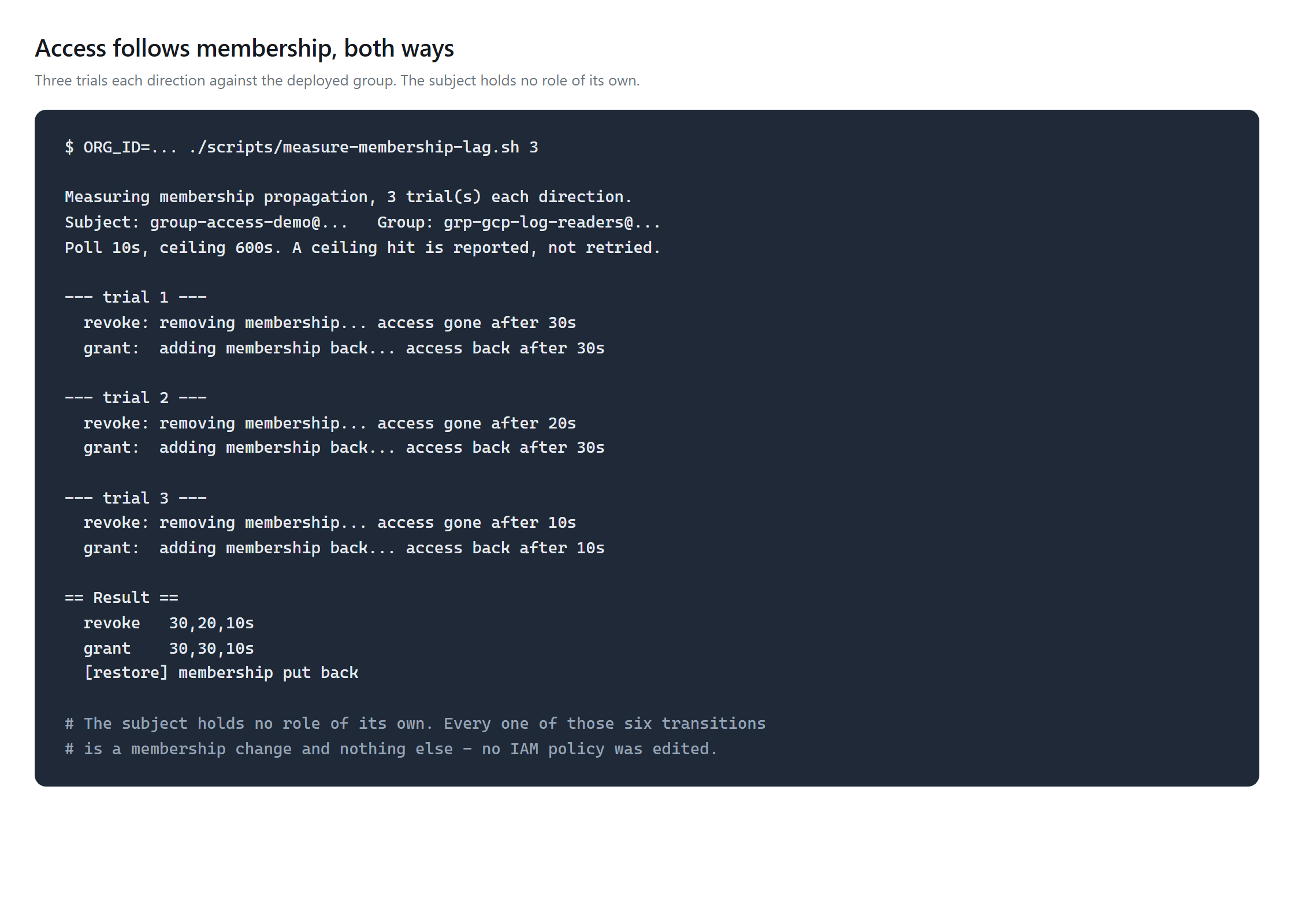
Access disappeared 10–30 seconds after the membership was removed, and came back 10–30 seconds after it was restored. Six transitions, none of which edited an IAM policy. The reverse direction is the one worth internalising: an operator who removes somebody from a group during an incident and sees their access persist for half a minute will conclude the removal failed, and start removing other things.
Google documents a propagation delay for membership arriving from an external identity provider and puts it at up to several hours. There is no external provider here, so that figure describes a different system and should not be quoted for this one.
What success looked like
Read back from the cloud rather than from Terraform state: the group exists,
it has exactly one member, that member is a MEMBER rather than a
manager, the folder's roles/logging.viewer is held by
group:grp-gcp-log-readers@ and not by any person, and the subject
holds zero direct role bindings anywhere in the organization. That last check is
the one that makes the rest of it mean anything.
scripts/validate.sh asserts all six of those against the live
organization rather than against Terraform state, and was run green end to end
before the teardown — which matters, because after the teardown it can
never be run again.
Challenges — What Actually Went Wrong
The pipeline built a group it could not read
Google suggests that a pipeline which should not administer every group
can instead own the groups it creates. Terraform exposes that as
initial_group_config = "WITH_INITIAL_OWNER". It created the
group and conferred no ownership — the group came out with zero
members, including no owner. The result was worse than a refused request: an
apply that reported success, and an object nobody could manage.
A 403 that was really a clock
Granting the admin role did not fix it, and the error stayed a flat
403 Permission denied. Five minutes later the identical apply
succeeded with nothing changed. Workspace admin role assignments take
minutes to take effect, and in that window the API returns exactly what a
wrong permission returns. Seen once, so five minutes is an anecdote —
but it is a different clock from the membership one below, which is
measured.
And one that invalidated my own evidence.
gcloud identity groups search --organization=<ORG_ID> returns
zero results always. Groups are parented to the customer, not the
organization, so that query asks for groups under a parent no group can ever
have. It exits zero and prints nothing, which reads exactly like "there are no
groups". I had used it to establish this week's premise. The premise was true,
but only the Admin console screenshot ever proved it — the command I
quoted could not have returned anything else. A check that cannot fail is not a
check.
Security — Controls at Every Layer
The plan identity stays read-only: it was given a custom Workspace admin role carrying exactly one privilege, Groups → Read, confirmed against all 244 available privileges before the role was created. The write identity holds Groups Admin, which is broader than it should be and is the honest cost of this design — Cloud Identity publishes no narrower service-account path. The test subject holds no role directly, so its access depends entirely on a membership. And the grant sits on a folder rather than the organization, because the pipeline cannot write organization policy by deliberate design.
Cost
$0. Cloud Identity Free covers groups and memberships, and no compute, storage or network resource was created. One capability is missing at this tier and worth knowing before you design around it: dynamic groups — membership from a query rather than a list — require Premium. Everything here is static membership, which is why removing someone is an explicit act rather than a consequence of their attributes changing.
Cleanup
terraform destroy removes the membership, the group, the folder
binding and the service account. The two Workspace admin roles are not
Terraform-managed and must be revoked by hand in the Admin console — which
is the same lesson as the grant: the directory is a separate system, and it will
not be tidied up by the tool that manages the cloud.
References
- Best practices for using Google groups — the four kinds of group, and which may be nested
- Setting up the Groups API — the service-account authorization paths
- Dynamic groups overview — what the free tier does not include
Key Takeaways
- Directory administration is not cloud administration. No GCP role, up to and including Organization Administrator, lets you manage a group. That grant lives in the Admin console and has no command-line path.
- An identity that cannot read a resource cannot manage it. A read-only plan identity is a good control until the resource being planned lives in a system that has no read-only role to give it.
- A permission error and a propagation delay look identical. Before redesigning around a 403, wait and try again.
- Verify the command, not just the result. A query that returns nothing because it asked the wrong parent is indistinguishable from one that returns nothing because there is nothing there.
Comments