1. The Challenge — Why Fixed Budget Alerts Aren’t Enough
You set a monthly AWS budget of $500. You get an alert when you hit $450. Job done, right?
Not quite. Here’s the scenario that breaks that model: your EC2 spend is normally $80/month. This week it’s running at $200 — 150% above normal. But your total bill is still $280, well under your $500 alert threshold. No alert fires. No one notices. The overrun continues for days.
Fixed budget alerts have four fundamental blind spots:
- Threshold blindness. A fixed dollar limit can’t distinguish between $200 spend in a month where $200 is normal versus $200 when $50 is normal.
- Lagging detection. Budget alerts fire after a percentage of the monthly budget is consumed — which may be days after the anomalous spending began.
- No root cause. A budget alert tells you how much you’ve spent. Cost Anomaly Detection tells you which service, which region, which usage type is the culprit.
- No baseline learning. Budget thresholds don’t account for your actual spending patterns. The ML model updates itself as your workloads grow.
A misconfigured NAT Gateway left running overnight generated $35 in data processing charges. The bill was under budget. No alert fired. The only way it was caught was a manual cost review — the kind of thing that doesn’t scale.
2. Why Implement Cost Anomaly Detection
AWS Cost Anomaly Detection uses ML to model your expected spend per service per day. It triggers an alert the moment actual spend diverges significantly from that model — regardless of whether a fixed budget threshold was crossed.
Catches what budgets miss
Anomaly detection catches relative spikes — a service costing 3× its normal amount — even when the absolute dollar value is small.
Immediate alerts, not end-of-month surprises
IMMEDIATE frequency means the alert fires as soon as the anomaly is confirmed — typically within minutes of the cost spike starting.
Root cause in the alert
The alert payload includes the specific service, region, usage type, and linked account. You know where to look before you open the console.
Zero ongoing maintenance
The ML model updates itself continuously. One-time setup, permanent benefit. And it’s completely free.
3. Skills & Tools Required
AWS Services
- AWS Cost Explorer & Cost Anomaly Detection
- SNS (Simple Notification Service) — two-topic fan-out pattern
- Lambda (Python 3.12)
- IAM — least-privilege roles, OIDC federation
- CloudWatch Logs
Infrastructure & Tooling
- Terraform — modules,
cloud {}backend block - HCP Terraform — VCS-driven workspaces, OIDC dynamic credentials
- Python — boto3, json, os
- GitHub — VCS trigger for HCP runs
Concepts to understand before starting
- ML-based anomaly detection. The model needs 10+ days of data to build a reliable baseline. Don’t expect alerts on a fresh account immediately.
- SNS fan-out pattern. Two topics: one receives raw JSON from AWS, the second delivers a formatted email. Lambda sits between them as a transformer.
- OIDC federation. HCP Terraform authenticates to AWS using short-lived tokens — no static keys stored anywhere.
- VCS-driven IaC. Push to GitHub → HCP plans automatically. Merge to main → HCP applies. No GitHub Actions Terraform steps needed.
4. Architecture
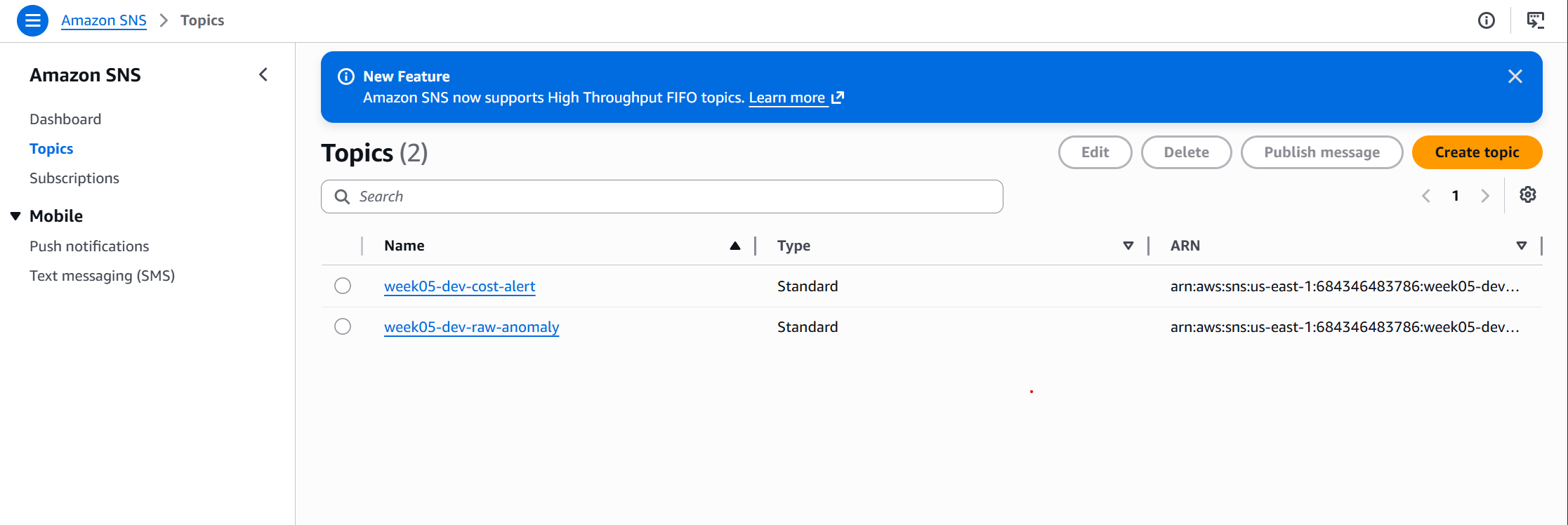
The architecture uses two SNS topics by design. The raw-anomaly topic receives dense JSON from AWS — not human-readable. Lambda transforms it and publishes a formatted plain-text alert to the cost-alert topic, which delivers to email subscribers. This separation gives a clean extension point: add Slack, PagerDuty, or Teams as additional subscribers to the formatted topic later without touching the detection layer.
5. How to Implement — Step by Step
Step 1 — Create the AWS OIDC provider and IAM role
Before HCP can authenticate to AWS, AWS needs to trust HCP. This is a one-time, manual bootstrap — it can’t be created by the same Terraform run that depends on it.
Register app.terraform.io as an OIDC identity provider, then create the role HCP will assume:
aws iam create-open-id-connect-provider \
  --url https://app.terraform.io \
  --client-id-list aws.workload.identity \
  --thumbprint-list <thumbprint>

aws iam create-role \
  --role-name hcp-terraform-role \
  --assume-role-policy-document file://trust-policy.json
{
  "Version": "2012-10-17",
  "Statement": [{
    "Effect": "Allow",
    "Principal": {
      "Federated": "arn:aws:iam::<ACCOUNT_ID>:oidc-provider/app.terraform.io"
    },
    "Action": "sts:AssumeRoleWithWebIdentity",
    "Condition": {
      "StringEquals": {
        "app.terraform.io:aud": "aws.workload.identity"
      },
      "StringLike": {
        "app.terraform.io:sub":
          "organization:katta:project:*:workspace:week-05-dev:run_phase:*"
      }
    }
  }]
}
The org shows as Katta in the HCP UI, but the actual slug used in the OIDC sub claim is lowercase katta (visible in API URLs like /api/v2/organizations/katta/...). IAM’s StringLike condition is case-sensitive — a capital letter here causes AccessDenied: Not authorized to perform sts:AssumeRoleWithWebIdentity with no other clue as to why.
Step 2 — Set up HCP Terraform workspace
Previous weeks used an S3 backend. This week switches to HCP Terraform — a managed backend with VCS integration and a cleaner OIDC credential story.
| S3 Backend + GitHub Actions | HCP Terraform | |
|---|---|---|
| State storage | S3 bucket (you manage) | HCP manages it |
| State locking | DynamoDB table | Built-in |
| CI/CD | GitHub Actions workflow | HCP VCS-driven |
| AWS credentials | OIDC via GitHub Actions | OIDC via HCP workspace |
| Free tier | ~$0 | Free ≤500 resources |
Create the workspace in app.terraform.io: org Katta → New Workspace → Version Control Workflow → connect katta698/AWS-Platform-Engineering-Lab → working directory week-05-cost-anomaly-detection/terraform/environments/dev → name it week-05-dev.
Step 3 — Terraform backend and module composition
terraform {
  cloud {
    organization = "Katta"
    workspaces { name = "week-05-dev" }
  }
}

module "sns"           { source = "../../modules/sns"           ... }
module "lambda_alerter"{ source = "../../modules/lambda_alerter" ... }
module "cost_anomaly"  { source = "../../modules/cost_anomaly"   ... }
Step 4 — SNS topic policy (the part everyone gets wrong)
Without this policy, costalerts.amazonaws.com cannot publish to the topic and no alerts will ever arrive. There is no error message — AWS silently drops the publish attempt.
The service principal for Cost Anomaly Detection is costalerts.amazonaws.com — not budgets.amazonaws.com. This is the most common mistake when setting up this pipeline.
resource "aws_sns_topic_policy" "raw_anomaly" {
  arn = aws_sns_topic.raw_anomaly.arn

  policy = jsonencode({
    Statement = [{
      Principal = { Service = "costalerts.amazonaws.com" }
      Action    = "SNS:Publish"
      Resource  = aws_sns_topic.raw_anomaly.arn
    }]
  })
}
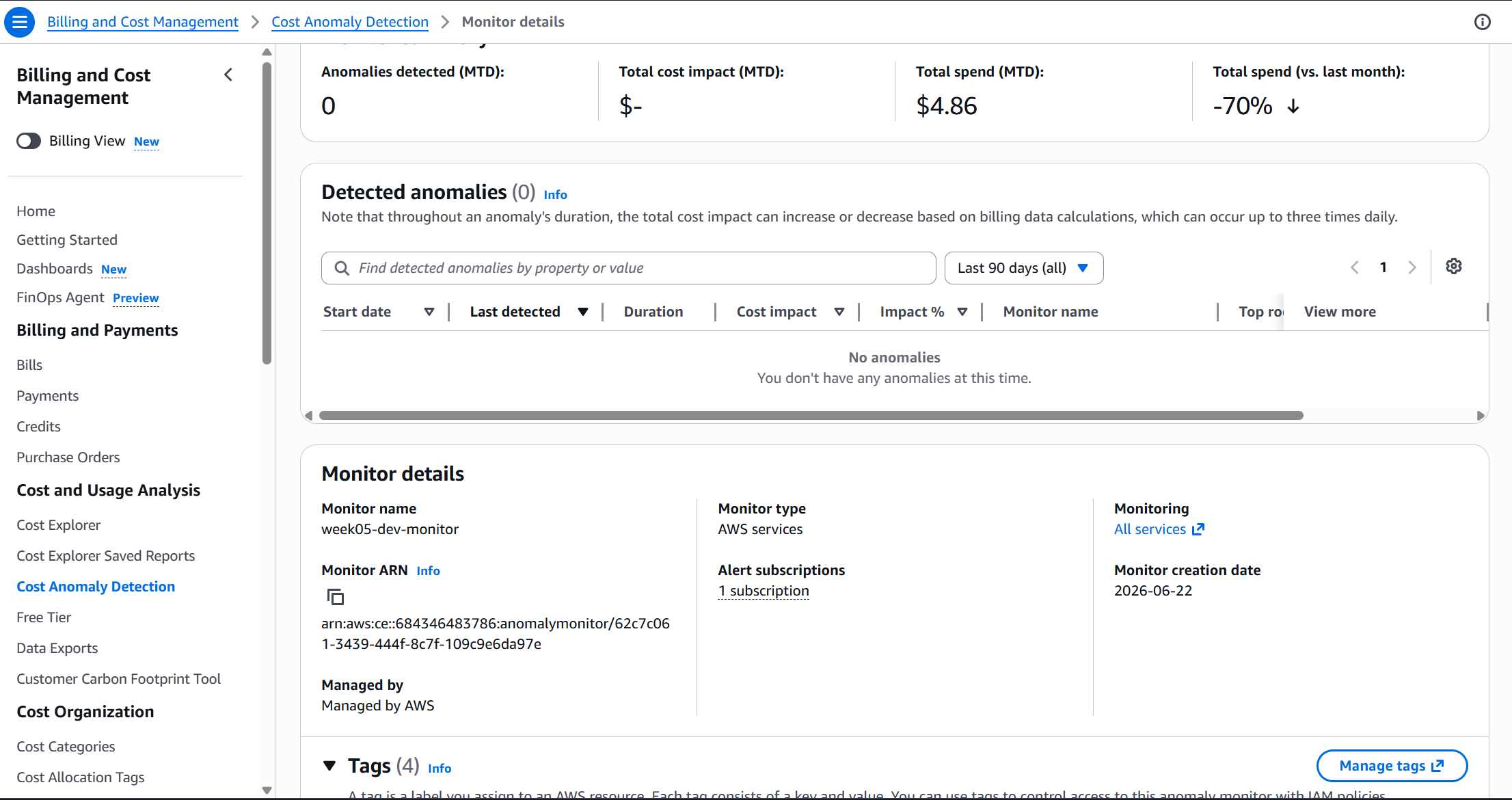
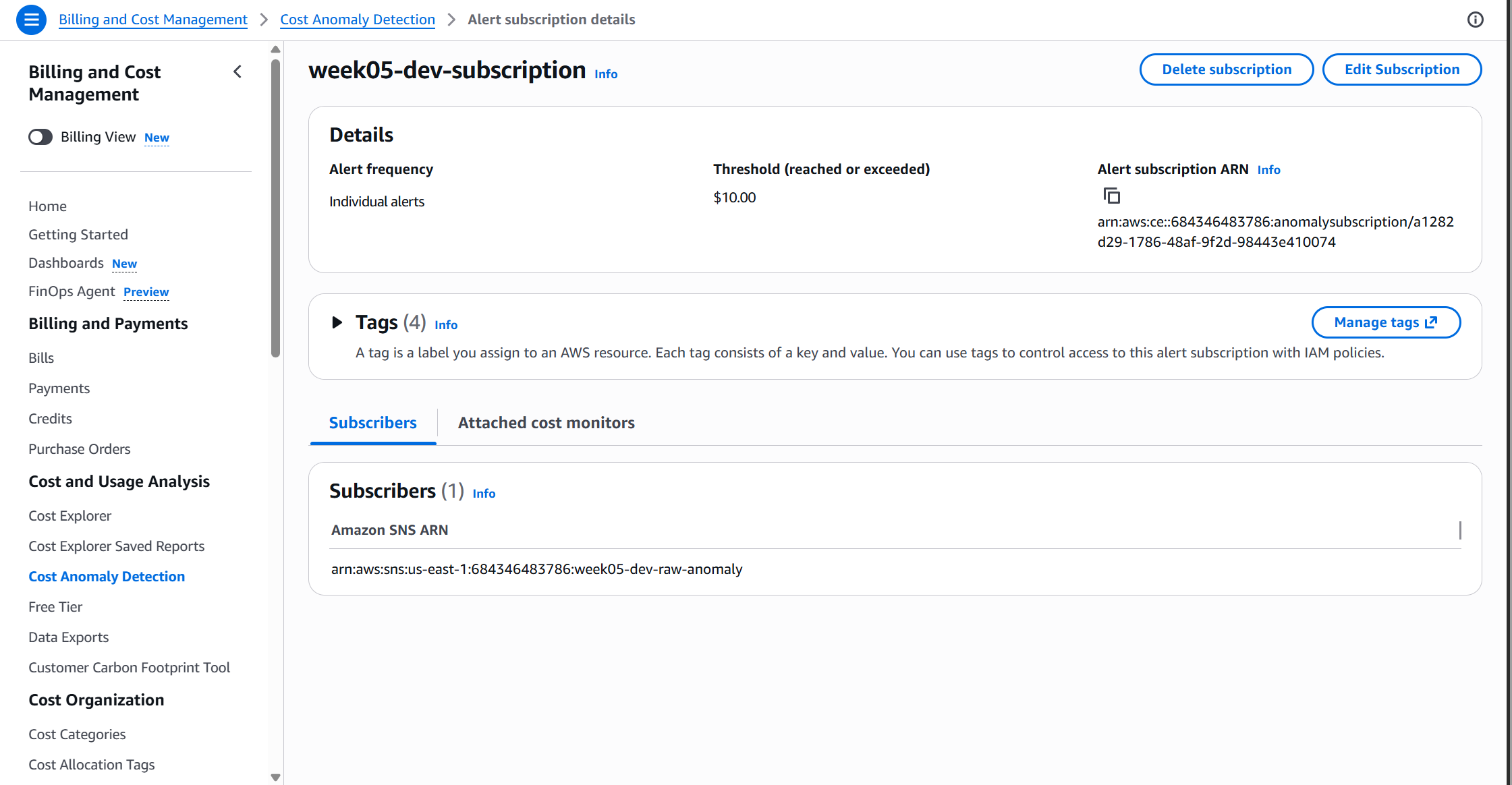
Step 5 — Cost Anomaly Monitor and Subscription
resource "aws_ce_anomaly_monitor" "this" {
  name              = "${var.project}-${var.environment}-monitor"
  monitor_type      = "DIMENSIONAL"
  monitor_dimension = "SERVICE"
}

resource "aws_ce_anomaly_subscription" "this" {
  frequency        = "IMMEDIATE"
  monitor_arn_list = [aws_ce_anomaly_monitor.this.arn]

  subscriber { type = "SNS"; address = var.raw_sns_topic_arn }

  threshold_expression {
    dimension {
      key           = "ANOMALY_TOTAL_IMPACT_ABSOLUTE"
      values        = ["10"]
      match_options = ["GREATER_THAN_OR_EQUAL"]
    }
  }
}
Step 6 — Lambda alert formatter
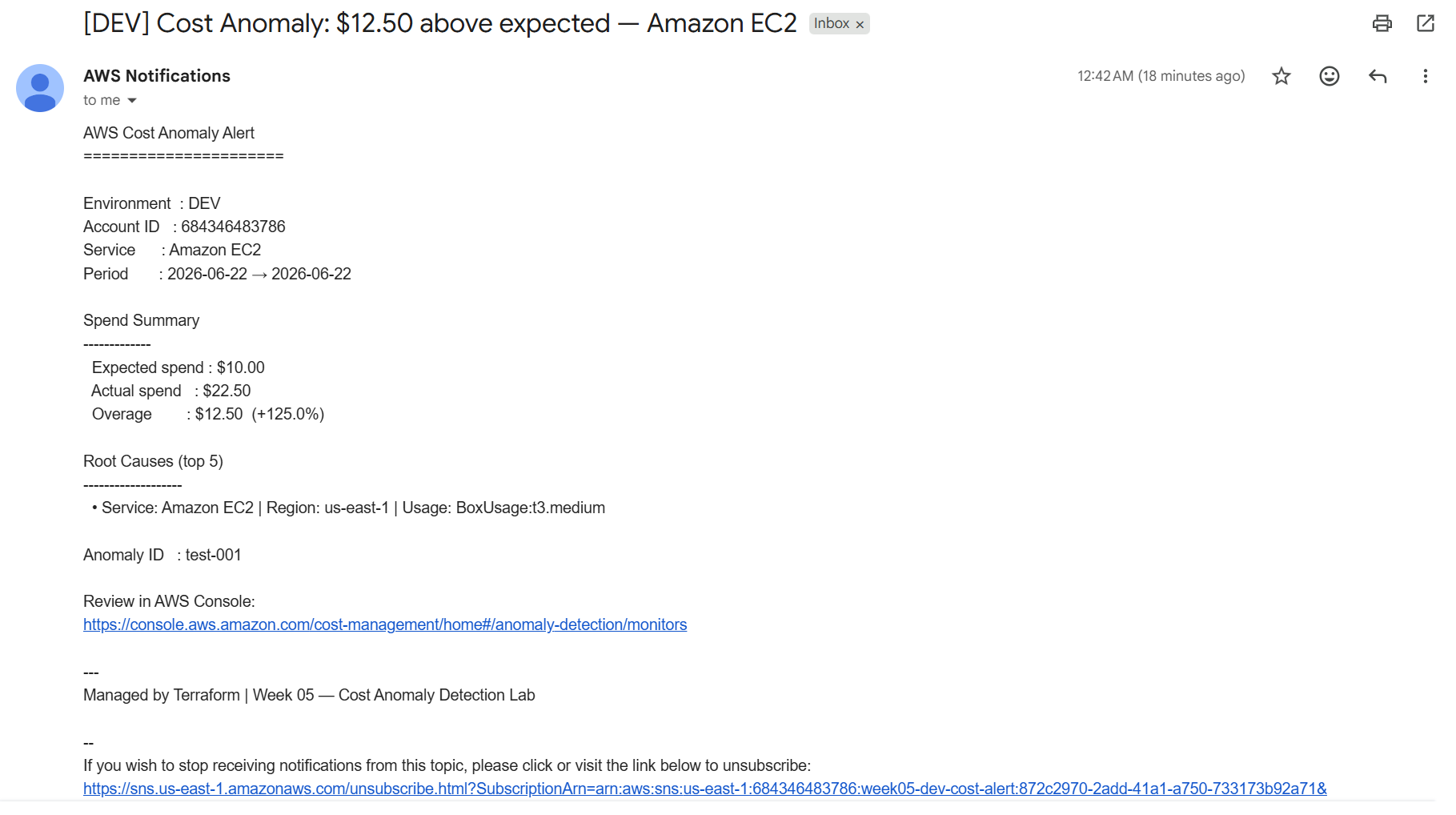
Lambda transforms the raw Cost Anomaly Detection JSON payload into a plain-text email showing the service, expected vs. actual spend, and the top 5 root causes.
def format_alert(payload):
    impact   = payload.get("impact", {})
    expected = impact.get("totalExpectedSpend", 0.0)
    actual   = impact.get("totalActualSpend",   0.0)
    overage  = impact.get("totalImpact",        0.0)
    pct      = impact.get("totalImpactPercentage", 0.0)
    service  = payload.get("dimensionValue", "Unknown")

    root_causes = "\n".join(
        f"  - {rc['service']} | {rc['region']} | {rc['usageType']}"
        for rc in payload.get("rootCauses", [])[:5]
    )
    subject = f"[DEV] Cost Anomaly: ${overage:.2f} above expected - {service}"
    return subject, body
Step 7 — Configure OIDC dynamic credentials
Two workspace environment variables replace the entire AWS credential setup, pointing at the role created in Step 1. HCP mints short-lived tokens per run via sts:AssumeRoleWithWebIdentity — no static keys stored anywhere.
TFC_AWS_PROVIDER_AUTH  = true
TFC_AWS_RUN_ROLE_ARN   = arn:aws:iam::<ACCOUNT_ID>:role/hcp-terraform-role
Step 8 — Push to GitHub and apply via HCP
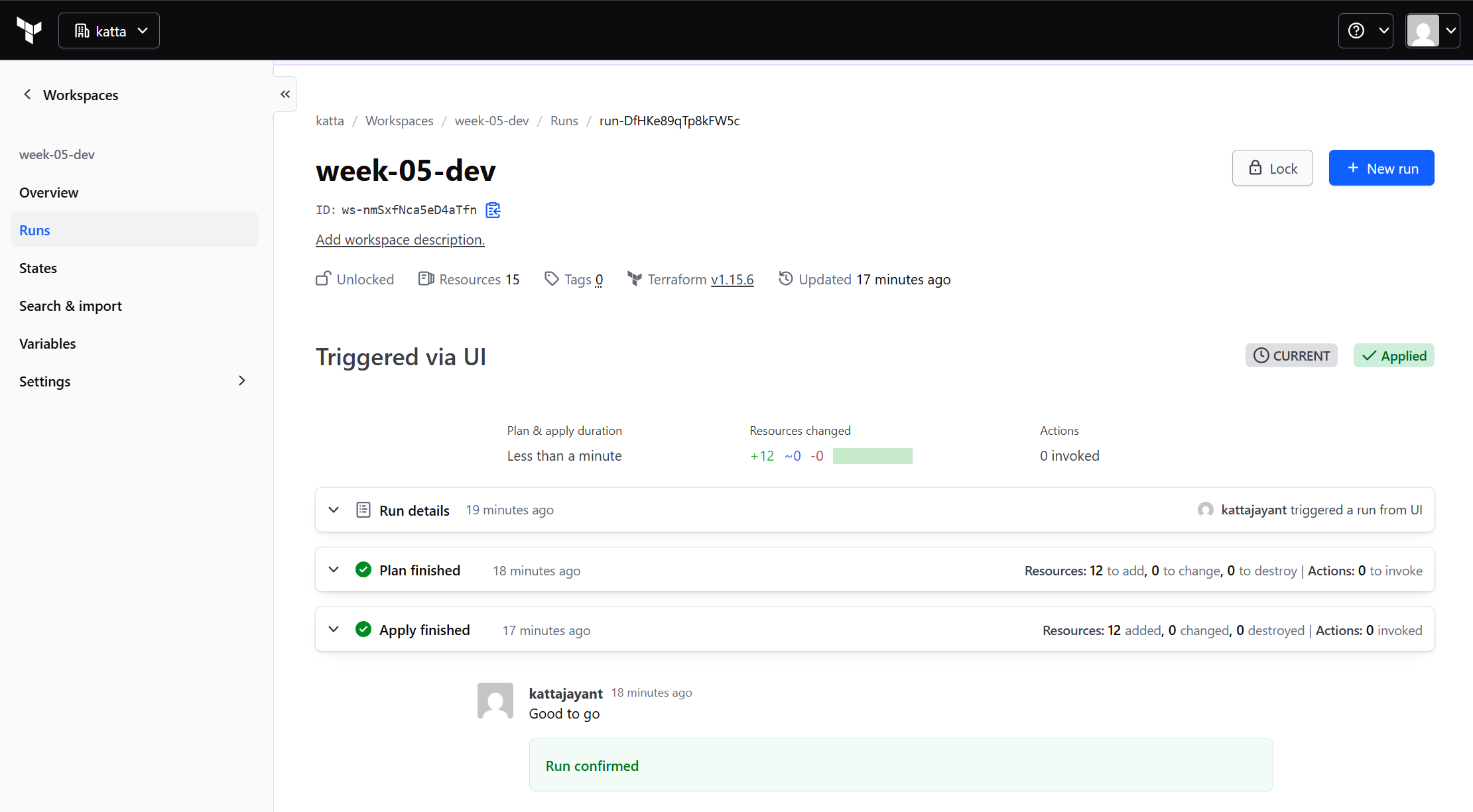
A git push to the connected branch automatically queues a plan in HCP — no manual trigger needed for that part. But a VCS-connected workspace blocks terraform apply from local CLI or CI entirely (Error: Apply not allowed for workspaces with a VCS connection). The actual resource creation only happens once you open the run in the HCP UI and click Confirm & Apply.
Step 9 — Test immediately after deploy
Don’t wait for a real anomaly. Use the Lambda test console with a mock payload to verify the full pipeline:
{
  "Records": [{
    "Sns": {
      "Message": "{\"dimensionValue\":\"Amazon EC2\",
                   \"impact\":{\"totalActualSpend\":22.50,
                               \"totalExpectedSpend\":10.00,
                               \"totalImpact\":12.50},
                   \"rootCauses\":[{\"service\":\"Amazon EC2\",
                                    \"region\":\"us-east-1\",
                                    \"usageType\":\"BoxUsage:t3.medium\"}]}"
    }
  }]
}
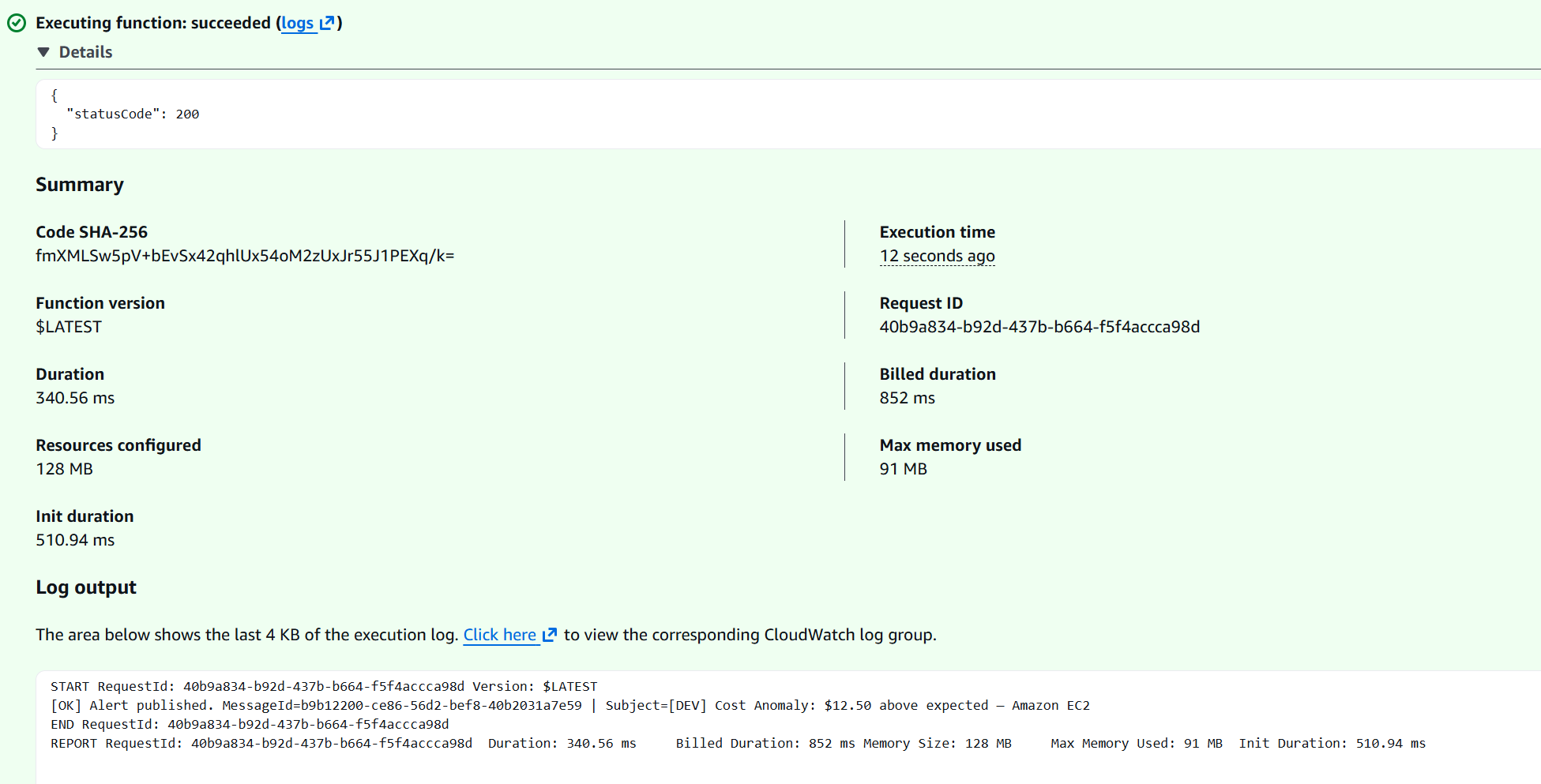
Post-deploy checklist: (1) Confirm SNS email subscription — check inbox for AWS Notification email and click the link. (2) Verify monitor in Cost Management → Anomaly Detection. (3) Run the Lambda test above and confirm a formatted email arrives within 30 seconds.
6. Real Challenges & Gotchas
What happens: The monitor is created, the subscription is configured, but no alerts ever fire. No error in CloudWatch, no failure in the console.
Root cause: The SNS topic policy uses budgets.amazonaws.com instead of costalerts.amazonaws.com. AWS drops the publish attempt silently.
Fix: Update the topic policy principal to costalerts.amazonaws.com.
What happens: Deploy succeeds, Lambda test works, but no real anomaly alerts arrive for days even when you intentionally run up charges.
Root cause: Cost Anomaly Detection requires a minimum amount of historical spend data to train its ML baseline. Expected behaviour on a new monitor — not a bug.
Fix: Use the Lambda test event to validate the pipeline immediately. Real anomaly alerts start arriving once the baseline stabilises.
What happens: Lambda executes successfully (visible in CloudWatch logs), but no email arrives.
Root cause: The email subscription is in PendingConfirmation state. SNS does not deliver to unconfirmed endpoints.
Fix: Check inbox for the AWS Notification — Subscription Confirmation email and click the confirmation link.
What happens: Every plan — auto-triggered or manually started — fails with Error: No Terraform configuration files found in working directory / lstat .../config/week-05-cost-anomaly-detection: no such file or directory. This happens even though the folder is confirmed to exist on main via the GitHub API, the working directory setting is correct, and the branch/trigger settings are all correct.
Root cause (layered): First, HCP's GitHub App integration had repository access scoped to a different repo entirely — check GitHub → Settings → Applications → Installed GitHub Apps → (your Terraform app) → Repository access. Granting access to the correct repo didn’t fix it on its own; the existing VCS connection in the workspace needed a full disconnect-and-reconnect (Settings → Version Control → Change source) to actually pick up the change. Even after that, the same error persisted across several fresh runs.
What actually fixed it: Settings → Version Control → Edit → enabling “Include submodules on clone” (a.k.a. ingress_submodules). The repo has no real submodules, so the exact mechanism is unconfirmed — but toggling it on is what broke the cycle of stale ingestion. Worth trying early, before chasing GitHub App permissions or doing repeated reconnects.
Bonus finding: a VCS-connected workspace also blocks terraform apply (and terraform plan -out=tfplan) from local CLI or CI with Error: Apply not allowed for workspaces with a VCS connection — apply has to be confirmed via the HCP UI run page (or the API) once VCS is the source of truth.
7. Security Best Practices
No static AWS credentials anywhere
HCP Terraform authenticates via OIDC, minting short-lived tokens scoped to the workspace. No AWS_ACCESS_KEY_ID stored in HCP, GitHub, or anywhere else.
Workspace-scoped OIDC trust
The IAM trust policy uses StringLike with the workspace name in the sub condition. Only the week-05-dev workspace can assume this role.
Lambda least-privilege IAM
The execution role has exactly two permissions: sns:Publish scoped to the formatted alert topic ARN, and CloudWatch Logs write access scoped to its own log group.
SNS topic policy scoped to service principal
Only costalerts.amazonaws.com can publish to the raw-anomaly topic. No IAM user, cross-account entity, or other AWS service can inject fake anomaly payloads.
CloudWatch log retention set explicitly
Without an explicit retention_in_days, log groups retain logs indefinitely — an unbounded cost. This Lambda’s log group is set to 14 days.
8. Cost & Cleanup
| Service | Pricing | Monthly Cost |
|---|---|---|
| Cost Anomaly Detection | Free | $0.00 |
| SNS (2 topics) | First 1M publishes/month free | $0.00 |
| Lambda | First 1M requests + 400K GB-s free | $0.00 |
| CloudWatch Logs | First 5GB/month free | $0.00 |
| HCP Terraform | Free ≤500 managed resources | $0.00 |
| Total | $0.00 |
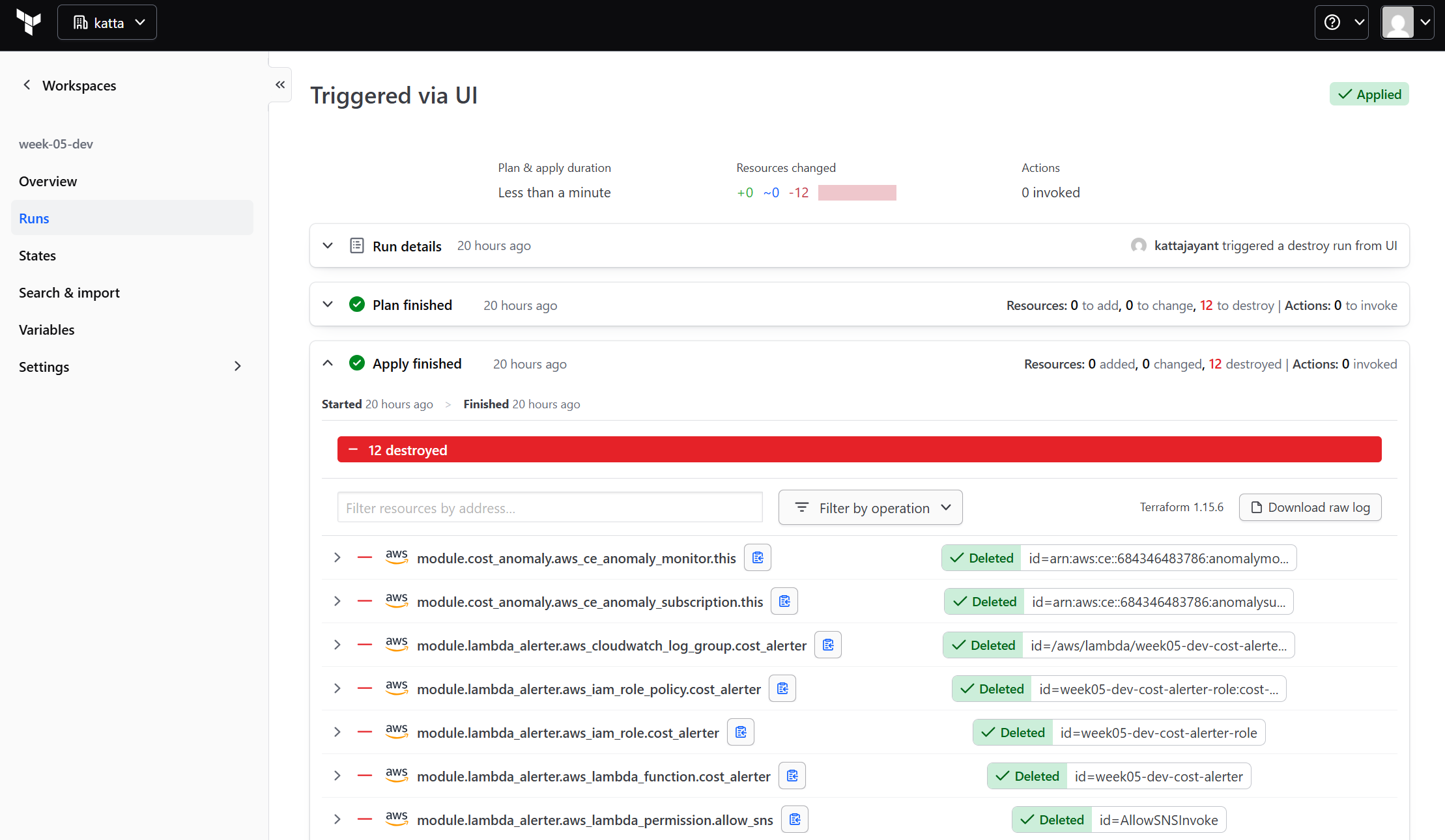
This workspace is VCS-connected, which blocks terraform apply/destroy from any CLI or CI context — including a GitHub Actions workflow, even with a valid HCP API token. The only working path is the HCP UI:
Workspace (week-05-dev) → Actions → Start new run → Plan and destroy
→ review the plan → Confirm & Apply
9. References
- AWS DocsGetting started with AWS Cost Anomaly Detection — monitor types, subscription frequencies, threshold expressions.
- AWS DocsReceiving Cost Anomaly Detection alerts using Amazon SNS — documents the
costalerts.amazonaws.comservice principal. - Terraformaws_ce_anomaly_monitor — DIMENSIONAL and CUSTOM monitor types.
- Terraformaws_ce_anomaly_subscription — threshold expression syntax and subscriber configuration.
- HCP TerraformDynamic Provider Credentials — AWS — OIDC trust setup between HCP and AWS.
- GitHubFull source code — week-05-cost-anomaly-detection
10. Key Takeaways
costalerts.amazonaws.comis the SNS publisher principal for Cost Anomaly Detection — wrong principal causes silent failure with no error.- The ML baseline needs 24–48 hours on a new monitor. Test with Lambda test events immediately after deploy.
- Two SNS topics is the right pattern — raw topic for AWS-to-Lambda, formatted topic for Lambda-to-human. Gives a clean extension point for Slack or PagerDuty later.
- HCP dynamic credentials eliminate static AWS keys entirely. 15 minutes of setup, zero ongoing rotation burden.
- Confirm the SNS email subscription before testing. Messages to unconfirmed subscriptions are silently dropped.
- VCS-connected HCP workspaces fail in confusing, layered ways — GitHub App repo access, OIDC
subcase-sensitivity, and stale config ingestion can all produce the exact same generic error. Check "Include submodules on clone" early if a VCS-connected workspace can't find files that genuinely exist in the repo. - Cost Anomaly Detection is completely free. The only reason not to have it in every AWS account is not knowing it exists.
Comments