Business Challenge
Config is usually introduced as a compliance dashboard, and a dashboard implies that green means checked. Two layers sit under that word, and each can produce green for a reason that is not compliance.
“The configuration recorder stores the configuration changes to the resource types in scope as configuration items (CIs).” And the default: “By default, a customer managed configuration recorder records all supported resources in the AWS Region where AWS Config is running.”
Two things follow. The scope is per Region, so a resource in a Region with no recorder generates no configuration items and therefore nothing to evaluate. And the default is everything, which is the safe default for coverage and the expensive one for cost — which is why the scope gets narrowed, usually by somebody optimising a bill rather than by somebody thinking about what the rules need.
There is also a second recorder type worth knowing exists: a service-linked recorder, which AWS describes as “A configuration recorder that is linked to a specific AWS service” whose “resource types in scope are set by the linked service”. Where the customer managed one has its scope “set by you”, this one does not.
FixTreat recorder scope as a security control, not a cost setting, and review changes to it the way you would review deleting a rule. Narrowing scope and deleting a rule have the same observable effect on the dashboard: fewer findings.
“NON_COMPLIANT — The rule fails the conditions of the compliance check.” That is the one everybody expects. The other two non-compliant-adjacent results are the interesting ones.
“ERROR — The one of the required/optional parameters is not valid, not of the correct type, or is formatted incorrectly.”
A rule in ERROR is not telling you that you are compliant. It is not telling you
anything, and it got into that state through a configuration mistake rather than through a resource
problem — which means the person who introduced it was editing a rule, not touching the resource
the rule protects.
“NOT_APPLICABLE — Used to filter out resources that the logic of the
rule cannot be applied to. For example, the alb-desync-mode-check rule only checks
Application Load Balancers, and ignores Network Load Balancers and Gateway Load
Balancers.”
That one is correct behaviour and still worth counting. A rule returning NOT_APPLICABLE
for everything is indistinguishable, on a compliance summary, from a rule that is passing — and
one common cause is a rule scoped to a resource type you do not have, which is what a copied
conformance pack produces.
Report the four results separately rather than as compliant and non-compliant. The number worth watching is rules in ERROR and rules whose evaluations are entirely NOT_APPLICABLE, because both look like success and neither is a check.
“A conformance pack is a collection of AWS Config rules and remediation actions that can be easily deployed as a single entity in an account and a Region or across an organization in AWS Organizations.”
The remediation half is the part that gets skimmed. A pack is not only a set of checks; it can carry the actions that fix what the checks find. And it is an authored artefact rather than a product: “Conformance packs are created by authoring a YAML template that contains the list of AWS Config managed or custom rules and remediation actions.”
Charging follows evaluations rather than packs: “you are charged based on the number of configuration items recorded, the number of active AWS Config rule evaluations, and the number of conformance pack evaluations in your account”, where “A conformance pack evaluation is the evaluation of a resource by an AWS Config rule within the conformance pack.”
So deploying a pack of forty rules across an organisation is forty rules' worth of evaluations in
every account and Region it lands in — including, by the logic above, the rules that will return
NOT_APPLICABLE because that account has none of the resource type.
Trim sample packs to the resource types an account actually has before deploying them widely. An always-NOT_APPLICABLE rule costs evaluations and contributes a reassuring green tile, which is the worst combination available.
Architecture
A recorder that decides what is visible, rules that decide what is checked, and a compliance view that collapses four results into two.
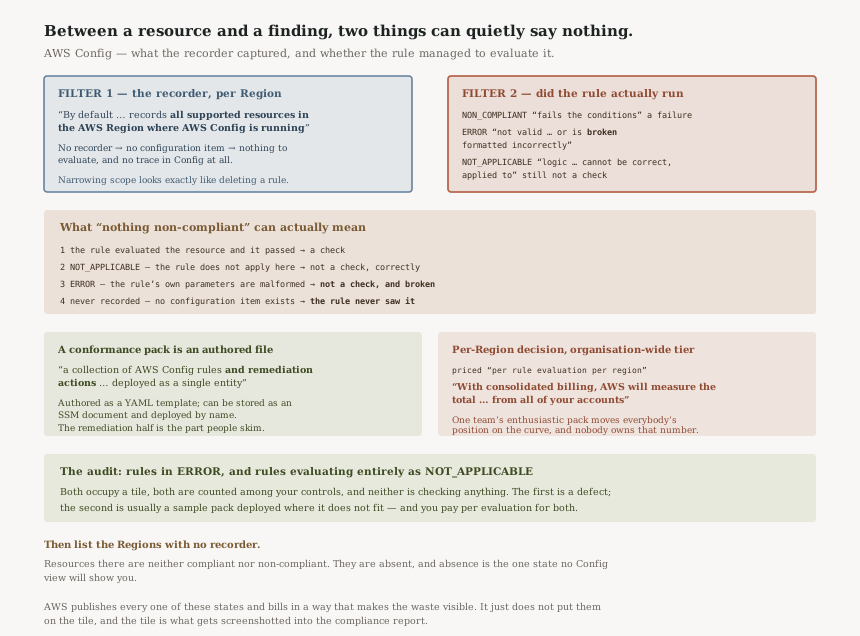
What green can mean
| The dashboard shows | What actually happened | Is it a check? |
|---|---|---|
| Compliant | The rule evaluated the resource and it passed | Yes |
| Nothing | NOT_APPLICABLE — “the logic of the rule cannot be applied” |
No, and correctly so |
| Nothing | ERROR — a parameter is “not valid, not of the correct type, or is formatted incorrectly” |
No, and it is broken |
| Nothing | The resource was never recorded — no configuration item exists | No, and the rule never saw it |
Only the first row is the statement people take the dashboard to be making. The fourth is the one that does not appear anywhere in Config at all, because a resource outside recorder scope leaves no trace in the service to be counted.
Rule evaluations are priced “per rule evaluation per region”. But: “With consolidated billing, AWS will measure the total number of AWS Config rules evaluations from all of your accounts”.
So the recording and rule decisions are made account by account and Region by Region, while the volume those decisions produce is aggregated across the organisation. One team's enthusiastic conformance pack moves everybody's position on the curve, and nobody owns that number.
One pricing detail worth knowing before you duplicate a rule
“If you are running a rule in both detective mode and proactive mode, you will be charged for only the evaluations in detective mode.”
Which removes the obvious argument against running both. If you were going to pick one to save money, AWS has already decided you should not have to.
Packs can come from SSM, not just from a file
“You can also use AWS Systems Manager documents (SSM documents) to store your conformance pack templates on AWS and directly deploy conformance packs using SSM document names.”
Useful if you want the pack itself versioned and distributable as an AWS object rather than as a file in somebody's repository — which is the difference between a standard you can point at and a standard somebody copied once.
Not every rule is about one resource
“AWS Config can also check all of your resources for account-wide requirements. For example, AWS Config can check whether the number of EC2 volumes in an account stays within a desired total, or whether an account uses AWS CloudTrail for logging.”
Worth knowing because those are the rules most likely to be genuinely useful and least likely to be in a sample pack — a count across an account is a different kind of question from a property of a single resource.
Why This Architecture Holds Up
Separating recording from evaluation is the right split
A recorder that captured only what the current rules needed would silently change coverage every time somebody edited a rule, and would have no history for a rule added tomorrow. Recording everything by default and evaluating selectively means the configuration history is complete even when the rule set is not — which is what makes a retrospective question answerable.
The cost is that the expensive half is the half with no visible benefit until something goes wrong, so it is the half that gets trimmed.
Publishing four evaluation results rather than two is honest
AWS could have folded ERROR and NOT_APPLICABLE into a single “no
result” and nobody would have complained. Keeping them separate is what lets you distinguish a rule
that correctly ignored a resource from a rule that is misconfigured, and that distinction is the entire
difference between a working control and a decoration.
Every other failure mode in Config announces itself: a non-compliant resource appears in a list, a remediation action fails visibly, a recorder that is stopped is stopped.
A rule in ERROR does none of that. It occupies a slot on the dashboard, it is counted among your controls, it has a name that describes something useful, and it is evaluating nothing. The audit for it is a query, not an alarm, which means somebody has to decide to look.
Charging per evaluation makes the incentives honest, mostly
Paying per evaluation means an unused rule costs something, which is the right pressure — a rule
nobody reads should not be free to keep. The exception is the
NOT_APPLICABLE case, where you pay for a rule to confirm repeatedly that it has nothing to
look at, and the pressure to remove it is financial rather than operational because it never shows up as
a problem.
Key Architecture Decisions
| Decision | Choice | Reasoning |
|---|---|---|
| Recorder scope | Treat changes as a security review | Narrowing scope and deleting a rule look identical on the dashboard. |
| Regions | Decide recording per Region, deliberately | The default records “all supported resources in the AWS Region” — and no others. |
| Compliance reporting | Four results, not two | ERROR and NOT_APPLICABLE both read as success. |
| Sample conformance packs | Trim before deploying widely | Evaluations are charged whether or not the rule applies. |
| Pack distribution | Consider SSM documents | They make the pack a versioned AWS object rather than a copied file. |
| Detective and proactive | Run both where useful | You are charged “for only the evaluations in detective mode”. |
| Cost ownership | Name an owner for org-wide evaluation volume | Consolidated billing measures evaluations “from all of your accounts”. |
| Service-linked recorders | Know which exist and what they cover | Their scope is “set by the linked service”, not by you. |
| Account-wide rules | Write them deliberately | They answer questions a per-resource rule cannot, and are rarely in sample packs. |
The audit worth running
Count your rules in ERROR, and your rules whose evaluations are entirely
NOT_APPLICABLE. Both groups occupy space on a compliance dashboard and check
nothing. The first is a defect; the second is usually a conformance pack deployed somewhere it does not
fit.
Then list the Regions with no recorder. Resources there are not compliant or non-compliant — they are absent, and absence is the one state no Config view will show you.
Closing Thought
The useful question to ask of a Config dashboard is not what is non-compliant but what did this actually check. Between a resource and a finding sit two filters: the recorder decides whether the resource exists as far as Config is concerned, and the rule decides whether it got evaluated. Both filters fail quietly, and both failures look like good news.
That is not a flaw in the service. Config publishes every one of these states, names them, and bills you in a way that makes the waste visible if you look. It simply does not put them on the tile, and the tile is what gets screenshotted into the compliance report.
#95 was about a service that maintains what you use and quietly lets the rest lapse. This is a service that reports on what it recorded, with rules that may not have run. The shared move is the same one: read the states the service publishes, not the summary it renders.
Security & Identity — Amazon Macie: what a sensitive data discovery job actually samples, why an automated discovery result is not a full scan, and what it costs to be wrong about which buckets matter.
Official AWS Reference
- Working with the configuration recorder — configuration items, the per-Region default scope of a customer managed recorder, and the service-linked recorder whose scope is set by the linked service
- Evaluating resources with AWS Config rules — the NON_COMPLIANT, ERROR and NOT_APPLICABLE evaluation results with the alb-desync-mode-check example, and account-wide requirement rules
- Conformance Packs for AWS Config — what a pack contains and where it deploys, the YAML template authoring model, and SSM document storage and deployment
- AWS Config pricing — the three charging dimensions and their definitions, per-region rule evaluation pricing, consolidated billing measurement across all accounts, and the detective-mode-only charge when a rule runs in both modes
- What is AWS Config? — further reading on the service overview; no claims in this post are drawn from it
Comments