Business Challenge
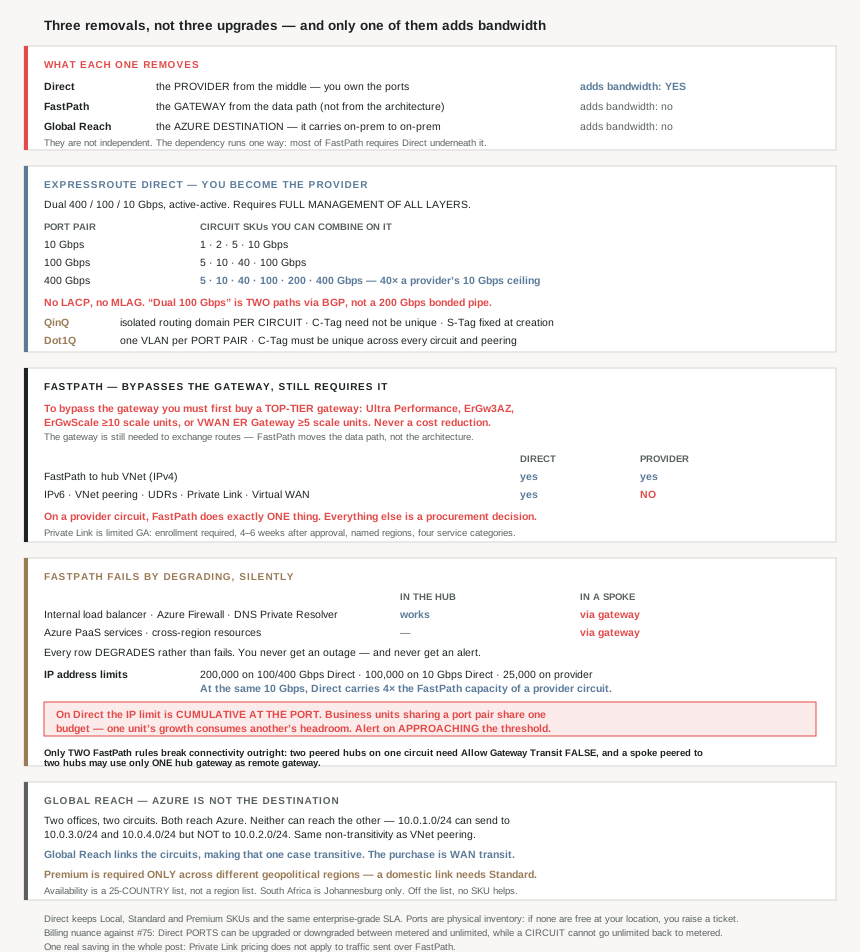
#75 covered the circuit: three parties, two peerings, a provider in the middle. These three capabilities all appear in the same documentation set as things you can add to that arrangement, which makes them look like a menu of upgrades. They are not comparable items.
| What it removes | Adds bandwidth? | |
|---|---|---|
| ExpressRoute Direct | The provider from the middle — you own the ports | Yes |
| FastPath | The gateway from the data path | No |
| Global Reach | The Azure destination — it carries on-premises to on-premises | No |
Two of the three are about removing a hop rather than buying capacity, and the third is the only one that breaks the 10 Gbps ceiling a connectivity provider can sell you.
The relationship between them is the part worth knowing before you plan. They are not independent, and the dependency runs one way:
On a provider circuit, FastPath does exactly one thing: the hub virtual network over IPv4. Virtual network peering over FastPath, User-Defined Routes over FastPath, Private Link, IPv6 and Virtual WAN integration are all ExpressRoute Direct only.
So “we'll turn on FastPath” on a provider circuit buys a fraction of what the FastPath documentation describes, and the rest is a procurement decision rather than a configuration one.
And the failure mode they share is worth stating up front, because it is not an outage. Nearly every FastPath limitation resolves to the same sentence — traffic “flows through the ExpressRoute gateway instead”. You lose the performance you designed for and nothing reports it.
Architecture
ExpressRoute Direct: you become the provider
“ExpressRoute Direct gives you the ability to connect directly into the Microsoft global network at peering locations… dual 400-Gbps, 100-Gbps or 10-Gbps connectivity that supports active-active connectivity at scale.”
The comparison Azure draws with the provider model is blunt about the trade: a provider “enable[s] fast onboarding and connectivity into existing infrastructure”, while Direct “requires 400-Gbps, 100-Gbps or 10-Gbps infrastructure and full management of all layers”. You are not buying a faster circuit; you are taking on the job the provider was doing.
What you get for it is capacity the provider model cannot sell. Provider circuits top out at 10 Gbps. On Direct:
| Port pair | Circuit SKUs you can combine on it |
|---|---|
| 10 Gbps | 1, 2, 5, 10 Gbps |
| 100 Gbps | 5, 10, 40, 100 Gbps |
| 400 Gbps | 5, 10, 40, 100, 200, 400 Gbps |
A 400 Gbps circuit is forty times the largest a provider can give you. Note the phrasing throughout: “a combination of the following circuit SKUs”. One port pair hosts several circuits, which is what makes the stated use case — “granular control of circuit distribution based on business unit” — possible.
Three frictions before any of that happens. Enrollment is a PowerShell feature registration rather than a portal switch: “you must first enroll your subscription… AllowExpressRoutePorts”. The largest ports are gated further — “400-Gbps is available in limited ExpressRoute peering locations and requires enrollment”. And capacity is physical inventory rather than a cloud abstraction:
“If you start using ExpressRoute Direct and find that ports at your selected peering location are unavailable, submit a support ticket to request more inventories.”
This is the one part of ExpressRoute that behaves like a datacentre order rather than a subscription. Confirm port availability at your chosen location before the location is in a design document.
The dual ports are not a bonded link
The most consequential technical line on the Direct page is a one-sentence note, and it defeats the obvious assumption: “ExpressRoute Direct doesn’t support Link Aggregation Control Protocol (LACP) or Multi-Chassis Link Aggregation (MLAG).”
So “dual 100-Gbps” is two 100 Gbps paths in active-active via BGP, not a 200 Gbps aggregate you can treat as one pipe. This is the same shape as the ExpressRoute secondary-connection warning in #72 — redundant capacity is not additive capacity — and here it also constrains your own hardware design, because a network team that planned a LAG to the MSEEs has planned something unsupported.
The rest of the requirements are worth settling in one meeting: dual Ethernet ports “only across router pair”, single-mode LR fibre with specific optics (QSFP-100G-LR-4 at 100 Gbps, QSFP-DD-400G-LR-4 at 400 Gbps), IPv4 and IPv6, “IP MTU 1,500 bytes”, and support for multiple BGP sessions per port. BFD is “Optional” on your side but “configured by default on all Private Peerings” on Azure's.
QinQ or Dot1Q is a real decision, made once
Direct supports both VLAN tagging schemes and they differ in a way that determines whether the multi-business-unit use case works:
| QinQ | Dot1Q | |
|---|---|---|
| Isolation | “isolated routing domains on a per ExpressRoute circuit basis” | “a single tagged VLAN on a per… port pair basis” |
| C-Tag uniqueness | “isn’t required to be unique across circuits” | “must be unique across all circuits and peerings on the… port pair” |
| S-Tag | Assigned by Azure at circuit creation and “can’t be changed” | n/a |
If the point of buying Direct is to hand separate circuits to separate business units, QinQ is the mechanism — it gives each circuit an isolated routing domain and frees each unit from coordinating VLAN IDs with the others. Dot1Q turns the port pair into one shared VLAN namespace that every circuit must negotiate within, which is precisely the coordination overhead a per-business-unit split is meant to avoid.
And the S-Tag being immutable at creation means the isolation boundary is fixed when the circuit is made, not later.
Why This Architecture Holds Up
Because FastPath requires the gateway it bypasses, at its most expensive SKU
FastPath's description is unambiguous about what it does: “network traffic bypasses the gateway and goes directly to virtual machines in your virtual network”. And one sentence later: “To use FastPath, you need an ExpressRoute virtual network gateway to exchange routes between your virtual network and on-premises network.”
FastPath moves the data path, not the architecture. The gateway stays, because the control plane — route exchange — still runs through it. And the SKU requirement is the part that catches budgets:
| Required gateway for FastPath |
|---|
| Ultra Performance |
| ErGw3AZ |
| ErGwScale with a minimum of 10 scale units |
| Virtual WAN ExpressRoute Gateway with a minimum of 5 scale units |
To bypass the gateway you must first buy a top-tier gateway. That inverts the intuition that bypassing something lets you buy less of it, and it means FastPath's business case is a latency and throughput argument, never a cost-reduction one.
The gateway also does not stop affecting you once bypassed. For private endpoints over FastPath: “We perform regular host and operating system maintenance on the ExpressRoute virtual network gateway… During these maintenance windows, you may experience brief or intermittent connectivity interruptions to private endpoint resources.” A component you have removed from the data path still has maintenance windows that interrupt your traffic.
Because FastPath's failure mode is a performance regression nobody reports
Collect the limitations and they end the same way every time:
| Resource | In the hub | In a spoke |
|---|---|---|
| Internal load balancer | FastPath works | Not supported → via gateway |
| Azure Firewall | FastPath works | Not supported → via gateway |
| DNS Private Resolver | FastPath works | Not supported → via gateway |
| Azure PaaS services | — | Not supported → via gateway |
| Cross-region resources | — | Not supported → via gateway |
A clean pattern: FastPath reaches the hub, and infrastructure that lives in a spoke falls back. Every row degrades rather than fails, which is both the good news and the problem. “If FastPath becomes unavailable, traffic automatically flows through the ExpressRoute gateway to maintain connectivity” means you will never get an outage from this — and you will never get an alert either.
That matters because of where the hub-and-spoke pattern naturally puts things. A shared Azure Firewall in the hub is the design #71 described, and that one keeps FastPath. But teams that give each spoke its own firewall or internal load balancer have built a topology where FastPath silently does nothing for that traffic, while still paying for Ultra Performance.
Because the FastPath IP budget is per port, and shared
The limits are generous until you notice how they are counted:
| Circuit type | Bandwidth | FastPath IP address limit |
|---|---|---|
| ExpressRoute Direct | 100, 400 Gbps | 200,000 |
| ExpressRoute Direct | 10 Gbps | 100,000 |
| ExpressRoute provider | 10 Gbps or lower | 25,000 |
At identical 10 Gbps bandwidth, Direct carries four times the FastPath IP capacity of a provider circuit. That is a second, quieter reason Direct matters for FastPath beyond the feature matrix — the same bandwidth buys four times the reachable address space.
And on Direct the accounting is not per circuit:
“ExpressRoute Direct applies IP limits cumulatively at the port level. When you reach the limit, FastPath stops configuring new routes and traffic flows through the ExpressRoute gateway instead.”
So the business units sharing your port pair share one FastPath budget. One unit growing its address space consumes another's headroom, and the symptom lands on whoever happens to add routes next.
Microsoft's own mitigation is the tell that this needs watching: “Configure alerts using Azure Monitor to get notified when FastPath routes approach the threshold limit.” Approaching, not exceeding — because by the time you have exceeded it, the only evidence is that things got slower.
Because two FastPath peering rules break connectivity rather than degrading it
Among a page of graceful fallbacks, exactly two limitations are different in kind, and both are peering settings:
- “Gateway transit: If you peer two hub virtual networks and connect them to the same ExpressRoute circuit, set Allow Gateway Transit to false in the peering configuration to avoid connectivity issues.”
- “Remote gateway: If you peer a spoke virtual network to two different hub virtual networks, use only one hub gateway as the remote gateway. Configuring both as remote gateways causes connectivity issues.”
Note what the first one asks for, because it reverses advice from earlier in this series. #71 and #74 both treated Allow gateway transit as a setting you turn on — it is off by default and enabling it is what lets spokes use the hub's gateway. Here, in one specific topology, leaving it on breaks things.
The two pieces of advice are not in conflict once the topology is stated: turn gateway transit on for a hub serving spokes, and off between two hubs that share one ExpressRoute circuit. But it is a genuine exception to a rule this series has repeated, and it is the kind of detail that gets lost when a peering standard is written once and applied everywhere.
Because FastPath Private Link is a six-week procurement, not a toggle
Worth separating from the rest of FastPath because its availability profile is completely different: “This feature is in limited general availability and requires enrollment… Deployment takes 4-6 weeks after approval.”
It is also narrow in three independent ways at once — Direct circuits at 100 or 10 Gbps, a specific region list, and four service categories (“Azure Cosmos DB… Azure Key Vault… Azure Storage… Third-party Private Link services”). Any design depending on it should confirm all three before the timeline is committed, because a six-week lead time discovered late is a six-week slip.
There is one genuine saving in it, and it is the only cost reduction anywhere in this post: “Azure Private Link pricing doesn’t apply to traffic sent over FastPath.” For a high-volume private endpoint workload that is a real line item removed, and it partly offsets the Ultra Performance gateway the feature requires.
Because Direct gives back the reversibility that circuits take away
A precise distinction, and it matters because it looks like a contradiction with yesterday's post. #75 established that for circuits, “Change from UnlimitedData to MeteredData” is an unsupported workflow — the billing model is a one-way door. The Direct page says this:
“ExpressRoute Direct Ports can be upgraded or downgraded between metered and unlimited billing type.”
Both are true, because they are different objects. The irreversible constraint applies to the circuit; the reversible one applies to the port pair. On Direct you are billed for ports as well as circuits, and the port-level billing decision can be undone. I would not read that as making the circuit-level constraint disappear — #75's rule is stated on the circuit page and this one is stated about ports — but it does mean a Direct deployment has a billing lever that a provider deployment does not.
One other thing Direct keeps that is easy to assume it loses: “ExpressRoute Direct supports Local, Standard and Premium SKUs”, and “the same enterprise-grade SLA with Active/Active redundant connections”. Taking over the provider's job does not cost you the SKU range or the SLA.
And one capability that only exists here: “You can enable or disable rate limiting for ExpressRoute Direct circuits at the circuit level.” With several circuits sharing a port pair, a per-circuit rate limit is how you stop one business unit's traffic from consuming the shared port — and the fact that it can be disabled implies that, left off, a circuit's share of the port is not enforced by the SKU alone. On a shared port pair that is a control worth deliberately turning on rather than discovering.
Because Global Reach solves a problem Azure is not in the middle of
Global Reach is the odd one out, and the documentation's own example is the clearest statement of the gap. Two offices, two circuits, both reaching Azure: “Both offices can connect to Azure resources in US West and UK South, but they can’t directly communicate with each other… the 10.0.1.0/24 network can send data to the 10.0.3.0/24 and 10.0.4.0/24 networks, but not to the 10.0.2.0/24 network.”
That non-transitivity should look familiar — it is the same shape as VNet peering in #71 and point-to-site routing in #74. Reaching a shared middle does not let two edges reach each other. Global Reach is the explicit opt-in that makes that one case transitive: “link ExpressRoute circuits to create a private network between your on-premises networks”.
So the purchase is WAN transit. Azure is selling you connectivity between your own buildings, and the stated use case is honest about that being a gap-filler rather than a WAN replacement: “complements your service provider’s WAN… if your service provider operates primarily in the United States… but doesn’t operate in Japan and Hong Kong SAR, you can use ExpressRoute Global Reach to work with a local service provider and Microsoft to connect your branches.”
Two constraints decide whether it is available to you. The SKU gate is narrower than #72's summary implied, and in your favour: “To enable ExpressRoute Global Reach between different geopolitical regions, your circuits must be Premium SKU.” Only across geopolitical regions — linking two circuits inside one does not require Premium, which makes a domestic multi-site Global Reach considerably cheaper than the headline suggests.
The second is a country list rather than a region list, 25 entries long, and it contains one sub-national restriction worth catching: “South Africa (Johannesburg only)”. Every other entry is a whole country. If a site sits in a country that is not on that list, Global Reach is not an option regardless of SKU, and no amount of Premium changes it.
Key Architecture Decisions
| Decision point | Choose | Because |
|---|---|---|
| You need more than 10 Gbps on one circuit | ExpressRoute Direct | Provider circuits stop at 10 Gbps; Direct reaches 400. |
| You want FastPath’s advanced features | ExpressRoute Direct | IPv6, VNet peering, UDRs, Private Link and Virtual WAN are Direct-only. |
| FastPath on a provider circuit | Expect hub IPv4 only | That is the single row both circuit types share. |
| Justifying FastPath | On latency and throughput | It requires a top-tier gateway, so it never reduces cost. |
| Planning a Direct deployment | Confirm port inventory at the location first | Unavailable ports mean a support ticket, not a retry. |
| Planning 400 Gbps | Check the location list and enrol early | Limited peering locations plus a separate enrollment form. |
| Sizing dual Direct ports | As two paths, not one aggregate | LACP and MLAG are not supported. |
| Separate circuits per business unit | QinQ tagging | Isolated routing domains per circuit and no cross-unit C-Tag coordination. |
| Several circuits on one port pair | Enable circuit-level rate limiting | It can be disabled, so the shared port is not protected by default. |
| Firewall or load balancer placement with FastPath | Hub, not spokes | Spoke-resident infrastructure falls back to the gateway. |
| Verifying FastPath is actually in use | Measure; don’t assume | Every unsupported case degrades silently to the gateway. |
| Direct with multiple circuits | Track FastPath IPs as a shared port-level budget | The limit is cumulative at the port, not per circuit. |
| FastPath IP headroom | Alert on approaching, not exceeding | Microsoft’s own recommendation, because exceeding is invisible. |
| Two peered hubs on one circuit | Allow Gateway Transit false | One of only two FastPath rules that breaks connectivity outright. |
| A spoke peered to two hubs | One remote gateway only | Both configured as remote gateways causes connectivity issues. |
| FastPath with VNet peering | Keep hub and spokes in one region | Global virtual network peering isn’t supported. |
| FastPath Private Link in a plan | Budget 4–6 weeks after approval | Limited GA with enrollment, a region list and four service categories. |
| High-volume private endpoint traffic | Price FastPath against Private Link charges | Private Link pricing doesn’t apply to FastPath traffic. |
| Azure NetApp Files with FastPath | Standard network features | Basic network features aren’t supported. |
| Two on-premises sites that must talk | Global Reach | Two circuits reaching Azure cannot reach each other. |
| Global Reach within one geopolitical region | Standard is enough | Premium is required only across geopolitical regions. |
| A site outside the 25 listed countries | Global Reach is unavailable | It is a country list, and Premium does not extend it. |
| Billing flexibility on Direct | Remember ports are reversible | Port billing type can be upgraded or downgraded; circuit billing cannot. |
Closing Thought
Filing these three under one product invites the assumption that they are three ways to make ExpressRoute better, selectable independently. They are three structurally different removals. Direct removes the provider and is the only one that adds capacity. FastPath removes the gateway from the data path while still requiring it, at a top-tier SKU, for the control plane. Global Reach removes Azure from the conversation entirely and sells you transit between your own buildings. Nothing about the second or third buys bandwidth.
The dependency is the thing to establish before any of it reaches a design. On a provider circuit, FastPath is one feature: the hub virtual network over IPv4. Everything else the FastPath documentation describes — peering, user-defined routes, IPv6, Private Link, Virtual WAN — needs ExpressRoute Direct underneath it. That turns “enable FastPath” from a configuration task into a question about who owns the ports, with a port-inventory check and a PowerShell feature registration in front of it.
What I would carry into operations is the shape of how FastPath fails. Almost every limitation on that page ends with traffic flowing through the gateway instead, which means a FastPath deployment can quietly stop applying to most of its traffic without a single error. Put a firewall in a spoke, grow past a port-level IP budget shared with another business unit, reach a cross-region private endpoint, and the fallback is immediate, automatic and unannounced. You keep paying for Ultra Performance and get the latency you had before. Microsoft recommending an alert on approaching the threshold is the clearest signal that this is a thing you are expected to watch rather than configure once.
#77 steps back from the connectivity primitives to the topology that has been implicit in the last fifteen posts: hub-and-spoke — what belongs in the hub, what the pattern actually buys, and which of its costs only appear at scale.
Official Azure Reference
- About Azure ExpressRoute Direct — the port sizes and per-port circuit SKU combinations, the provider comparison, the enrollment and port-inventory constraints, the LACP and MLAG exclusion, the technical requirements, QinQ versus Dot1Q tagging, circuit rate limiting and the port billing reversibility
- Azure ExpressRoute FastPath features, availability and limitations — what it bypasses, the gateway SKU requirement, the Direct-versus-provider feature matrix, the IP address limits and their port-level accounting, the hub and spoke limitations, the two peering rules that break connectivity, and the Private Link enrollment profile
- About Azure ExpressRoute Global Reach — the on-premises to on-premises gap it fills, the worked address example, the geopolitical Premium condition and the 25-country availability list
- ExpressRoute circuits and peering — the shared-bandwidth property and the circuit-level billing constraint this post contrasts with port billing
- Rate limiting for ExpressRoute Direct circuits — the mechanism referenced above for protecting a shared port pair (no claims drawn from it)
- ExpressRoute virtual network gateways — the gateway SKU performance detail behind the FastPath requirement (no claims drawn from it)
Comments