Executive summary
IAM now allows 20 managed policies per role by default, up from 10, raisable to 25 through Service Quotas. All commercial Regions, GovCloud (US) and China. Nothing to enable, no cost.
Read as a quota bump this is trivia. Read as a design constraint it is not, because the limit of 10 has been doing real work: it is the reason teams consolidate permissions into fewer, broader documents, and the reason "we've hit the policy limit" has ended a great many arguments about attaching one more thing to a role.
The part worth knowing is what did not move alongside it:
- Users stayed at 10 (max 20). Groups stayed at 10 with a maximum of 10 — that one cannot be raised at all.
- Session policies still cap at 10 managed policy ARNs, with the JSON document and all ARN characters together limited to 2,048.
- Policy size did not change. Each managed policy is still 6,144 characters. You can attach twice as many documents, each the same size as before.
What changed
One row in the IAM quota table, and it is the row for roles only.
| Resource | Default quota | Maximum quota | Changed? |
|---|---|---|---|
| Managed policies per role | 20 | 25 | Yes, was 10 |
| Managed policies per user | 10 | 20 | No |
| Managed policies per group | 10 | 10 | No, and cannot be raised |
Increases up to the maximum are handled by Service Quotas, and AWS notes that requests up to the maximum quota are automatically approved and completed within a few minutes — so 25 is a form to fill in rather than a negotiation.
The group row is the one to notice. Its default and its maximum are the same number, which means there is no request to make. If your permission model routes through groups, this launch does nothing for you.
Why AWS built this
Ten stopped being enough some time ago, and the pressure comes from AWS itself. A modern role commonly carries a service-specific managed policy, a couple of AWS managed policies for observability, an organisation-standard baseline, something for the CI pipeline, and whatever a service attached on its behalf. Six or seven arrive without anyone designing anything.
The workaround has always been consolidation: merge several small, readable, purpose-named policies into one larger document that nobody can describe in a sentence. That is a worse outcome than the limit was protecting against, and it happens precisely because the limit is per-document rather than per-permission.
Doubling it removes an artificial reason to write broader policies. Whether it also removes a useful discipline is the interesting question, and the answer depends entirely on what your ten were doing.
Architecture
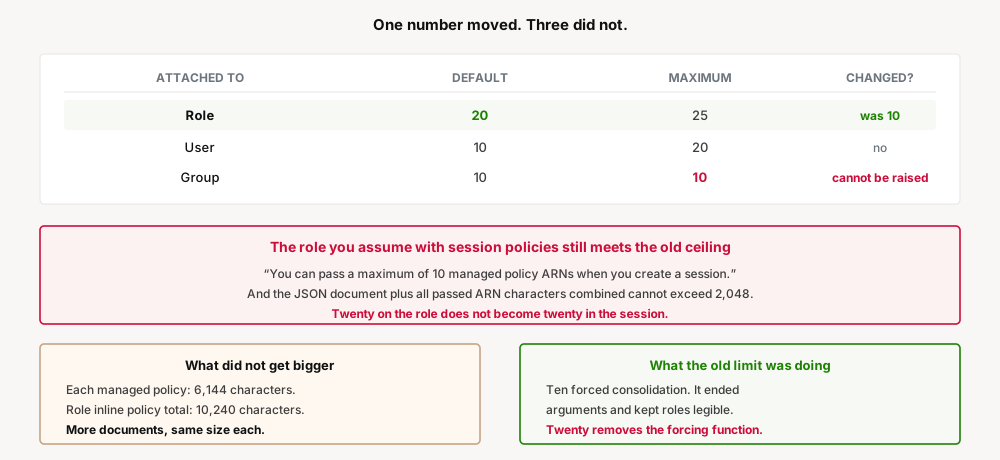
There is no architecture to change here — a quota is a number in a table. What matters is which numbers sit next to it, because a quota only relieves pressure if it is the binding one.
Two other IAM limits constrain the same design and are unchanged. Each customer managed policy remains capped at 6,144 characters, with white space not counted. Aggregate inline policy per role remains 10,240 characters. So the total policy surface a role can carry has grown by adding documents, not by making any document bigger — which is the right shape, but worth stating, because "we can now put more permissions on a role" and "we can now attach more policies to a role" are not the same sentence.
The trap: three limits that did not move
A quota increase invites the assumption that a class of problem is solved. Three places will still meet the old number.
1. Session policies still cap at 10. This is the sharpest one, because it applies to the same roles that just gained headroom. When you assume a role and pass session policies, the documented limits are unchanged: “You can pass a maximum of 10 managed policy ARNs when you create a session”, and the JSON document plus all passed ARN characters combined cannot exceed 2,048 characters.
So a role can carry 20 attached policies while a session assuming that role can pass only 10 of its own. Anything building sessions programmatically — a broker, a federation layer, a CI system that narrows permissions per job — sits at the old ceiling regardless of today's change.
2. Groups cannot be raised at all. Default 10, maximum 10. Every other adjustable quota in that table has a maximum above its default; this one does not. A design that attaches permissions to groups and adds users to groups gets nothing here, and cannot ask for it.
3. Users doubled only in the maximum, not the default. Users sit at 10 by default with a maximum of 20 — so a user can reach 20, but only by asking, and only to the number a role now gets for free.
The direction of travel is worth reading. Roles get headroom automatically; users get it on request; groups do not get it. That is consistent with everything else AWS has been saying about identity — roles are the principal you are meant to be using. If this quota is binding on your users or groups, the constraint is arguably telling you something about the design rather than about the quota.
Business value
The value is the ability to stop merging policies that had no business being merged.
| Situation | Under 10 | Under 20 |
|---|---|---|
| Role near the limit, one more grant needed | Merge two policies into a broader one | Attach it |
| Small purpose-named policies | Consolidated into unreadable documents | Can stay small and named |
| Org baseline plus service policies plus CI | Competing for slots | Room for all three |
| Auditing what a role can do | Fewer, larger, harder to read | More, smaller, each explainable |
That last row is the real gain and it is easy to miss. Ten larger policies are harder to audit than twenty small ones, because a policy whose name describes exactly what it grants can be reasoned about without opening it.
Security considerations
The limit was doing security work by accident. Not good work — it pushed people toward broader documents — but it did force a periodic reckoning. Hitting the ceiling made somebody look at what was attached and ask whether all of it was still needed. At 20, that prompt arrives half as often, and for many roles never.
More policies means more evaluation surface. Twenty documents at up to 6,144 characters each is a large amount of policy to reason about when answering "can this principal do X". The S3 access-denied improvements covered earlier this week help, but only for explicit denies — and with more attached policies, an implicit deny becomes correspondingly harder to trace.
Nothing here narrows anything. This is a ceiling, not a grant: no permissions changed and no role gained access. But a raised ceiling tends to get used, and the thing that fills it is rarely a policy someone removed something from.
Cost considerations
None. IAM is not metered and quota increases are free.
The only cost is the one that does not appear on a bill: a role carrying twenty policies takes longer for a human to understand than one carrying six, and that time is spent during incidents, audits and access reviews rather than at attach time.
Operational considerations
Check what your tooling assumes. Anything that enumerates attached policies with an expectation of at most 10 — a compliance check, a drift detector, a dashboard, a home-grown audit script — will now see up to 20 and should be confirmed rather than assumed correct.
Requests to the maximum are automatic. Going to 25 needs Service Quotas, and AWS states that requests up to the maximum are automatically approved within a few minutes. Worth knowing before anyone plans around a support case.
The quota is per role, not per account. Separately, customer managed policies per account default to 1,500 with a maximum of 10,000, which is the limit that binds when many small policies are the house style.
Existing roles are unaffected. Nothing is reattached, reordered or re-evaluated. The number simply stops being a barrier the next time somebody tries to attach.
Tradeoffs
| Gain | Cost |
|---|---|
| No longer forced to merge unrelated policies | Nothing now forces the periodic clean-out that hitting 10 caused |
| Small, purpose-named policies stay small and named | Twenty attachments is more to read than ten |
| Free, automatic, every Region | Applies to roles only; groups cannot be raised at all |
| 25 available on request, approved automatically | Session policies still cap at 10 ARNs regardless |
| More documents to attach | Each is still 6,144 characters; total policy per document unchanged |
Implementation guidance
1. Do not use the headroom to defer a clean-up. If a role was at 10 because nobody had reviewed it, it is now at 10 with room to grow rather than at 10 and forcing a decision. Review it while you remember why.
2. Split the policies you merged under duress. The consolidated documents written to fit under 10 are the ones worth breaking apart, because their names stopped describing their contents.
3. Check session-policy paths separately. Anything passing managed policy ARNs at AssumeRole time is bounded at 10 ARNs and 2,048 combined characters, and today changed neither.
4. Confirm any tooling that counted to 10. Audit scripts and compliance rules with a hardcoded expectation will now be wrong in a direction that looks like a finding.
5. If groups are your binding constraint, redesign rather than wait. The maximum equals the default, so there is no increase to request.
6. Watch the account-level policy count if small policies are your convention — 1,500 customer managed policies per account by default, 10,000 maximum.
Best practices
- Prefer many small named policies to few large ones, now that the limit no longer punishes it.
- Name a policy after what it grants, so twenty attachments can be read from the list without opening any of them.
- Schedule the review the limit used to force. A ceiling that never gets hit provides no prompt.
- Do not design around 20 in session-policy paths. That ceiling is still 10.
- Treat a role needing 20 policies as a signal worth a second look, even though it is now permitted.
Who should adopt, who should wait
There is nothing to adopt — the quota is already raised on every account, in every commercial Region plus GovCloud (US) and China.
It matters most to organisations with an org-wide baseline policy competing for slots against service and pipeline policies, and to anyone who has merged unrelated permissions into one document purely to fit.
It changes nothing for permission models built on groups, for session-policy-based brokers, or for anyone who was never near ten.
The one thing to do deliberately is decide what now triggers a review of a role's attachments, because hitting the limit used to be that trigger and it will now fire half as often.
Key takeaways
- Managed policies per role default to 20, up from 10, with a maximum of 25 through Service Quotas. All commercial Regions, GovCloud (US) and China.
- Requests up to the maximum are approved automatically within a few minutes.
- Users stayed at a default of 10 with a maximum of 20.
- Groups stayed at 10 with a maximum of 10 — the default equals the maximum, so there is no increase to request.
- Session policies still cap at 10 managed policy ARNs, with JSON plus ARN characters limited to 2,048 combined. A role with 20 attached policies does not give a session 20.
- Policy size did not change: each managed policy is still 6,144 characters, white space not counted.
- Aggregate inline policy per role is still 10,240 characters.
- The old limit was quietly forcing consolidation into broader, less readable documents — removing it is a chance to split those back apart.
- It was also forcing a periodic review. Nothing replaces that prompt, so schedule one.
- Roles get headroom automatically, users on request, groups not at all. That ordering is the same message AWS has been sending about which principal to use.
Official AWS references
- AWS IAM now supports 20 managed policies per role by default — launch announcement
- IAM and AWS STS quotas — the quota table, character limits and session policy caps
- Managed policies and inline policies — IAM User Guide
- Policies and permissions in IAM — including session policies
Comments