Business Challenge
“AWS Directory Service for Microsoft Active Directory, also referred to as AWS Managed Microsoft AD, runs Microsoft Active Directory as a managed service powered by Windows Server 2019. It creates a highly available pair of domain controllers in your Amazon VPC across different Availability Zones”
Read “in your Amazon VPC” carefully, because it is doing less work than it appears to. The rest of this post is what that phrase actually means, and what your users do and do not do as a result.
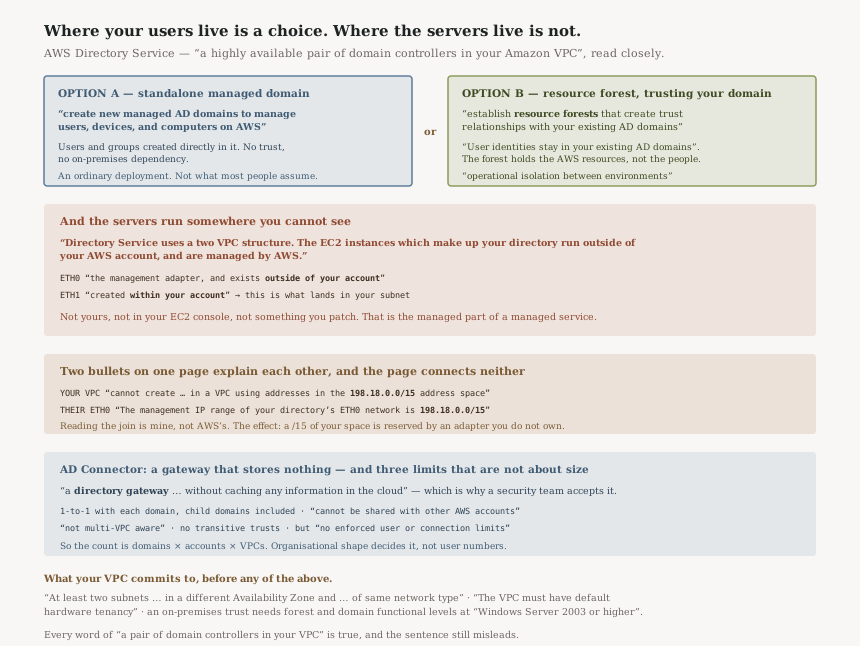
Start with what the thing is. AWS Managed Microsoft AD is a real Active Directory domain, hosted on infrastructure AWS manages — Standard and Enterprise editions “create new managed AD domains to manage users, devices, and computers on AWS”. You can create users and groups directly in it and run it on its own. That is a perfectly ordinary deployment and nothing below argues against it.
The second option is the one people assume they are getting without choosing it. The same directories “establish resource forests that create trust relationships with your existing AD domains on-premises, in AWS, or in multi-cloud environments”, and in that arrangement: “User identities stay in your existing AD domains while the resource forest manages your AWS resources, maintaining operational isolation between environments while providing seamless single sign-on.”
So in a resource-forest deployment the managed directory holds your AWS resources — the EC2 instances joined to it, the directory-aware applications, the group policy that applies to them — and trusts the domain where your people already are. Nothing is copied and nothing is synchronised. The Hybrid Edition makes the same point about itself: “This solution extends your directory services to AWS without synchronizing user identities”.
That is a genuinely good design. A synchronised copy of an identity store is two sources of truth and a reconciliation problem; a trust is one source of truth and a network dependency. But it does mean that in this arrangement the thing you are standing up is not a backup of your existing directory, and logons from the trusted domain depend on reaching it. A standalone deployment has neither property, and neither does it give you single sign-on from your corporate identities.
FixDecide standalone or resource forest explicitly, and write down which side of the trust each failure mode lands on. The sentence to catch in a design review is our AD is in AWS now — it describes a standalone directory accurately and a resource forest not at all, and the speaker rarely knows which one they have.
This is the paragraph worth reading twice before you design around it:
“Directory Service uses a two VPC structure. The EC2 instances which make up
your directory run outside of your AWS account, and are managed by AWS. They have two
network adapters, ETH0 and ETH1. ETH0 is the management
adapter, and exists outside of your account. ETH1 is created within your
account.”
So what you receive in your subnets is ETH1. The instance behind it is not yours, is not
in your account, is not visible to your EC2 console, and is not something you patch. That is the
managed part of a managed service, and it is the right trade — but it changes what your
monitoring and your incident response can actually reach.
And then, a few lines earlier on the same page:
“You cannot create a AWS Managed Microsoft AD in a VPC using addresses in the
198.18.0.0/15 address space.” With the reason sitting below it:
“The management IP range of your directory's ETH0 network is
198.18.0.0/15.”
The page states both and connects neither — that join is my reading rather than AWS's. But the
two ranges are the same, and the practical effect is that a /15 of your address space is
unusable here because of a network adapter in an account you do not have.
Check your IP address management plan for 198.18.0.0/15 before you choose a VPC. It is an unusual range to have allocated — it is reserved for benchmarking — but organisations that carved up private space informally sometimes have, and discovering it at create time is a bad day.
The alternative is a proxy rather than a directory: “AD Connector is a directory gateway with which you can redirect directory requests to your on-premises Microsoft Active Directory without caching any information in the cloud.”
For a single account with one domain and a reliable link, that is often exactly right. Nothing is stored, nothing is duplicated, and “Your end users and IT administrators can use their existing corporate credentials to log on to AWS applications such as WorkSpaces, WorkDocs, or Amazon WorkMail.”
Three documented limits decide against it in a large organisation, and none of them is about performance:
“AD Connectors and your on-premises Active Directory domains have a 1-to-1 relationship. That is, for each on-premises domain, including child domains in an Active Directory forest that you want to authenticate against, you must create a unique AD Connector.”
“AD Connector cannot be shared with other AWS accounts.” And: “AD Connector is also not multi-VPC aware, which means that AWS applications like WorkSpaces are required to be provisioned into the same VPC as your AD Connector.”
Multiply those together across an organisation and the arithmetic does it for you: one connector per domain, per account, per VPC. Managed Microsoft AD can be shared across accounts, which is why AWS points there — the documentation says to consider it “If this is a requirement”.
FixCount your domains, your accounts and your VPCs before choosing. AD Connector is a good answer to a small question and a bad answer to a large one, and the thing that decides it is organisational shape rather than user count — there are “no enforced user or connection limits”.
Architecture
A forest that holds resources and trusts your domain, instances that run in an account you cannot see, and one adapter in your subnet.
The three options, and what decides between them
| Managed Microsoft AD (Standard, Enterprise) | Managed Microsoft AD (Hybrid Edition) | AD Connector | |
|---|---|---|---|
| What it is | A new managed AD domain, run standalone or as a “resource forest” | Connects your self-managed AD with the managed service | A “directory gateway” |
| Your identities | Standalone: created in the directory. Resource forest: stay in the domain it trusts | Stay where they are — “without synchronizing user identities” | Stay where they are; nothing is cached |
| Shareable across accounts | Yes | “cannot be shared with other AWS accounts” | |
| Per domain | One directory, trusts many | One connector per domain, child domains included | |
| Works if the link is down | Resources keep working; trusted logons do not | No — every request is proxied | |
The row that usually settles it in a large estate is sharing. A directory you can share is one directory; a connector you cannot share is one per account, and at 500 accounts that stops being a design and becomes an inventory.
“At least two subnets. Each of the subnets must be in a different Availability Zone and must be of same network type.”
“The VPC must have default hardware tenancy.” — so a dedicated-tenancy VPC is out, which is the kind of thing a regulated workload may have chosen for its own reasons.
And before you plan a trust: “you must have the Forest and Domain functional levels for your on-premises domain set to Windows Server 2003 or higher”. Low bar, worth confirming rather than assuming, because it is a property of a system you may not administer.
Sizing AD Connector is about operations, not users
“AD Connector comes in two sizes, small and large. A small AD Connector is designed for smaller organizations and is intended to handle a low number of operations per second. A large AD Connector is designed for larger organizations and is intended to handle a moderate to high number of operations per second.”
With the escape hatch: “You can spread application loads across multiple AD Connectors to scale to your performance needs. There are no enforced user or connection limits.”
So the sizing question is throughput, and the scaling answer is more connectors — which runs into the per-account and per-VPC limits above rather than into a quota.
One more AD Connector limit, for anyone with a forest
“AD Connector does not support Active Directory transitive trusts.” If your on-premises estate relies on transitive trust between domains to resolve access, a connector will not inherit that, which is the same reason the 1-to-1 rule names child domains explicitly.
Why This Architecture Holds Up
A resource forest is the right answer to one of the two questions people ask
People ask for their directory in AWS and usually mean one of two things. If they mean I want a directory for my AWS workloads, a standalone managed domain is the whole answer and the trust machinery is unnecessary. If they mean I want my corporate identities to work in AWS, copying the identity store would satisfy the literal request and create a second source of truth, a sync pipeline and a divergence problem — and a resource forest satisfies the actual requirement with “operational isolation between environments” intact.
The honest cost is the one the design makes explicit: resources in the forest keep working, but a logon by a user from the trusted domain is only as available as the path to that domain.
Running the instances outside your account is what makes it managed
“with AWS automatically managing host monitoring, recovery, data replication, snapshots, and software updates” is only deliverable if AWS controls the host. You cannot have both a patched, recovered, snapshotted domain controller and a domain controller you administer at the OS level.
Publishing the mechanism rather than hiding it is the good part. The ETH0 and
ETH1 split tells you exactly where the boundary is, which is more than most managed services
disclose.
Almost every consequence of the two-VPC structure is invisible and benign. This one is neither: “You cannot create a AWS Managed Microsoft AD in a VPC using addresses in the 198.18.0.0/15 address space.”
An implementation detail of an account you cannot see constrains the addressing of a VPC you own. It sits in the prerequisites rather than anywhere you would look while designing a network, and it fails at create time — by which point the VPC usually exists.
AD Connector's limits are honest about what a proxy can be
Not caching is the whole value — “without caching any information in the cloud” is what makes it acceptable to a security team that will not have credentials stored in AWS. The 1-to-1 mapping, the no-sharing rule and the single-VPC scope all follow from being a network path rather than a directory. A proxy that could be shared across accounts and VPCs would be a directory, and would need to cache.
Key Architecture Decisions
| Decision | Choice | Reasoning |
|---|---|---|
| Directory type at scale | Managed Microsoft AD, shared across accounts | AD Connector “cannot be shared with other AWS accounts”. |
| Expectation setting | Name the pattern: standalone domain or resource forest | Only in the second do “User identities stay in your existing AD domains”. |
| VPC selection | Check for 198.18.0.0/15 first |
It collides with the ETH0 management range and fails at create time. |
| Tenancy | Default, not dedicated | “The VPC must have default hardware tenancy.” |
| Subnets | Two, different AZs, same network type | A stated prerequisite, not a recommendation. |
| Monitoring | Plan around instances you cannot reach | They “run outside of your AWS account”. |
| Before planning a trust | Confirm functional levels | “Windows Server 2003 or higher”, on a system you may not own. |
| Forests with transitive trust | Not AD Connector | It “does not support Active Directory transitive trusts”. |
| Sizing a connector | By operations per second, then add connectors | There are “no enforced user or connection limits”. |
The audit worth running
Count the AD Connectors you would need: domains times accounts times VPCs. Do the multiplication before the first one is built, because each factor is a documented constraint rather than a tuning decision, and the number is usually larger than the room expects.
Then grep your IPAM for 198.18. Thirty seconds, and it joins tenancy and
subnet layout as a constraint that stops you at create time rather than in a design review — except
that unlike those two, nobody thinks to check it.
Closing Thought
The phrase to re-read is “a highly available pair of domain controllers in your Amazon VPC.” Every word is true and the sentence still misleads, because the domain controllers are not yours and the VPC holds one adapter each. Whether the directory contains your users is the one part that is genuinely up to you, and it is the part most often left unstated.
None of that is a criticism. Each is the price of something you wanted: managed patching costs you OS access, a resource forest trades a copy of your directory for a dependency on reaching it, and a non-caching proxy costs you sharing. The failure mode is only ever describing the service to somebody else in the words of the marketing sentence rather than the words of the prerequisites page.
#93 was a policy whose asymmetry is about which account owns the resource. This is a service whose surprises are all about which account owns the instance. Twice in a week, the useful question has turned out to be the same one: not what the thing does, but whose account it does it in.
Security & Identity — AWS Certificate Manager: why a certificate's automatic renewal depends on whether anything is actually using it, what DNS validation buys that email validation does not, and why a certificate issued through ACME cannot be used with an integrated service.
Official AWS Reference
- AWS Managed Microsoft AD — the Windows Server 2019 basis and the highly available pair of domain controllers, the resource forest model and the statement that user identities stay in your existing domains, the Hybrid Edition's no-synchronisation behaviour, and the which-to-choose table
- AWS Managed Microsoft AD prerequisites — the two-subnet and Availability Zone requirement, default hardware tenancy, the 198.18.0.0/15 prohibition, the two-VPC structure with ETH0 outside your account and ETH1 within it, the ETH0 management range, and the on-premises forest and domain functional level requirement
- AD Connector — the directory gateway definition and the no-caching guarantee, the small and large sizes with their operations-per-second framing, the absence of enforced user or connection limits, the lack of transitive trust support, the 1-to-1 domain relationship including child domains, the no-sharing rule, the single-VPC scope, and the existing-credentials benefits
- What is AWS Directory Service? — further reading on the full option set including Simple AD; no claims in this post are drawn from it
Comments