Business Challenge
AWS states the choice between the two organization policy types in one sentence, and it is the clearest thing written about either:
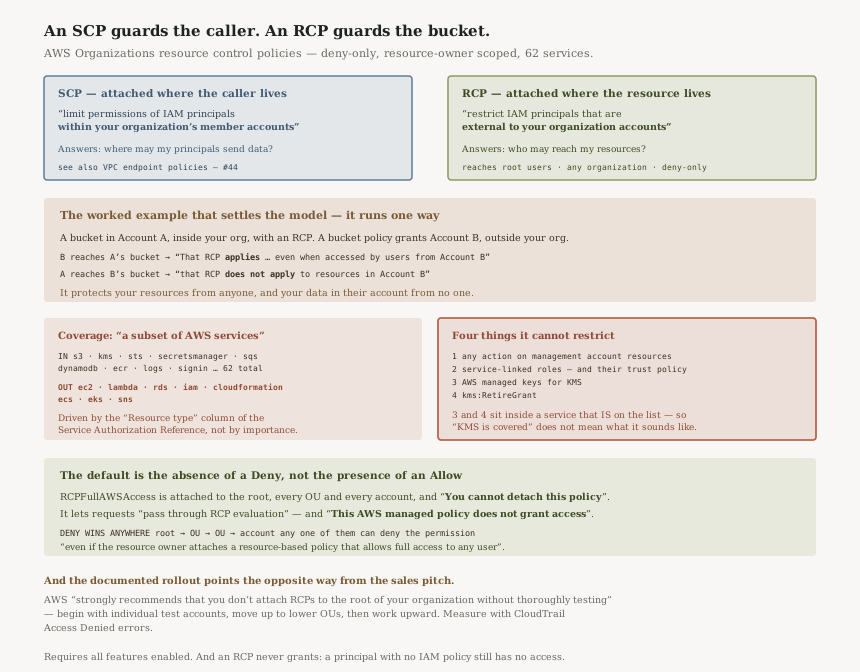
“Use an SCP when you need to limit permissions of IAM principals within your organization's member accounts. Use an RCP when you need to restrict IAM principals that are external to your organization accounts making requests to access resources within your organization's member accounts.”
So the two are not alternatives and they are not layers of the same thing. An SCP is attached where the caller lives; an RCP is attached where the resource lives. Everything below follows from that, including the parts that read as gaps.
The seven-gate evaluation order these sit inside — and where an RCP comes in that order — is #35. This post is about the policy type itself.
“RCPs affect only resources that are managed by accounts that are part of the organization which has attached the RCPs. They don't affect resources from accounts outside the organization.”
Which sounds obvious until you read the worked example:
“consider an Amazon S3 bucket that's owned by Account A in an organization. The bucket policy (a resource-based policy) grants access to users from Account B outside the organization. Account A has an RCP attached. That RCP applies to the S3 bucket in Account A even when accessed by users from Account B. However, that RCP does not apply to resources in Account B when accessed by users in Account A.”
Read both halves. Your RCP defends your bucket against a stranger's credentials — that is the strong half, and it is strong precisely because it does not depend on who the caller is. And your RCP does nothing about your own users writing your data into somebody else's bucket. That direction is an SCP's job, or a VPC endpoint policy's, as in #44.
FixWrite your data perimeter as two separate controls with two separate owners: RCPs for who may reach my resources, SCPs and endpoint policies for where my principals may send data. A single document describing the perimeter usually hides which direction it actually covers.
“RCPs apply to resources for a subset of AWS services.” The documentation then lists them, and counting that list it runs to 62 services. The ones you would expect are there: “Amazon S3 (prefix:s3)”, “AWS Key Management Service (prefix:kms)”, “AWS Security Token Service (prefix:sts)”, “AWS Secrets Manager (prefix:secretsmanager)”, “Amazon SQS (prefix:sqs)” and “Amazon DynamoDB (prefix:dynamodb)”.
The absences are the finding. Reading that list against the services a platform team actually runs, there is no EC2, no Lambda, no RDS, no IAM, no CloudFormation, no ECS or EKS, and no SNS. Four of those are usually the first things anyone tries to put a perimeter around.
AWS gives the mechanism rather than a rationale: “RCPs apply to the resources that are authorized as part of an operation request.” Those resources are the ones named in the Resource type column of the Action table in the Service Authorization Reference — AWS points at that column by name. So whether an RCP can see an action is a property of how that action is modelled, not of how important the service is. I would not read more into the shape of the list than that: some absent services do have resource-based policies, so having a resource policy is not the rule either.
FixCheck the list before designing a control, not after. And check it again later: it is a list AWS adds to, so a service absent today is not permanently out, and a perimeter documented as complete will quietly become understated.
AWS publishes the exclusions plainly. “Any action on resources in the management account” is the first, and it is consistent with how SCPs treat that account — see #39.
The second is broader than it first reads: “RCPs do not impact the effective permissions of any service-linked role… The permissions of service-linked roles can't be restricted by RCPs. RCPs also do not impact AWS services' ability to assume a service-linked role; that is, the service-linked role's trust policy is also not impacted by RCPs.”
Both the role's permissions and the trust policy that lets a service assume it are outside the perimeter. So an RCP cannot be used to stop an AWS service acting in your account through its own service-linked role.
The third and fourth are the interesting ones, because KMS is in the service list:
“RCPs do not apply to AWS managed keys for AWS Key Management
Service”, and “RCPs do not impact the kms:RetireGrant
permission.”
A service being on the list does not mean every resource and every action in it is covered. Grant retirement in particular has its own authorisation path, which #72 went into — and that path is not one an RCP participates in.
FixKeep the exclusion list next to your RCPs, not in the ticket that created them. Recording that KMS is covered is true and does not mean what it sounds like, and a reviewer reading only the policy document cannot tell.
Architecture
A deny-only policy attached by the resource's owner, evaluated against every caller including ones you have never heard of, over the services where AWS models a resource on the request.
SCP and RCP, side by side
| Service control policy | Resource control policy | |
|---|---|---|
| Constrains | IAM principals “within your organization's member accounts” | IAM principals “external to your organization accounts” making requests to your resources |
| Attached where | The caller's account, OU or root | The resource owner's account, OU or root |
| Reaches the root user | An RCP does — “This includes root users” | |
| Management account | Neither reaches resources there | |
| Grants anything | No. “an RCP never grants permissions” | |
| Coverage | Actions generally | “a subset of AWS services” — 62 on the current list |
The root-user row is the one to take away. An RCP is one of the few controls that applies to a member account's root user, and it does so without needing anything configured in that account.
The default policy is a pass-through, not an allow
“The RCPFullAWSAccess policy is an AWS managed policy. It is automatically attached
to the organization root, every OU, and every account in your organization, when you enable resource
control policies (RCPs). You cannot detach this policy.”
And the careful wording about what it does: “This default RCP allows all principals and actions access to pass through RCP evaluation, meaning until you start creating and attaching RCPs, all your existing IAM permissions continue to operate as they did. This AWS managed policy does not grant access.”
Both sentences are needed, and the second is the one people skip: the policy that is attached everywhere and cannot be removed is not granting anybody anything. AWS states the practical consequence directly — “until you start creating and attaching RCPs, all your existing IAM permissions continue to operate as they did”. Enabling the policy type changes nothing until you write a policy, which is the right way to ship something attachable to the organisation root.
“For a permission to be denied for a resource in a specific account, any RCP from the root through each OU in the direct path to the account (including the target account itself) can deny that permission.”
And the consequence for the account owner: “If a permission is blocked at any level above the account, a resource in the affected account does not have that permission, even if the resource owner attaches a resource-based policy that allows full access to any user.”
That is the whole value proposition in one sentence: a bucket policy written by somebody in a hurry cannot open a hole the organisation has closed.
Rollout, in AWS's own recommended order
“AWS strongly recommends that you don't attach RCPs to the root of your organization without thoroughly testing the impact that the policy has on resources in your accounts. You can begin by attaching RCPs to individual test accounts, moving them up to OUs lower in the hierarchy, and then working your way up through the organization structure as needed.”
With a concrete method attached: “One way to determine impact is to review AWS CloudTrail logs for Access Denied errors.”
Worth noticing that the same pages recommend both directions. On the value of a root-level deny: “Deny statements are a powerful way to implement restrictions that should be true for a broader part of your organization”, and AWS offers preventing external identities from reaching your resources as the example of one. On getting there: “begin by attaching RCPs to individual test accounts”. The destination is the root; the route is not.
Two preconditions
“RCPs are available only in an organization that has all features enabled. RCPs aren't available if your organization has enabled only the consolidated billing features.”
And the one that catches people reading an RCP as a grant: “A user or role without any IAM permission policies has no access, even if an applicable RCP allows all services, all actions, and all resources.”
Why This Architecture Holds Up
Scoping the policy to the resource owner is the only version that works
The alternative would be a policy that followed the principal across organisation boundaries, which is not something AWS can offer: the caller's organisation is not yours to configure. By attaching the control where the resource lives, AWS gets a guarantee that holds against any caller — “regardless of whether the principals belong to the same organizations or not” — without needing cooperation from anybody.
The cost is exactly the asymmetry in the worked example, and it is unavoidable rather than an oversight. Your data in a partner's account is protected by their controls, not yours. That is worth saying in a design review, because an RCP is often introduced as though it secured the data rather than the bucket.
Deny-only keeps the blast radius one-directional
“No permissions are granted by an RCP” means a misconfigured RCP can only ever take access away. Combined with “The effective permissions are the logical intersection” of the policy types, the failure mode is an outage rather than an exposure. For a control attachable to the organisation root, that is the correct direction to fail in.
The management account exclusion has an answer: put nothing in the management account, which #39 argues for anyway. The service list has an answer: use a different control for the services not on it.
The service-linked role exclusion has neither. Both the role's permissions and “the service-linked role's trust policy” are outside RCPs, so there is no RCP you can write that constrains what an AWS service does in your account on its own behalf. If that is in your threat model, this is not the control that addresses it.
Publishing the exclusions at all is the good part
A single-permission carve-out like “RCPs do not impact the kms:RetireGrant
permission” is the sort of thing that usually surfaces in a support case. Having it in the
table means a perimeter review can be complete, which is the difference between a control you can reason
about and one you have to test blindly.
Key Architecture Decisions
| Decision | Choice | Reasoning |
|---|---|---|
| Which policy type | RCP for inbound, SCP for outbound | AWS's own rule: SCPs for principals within, RCPs for principals external. |
| Perimeter documentation | Two documents, two owners | An RCP covers one direction only, and the example proves it. |
| Service coverage | Check the list per control, and re-check | It is “a subset”, currently 62 services, and it grows. |
| Rollout order | Test account → low OU → upward | AWS “strongly recommends” not starting at the root. |
| Impact measurement | CloudTrail AccessDenied review |
The documented method, and the only one that sees real traffic. |
| Management account | Do not rely on RCPs there | They have “no effect on resources in the management account”. |
| Delegated administrators | Treat as in scope | RCPs “apply to member accounts that are designated as delegated administrators”. |
| Service-linked roles | Use a different control entirely | Their permissions and trust policy are both outside RCPs. |
| KMS | Record the two carve-outs explicitly | AWS managed keys and kms:RetireGrant are excluded though KMS is listed. |
The audit worth running
List the services carrying your sensitive data, and mark which are on the RCP list. The unmarked ones are where your inbound perimeter does not exist, and for most organisations that set includes at least one surprise.
Then list what reaches your accounts through a service-linked role. That traffic is outside this control by design, and it is the part a perimeter diagram usually omits.
Closing Thought
Resource control policies are the first organization policy type that constrains somebody who has never heard of your organisation. That is a genuinely new capability, and it comes from one design decision: attach the control to the resource rather than to the caller. A stranger's credentials, a partner's role, a member account's root user — all evaluated the same way, because none of them is what the policy is about. The policy is about the bucket.
The same decision is why the protection does not travel. Your data in somebody else's account is covered by their policies, and no RCP you write changes that. Teams reach for an RCP to protect data and get a control that protects resources — which is most of what they wanted, and not all of it, and the gap is invisible in a policy document.
#92 was a service that reads your logs and returns a conclusion. This is a policy that guards your resources and ignores your data elsewhere. In both cases the thing to write down is the boundary, because the capability is easy to describe and the boundary is where the next design review goes wrong.
Security & Identity — AWS Directory Service: why a managed directory establishes a resource forest that trusts your existing domain rather than copying it, what a pair of domain controllers in your VPC commits you to, and when AD Connector’s proxy model is the right answer instead.
Official AWS Reference
- Resource control policies (RCPs) — the SCP-versus-RCP rule, the all-features-enabled requirement, the no-permissions-granted and logical-intersection statements, the one-directional scoping with the Account A and Account B example, the Resource type column mechanism, the full supported-service list, the management account and delegated administrator behaviour, root-user coverage, and the four exclusions including AWS managed keys and kms:RetireGrant
- RCP evaluation — the RCPFullAWSAccess managed policy, that it cannot be detached and does not grant access, and the rule that any RCP in the direct path to the account can deny a permission
- RCP syntax — further reading on policy structure; no claims in this post are drawn from it
- Resource control policy examples — further reading on worked policies; no claims in this post are drawn from it
Comments