Business Challenge
Point-to-site reads like the simplest thing VPN Gateway does. “A Point-to-Site (P2S) VPN gateway connection lets you create a secure connection to your virtual network from an individual client computer… established by starting it from the client computer” — remote access, one person at a time, useful “when you have only a few clients”.
The configuration presents three choices: which tunnel protocol, which authentication method, and which client software. They are laid out as three independent dropdowns. They are not independent, and the dependency runs in a direction that catches people out: a single security requirement at the top can eliminate most of the options below it.
Want Conditional Access and MFA on your VPN? Then you want Microsoft Entra ID authentication. “Microsoft Entra ID authentication is supported only for the OpenVPN protocol.” So the protocol is decided. “To authenticate and connect, clients must use the Azure VPN Client.” So the client software is decided. And that client runs on “Windows 11” and macOS — so your supported platform list is decided too.
One checkbox at the top, and Linux, iOS, Android and Windows 10 are all gone from the bottom.
That is the shape of this decision, and it is why the order you make the choices in matters more than the choices themselves. Decide the protocol first and you may discover your identity requirement is unreachable.
The second thing this post is about is stranger. The routing behaviour of a point-to-site connection “is dependent on the client OS, the protocol used… and how the virtual networks are connected”. Not just the protocol — the operating system. The same gateway, the same topology, two clients, two different routing tables. And the asymmetry does not favour Windows.
Architecture
Before any of the choices: “Point-to-site configurations require a route-based VPN type.” That closes off the policy-based option #73 discussed — which is one more reason that post's advice to choose route-based and attach PolicyBasedTrafficSelectors is the right default. A policy-based gateway cannot do remote access at all.
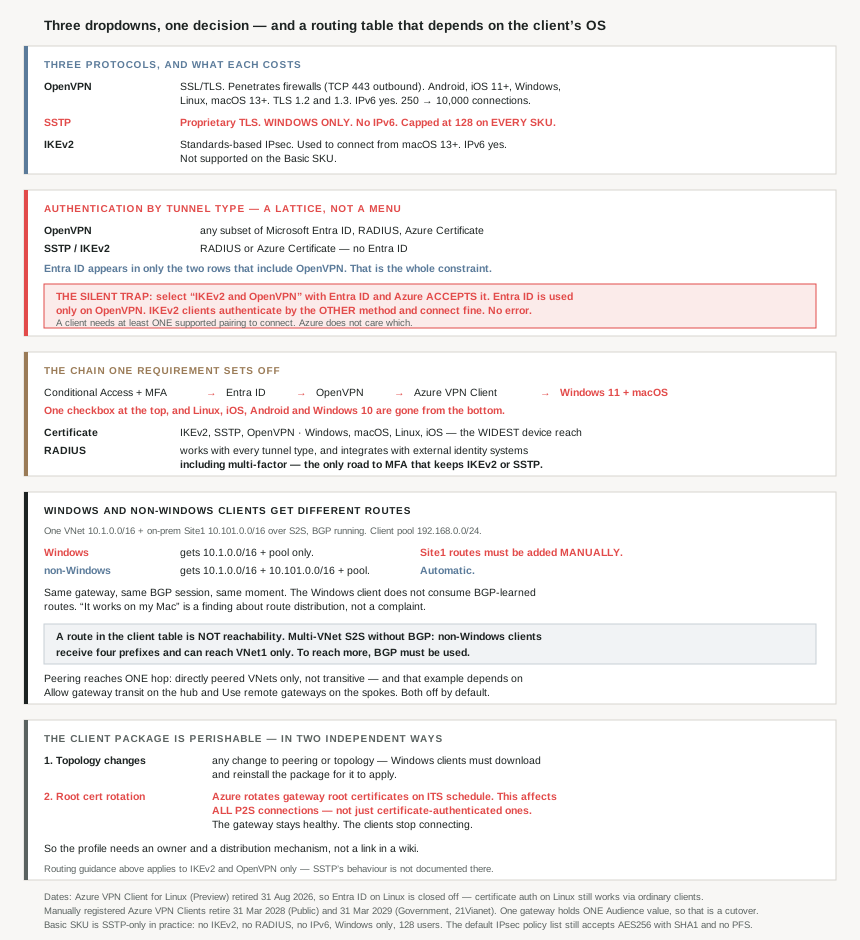
The three protocols, and what each costs you
| OpenVPN | SSTP | IKEv2 | |
|---|---|---|---|
| Kind | “SSL/TLS based” | “proprietary TLS-based” | “standards-based IPsec” |
| Platforms | Android, iOS 11+, Windows, Linux, macOS 13+ | Windows only | macOS 13+ |
| Firewall traversal | Both: “most firewalls open TCP port 443 outbound, which TLS uses” | IPsec — needs more than 443 | |
| IPv6 | Yes | No | Yes |
| Connection ceiling | 250 → 10,000 by SKU | 128 on every SKU | 250 → 10,000 by SKU |
| Entra ID auth | Yes — only here | No | No |
SSTP accumulates four disqualifications: Windows only, no IPv6, the 128-connection ceiling #73 found on every SKU including VpnGw5AZ, and no Entra ID. It is also proprietary. There is one thing it has going for it — it rides port 443 through restrictive firewalls — and OpenVPN does that too, on every platform, with IPv6 and modern identity. On a greenfield design SSTP is hard to justify.
One sizing note carried from #73 that applies directly here: the connection limits “are separate”, so a VpnGw1AZ can serve “128 SSTP connections and also 250 IKEv2 connections”. Enabling SSTP alongside OpenVPN for a handful of legacy Windows machines does not consume your OpenVPN budget. But throughput is shared, and “if you have numerous P2S connections, it can negatively impact your S2S connections” — so a busy remote-access population degrades your branch tunnels on the same gateway.
The authentication matrix is a lattice, not a menu
Azure publishes the compatibility directly:
| Tunnel type | Authentication mechanism |
|---|---|
| OpenVPN | “Any subset of Microsoft Entra ID, Radius Auth and Azure Certificate” |
| SSTP | “Radius Auth / Azure Certificate” |
| IKEv2 | “Radius Auth / Azure Certificate” |
| IKEv2 and OpenVPN | “Radius Auth / Azure Certificate / Microsoft Entra ID and Radius Auth / Microsoft Entra ID and Azure Certificate” |
| IKEv2 and SSTP | “Radius Auth / Azure Certificate” |
Read the Entra ID column and it appears in exactly two rows — the two that include OpenVPN. That is the whole constraint, and everything else in this post follows from it.
The platform consequence is sharper than the protocol consequence, because the three methods do not reach the same devices:
| Authentication method | Tunnel type | Client OS |
|---|---|---|
| Certificate | IKEv2, SSTP, OpenVPN | Windows, macOS, Linux, iOS |
| Microsoft Entra ID | OpenVPN | Windows, macOS only |
So the modern identity option has the narrowest device reach, and the old certificate option has the widest. That is the opposite of the usual direction of travel, and it is the trade to put in front of a security team: Conditional Access and MFA, or Linux and mobile. Not both, on one gateway, through Entra ID.
Why This Architecture Holds Up
Because an invalid combination is accepted rather than rejected
This is the failure mode worth knowing before you build, and the documentation describes it without flagging it as a hazard:
“For example, if you select ‘IKEv2 and OpenVPN’ for tunnel types, and ‘Microsoft Entra ID and Radius’ or ‘Microsoft Entra ID and Azure Certificate’ for authentication type, Microsoft Entra ID will only use the OpenVPN tunnel type since it’s not supported by IKEv2.”
Azure accepts the configuration. The portal shows Entra ID enabled. An IKEv2 client simply authenticates by the other configured method instead — certificate or RADIUS — and connects successfully. Nothing errors.
The security consequence is the point. You believe every VPN user is passing Conditional Access and MFA; your IKEv2 users are passing a certificate check. That is not a broken VPN, which is why nobody investigates — it is a working VPN with a quieter authentication path than the one on the architecture diagram. “the VPN client you use must be supported by at least one authentication type and corresponding tunnel type” is the mechanism: at least one is enough to connect, and Azure does not care which.
If MFA is a control you are attesting to, enable OpenVPN only. Leaving IKEv2 on as a fallback leaves the control optional.
Because there are two roads to MFA and only one keeps IKEv2
The Entra ID path is the well-signposted one, but it is not the only one. RADIUS is the other, and it is more capable than its age suggests: “A RADIUS server can also integrate with other external identity systems. This opens up plenty of authentication options for P2S VPN, including multi-factor options.”
And RADIUS appears in every row of the tunnel-type matrix. So:
| If you need… | Use | Cost |
|---|---|---|
| MFA + Conditional Access, Windows/macOS only | Entra ID | OpenVPN only; no Linux, iOS, Android |
| MFA on IKEv2 or SSTP | RADIUS | You operate a RADIUS server |
| Widest device reach, no MFA requirement | Certificate | Certificate lifecycle management |
There is a second reason to look at RADIUS that has nothing to do with MFA: “The RADIUS server can also integrate with AD certificate services… The advantage is that you don’t need to upload root certificates and revoked certificates to Azure.” If you already run an enterprise PKI, that keeps revocation where it belongs rather than requiring you to mirror a CRL into a gateway resource.
The cost is a dependency most designs miss, and it inverts the usual relationship between the two connection types:
“the Azure VPN Gateway acts as a pass through and forwards authentication messages back and forth between the RADIUS server and the connecting device. So Gateway reachability to the RADIUS server is important. If the RADIUS server is present on-premises, then a VPN S2S connection from Azure to the on-premises site is required for reachability.”
Your home workers' ability to log in now depends on a branch tunnel staying up. And both tunnels terminate on the same gateway whose bandwidth they share.
Because Windows and non-Windows clients get different routes
This is the finding that changes how you troubleshoot. Take the simplest hybrid topology in the documentation — one virtual network, one on-premises site over a site-to-site VPN, BGP running:
| Client | Routes added | Can reach |
|---|---|---|
| Windows | 10.1.0.0/16, 192.168.0.0/24 | VNet1 and Site1, “but the routes to Site1 must be manually added” |
| non-Windows | 10.1.0.0/16, 10.101.0.0/16, 192.168.0.0/24 | VNet1 and Site1 |
The on-premises prefix arrives on the Mac and does not arrive on the Windows machine. Same gateway, same BGP session, same moment. The multi-VNet case is the same story at larger scale: with BGP across three virtual networks, “Windows clients can access VNet1, VNet2, and VNet3, but routes to VNet2 and VNet3 will have to be manually added”, while “Non-Windows clients can access VNet1, VNet2, and VNet3” with no such caveat.
So the Windows client does not consume BGP-learned routes from the gateway, and every prefix beyond the virtual network's own address space is a manual addition on each machine. In an estate that advertises new on-premises ranges periodically, that is a recurring per-laptop task that non-Windows users never notice.
The practical reading: when one platform can reach a resource and another cannot, this is the first thing to check, and it is a configuration gap rather than a fault. “It works on my Mac” is evidence about route distribution, not a dismissal.
One scope limit on all of the above, stated at the top of that page: “This article applies to IKEv2 and OpenVPN only.” SSTP's routing behaviour is not documented there — one more reason the Windows-only protocol is the awkward one.
Because a route in the client's table is not proof of reachability
A subtlety that will waste an afternoon if you assume otherwise. In the multi-virtual-network topology joined by site-to-site VPN without BGP, the routes pushed to a non-Windows client are 10.1.0.0/16, 10.2.0.0/16 and the client pool — and yet “Non-Windows clients can access VNet1 only”.
The larger example is starker. Add a third virtual network and a branch office, still no BGP, and non-Windows clients receive 10.1.0.0/16, 10.2.0.0/16, 10.3.0.0/16, 10.101.0.0/16 and the pool — four destination prefixes — while “all clients can access VNet1 only”.
Four routes, one reachable destination. The client's routing table is advertising intent, and the transit behaviour behind the gateway is what decides delivery. The fix is the same one the documentation names: “To access additional VNets, BGP must be used.” Checking route print on the client tells you what the profile installed, not what will answer.
Because peering reaches one hop, exactly as it does everywhere else
The peered case behaves the way #71 would predict: “clients can access directly peered VNets… Access isn’t transitive and is limited to only directly peered VNets.” A spoke two peerings away is unreachable from a VPN client for the same reason it is unreachable from a VM.
Worth noting what that example depends on, because it is not the default: “VNet1 has ‘Allow gateway transit’ and VNet2 and VNet4 have ‘Use remote gateways’ enabled.” Those are two of the four per-side peering settings from #71, and both are off until you turn them on. A point-to-site client that cannot reach a spoke may be looking at an untick rather than a routing problem.
Because the client configuration package expires in two independent ways
The profile package is generated, not written, and that is because it is a snapshot of the gateway and the topology at the moment you download it. Two separate things invalidate it.
Topology changes. “If you make a change to the topology of your network and have Windows VPN clients, the VPN client package for Windows clients must be downloaded and installed again in order for the changes to be applied.” Adding a peering counts: “the VPN client must be downloaded again if any changes are made to VNet peering or the network topology”.
Certificate rotation, which is not optional and not yours. “Azure periodically rotates the root certificates that VPN gateways use… Microsoft provides advance notice before each migration.” And the scope is the part people get wrong:
“This change affects all P2S client connections, not just clients that connect via Certificate Authentication… the gateway continues to function as normal, but you must generate and update your VPN client profile to maintain connectivity.”
So an Entra ID deployment with no client certificates anywhere still has to redistribute profiles when Azure rotates the gateway's root. The gateway keeps working; the clients stop connecting.
Together these mean the profile package needs an owner and a distribution mechanism, not a one-time download saved in a shared folder. Two unrelated events invalidate it, one of which is scheduled by Microsoft rather than by you, and the symptom in both cases is clients failing to connect to a gateway that reports itself healthy.
Because the Entra ID app registration has a deadline and no overlap window
Azure moved from requiring you to register the Azure VPN Client in your own tenant to a Microsoft-registered app, and the security argument is explicit: “you skip the previously required… manual registration process… This process is more secure than manually registering the Azure VPN Client because you don’t need to authorize the app or assign permissions via the Cloud App Administrator role.” One audience value, c632b3df-fb67-4d84-bdcf-b95ad541b5c8, now covers Azure Public, Government, Germany and 21Vianet — where the manual approach needed a different value per cloud.
There is a date: “Manually registered Azure VPN Clients… will retire on March 31, 2028 in Azure Public Cloud, and on March 31, 2029 in Azure Government and… 21Vianet clouds. After these dates, manually registered clients will no longer function.”
And one constraint that decides how you get there: “A P2S VPN gateway can only support one Audience value. It can’t support multiple Audience values simultaneously.”
So this is a cutover, not a phased rollout. You cannot stand up the new audience alongside the old on one gateway and migrate users in waves. Either you accept a window where un-updated clients fail, or you run a second gateway for the transition — which means a second client address pool and a second set of routes. With eighteen months to go that is a plan worth making early, because the thing that makes it awkward is structural rather than a matter of effort.
A date that has already gone by, for completeness: “The Azure VPN Client for Linux (Preview) retired on 31 August, 2026.” Since the Azure VPN Client is what Entra ID authentication requires, Entra ID on Linux is now closed off entirely. Linux remains a supported client OS for certificate authentication, which uses ordinary IKEv2 and OpenVPN clients rather than Microsoft's — so Linux has not lost point-to-site, it has lost Entra ID.
Because Basic is effectively SSTP-only here
Stacking this page's note against #73's SKU table produces a narrower result than either states alone. “The Basic SKU has limitations and does not support IKEv2, IPv6, or RADIUS authentication.” #73 adds that Basic supports 128 SSTP connections and no IKEv2 or OpenVPN point-to-site connections at all.
Combine them: on Basic, point-to-site means SSTP, which means Windows only, and with RADIUS unavailable it means certificate authentication. No Entra ID, no MFA, no IPv6, no non-Windows device, 128 users maximum. That is not a remote-access tier; it is a lab.
Because the default cipher list still contains SHA1
#73 established that the cipher outranks the SKU for throughput. The point-to-site defaults deserve the same look, because the published default IPsec policy list runs from GCM_AES256 at the top down to AES256 / SHA1 / GROUP_NONE at the bottom.
A list of accepted policies is a list of things a client may negotiate. If SHA1 with no perfect forward secrecy is in the default set, some client will land on it, and nothing will report that as a problem. Custom policy is the control — and on this protocol there is an extra incentive to prefer OpenVPN: the two TLS 1.3 cipher suites in the published list are marked “Only supported on TLS1.3 with OpenVPN”. The newest transport security on this service is reachable through exactly one protocol.
Key Architecture Decisions
| Decision point | Choose | Because |
|---|---|---|
| Order of decisions | Identity requirement first, then protocol, then platforms | Entra ID collapses the other two. Deciding protocol first can strand the identity requirement. |
| Default protocol | OpenVPN | Widest platforms, port 443 traversal, IPv6, TLS 1.3, and the only one supporting Entra ID. |
| Greenfield SSTP | Don’t | Windows-only, no IPv6, no Entra ID, and 128 connections on every SKU. |
| MFA and Conditional Access required | Entra ID, OpenVPN only | Leaving IKEv2 enabled lets clients authenticate another way with no error. |
| MFA required on IKEv2 or SSTP | RADIUS | RADIUS integrates with external identity systems including multi-factor, and works with every tunnel type. |
| Linux, iOS or Android clients | Certificate authentication | Entra ID reaches Windows and macOS only, and the Linux Azure VPN Client retired in August 2026. |
| An existing enterprise PKI | RADIUS with AD Certificate Services | Avoids uploading root and revoked certificates to Azure. |
| RADIUS server location | In Azure if you can | On-premises makes remote-access login depend on a site-to-site tunnel. |
| One platform can reach a resource and another cannot | Check route distribution before anything else | Windows clients need BGP-learned routes added manually; non-Windows get them. |
| Diagnosing reachability from a client | Don’t trust the routing table | Clients receive routes to destinations they cannot reach without BGP. |
| Clients needing more than the local virtual network | Run BGP on the site-to-site connections | Without it, access is the local virtual network only regardless of routes pushed. |
| Clients needing a spoke two peerings away | Peer it directly | Access is limited to directly peered virtual networks; it isn’t transitive. |
| Clients reaching the virtual network but not a peer | Check Allow gateway transit and Use remote gateways | Both are off by default and the documented example depends on them. |
| After any topology or peering change | Regenerate and redistribute the client package | Windows profiles bake in routes at download time. |
| Owning the client profile | Give it a distribution mechanism | Two independent events invalidate it, one scheduled by Microsoft. |
| Entra ID deployment with no client certificates | Still plan for root certificate rotation | Rotation affects all point-to-site connections, not just certificate ones. |
| Manually registered Azure VPN Client app | Migrate to the Microsoft-registered App ID | Retires 31 March 2028 in Azure Public, and it removes a Cloud App Administrator grant. |
| Planning that migration | Treat it as a cutover, or build a second gateway | One gateway supports exactly one Audience value. |
| Basic SKU for remote access | Lab only | SSTP-only in practice: no IKEv2, no RADIUS, no IPv6, Windows only, 128 users. |
| Cipher policy | Set a custom one | The default accepted list includes AES256 with SHA1 and no forward secrecy. |
| Remote access on a gateway carrying branch tunnels | Size with headroom, or separate them | Numerous point-to-site connections can negatively impact site-to-site connections. |
Closing Thought
The three dropdowns in a point-to-site configuration are not three decisions. They are one decision with three visible consequences, and which one you treat as the input determines what you can still have afterwards. Start from “we need Conditional Access on the VPN” and you have chosen OpenVPN, the Azure VPN Client, and a Windows-and-macOS estate before you have opened the protocol dropdown. Start from “we support Linux developers” and you have chosen certificate authentication and given up Entra ID. Both are defensible; discovering which one you picked after the build is not.
The sharper hazard is that the invalid combinations do not announce themselves. Enabling Entra ID alongside IKEv2 produces a gateway that configures cleanly, connects clients successfully, and quietly authenticates some of them by a weaker method than the one on your diagram. Nothing fails, which is precisely why nobody looks. If multi-factor authentication is a control you report on, the protocol list has to be narrowed to the one protocol that can enforce it.
And the detail I would carry into operations rather than design: the client configuration package is a perishable artefact, and one of the two things that spoils it is on Microsoft's calendar rather than yours. Root certificate rotation breaks every client profile, including on deployments that use no certificates for authentication at all, while leaving the gateway reporting itself perfectly healthy. A remote-access service whose profile distribution is a link in a wiki will fail on a date nobody in the team chose.
#75 moves to the other side of the hybrid story that #72 introduced: ExpressRoute circuits, peerings and providers — what a circuit actually consists of, why the peerings are configured separately, and where the provider's responsibility ends and yours begins.
Official Azure Reference
- About Azure point-to-site VPN connections — the three protocols and their platform limits, the authentication-by-tunnel-type matrix, the Entra ID and RADIUS mechanics, the Audience values and retirement dates, root certificate migration, and the default IPsec and TLS policy lists
- About point-to-site VPN routing — the eight worked topologies with the exact routes pushed to Windows and non-Windows clients, what each can actually reach, and the client package regeneration requirement
- About VPN Gateway SKUs — the point-to-site connection ceilings per SKU, the separate SSTP and IKEv2 limits, and the interaction between point-to-site and site-to-site load
- VPN Gateway certificate migration — the rotation schedule and profile update procedure referenced above (no claims drawn from it)
- How to advertise custom routes for point-to-site clients — the mechanism for pushing prefixes clients don’t receive by default (no claims drawn from it)
Comments