Business Challenge
Firewall Manager's value is that it keeps up with your organisation without being told. “When you add a new account or resource to your organization, Firewall Manager automatically assesses it against your settings for each policy and applies the policy based on these settings.” And: “When policies are in place, Firewall Manager manages them continuously and applies them to new AWS accounts and resources as they are added.”
Entering scope is automatic. Leaving it is not, and that is a deliberate design with three consequences worth knowing before you draw a policy scope narrower than your organisation.
“If an account or resource goes out of scope for any reason, AWS Firewall Manager doesn't automatically remove protections or delete Firewall Manager-managed resources unless you select the Automatically remove protections from resources that leave the policy scope check box.”
The default is stated concretely: “Any protected resource that goes out of scope remains associated and protected. For example, an Application Load Balancer or API from API Gateway that's associated with a web ACL remains associated with the web ACL, and the protection remains in place.”
For security posture that is the safe default — nothing becomes unprotected because a tag changed. For operations it means a resource can be protected by a web ACL that no policy is managing, which is a thing nobody owns.
There is also one policy type where the choice does not exist: “The option Automatically remove protections from resources that leave the policy scope is not available for AWS Shield Advanced or AWS WAF Classic policies.”
FixDecide the check box per policy and write down which way you chose, because the two settings produce opposite states and neither is visibly wrong later. If your scope is defined by tags, remember that an ordinary tag edit moves a resource across this boundary — and under the default, moving out does not undo anything.
The check box governs the protections. It does not govern everything, and the exceptions run the other way.
“Firewall Manager deletes the logging configuration regardless of the resource cleanup option value when a member account leaves the scope or when the policy is deleted.”
Read the two triggers in that sentence, because they are narrower than the default above. The default about protections is written for “an account or resource”; the logging deletion is documented for a member account leaving the scope and for the policy being deleted. So when a member account leaves, the default cleanup behaviour can leave its web ACL association in place while the logging configuration goes regardless of the setting: the control continues to operate and the record of what it did stops being written. Those are the two halves of an audit answer, and they default in opposite directions.
What the page does not establish is that every resource-level scope change carries the same logging consequence — a single load balancer dropping out of scope on a tag edit is not one of the two cases named. Treat that as unknown from this source rather than as either outcome.
Two more are also unconditional, and both are cleanup rather than loss: “The associated AWS Config managed rules are deleted. This behavior is independent of the check box.” And: “Any associated AWS WAF web access control lists (web ACLs) that don't contain any resources are deleted. This behavior is independent of the check box.”
Read the qualifier on that second one. An empty web ACL is removed; one still holding a resource is not. Which is consistent with the default above, and means the thing left behind is specifically the web ACL that is still doing something.
FixWhen a member account leaves the scope, assume its protections may still be enforcing and its logging configuration is not. Treat a member account leaving scope, and a policy deletion, as events that need the logging re-established deliberately by whoever now owns the resources — and note that the associated Config managed rules go at the same time. For a resource-level scope change, verify the logging state rather than inferring it from this rule.
For managed network ACLs, Firewall Manager remediates drift — but the remediation yields to the local change by default.
“If an account adds custom rules to a network ACL that's managed by Firewall Manager, and those rules interfere with Firewall Manager remediation, Firewall Manager stops any remediation activities on the network ACL and reports the conflict.”
There is a setting for that, and it is opt-in: “If you choose auto remediation for the policy, you also specify whether to force remediation for the first rules or last rules”, and “If forced remediation is enabled, Firewall Manager applies the remediation, in spite of the conflict. If this option isn't enabled, Firewall Manager halts remediation.”
So the central control defers to the account's local rule unless somebody chose otherwise. That is a defensible default — overriding a member account's traffic rules without being asked is how a central tool causes an outage — and it means the policy's enforcement is advisory in exactly the case it exists for.
AWS is good about the visibility either way: “In either case, Firewall Manager reports the rule conflict and offers remediation options.”
FixDecide forced remediation per policy, and route the conflict reports somewhere a person reads. Without forced remediation, a conflict is a standstill from the policy's point of view — AWS is explicit that it reports, and equally explicit that it then halts, so nothing further happens until somebody acts on the report.
Architecture
A scope that governs entry automatically, an opt-in cleanup that governs exit, and three behaviours that ignore the cleanup setting — one of which has triggers of its own.
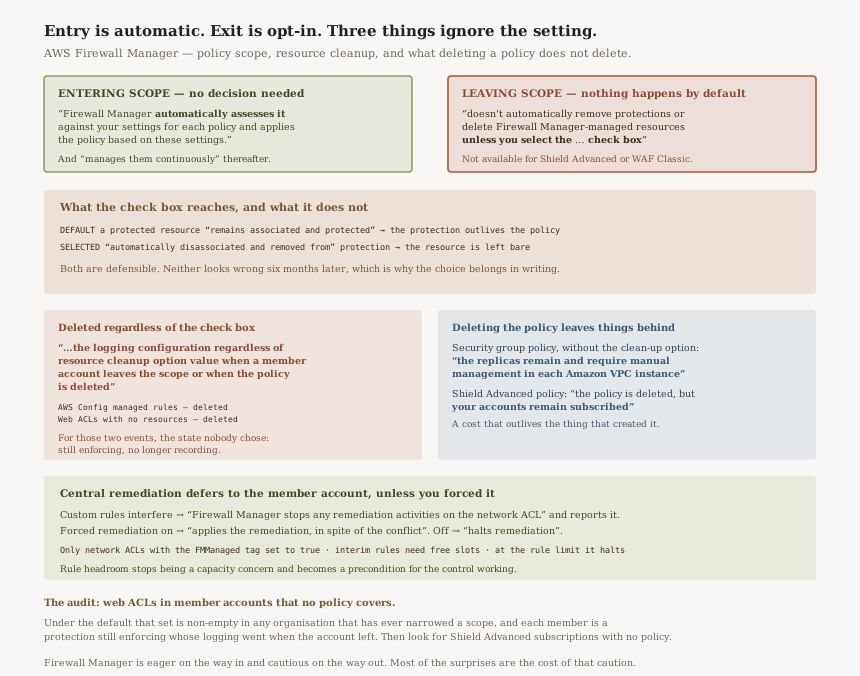
What the check box does and does not reach
| On leaving scope | Default | With cleanup selected |
|---|---|---|
| A protected resource | “remains associated and protected” | “automatically disassociated and removed from Firewall Manager protection” |
| AWS Config managed rules | Deleted — “independent of the check box” | |
| Web ACLs with no resources | Deleted — “independent of the check box” | |
| The logging configuration when a member account leaves the scope, or the policy is deleted |
Deleted — “…regardless of the resource cleanup option value when a member account leaves the scope or when the policy is deleted” | |
| Shield Advanced and WAF Classic policies | The option is “not available” | |
The bottom two rows are the ones to carry. For the two cases AWS names, logging goes in both columns, so there is no setting under which a member account leaving scope keeps both its protections and its logging configuration. Note the scoping, though: that row's trigger is a member account or a policy deletion, not any resource dropping out of scope. And for two policy types the choice is not offered at all.
Deleting a policy leaves things behind too
“When you delete a Firewall Manager common security group policy, to remove the policy's replica security groups, choose the option to clean up the resources created by the policy. Otherwise, after the primary is deleted, the replicas remain and require manual management in each Amazon VPC instance.”
And the one with a bill attached: “When you delete a Firewall Manager Shield Advanced policy, the policy is deleted, but your accounts remain subscribed to Shield Advanced.”
Shield Advanced is a subscription service, so deleting the policy that caused accounts to subscribe does not end the subscriptions it caused. #83 covers how that subscription is billed.
“it might temporarily duplicate rules to new locations, and then perform an ordered removal of the original rules… This approach protects your settings, but it also requires space in the network ACL for the interim rules.”
And: “If Firewall Manager hits the limit for rules in a network ACL, it will halt remediation. When this happens, the network ACL remains out of compliance and Firewall Manager reports the reason.”
So rule headroom stops being a capacity concern and becomes a precondition for the control working at all.
A tag decides whether remediation applies
“Firewall Manager only remediates managed network ACLs—with the
FMManaged tag set to true.”
Which is the same shape as the scope rules above, where “Resource tags can also be used to define policy scope” and “Resource tags only match with tags that have the same key and the same value”. Tags are doing load-bearing work in two places here: deciding what is in scope, and deciding what gets remediated.
Why This Architecture Holds Up
Leaving protections in place is the right default, even though it surprises
The alternative is worse in a specific way. If leaving scope removed protections automatically, then a tag edit, an OU move or an account exclusion would strip a web ACL off a live load balancer. That is a security change caused by an administrative one, arriving without review.
Defaulting to "keep protecting" means the failure mode is an unmanaged protection rather than an unprotected resource. Of the two, the first is the one you can find later.
Not overriding a member account's rules by default is also correct
Forced remediation exists, is per-policy, and is off unless chosen. A central tool that rewrote traffic rules over the top of a conflicting local rule would eventually take down something it did not understand. Halting and reporting puts the decision where the context is.
The honest cost is that the policy's guarantee weakens precisely when a member account has done something unusual — which is the case you wrote the policy for.
Everything else here is a choice: the cleanup check box, forced remediation, the clean-up option when deleting a security group policy. The logging configuration is not. It is deleted “…regardless of the resource cleanup option value when a member account leaves the scope or when the policy is deleted”.
So for those two events there is a state no setting avoids: protections enforcing, logging absent. Logs delivered beforehand are wherever they were delivered; what stops is the configuration that keeps delivering them. If an auditor asks what a web ACL blocked last week and the member account left scope a fortnight ago, the record runs out at the exit rather than at the present.
Reporting the conflict in both branches is good practice
“In either case, Firewall Manager reports the rule conflict and offers remediation options.” Whether it forced the change or halted, there is a record and a suggested next step. A tool that silently succeeded in one branch and silently stopped in the other would be much harder to operate.
Key Architecture Decisions
| Decision | Choice | Reasoning |
|---|---|---|
| The cleanup check box | Decide per policy and record it | The two settings produce opposite states and neither looks wrong later. |
| After a member account leaves scope, or a policy is deleted | Re-establish logging deliberately | It is deleted “regardless of the resource cleanup option value” in those two cases. |
| After a resource-level scope change | Check the logging state rather than assume it | The cited page names member-account exit and policy deletion, and does not extend the rule further. |
| Shield Advanced and WAF Classic policies | Plan manual cleanup | The option is “not available” for them. |
| Tag-based scope | Treat a tag edit as a scope change | Tags define scope, and matching requires the same key and value. |
| Forced remediation | Decide per policy; route the reports | Without it, a conflict halts remediation. |
| Network ACL rule budget | Keep headroom | Remediation “requires space in the network ACL for the interim rules”. |
| Deleting a security group policy | Choose the clean-up option | Otherwise replicas “remain and require manual management in each Amazon VPC instance”. |
| Deleting a Shield Advanced policy | Unsubscribe separately if you mean to | Accounts “remain subscribed to Shield Advanced”. |
FMManaged tag |
Protect it from edits | It decides whether a network ACL is remediated at all. |
The audit worth running
List the web ACLs in member accounts that no Firewall Manager policy currently covers. Under the default, narrowing a scope is how that set grows. Where the account itself left the scope, each one is a protection still enforcing whose logging configuration was deleted on the way out — the resources where the control works and the record stops. Where only the resource left, the logging state is not settled by the cited page, so read it off the resource.
Then check for Shield Advanced subscriptions without a corresponding policy, since deleting the policy leaves them in place.
Closing Thought
Firewall Manager is built around a sound asymmetry: it is eager on the way in and cautious on the way out. Adding an account protects it without being asked; removing one does not unprotect it without being asked. Both halves of that are the safer direction, and most of the surprises in this post are the cost of choosing safety twice.
The exception is the logging configuration, and it is the one worth remembering because it has no setting attached. Protections persist by default, and when a member account leaves the scope — or the policy is deleted — the logging configuration is deleted whichever way the check box was set. Those two together produce a state nobody chose: a control that is still enforcing and no longer recording.
#90 was about not over-reading a clean scan. This is about not over-reading a narrowed scope. In both cases the tool is behaving exactly as documented, and the mistake available is to infer something from an absence — there, no findings; here, no policy.
Security & Identity — AWS Audit Manager: what an assessment actually collects, why evidence accumulates on a schedule you do not control, and what delegation does to who can see it.
Official AWS Reference
- Using the AWS Firewall Manager policy scope — what the scope governs and the account and resource options, automatic assessment on entry and continuous management, the out-of-scope default and the cleanup check box, its unavailability for Shield Advanced and WAF Classic, the full default and selected behaviour lists, the unconditional deletion of Config rules and empty web ACLs, the deletion of the logging configuration when a member account leaves the scope or the policy is deleted, and the tag matching rules
- How Firewall Manager remediates noncompliant managed network ACLs — the FMManaged tag requirement, the interim-rule duplication and its space requirement, the halt on hitting the rule limit, the halt when an account's custom rules interfere, the forced remediation setting and its two branches, and the conflict reporting in either case
- Deleting an AWS Firewall Manager policy — the replica security groups left behind without the clean-up option, and the Shield Advanced subscriptions that survive policy deletion
- Creating an AWS Firewall Manager policy — further reading on where these settings are chosen; no claims in this post are drawn from it
- Viewing compliance information — further reading on the compliance reporting side; no claims in this post are drawn from it
Comments