Business Challenge
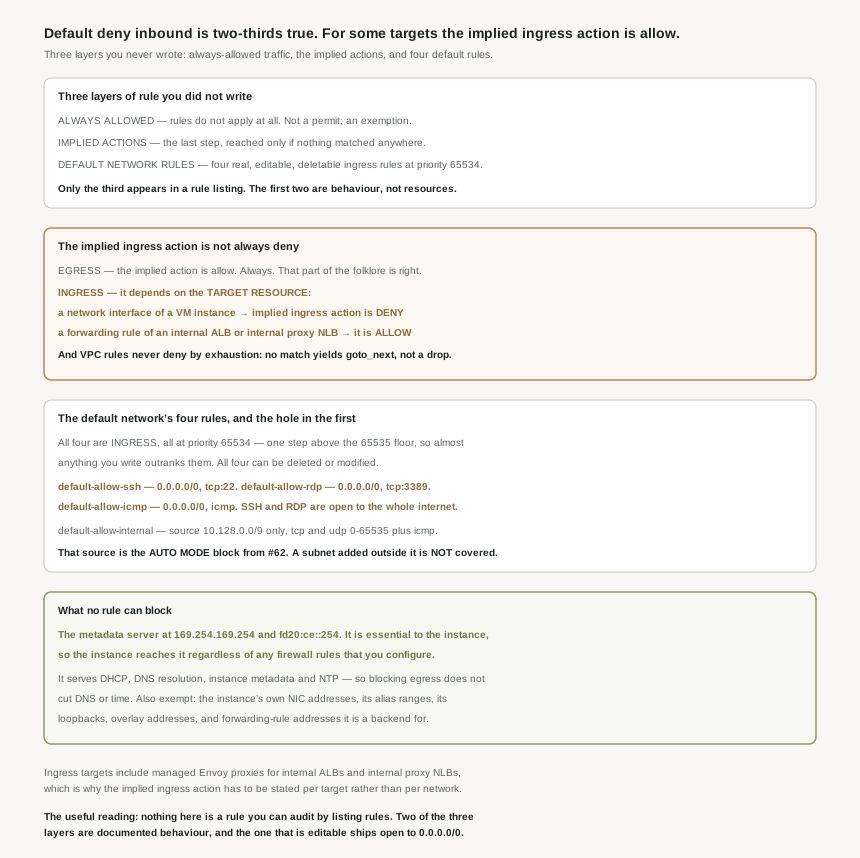
The previous post covered the rules you write. This one covers the ones already there, and they come in three layers that behave differently enough to be worth separating. Traffic that firewall rules do not apply to at all. Implied actions, which run only when nothing else matched. And, in the default network, four ordinary rules that ship enabled.
The summary everybody repeats — deny inbound, allow outbound — gets the outbound half right and the inbound half conditionally wrong. The implied action depends on the traffic direction and the target resource type, and for ingress that second dependency is the one nobody mentions.
True for VMs, not universally. The documentation splits it by target: if the target resource is a network interface of a VM instance, the implied ingress action is deny — but if the target resource is a forwarding rule of an internal Application Load Balancer or internal proxy Network Load Balancer, the implied ingress action is allow. Closed-by-default is a property of the target, not of the network.
Correct approachWrite explicit ingress rules for internal Application Load Balancer and internal proxy Network Load Balancer front ends rather than relying on an implied deny that does not exist there. The asymmetry makes sense once you see it — a managed proxy front end whose whole purpose is to receive traffic would be useless if the fallthrough denied it — but it means an audit that assumes a single default per network is checking the wrong thing.
Removing rules does not reach the first layer. For VM instances, VPC firewall rules and hierarchical firewall policies do not apply to a specific list, and the metadata server heads it: this server is essential to the operation of the instance, so the instance can access it regardless of any firewall rules that you configure.
Correct approachRead that as reassurance rather than as a gap. The metadata server provides DHCP, DNS resolution, following the DNS name resolution order for the VPC network, instance metadata and NTP — so a network stripped to no egress rules still has addressing, name resolution and time. It is also why #68's point holds: you can delete the default route and still administer the fleet.
It ships with SSH and RDP open to the internet. Two of its four rules are default-allow-ssh ingress 65534 0.0.0.0/0 allow tcp:22 and default-allow-rdp ingress 65534 0.0.0.0/0 allow tcp:3389. Those are not implied anything — they are real rules, enabled, with the whole internet as the source range, and #62 established that every new project gets this network unless somebody enforced the policy that skips it.
Correct approachThe good news is in the priority: 65534, one step above the floor of 65535, so almost any rule you write outranks them and these rules can be deleted or modified as necessary. Either delete the two remote-access rules or override them with a higher-priority deny, and reach administrative access through IAP instead — which, as #68 showed, rides a non-removable path and needs no open port at all.
Architecture
Only one of the three layers is a resource you can list. That is the single most useful thing to know about them.
| Layer | When it applies | Visible in a rule listing? |
|---|---|---|
| Always-allowed traffic | Before anything. Rules do not apply to it at all | No — it is an exemption, not a permit |
| Implied actions | As a last step, if nothing matched in any policy or rule set | No — behaviour, with no resource behind it |
| The default network's rules | Like any other rule, at priority 65534 | Yes, and they can be deleted or modified |
The implied actions, stated precisely
The implied action is genuinely last: Cloud NGFW applies an implied action if firewall rule evaluation has continued through every previous step by following explicit or implicit goto_next actions. One detail from that sentence matters for reasoning about VPC rules specifically — they do not themselves deny by exhaustion. If no VPC firewall rules match the traffic, Cloud NGFW uses an implied goto_next action to continue to the next step in the evaluation order. A VPC rule set that matches nothing passes the decision on; it does not drop the packet.
| Direction | Target resource | Implied action |
|---|---|---|
| Ingress | A network interface of a VM instance | deny |
| Ingress | A forwarding rule of an internal Application Load Balancer or internal proxy Network Load Balancer | allow |
| Egress | Any | For egress traffic, the implied action is allow |
The reason the target type can vary at all is that firewall targets are not only VMs. Ingress rules apply to packets for a new connection that a target resource receives, and the supported targets are network interfaces of virtual machine (VM) instances and managed Envoy proxies used by internal Application Load Balancers and internal proxy Network Load Balancers. Egress is narrower and has no such split: egress rules apply to packets for a new connection that a target VM network interface sends.
One more rule from the same page confirms #70's tie-breaking from a second source: if two rules match, they must have the same priority but different actions. In this case, Cloud NGFW enforces the deny VPC firewall rule, and ignores the allow VPC firewall rule.
The default network's four rules
The default network is pre-populated with firewall rules that allow incoming connections to instances, and all four are ingress at priority 65534.
| Rule | Source | Protocols and ports | Stated purpose |
|---|---|---|---|
default-allow-internal |
10.128.0.0/9 |
tcp:0-65535 udp:0-65535 icmp |
Permits incoming connections to VM instances from other instances within the same VPC network |
default-allow-ssh |
0.0.0.0/0 |
tcp:22 |
Lets you connect to instances with tools such as ssh , scp , or sftp |
default-allow-rdp |
0.0.0.0/0 |
tcp:3389 |
Lets you connect to instances using the Microsoft Remote Desktop Protocol (RDP) |
default-allow-icmp |
0.0.0.0/0 |
icmp |
Lets you use tools such as ping |
Its description says "from other instances within the same VPC network", but its source range is 10.128.0.0/9 — which #62 established is the auto mode block, the range auto mode draws every automatically created subnet from. The same post established that you may add subnets manually to an auto mode network using ranges outside that block. Putting those two documented facts together: a subnet you add to the default network outside 10.128.0.0/9 is not covered by default-allow-internal, even though it is in the same VPC network. The rule's description is about intent; its source range is what gets enforced.
Nothing about these four is special beyond being created for you — you can create similar firewall rules for networks other than the default network, and conversely they are ordinary enough to delete. Priority 65534 is the deliberate part: it leaves 65,534 higher-priority slots for your own rules, so overriding them never requires touching them.
Why This Architecture Holds Up
The always-allowed list is short, specific, and worth knowing in full, because every item on it is a thing you cannot block and therefore do not need to allow.
The metadata server is the headline. Google Cloud runs a local metadata server alongside each instance, and the server is accessible at 169.254.169.254 (for IPv4) and fd20:ce::254 (for IPv6). Access is unconditional, and the reason is stated: it is essential to the operation of the instance. Note the address sits inside link-local space, which #63 listed among the ranges prohibited as subnet ranges — the prohibition and this exemption are the same fact seen from two sides.
The rest of the list is the instance talking to itself, and it is broader than you might guess. Rules do not apply to packets sent to an IP address assigned to one of the instance's own network interfaces (NICs) where packets stay within the VM itself, and that includes the primary internal IPv4 address of the NIC, any internal IPv4 address from an alias IP range of the NIC, the NIC's IPv6 addresses, loopback addresses, and addresses configured as part of networking overlay software you run within the instance itself.
Also exempt is an internal or external IPv4 address associated with a forwarding rule, for load balancing or protocol forwarding, if the instance is a backend for the load balancer or is a target instance for protocol forwarding. So a backend reaching its own load balancer's address is unfiltered — the hairpin case. That is convenient and it is also a path that no firewall rule describes, which is worth knowing before you conclude that a rule set fully constrains what a compromised backend can reach.
Two of those entries land on earlier posts. The alias-range exemption is #64's service addresses again, and it is a third distinct rule about them after the source-tag exclusion and the static-route ineligibility — alias ranges keep turning out to be governed slightly differently from primary addresses. And the overlay-software line is the same boundary #61 found, where Cloud Customer Care does not support overlay networks: the platform declines to filter what it declines to understand.
What the firewall does still control at a load balancer
The exemptions above are narrow, and it is worth stating the positive case so the picture is not left lopsided: VPC firewall rules and hierarchical firewall policies do control which of the forwarding rule's supported protocols and ports are allowed to access the passthrough load balancer's backends. A passthrough load balancer does not bypass your rules; the backends are still filtered. It is the internal proxy front ends whose implied ingress action differs, and the instance's own addresses that are exempt.
Key Architecture Decisions
| Situation | Decision | Because |
|---|---|---|
| Any new project | Enforce the skip-default-network constraint, or delete the SSH and RDP rules | They ship enabled with 0.0.0.0/0 as the source. |
| Administrative access | IAP rather than an open port | It rides a non-removable path and needs no ingress rule. |
| Internal Application Load Balancer or internal proxy NLB front ends | Write explicit ingress rules | Their implied ingress action is allow, not deny. |
| Auditing "what is closed by default" | Answer per target type, not per network | The implied action depends on the target resource type. |
| Adding a subnet to the default network | Check whether default-allow-internal covers its range |
That rule's source is 10.128.0.0/9, not "the network". |
| Overriding a default rule | Add a higher-priority rule rather than editing | 65534 leaves everything above it free, so the override is reversible. |
| Planning a no-egress network | Do not provision DNS or NTP paths | The metadata server supplies both and cannot be blocked. |
The one to look at today
Two checks, both quick. First, list the firewall rules in every network and look for the four default-allow-* names — each surviving default-allow-ssh or default-allow-rdp is a port open to the internet that nobody decided to open. Second, list the internal Application Load Balancer and internal proxy Network Load Balancer forwarding rules and check that each has an explicit ingress rule scoped to its intended clients, because the fallthrough there admits rather than refuses.
Closing Thought
The thing I will take from this is how much of a firewall's behaviour is not in its rules. Two of the three layers here have no resource to inspect: one is a list of exemptions in prose, the other a conditional stated in a paragraph at the end of an evaluation-order page. An audit built from listing rules sees neither, and both change what reaches a workload.
And the inbound default deserves to be retired as a slogan. "Deny inbound, allow outbound" is a reasonable summary of a VM's network interface and a wrong summary of an internal proxy load balancer's front end, in the same network, under the same rules. Eleven posts into this block, the recurring shape is that Google Cloud's defaults are defensible and its summaries of them are not — the behaviour is stated per resource type, and the sentence that qualifies it is never the one that gets repeated.
#72 takes how a rule picks its targets: network tags versus service accounts — and why the two are not interchangeable.
Comments