Business Challenge
Five posts in this block have been about access — who may do what, and whether the system knows. This one is about availability, and it has the same shape: a signal configured for one purpose turns out to be an input to another.
Shield Advanced is “a managed service that helps you protect your application against external threats, like DDoS attacks, volumetric bots, and vulnerability exploitation attempts”, with a caveat stated early and worth holding onto: “The protections that you receive from Shield Advanced can vary depending on your architecture and configuration choices.”
This post is about two of those configuration choices.
Health-based detection is presented as an improvement, and it is. The mechanism is a dial, and AWS documents both ends of it.
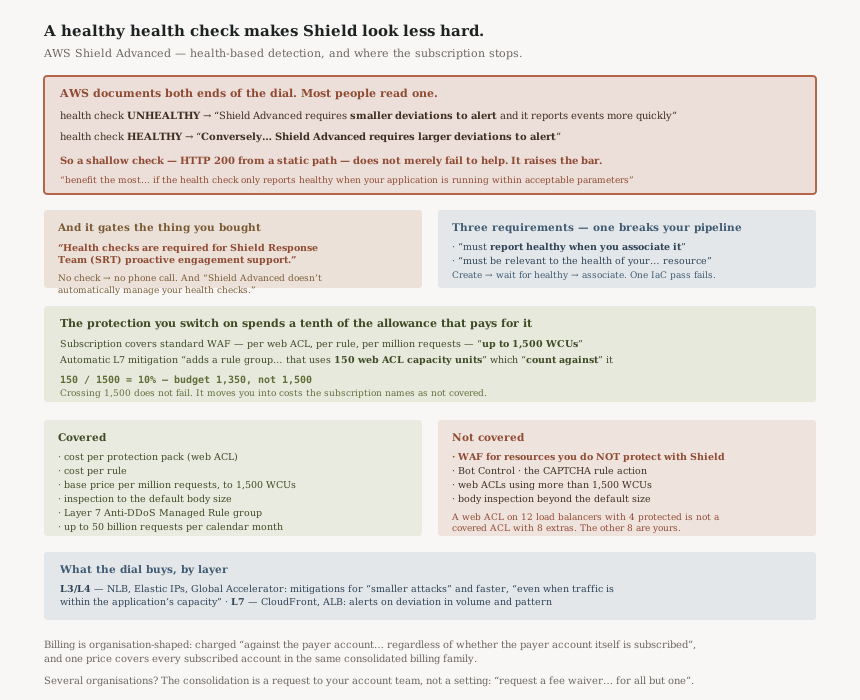
“With health-based detection, when the associated Route 53 health check is unhealthy, Shield Advanced requires smaller deviations to alert and it reports events more quickly.”
“Conversely, when the associated Route 53 health check is healthy, Shield Advanced requires larger deviations to alert.”
Read those together. Associating a health check does not only add sensitivity when things are bad; it removes sensitivity when the check says things are fine. A classic shallow check — an HTTP 200 from a path that returns a static response — keeps reporting healthy while the application behind it is drowning. That is not a neutral failure. It actively raises the threshold Shield needs to cross before telling you.
AWS says what good looks like, and the condition is strict: “You'll benefit the most from using a health check with Shield Advanced if the health check only reports healthy when your application is running within acceptable parameters and only reports unhealthy when it's not.”
FixPoint the health check at something that degrades when the application degrades — a path that touches the dependency you actually worry about. If you are not willing to maintain that, understand you are choosing between no health check and a check that can work against you.
One line, in a note, carrying a dependency people discover during an incident:
“Health checks are required for Shield Response Team (SRT) proactive engagement support.”
Proactive engagement is the SRT contacting you when they see something, rather than you raising a case and waiting. It is a large part of what the subscription is bought for, and it is conditional on a Route 53 health check existing and being associated.
So the health check is not an optimisation. It is a prerequisite for one of the headline benefits, and nothing about subscribing to Shield Advanced creates one for you: “Shield Advanced doesn't automatically manage your health checks.”
FixTreat "configure a Route 53 health check per protected resource" as a step in subscribing, not as a later refinement. Check it during onboarding rather than discovering the gap when you wanted a phone call.
The subscription covers standard AWS WAF costs, bounded: “the cost per protection pack (web ACL), the cost per rule, and the base price per million requests for web request inspection, up to 1,500 WCUs and up to the default body size”.
And then: “Enabling Shield Advanced automatic application layer DDoS mitigation adds a rule group to your protection pack (web ACL) that uses 150 web ACL capacity units (WCUs). These WCUs count against the WCU usage in your protection pack (web ACL).”
150 / 1500 — the automatic mitigation consumes a tenth of the
capacity the subscription pays for, before any rule of yours. And crossing 1,500 does not fail; it
moves you into costs the subscription explicitly excludes:
“web ACLs that use more than 1,500 WCUs” is named among the
“non-standard AWS WAF costs” that are not covered.
Budget WCUs as 1,350 rather than 1,500 if automatic mitigation is on, and know that the boundary is a billing change rather than a block.
Architecture
A subscription with edges, a detection mechanism you tune, and a response team you can only reach proactively if you did one specific thing first.
What the dial actually does, by resource class
| Layer | Resources | What health-based detection changes |
|---|---|---|
| Network / transport (3 and 4) | “Network Load Balancers, Elastic IP addresses, and Global Accelerator standard accelerators” | Mitigations for “smaller attacks” and “faster mitigation… even when traffic is within the application's capacity” |
| Application (7) | CloudFront distributions and Application Load Balancers | Alerting on “a statistically significant deviation in traffic volume… combined with significant changes in traffic patterns”, with the threshold moved by health |
The layer 3/4 phrase worth noticing is “even when traffic is within the application's capacity”. Without health-based detection, an attack that your infrastructure is absorbing may not trip anything, because nothing is obviously wrong. That is often fine and occasionally expensive — absorbing an attack is a cost you are paying.
“The health check must report healthy when you associate it with your Shield Advanced protection. The health check must be relevant to the health of your protected resource.” And: “You are responsible for defining and maintaining health checks that accurately report the health of your application.”
The first is an ordering constraint. A Terraform or CloudFormation run that creates the health check and the association in one pass can fail, because a newly created health check has not yet reported healthy. That is the kind of thing that works when you build it by hand and breaks in the pipeline.
Where the subscription's edges are
The covered set is specific, and so is the excluded set.
| Covered by the subscription | Not covered |
|---|---|
| Cost per protection pack (web ACL) | “AWS WAF for resources that you do not protect using Shield Advanced” |
| Cost per rule | Bot Control |
| Base price per million requests, “up to 1,500 WCUs” | Web ACLs “that use more than 1,500 WCUs” |
| Inspection “up to the default body size” | The CAPTCHA rule action; body inspection beyond the default size |
| The Layer 7 Anti-DDoS Amazon Managed Rule group | Requests beyond “50 billion requests… in a calendar month” |
Two of those are gradients rather than switches. Exceeding 1,500 WCUs or the default body size does not stop anything working — it changes who pays. That makes them the kind of boundary you cross without an event, which is the recurring theme of this block.
Billing lands on the payer account, subscribed or not
“For accounts that are members of an AWS Organizations organization, AWS bills the Shield Advanced subscriptions against the payer account for the organization, regardless of whether the payer account itself is subscribed.”
And the economics that follow: “When you subscribe multiple accounts that are in the same AWS Organizations consolidated billing account family, one subscription price covers all subscribed accounts in the family. The organization must own all of the AWS accounts and all of their resources.”
So the subscription is an organisation-level purchase that happens to be enabled per account. A team subscribing "their" account is not buying a small thing — and conversely, once the organisation is paying, additional accounts in the family are covered by the same price.
Why This Architecture Holds Up
The bidirectional dial is the right design, stated honestly
It would be easy to document health-based detection as "improves detection" and leave the converse unstated. AWS writes it out: healthy means “larger deviations to alert”. That is correct behaviour — a system known to be serving normally should tolerate more variation before crying wolf — and publishing it is what lets you reason about whether your health check is good enough to be trusted with that job.
The design assumes a health check that means something. The documentation says so twice, once as a benefit condition and once as a responsibility. The failure mode is not AWS's; it is a health check written years ago to satisfy a load balancer.
Covering standard WAF costs changes the WAF decision
The covered list — protection pack, rules, base request inspection — is most of what an ordinary web ACL costs. For a team already running WAF on protected resources, a meaningful part of the Shield Advanced subscription is recovered rather than added.
That reframes the comparison. The question is not "is DDoS protection worth the subscription" but "is the subscription worth the difference, given it absorbs the WAF bill for these resources" — and the answer changes with how much WAF you already run.
“Your subscription to Shield Advanced does not cover the use of AWS WAF for resources that you do not protect using Shield Advanced.”
Protection is per resource, and so is the cost coverage. A web ACL attached to twelve load balancers where only four are Shield-protected is not a covered web ACL with eight extras — the WAF costs for those eight are yours.
Which means the cheapest configuration and the most protected configuration point the same way: protect everything the web ACL serves, or move the unprotected resources to their own ACL deliberately.
The fee waiver for multiple organisations is a manual step
For customers running more than one organisation, the documentation does not describe a setting. It describes a conversation: “Contact your account manager or AWS support and request a fee waiver on the AWS Shield Advanced subscription charges for all but one of the organizations.”
That is worth knowing because it will not happen by itself. An organisation structure that grew by acquisition, each with its own Shield subscription, is paying several times for something AWS will consolidate on request.
Key Architecture Decisions
| Decision | Choice | Reasoning |
|---|---|---|
| Health check depth | Make it reflect real application health | A healthy check means “larger deviations to alert”, so a shallow one suppresses detection. |
| Whether to attach one at all | Yes — it gates proactive SRT | “Health checks are required for Shield Response Team (SRT) proactive engagement support.” |
| Provisioning order in IaC | Create, wait for healthy, then associate | The check “must report healthy when you associate it”. |
| WCU budgeting | Plan against 1,350, not 1,500 | Automatic mitigation consumes 150 of the covered 1,500. |
| Web ACL composition | Do not mix protected and unprotected resources | Coverage is per protected resource, not per web ACL. |
| Route 53 hosted zones | Do not plan on health-based detection | It works with “any resource type except for Route 53 hosted zones”. |
| Multiple organisations | Ask for the fee waiver | It is a request to your account team, not a setting. |
| Who owns the subscription | Treat it as organisation-level | Billed to the payer account “regardless of whether the payer account itself is subscribed”. |
| Request volume | Know where 50 billion a month sits for you | Beyond it, requests are billed separately. |
The audit worth running
For every Shield-protected resource, answer two questions: is a health check associated, and would that check go unhealthy if the application degraded without failing outright? The first is a yes/no you can query. The second needs somebody to read the check definition, and it is the one that decides whether the dial is helping or hurting.
Then total the WCUs on each protection pack. Anything near 1,350 is one rule away from crossing into uncovered cost, and the crossing produces a larger bill rather than an error.
Closing Thought
Shield Advanced is well documented, and unusually candid about its own conditionality. It says the protections “can vary depending on your architecture and configuration choices” in the overview rather than in a footnote, it writes out both directions of the health-check dial, and it lists what the subscription does not cover beside what it does.
The thing to carry away is that the health check is load-bearing in a way its origins do not suggest. It was probably created to tell a load balancer which targets to use. Associated with a Shield protection it becomes a statement about whether your application is behaving normally, and Shield believes it — which is right when it is true and costly when it is not.
That is the same pattern as the five posts before it, in a different domain. #80 had an identifier chosen for convenience becoming a permission decision. #82 had a schema version becoming a query result. Here a liveness probe becomes a detection threshold. In each case the signal is doing a job it was not designed for, and nothing in the system announces the promotion.
Security & Identity — AWS Resource Explorer: what an index actually contains, why a view is the unit of access rather than the index, and what an aggregator index changes about cross-Region search.
Official AWS Reference
- AWS Shield Advanced overview — the conditionality statement, the AWS WAF costs the subscription covers and the 1,500 WCU and default body size bounds, the 150 WCUs consumed by automatic application layer mitigation, the named non-standard costs, the 50 billion request allowance, and the organisation billing rules
- Health-based detection using health checks with Shield Advanced and Route 53 — both directions of the detection threshold, the SRT proactive engagement requirement, the resource types covered at each layer, the three requirements for a usable health check, and the statement that Shield Advanced does not manage them for you
- How AWS Shield works — further reading on the service as a whole; no claims in this post are drawn from it
- AWS Shield — the chapter this material sits in; no claims in this post are drawn from it
Comments