Business Challenge
Two days ago EC2 gained a fifth status check, for accelerated instances that are degraded but reachable, and the documentation noted in passing that a failed performance status check “also increments the StatusCheckFailed metric”. That is the aggregate. The obvious next question is what, exactly, is wired to the aggregate — and for a great many accounts the answer is an instance recovery action written years ago.
So this is worth getting precise about, because recovery is one of those features that everybody has switched on and very few people have read. The usual mental model is if my instance breaks, AWS restarts it somewhere else. Each clause of that is slightly wrong. It is not any break, it is not a restart, and whether it happens at all was decided when the instance launched.
Three facts decide whether recovery helps you, and none of them are intuitive.
“If AWS detects that an instance is unavailable due to an underlying hardware or software issue, there are two mechanisms that can automatically restore instance availability” — simplified automatic recovery and CloudWatch action based recovery.
Simplified recovery is Enabled by default on supported instances, which is why most teams have it without having chosen it. But it is Excluded for metal instance sizes and Not supported for instances that attach instance store volumes at launch — precisely the shapes nobody wants to lose. Those instances have no recovery at all unless somebody built a CloudWatch alarm, and nothing announces the absence.
“Automatic instance recovery can recover an instance that fails a system status check. However, automatic instance recovery does not operate if only the instance status check fails.”
The correct signal for a recover action is StatusCheckFailed_System. The aggregate
StatusCheckFailed is a different thing, and it is a different thing than it was
last week, because “A failed performance status check also increments the
StatusCheckFailed metric.” An alarm written years ago for a host failure can now
migrate an instance for a degraded GPU.
“During the instance recovery process, AWS will attempt to move your instance from the host with the underlying hardware or software issue to a different host. If successful, the instance recovery process will appear to the instance as an unplanned reboot.”
RAM is gone and uptime resets, but the instance ID and the addresses survive — and the documentation draws the contrast with the thing an engineer does by hand: “unlike automatic instance recovery, where the instance retains its public IPv4 address, a restarted instance receives a new public IPv4 address unless it has an Elastic IP address.” The managed path is gentler than the manual one, which inverts the usual instinct.
Architecture
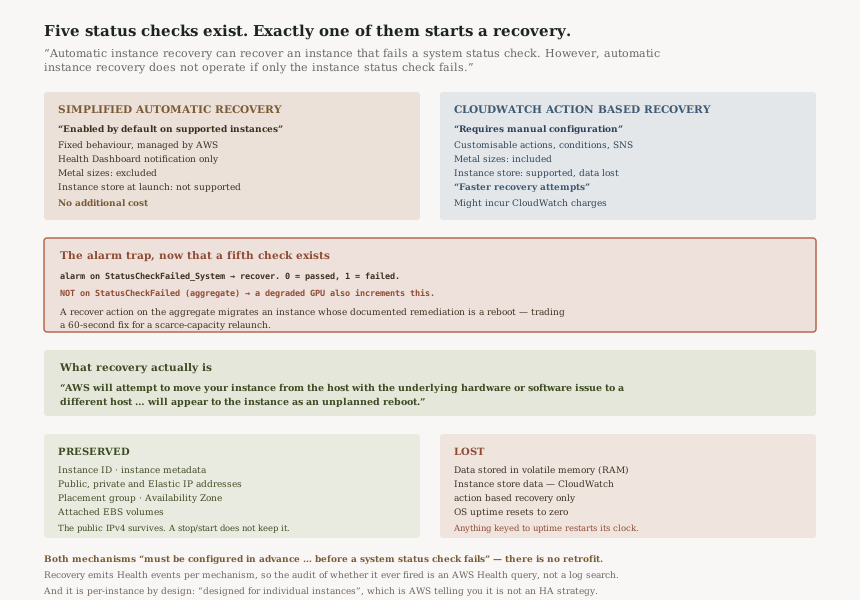
Two mechanisms, and only one of them is on by default
“If AWS detects that an instance is unavailable due to an underlying hardware or software issue, there are two mechanisms that can automatically restore instance availability” — simplified automatic recovery, and CloudWatch action based recovery.
Most teams have the first without knowing it and believe they have the second. They are not interchangeable, and the differences land precisely on the fleets where recovery matters most:
| Comparison point | Simplified automatic recovery | CloudWatch action based recovery |
|---|---|---|
| Configuration | Enabled by default on supported instances | Requires manual configuration of CloudWatch alarms and actions |
| Flexibility | Fixed recovery behavior managed by AWS | Customizable actions and conditions |
| Notification | Health Dashboard | Customizable through SNS |
| Metal instance size | Excluded | Included |
| Instance store volumes attached at launch | Not supported | Supported on selected types — and the data is lost |
| Recovery time | Standard recovery attempt | Faster recovery attempts |
| Cost | No additional cost | Might incur CloudWatch charges |
Read the metal row and the instance-store row together and a pattern appears: the default mechanism excludes exactly the shapes that cannot be casually replaced. A metal host, or an instance whose local NVMe holds working state, gets no simplified recovery at all. Those are the instances a team is least willing to lose and most likely to assume are covered.
And the retrofit does not exist: “To benefit from the automatic recovery mechanisms, they must be configured in advance on an instance before a system status check fails.” Reacting to an impairment by enabling recovery is too late by definition.
One check out of five starts it
“If a system status check fails, AWS initiates automatic instance recovery, which attempts to migrate the affected instance to different hardware.” And the exclusion is stated just as plainly: “automatic instance recovery does not operate if only the instance status check fails”.
That is the whole trigger surface. EC2 now publishes “five types of status checks: system, instance, attached EBS, application, and performance”, and recovery responds to one of them. The reasoning is sound rather than arbitrary: “A failed system status check indicates a problem with the host's hardware or software, and not a problem with the instance itself”. Moving a guest to a different host only helps when the host is the problem. A kernel panic travels with you.
The documented causes are all host-level: “loss of network connectivity, loss of system power, software issues on the physical host, and hardware issues on the physical host that impact network reachability”.
The metric to alarm on, and the one to stop alarming on
For CloudWatch action based recovery the correct signal is named in the documentation:
“The StatusCheckFailed_System metric in CloudWatch indicates whether a system status check
passed or failed”, reporting 0 when it passed and 1 when it
failed.
The aggregate StatusCheckFailed is a different thing, and as of this week it is a
materially different thing:
“A failed performance status check also increments the StatusCheckFailed metric.”
So a recover action attached to the aggregate now fires for a condition that recovery is the wrong answer to. A degraded GPU is not a host failure; its documented remedy is a reboot to reset the GPU and trigger row remapping, which resolves the issue without replacing the instance. Migrating instead is slower, discards the fix AWS actually recommends, and on accelerated capacity it trades a short reboot for a relaunch into a pool that may not have room.
One alarm, one metric, one remedy. The aggregate is a reasonable thing to put on a dashboard for a human to interpret; it is a poor thing to attach an automated action to, because it unions conditions whose correct responses differ.
What survives a recovery
“A recovered instance is identical to the original instance, except for the elements that are lost.” Preserved: instance ID, public, private and Elastic IP addresses, instance metadata, placement group, attached EBS volumes, Availability Zone.
Lost: “Data stored in volatile memory (RAM) will be lost and the operating system's uptime will start over from zero. Furthermore, with CloudWatch action based recovery, data on instance store volumes will also be lost.”
The instance-ID and IP preservation is the operationally valuable part, and it is what separates recovery from the manual fix people reach for. The documentation makes the contrast explicitly: “unlike automatic instance recovery, where the instance retains its public IPv4 address, a restarted instance receives a new public IPv4 address unless it has an Elastic IP address”.
That is worth sitting with. A stop/start — the thing an engineer does at 3am when an instance is unreachable — silently changes the instance's public address. Anything holding that address (a DNS record, a partner's allow-list, a hard-coded config) breaks, and it breaks as a consequence of the fix rather than of the fault. Recovery does not do that. Letting the mechanism act before intervening by hand is therefore the lower-blast-radius path, which inverts the usual instinct.
The uptime reset deserves a note too: anything that keys off uptime — a licence check, a cron-style scheduler, a heartbeat that treats low uptime as a fresh boot, a monitoring rule that suppresses alerts for newly booted hosts — sees a brand-new machine. The instance ID did not change, so inventory reconciliation will not flag it.
It can fail, and it can change its mind
Recovery is an attempt, not a guarantee: “If the recovery process is unsuccessful, the instance might continue running on the host with the underlying hardware or software issue. In this case, manual intervention is required.”
And in both mechanisms, “Migration might be canceled and the instance stays on the original host” if the host problem resolves mid-migration. Which means an impairment can appear, a recovery can begin, and the instance can end up exactly where it started with no reboot at all. A runbook that assumes impairment implies reboot will mis-explain what happened.
This is where the Health events matter. Recovery attempts emit distinct Health Dashboard event types per mechanism and per outcome — success and failure variants for simplified recovery, and a separate pair for CloudWatch action based recovery. That is the audit trail for whether recovery fired and whether it worked, and it is the same Health event channel that just gained resource and account tags, so these events can now carry the tags of the instance they are about.
Why This Architecture Holds Up
Restricting the trigger to system checks is a feature
A recovery that fired on any impairment would be actively harmful. Instance status check failures are guest problems, and migrating a guest carries its problem along while costing an unplanned reboot. Narrowing the trigger to the one class of fault that changing hosts can actually fix is the correct design, and AWS states the reasoning rather than leaving it implicit.
Enabling simplified recovery by default is the right call
The failure mode of a default-off resilience feature is that it is off on the instance that needed it, discovered during the incident. Making it the launch default, at no additional cost, with fixed AWS-managed behaviour, means the common case is covered without anyone deciding anything. The exclusions — metal, instance store at launch — are the shapes where a generic AWS-managed action genuinely cannot be safe.
Presenting as an unplanned reboot is the honest abstraction
AWS could have described recovery as transparent. Instead the documentation says it “will appear to the instance as an unplanned reboot” and spells out that RAM is gone and uptime resets. That is what the guest actually experiences, and saying so lets you reason about it: anything that cannot survive an unplanned reboot cannot survive a recovery either, so the test is one you already know how to run.
And the admission that this is not a resilience strategy
“Automatic instance recovery mechanisms are designed for individual instances.” AWS follows it by recommending load balancing and Auto Scaling for a resilient system. A feature whose documentation tells you it is not the architecture you want is being straight with you, and it is the line to quote when someone proposes recovery as the availability plan.
Key Architecture Decisions
| Decision | Take | Why |
|---|---|---|
| Which mechanism | Leave simplified on everywhere; add CloudWatch action based recovery on metal and instance-store-at-launch instances | Those two shapes are excluded from or unsupported by the default, and they are the least replaceable |
| Which metric for a recover action | StatusCheckFailed_System, never the aggregate |
The aggregate now includes a performance condition whose documented remedy is a reboot, not a migration |
| Instance store workloads | Treat local disk as lost on recovery and design for it | Instance store data is lost under CloudWatch action based recovery |
| Manual stop/start during an incident | Let recovery act first; stop/start is the escalation, not the reflex | A restart changes the public IPv4 address unless there is an Elastic IP; recovery keeps it |
| Treating recovery as HA | Do not | It is documented as being for individual instances; the resilient-system answer is ELB and Auto Scaling |
The audit worth running
Three questions, and none of them are answerable from the instance:
- Which instances have neither mechanism? Metal and instance-store-at-launch instances have no simplified recovery, so unless someone built an alarm they have none at all.
-
Which recover actions point at the aggregate metric rather than at
StatusCheckFailed_System? That is the alarm whose behaviour changed this week without anyone editing it. - Has recovery ever actually fired, and did it succeed? The Health events are the record — the success and failure event types differ by mechanism, so the query also tells you which mechanism acted.
Closing Thought
The interesting thing about recovery is how much of it is decided before anything goes wrong. Which mechanism you have was set at launch. Whether the mechanism covers your instance shape was set by AWS. What the recovery preserves was set by its design. By the time the system status check fails, every meaningful decision has already been made, and the only remaining variable is whether the migration succeeds.
Which is why the audit above is the whole of the work. There is no runbook step for recovery, no lever to pull during the incident, nothing to tune. There is only the question of whether the instances you care about are covered, and whether the alarm you wrote for a host failure is still only watching host failures — because that one stopped being true this week, quietly, in a metric nobody edited.
And the small counter-intuition worth keeping: the instinct to stop and start an unreachable instance is the one action that throws away an address other systems may depend on. The managed mechanism is gentler than the manual fix. That is unusual enough to be worth remembering at 3am.
Reliability — Amazon EC2 Auto Scaling health checks: how an Auto Scaling group decides an instance is unhealthy, why that decision is separate from EC2's own status checks, what the health check grace period actually protects, and how replacement interacts with an instance that recovery would have fixed.
Official AWS Reference
- Automatic instance recovery — that two mechanisms exist and that simplified automatic recovery is enabled by default at launch while CloudWatch action based recovery requires manual configuration, that both must be configured in advance before a system status check fails, that a failed system status check initiates recovery by migrating the instance to different hardware while recovery does not operate if only the instance status check fails, that a system check failure indicates a host problem rather than an instance problem and the documented host-level causes, that recovery appears to the instance as an unplanned reboot, the preserved and lost elements including RAM, instance store data under CloudWatch action based recovery and the uptime reset, the contrast with a restarted instance receiving a new public IPv4 address, that an unsuccessful recovery may leave the instance on the impaired host requiring manual intervention, that migration might be canceled if the host problem resolves, the
StatusCheckFailed_Systemmetric and its 0 and 1 values, the per-mechanism Health Dashboard events, the comparison table including the metal and instance-store rows, recovery speed and cost, and that these mechanisms are designed for individual instances - Status checks for Amazon EC2 instances — that EC2 provides five types of status check, and that a failed performance status check increments both
StatusCheckFailed_Performanceand the aggregateStatusCheckFailedmetric - Configure CloudWatch action based recovery on an EC2 instance — further reading on the alarm and action configuration and its instance-type requirements; no claims in this post are drawn from it
- Configure simplified automatic recovery on an Amazon EC2 instance — further reading on the requirements for the default mechanism and how to disable it; no claims in this post are drawn from it
- Verify if automatic instance recovery occurred — further reading on confirming a recovery after the fact; no claims in this post are drawn from it
Comments