Business Challenge
#116 covered the six account-level policy types and promised a closer look at the one with the strongest-sounding name. Data protection policies “let you audit and mask sensitive data that appears in log events ingested by the log groups in your account”, across a long list of managed identifiers — credentials, financial data, PII, PHI, device identifiers.
The word that does the work is mask, and it is doing something narrower than most readers hear. Masking is not redaction, and the documentation says so clearly enough if you read two sentences together rather than one.
“When you create a data protection policy, then by default, sensitive data that matches the data identifiers you've selected is masked at all egress points, including CloudWatch Logs Insights, metric filters, and subscription filters.”
And immediately after: “Only users who have the logs:Unmask IAM permission can view unmasked data.” Concretely, that user “can use a GetLogEvents or FilterLogEvents operation with the unmask parameter set to true to view the unmasked log events”.
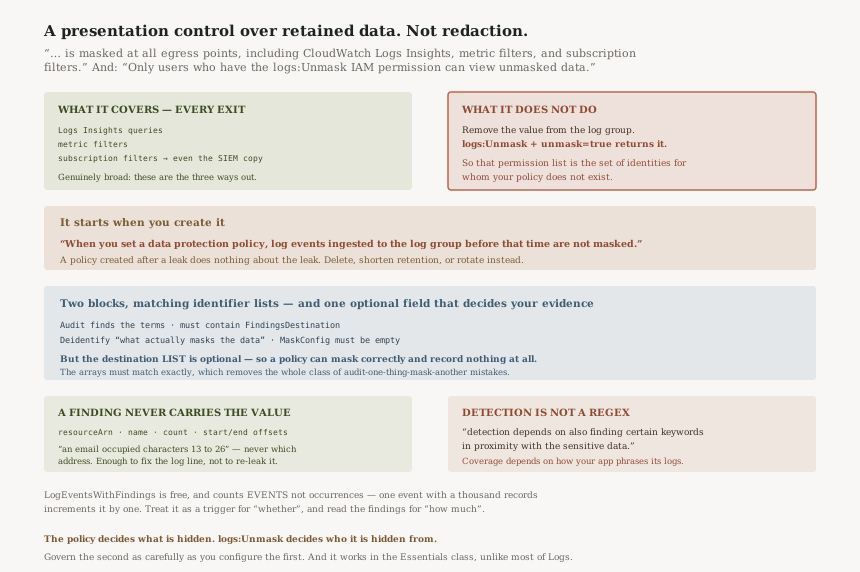
Put those together and the architecture is unambiguous. The masking happens on the way out, which means the unmasked value is still there to be returned when someone asks with the right permission and a parameter. This is a presentation control over retained data, not a destruction control. Both are legitimate designs; they answer different questions, and a compliance conversation that treats the first as the second is building on sand.
The egress list is the reassuring half, and it is genuinely broad: Logs Insights, metric filters
and subscription filters are the three ways data leaves a log group, and all three mask. The copy
that reaches your SIEM through #115's subscription filter is masked. What is not protected is the
data at rest, from anyone holding logs:Unmask.
Treat logs:Unmask as a tightly governed permission: granted to a named role, never to a human group. Monitor supported CloudTrail activity associated with access to CloudWatch Logs, and verify which unmask operations and request parameters are captured before relying on CloudTrail alerts as evidence of every unmasked read — IAM authorization and audit coverage are different controls. The data protection policy decides what is hidden; that permission decides who the hiding does not apply to, and it is the shorter list to audit.
The timing rule is in an Important callout, and it is the same shape as #113's field indexes:
“Sensitive data is detected and masked when it is ingested into the log group. When you set a data protection policy, log events ingested to the log group before that time are not masked.”
So a policy created in response to an incident does nothing about the incident. The credentials already in the log group stay visible to everyone who could already read them, and the only remedies are the ones that were always available: delete the log stream, shorten retention, or rotate what leaked. For an account-level policy there is also a propagation delay — “It might take up to 5 minutes before sensitive data in existing log groups begins to be masked”.
The second half of this is the policy's own structure. A data protection policy is two JSON
blocks: an Audit action and a Deidentify action, where
“The Operation property with the Deidentify action is what actually masks the
data” and the identifier lists
“must exactly match” between them. The audit block is mandatory — it is
“required to find the sensitive data terms” — and it must contain a
FindingsDestination object.
But: “You can optionally use that FindingsDestination object to list one
or more destinations to send audit findings to.” An empty destination list is valid. So
the common outcome is a policy that masks correctly and keeps no durable record of what it found,
leaving only the LogEventsWithFindings metric — a count, with no indication of
which log group, which identifier, or how often.
Configure a findings destination when you create the policy, not later, and note that destinations “must already exist” before the policy will accept them. If the destination is an S3 bucket with SSE-KMS, the extra step is real: “you must update the key policy for your KMS key so that the log delivery account can write to your S3 bucket”, whereas SSE-S3 needs nothing. And alarm on LogEventsWithFindings regardless, since it is free — “vended metrics and are free of charge”.
Two statements set expectations correctly, and both are easy to skim past.
On the mechanism: “CloudWatch Logs data protection allows you to leverage pattern matching and machine learning models to detect sensitive data”, and — the important one — “For some types of managed data identifiers, the detection depends on also finding certain keywords in proximity with the sensitive data.”
That is the difference between a regex and a detector. A driver's licence number in a log line with no nearby word suggesting it is a driver's licence may not be detected at all. The design is sound — context-free matching on a nine-digit number would mask half your request IDs — but it means coverage is a function of how your application happens to phrase its log messages, which nobody chose deliberately.
On measurement: “Even though this log event has two email addresses, the value of the LogEventsWithFindings metric is incremented only by one, because that metric counts the number of log events that contain sensitive data, not the number of occurrences of sensitive data.”
So the metric is a lower bound on exposure, and a bad one if your leak is a single log event containing a thousand records. A flat line at one per minute can be one address or a bulk dump.
FixWrite a custom data identifier for anything whose format you control — internal account numbers, customer references, tenant IDs — rather than hoping a managed identifier infers it: “You can also use custom data identifiers to create data identifiers tailored to your specific use case.” And treat LogEventsWithFindings as a detector of whether rather than how much; the findings reports are where the counts live.
Architecture
What the control actually does
| Question | Answer |
|---|---|
| Is the sensitive value removed from the log group? | No — masking is applied “at all egress points” |
| Who can see through it? | Holders of logs:Unmask, via the unmask parameter |
| Does it cover data already in the log group? | No — events ingested before the policy “are not masked” |
| Does it cover what leaves via a subscription filter? | Yes — subscription filters are an egress point |
| Does it cover Logs Insights queries? | Yes |
| Is there a record of what was found? | Only if you configured a findings destination — it is optional |
| Does it work in the Essentials log class? | Yes — “both the Standard and Essentials” classes |
That last row is worth noting against #114. Almost everything else in CloudWatch Logs is Standard-only — field indexing, metric filters, subscription filters, Live Tail. Masking works in the cheap class, which makes the consolidation tier a safer place to put logs you have not fully vetted than its feature table would suggest.
The two blocks, and why they must agree
“The first block must include both a DataIdentifer array and an Operation property with an Audit action”; “The second block must include both a DataIdentifer array and an Operation property with an Deidentify action. The DataIdentifer array must exactly match the DataIdentifer array in the first block of the policy.” And the deidentify block is mechanically fixed: it “must contain the "MaskConfig": {} object. The "MaskConfig": {} object must be empty.”
The requirement that the arrays match exactly is the service refusing to let you audit one set of identifiers and mask a different one. That could only produce two outcomes, both bad: data masked with no finding recorded, or a finding recorded for data still visible. Forcing the two lists to be identical removes the whole class of mistake, at the cost of a policy document that looks redundant and invites someone to simplify it.
What a finding tells you, and what it refuses to
“CloudWatch Logs writes one findings report for each log event that contains sensitive data”, containing the log group ARN, the identifier “name”, a “count” of occurrences in that event, and “The start and end fields show where in the log event, by character count, each occurrence of the sensitive data appears.”
What it does not contain is the value. A finding says an email address occupied characters 13 to 26 of this event, never which address. That is the right call and not an obvious one: a findings pipeline that carried the sensitive values would recreate the exposure in a second system, usually a less protected one. Offsets and counts are enough to triage and fix a logging statement without copying the secret into S3.
The one thing to design around is that offsets are a weak side channel in aggregate — stable offsets across many events reveal the shape of your log lines, not their contents. Negligible for most, worth a thought if findings go somewhere broadly readable.
How account and log-group policies combine
From #116's conflict table, this is the cumulative case: “If you create a data protection policy for your entire account and you also create a policy for a single log group, both policies apply to that log group. All managed data identifiers that are specified in either policy are audited and masked in that log group.”
With “Each log group can have only one log group-level data protection policy” and a document limit of “30,720 characters”. Cumulative is the right default for a protective control — a team can add identifiers for their own data without being able to subtract the organisation's. There is no exclusion mechanism here at all, which #116 showed is unusual among the six policy types and, for this one, correct.
Why This Architecture Holds Up
Masking at egress rather than at rest is the defensible choice
Destroying the original at ingestion would make the log group the only copy and the detection irreversible: a false positive would silently corrupt an audit trail, with no way to recover what was overwritten. Masking on read keeps the record intact and makes the exception auditable through one permission. The honest framing is that this control reduces casual exposure across every read path, and does not claim the data is gone.
Keeping values out of findings is a genuinely good decision
The obvious design is for an audit finding to say what it found. Resisting that keeps the sensitive-data blast radius inside the log group instead of fanning it out to every findings destination, and offsets plus counts are sufficient for the actual task — locating the logging statement that emitted it.
Cumulative with no exclusions is right for a protective policy
Every other account-level policy type in #116 has some way to scope or exclude. This one does not, and a protective baseline that a log group owner could narrow would not be a baseline. Additive-only is the correct asymmetry.
Key Architecture Decisions
| Decision | Choose this | Because |
|---|---|---|
| The real control boundary | Grant logs:Unmask to a named role and govern it tightly |
Masking is applied at egress and that permission reverses it |
| Findings destination | Configure one at creation | It is optional, and without it the only evidence is an event count |
| Destination encryption | SSE-S3 unless you need SSE-KMS | SSE-KMS needs a key policy update for the log delivery account; SSE-S3 needs nothing |
| Responding to a leak already in logs | Delete, shorten retention, or rotate — not a policy | Events ingested before the policy are never masked |
| Identifiers for your own formats | Custom data identifiers | Managed detection can depend on nearby keywords, which your log phrasing decides |
| Measuring exposure | Findings reports, with the metric as the trigger | LogEventsWithFindings counts events, not occurrences |
| Alarming | Alarm on the metric from day one | It is free, and it is the only always-present signal |
| Scope | Account-level baseline, log-group policies to add | The two are cumulative and there is no exclusion mechanism |
The audit worth running
List every principal with logs:Unmask. That list is the set of
identities for whom your data protection policy does not exist. If it is longer than a handful of
tightly governed roles, the policy is decoration.
Check whether each data protection policy has a findings destination. A policy masking without recording is the common configuration and the one that leaves you unable to answer what leaked, when, or from where.
Compare policy creation dates against log group retention. Any log group whose retention reaches back before its policy has an unmasked window still being served, and the length of it is arithmetic you can do today.
Test detection with a synthetic event in the format your application actually logs. Because some identifiers need nearby keywords, the only reliable coverage check is writing a line that looks like your real lines and querying for it.
Establish what your trail actually captures. Monitor supported CloudTrail activity associated with access to CloudWatch Logs, and verify which unmask operations and request parameters are recorded before treating CloudTrail as evidence of every unmasked read. The permission is the boundary; whether each exercise of it is individually recorded is a separate question, and the documentation cited here does not answer it.
Closing Thought
Five posts ago this series was looking at alarms that say nothing. The thread since has been about controls whose name is broader than their guarantee: an index that only covers what arrived after it, a class whose saving is only at ingestion, a subscription whose permissions failure skips the logs, an API whose retention policy deletes.
Data protection policies are the most sharply named of them. Mask sounds terminal, and the control is genuinely strong across every path data takes out of a log group — Logs Insights, metric filters, subscription filters, all of it. But the data is still there, one IAM permission and one request parameter away, which is not a flaw so much as the thing you must know in order to describe the control accurately to an auditor.
So the rule is: the policy decides what is hidden, and logs:Unmask decides who it is
hidden from. Govern the second as carefully as you configure the first — and keep the two
questions apart, because who is authorised to unmask and what your trail records about unmasking are
different controls with different coverage. Record what the audit block finds rather than leaving the
destination empty, and remember that none of it reaches backwards to the credential that was logged
last Tuesday.
Security — CloudWatch Logs custom data identifiers: what a custom pattern can and cannot express, the documented constraints on it, and why a detector that depends on keywords in proximity behaves differently from a pattern match in ways that decide your coverage.
Official AWS Reference
- Help protect sensitive log data with masking — that masking is applied at all egress points including Logs Insights, metric filters and subscription filters, that only
logs:Unmaskholders see unmasked data, that events ingested before the policy are not masked, how account-level and log-group policies combine cumulatively, the one-policy-per-log-group rule and the 30,720-character limit, support in both the Standard and Essentials log classes, the keyword-proximity dependency for some identifiers, custom data identifiers, and the freeLogEventsWithFindingsmetric - Audit findings reports — that one report is written per log event containing sensitive data, the fields it carries including the log group ARN, identifier name, occurrence count and character offsets, that the metric counts events rather than occurrences, and the SSE-S3 versus SSE-KMS requirements for an S3 destination
- PutAccountPolicy — the two-block policy structure with matching data identifier arrays, that the Deidentify action is what masks and must carry an empty
MaskConfig, that the Audit action's findings destinations are optional and must already exist, theunmaskparameter onGetLogEventsandFilterLogEvents, and the up-to-5-minute propagation for account-level policies - Custom data identifiers — further reading on defining identifiers for formats you control, and the constraints on them; no claims in this post are drawn from it
- Types of data that you can protect — further reading on the managed data identifiers available and the keywords some of them require; no claims in this post are drawn from it
- View unmasked data — further reading on the console and API paths for reading through a mask; no claims in this post are drawn from it
Comments