Business Challenge
A disaster recovery plan contains a sentence that has survived three annual reviews: "In the event of a regional outage, services fail over to the paired region." Everyone has read it. Nobody has queried it.
Nothing in the estate implements it. No replica exists in that region, no traffic manager profile points there, no runbook describes a cutover. The sentence is describing a property of Microsoft's platform operations — how Azure sequences its own recovery — and treating it as a property of this workload.
The documentation is unusually direct about this, in bold, in an Important callout: deploying resources to a region in a pair does not automatically make them more resilient, and provides no automatic high availability, no disaster recovery capability, and no failover.
Pairing genuinely does something, and the things it does sound like disaster recovery: recovery prioritisation, staggered updates, a partner region in the same geography. It is easy to hear those and conclude the platform will move your workload. It will not. Pairing changes how Microsoft operates the regions; it changes nothing about what you deployed into them.
Architecture
Azure regions are independent of each other. Microsoft associates some of them with one other region — usually inside the same geography — and that association is the region pair. A small number of Azure services use pairs to build their geo-replication and geo-redundancy, geo-redundant storage being the obvious example.
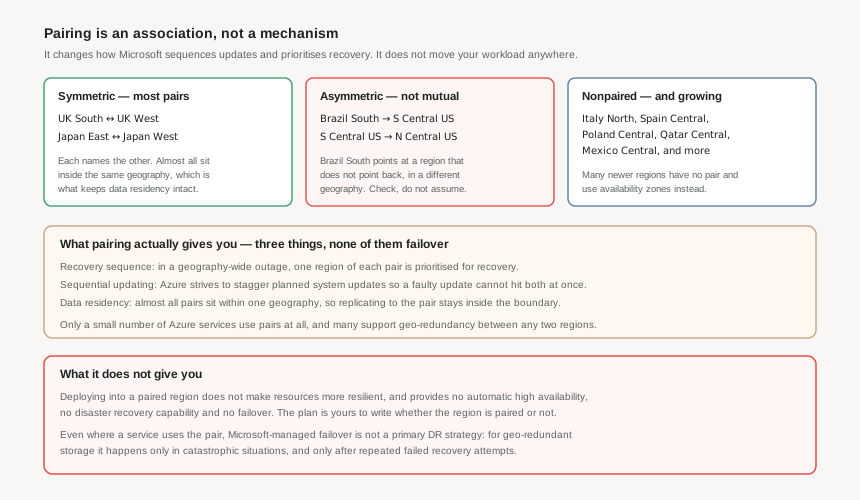
The three things pairing actually provides
- Region recovery sequence. In a geography-wide outage, one region in every pair is prioritised for recovery. Not both — one. If your workload spans the pair, one side comes back first, and which side is not your choice.
- Sequential updating. Azure strives to stagger planned system updates across a pair, so a faulty update cannot land on both at once. This is quiet, continuous, and probably the most valuable of the three.
- Data residency. Almost all pairs sit within the same geography, so a service replicating to its pair keeps data inside the residency boundary from #6.
Notice what is absent from that list. There is no failover. There is no replication of anything you deployed. Two of the three are things Microsoft does to its own platform, and the third is a property of geography.
Even where pairing is used, it is not a DR plan
Microsoft's guidance goes further than "build your own plan". It says explicitly not to rely on Microsoft-managed failover between pairs as a primary disaster recovery approach — and gives the reason with geo-redundant storage: managed failover happens only in catastrophic situations, and only after repeated failed recovery attempts.
That is a description of a last resort, on Microsoft's timetable, not a recovery objective you can put in a plan.
Why This Architecture Holds Up
Two structural facts break the mental model most people carry, and both are visible only if you look at the table rather than assume.
Pairing is not always mutual
Most pairs are symmetrical — West US with East US, East US with West US. But some are not, and the documented exceptions are not obscure regions:
- Brazil South is paired with South Central US, which is outside the Brazil geography. South Central US is not paired with Brazil South — it pairs with North Central US.
- West India is paired with South India, but South India is paired with Central India.
- West US 3 is paired in one direction with East US, while East US is bidirectionally paired with West US.
So "my pair's pair is me" is false in several real cases, and the Brazil example breaks the data residency assumption too: that pair crosses a geography boundary, which is exactly the property the third benefit is usually relied on for.
Many regions have no pair at all
Azure keeps expanding, and many newer regions provide multiple availability zones instead of a pair. The current nonpaired list includes Chile Central, Mexico Central, Austria East, Belgium Central, Denmark East, Italy North, Poland Central, Spain Central, Israel Central, Qatar Central, Indonesia Central, Malaysia West and New Zealand North — thirteen regions across four geographies.
That is not a gap waiting to be filled. It is the newer design: zones as the primary in-region redundancy, and geo-redundancy arranged between whatever regions you choose. Many Azure services already support replication between any arbitrary pair of regions and do not rely on pairing at all.
You are not limited to your region's pair. Microsoft's own example puts storage in Canada Central replicating to Canada East, compute in East US, and other resources in West US — one solution, four regions, no pairing relationship required between most of them. Pairing constrains a few specific service features; it does not constrain your architecture.
Key Architecture Decisions
| Decision | Choose this | Because |
|---|---|---|
| Whether pairing is your DR plan | No, under any circumstances | Microsoft states in an Important callout that pairing provides no automatic high availability, disaster recovery or failover. The plan is yours to build whether the region is paired or not. |
| Choosing a secondary region | Pick what the workload needs, not what the table says | Many services replicate between any two regions. Pairing constrains a few service features, not your architecture, and you can span four regions if that is the right design. |
| If your primary region has a pair | Read the entry in both directions before relying on it | Pairing is not always mutual. Brazil South points at South Central US, which points elsewhere, and that pair also crosses a geography boundary. |
| If your primary region has no pair | Treat that as normal and design zone-first | Thirteen regions are listed with no pair, and newer regions are being built that way deliberately, with zones as the in-region redundancy. |
| Data residency with a paired service | Confirm the pair is in the same geography | Almost all are, which means some are not. A geo-redundant service replicating to a pair outside the geography is a residency incident, not a resilience feature. |
| What to actually value pairing for | Staggered platform updates | It is continuous, it needs no configuration, and it is the one benefit that protects you from a class of failure you cannot otherwise mitigate — a faulty update landing everywhere at once. |
Closing Thought
Region pairing is a real feature that has been quietly recruited into a job it never applied for. It sequences Microsoft's recovery, staggers Microsoft's updates, and keeps most replication inside a geography. It does not move your workload, and the documentation says so in the plainest language Microsoft uses anywhere.
The practical test for any DR plan that mentions a paired region: point at the resource that exists in that region today, and the runbook that promotes it. If neither exists, the plan is describing the platform's behaviour rather than your own.
#9 leaves the infrastructure and starts on the commercial layer: subscription types — EA, MCA, CSP and pay-as-you-go — and how the one you have changes what you can automate, delegate and move.
Comments