Business Challenge
RAM has appeared in this series as a mechanism rather than a subject: #1 shared a Transit Gateway through it, #33 hit its invitation behaviour from the Lake Formation side, and #9 listed accepting a share as a provisioning step. This is the mechanism itself.
One sentence in the overview does most of the work, and it is easy to read past:
“When you share a resource in the owning account with another AWS account, the consuming account, you are granting access for principals in the consuming account to the shared resource. Any policies and permissions that apply to roles and users in the consuming account also apply to the shared resource.”
A share associates a resource with principals, and AWS defines principals broadly: “Principals can be individual AWS accounts, the accounts in an organization or an organizational unit (OU) in AWS Organizations, or individual AWS Identity and Access Management (IAM) roles or users.”
With a caveat that decides which of those you can actually use: “Not all resource types can be shared with IAM roles and users.” So for a good many resource types the finest granularity available to the owner is the account.
From there the consuming account's own IAM decides who inside it may act, and that is a policy set in a different change-control process from yours. The owner is not blind — “The owners of a resource can see which principals have access to each individual resource that they have shared” — but what the owner sees is the principal the share names, which for most resource types is an account rather than the identity that will use it.
FixTreat the account boundary as the unit of trust you are actually granting to, and check whether your resource type supports role-level sharing before designing around it. Where it does not, the consuming account's IAM hygiene is part of your control surface.
Both mechanisms work. AWS says so plainly: “You can share some types of AWS resources with other AWS accounts by attaching a resource-based policy… However, sharing a resource by attaching a policy doesn't take advantage of the additional benefits that AWS RAM provides.”
The difference that matters most is not permission but discoverability. With RAM, “Users can see the resources shared with them directly in the originating AWS service console and API operations as if those resources were directly in the user's account” — AWS's example being a shared subnet appearing “in the Amazon VPC console and in the results of Amazon VPC API operations performed in that account”.
Whereas: “Resources shared by attaching a resource-based policy aren't visible this way; instead, you have to discover and explicitly refer to the resource by its Amazon Resource Name (ARN).”
So a resource-policy share is access that nobody can find by looking. It works for the team that was told the ARN, and it is invisible to the next engineer doing an inventory from the consuming side.
FixUse RAM when the consuming team should be able to see what they have. Reserve resource policies for cases where a specific external principal is addressed deliberately — and record the ARN somewhere a successor will find it.
Two sentences, and the pairing is the point:
“When you delete a resource share, all principals that were associated with the resource share lose access to the shared resources.”
“Deleting a resource share doesn't delete the shared resources.”
Which is the correct separation — revoking access should not destroy data — and it means deletion is an instrument with a sharp edge in the other direction too: “You can't recover a resource share after you delete it.” The resource survives; the share, its principal list and its permissions do not.
There is also a confusing interval afterwards: “The deleted resource share disappears after two hours. Until then, it remains visible in the console with a deleted status.”
FixScript the share rather than clicking it, so deletion is recoverable from source even though it is not recoverable from the API. And read the status column during those two hours before concluding a deletion failed.
Architecture
One share, two accounts, and two independent permission decisions that have to agree before anything happens.
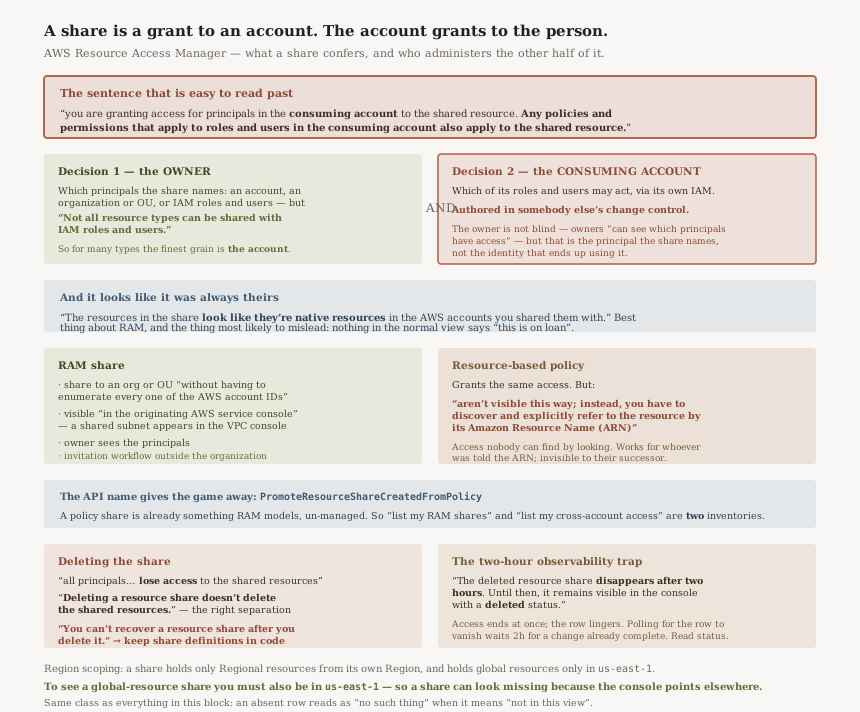
Two permission decisions, two organisations
The sentence from the overview is worth decomposing, because it describes a conjunction rather than a grant:
| Decided by | What it decides | Visible to the owner? |
|---|---|---|
| The owning account | Which principals the share names — accounts, OUs, or roles and users where supported | Yes — owners “can see which principals have access” |
| The consuming account | Which of its roles and users may act, via its own IAM | No — it is that account's policy set |
Both have to permit the call. That is familiar from #35, where a cross-account request needs the resource side and the identity side to agree. What is different here is the direction of ignorance: in a resource-policy world the owner writes the condition and can therefore reason about it; with a RAM share to an account, the second half of the conjunction is authored by somebody else entirely.
“Within the account that owns the resource, AWS RAM simplifies granting access to every role and user in that account without having to use identity-based permission policies.”
Listed as a benefit, and it is one — the owning account does not need to write identity policies to make its own resource usable. It is also worth reading as a statement of scope: the mechanism's natural grain is "everyone in the account", and narrowing it is work you add rather than work you remove.
Why the resource looks native, and why that matters
“The resources in the share look like they're native resources in the AWS accounts you shared them with.”
This is the single best thing about RAM and the thing most likely to mislead. An engineer in the consuming account sees a subnet in their VPC console. It is listed with their own subnets. Their IAM governs what they can do with it. Nothing in the normal workflow announces that deleting their VPC will not delete this subnet, or that the owner can withdraw it at any moment by deleting a share in another account.
The native appearance is deliberate and correct — it is why RAM beats passing ARNs around — and it makes "which of these resources do we actually own?" a question the console does not foreground.
Acceptance depends on organisation membership
“If you share resources with an account that isn't part of your organization, then AWS RAM initiates an invitation process. The recipient must accept the invitation before that principal can access the shared resources.”
And the other case: “After you turn on the ability to share within your organization, sharing with accounts in the organization doesn't require invitations.”
So the same API call has two different outcomes depending on a property of the target: a pending invitation, or live access immediately. #33 ran into the same split from the Lake Formation side, where a cross-account grant behaves differently by relationship. Worth knowing when automating: a share that "did not work" may be a share awaiting acceptance.
The promotion path, for shares you did not know you had
“If you have resources that you have shared by using a resource-based permission policy, you can
promote those resources to fully AWS RAM managed resources” — via
PromoteResourceShareCreatedFromPolicy, or the CLI equivalent
promote-resource-share-created-from-policy.
The operation name is the interesting part: a share created from policy. Sharing by resource policy produces something RAM already models, in a not-fully-managed state, and promotion converts it. Which means an inventory of RAM shares and an inventory of cross-account access are not the same list until you have gone looking for the resource policies too.
Region scoping, with one global exception
| Rule | Consequence |
|---|---|
| “A resource share can contain only Regional resources that are in the same AWS Region as the resource share” | A multi-Region estate needs a share per Region, each with its own principal list to keep in step |
“can contain global resources only if the resource share is in the designated home Region for global resources, US East (N. Virginia), us-east-1” | Global resource sharing happens in one Region whether or not you work there |
“to see resource shares that contain global resources, you must set the AWS Region to US East (N. Virginia), (us-east-1)” | A share can look missing because the console is pointed elsewhere |
That third row is a support ticket waiting to happen, and it is the same class of problem as everything in this block: the absence of a row reads as "no such thing" when it means "not in this view".
Why This Architecture Holds Up
Separating the share from the resource is the right call
“Deleting a resource share doesn't delete the shared resources.” The alternative — revocation that destroys — would make withdrawing access an operation nobody would dare perform. Keeping them separate means access can be withdrawn promptly and reversibly from the resource's point of view.
The corollary is the ordering advice AWS gives for the other direction: “If you need to delete an AWS resource that you included in a resource share, AWS recommends that you first ensure that you either remove the resource from any resource share that includes it, or delete the resource share.” Delete the resource first and you leave a share referring to something gone, which is a tidiness problem rather than a security one, and still worth avoiding.
Sharing to an OU is the feature that justifies the service
“You can share with an organization or an organizational unit (OU) without having to enumerate every one of the AWS account IDs.”
This is the operational argument, and it compounds with account vending. A share scoped to an OU covers accounts that do not exist yet — so an account created by Control Tower next month inherits the Transit Gateway attachment capability without anybody editing a share. The flip side is that the membership of that OU is now a permission boundary, and moving an account between OUs changes what it can reach.
“The deleted resource share disappears after two hours. Until then, it remains visible in the console with a deleted status.”
Access is gone the moment the share is deleted — “all principals that were associated with the resource share lose access” — while the share object lingers for two hours. So during that window the console shows an object that no longer does anything, and an automation that polls for the share's absence to confirm revocation will wait two hours for a state change that was already complete.
Confirm revocation by checking the status field, or from the consuming side, rather than by waiting for the row to vanish.
The resource-policy comparison is honest about both sides
AWS does not claim resource policies do not work. It says they do not get you the RAM features, and it lists them: OU-level targeting, native visibility, owner-side principal visibility, and the invitation workflow. That is a fair account, and it leaves the genuine case for resource policies intact — addressing one named external principal on a resource type RAM may not support.
The feature worth weighing most heavily is the visibility one, because its absence is silent. A resource policy grant is invisible from the consuming console and, unless somebody keeps a register, invisible to the consuming organisation entirely. The access is real either way; only one of the two mechanisms tells the recipient what they have.
Key Architecture Decisions
| Decision | Choice | Reasoning |
|---|---|---|
| Unit of trust | The consuming account, unless your resource type supports roles | “Not all resource types can be shared with IAM roles and users.” |
| Who may use a shared resource | Accept that the consuming account decides | “Any policies and permissions that apply to roles and users in the consuming account also apply.” |
| RAM share or resource policy | RAM, when the recipient should be able to find the resource | Policy-shared resources “aren't visible this way” and need the ARN. |
| Auditing cross-account access | List RAM shares and resource policies | PromoteResourceShareCreatedFromPolicy exists because the two are different inventories. |
| Targeting | Share to an OU where the intent is structural | No need to “enumerate every one of the AWS account IDs”, and new accounts inherit it. |
| OU membership | Treat it as a permission boundary | Moving an account between OUs changes what shares reach it. |
| Automating a share | Handle the invitation case explicitly | Outside the organisation the recipient “must accept the invitation”; inside it, no invitation. |
| Revoking access | Delete the share, and know the resource stays | Principals “lose access”; “Deleting a resource share doesn't delete the shared resources.” |
| Confirming revocation | Check status, not absence | The share object “disappears after two hours” while access ends immediately. |
| Share definitions | Keep them in code | You “can't recover a resource share after you delete it”. |
| Deleting a shared resource | Remove it from shares first | AWS's own recommended ordering. |
| Global resources | Work in us-east-1 |
It is the “designated home Region for global resources”, for creating and for viewing. |
The audit worth running
List your resource shares in every Region you operate in, plus us-east-1 whether you operate
there or not. Then, separately, list the resource-based policies on shareable resource types that name
external principals. The second list is the one nobody maintains, and the existence of a promotion API is
AWS telling you it is a different list.
For each share, write down the principal type. Every share whose principal is an account rather than a role is a grant whose effective membership is maintained by somebody else — which may be entirely fine, and should be a known fact rather than a discovered one.
Closing Thought
RAM is one of the better-designed services in this block. The native appearance of shared resources removes real friction, OU targeting makes sharing survive account vending, and the separation of share from resource means revocation is safe to perform. None of the findings here are defects.
They are consequences of the model, and the model is that a share is a grant to an account. The owner picks the account and the account picks the person, so the complete answer to "who can use this resource" lives in two places under two different kinds of governance. The console in the consuming account shows the resource as theirs, which is the point, and which also means nothing in the normal view distinguishes a resource you own from one you have been lent.
That makes a tidy end to this run. #78 was a revocation that your own verifier never hears about. #79 was a decision whose explanation arrives in fields the caller discards. This one is access whose other half is administered by an organisation you do not control. Three different shapes of the same practical question: when you want to know who can do something, which system actually holds the answer — and is it yours?
Security & Identity — AWS Organizations service control policies and resource control policies side by side: what each can and cannot reach, how they combine with an identity policy, and why neither grants anything.
Official AWS Reference
- What is AWS Resource Access Manager — the consuming-account permission statement, the principal types and the IAM role and user caveat, the resource-based policy comparison and its visibility difference, the invitation behaviour inside and outside an organisation, the promotion API, and the Regional and global share rules
- Deleting a resource share in AWS RAM — that principals lose access while the resources survive, the recommended ordering when deleting a shared resource, the unrecoverability warning, the two-hour visibility window, and the
us-east-1requirement for viewing global-resource shares - Working with shared AWS resources — further reading on creating, updating and viewing shares; no claims in this post are drawn from it
- Shareable AWS resources — the per-service list, which is where to confirm whether your resource type supports sharing with IAM roles and users; no claims in this post are drawn from it
Comments