Business Challenge
“AWS Security Incident Response is a managed security service that monitors your AWS environment for threats, triages security findings on your behalf, and engages you only when action is required.”
That last clause is the product. Everything interesting about the service follows from taking it literally, because a service whose job is to not contact you has to be judged on what it keeps rather than on what it sends.
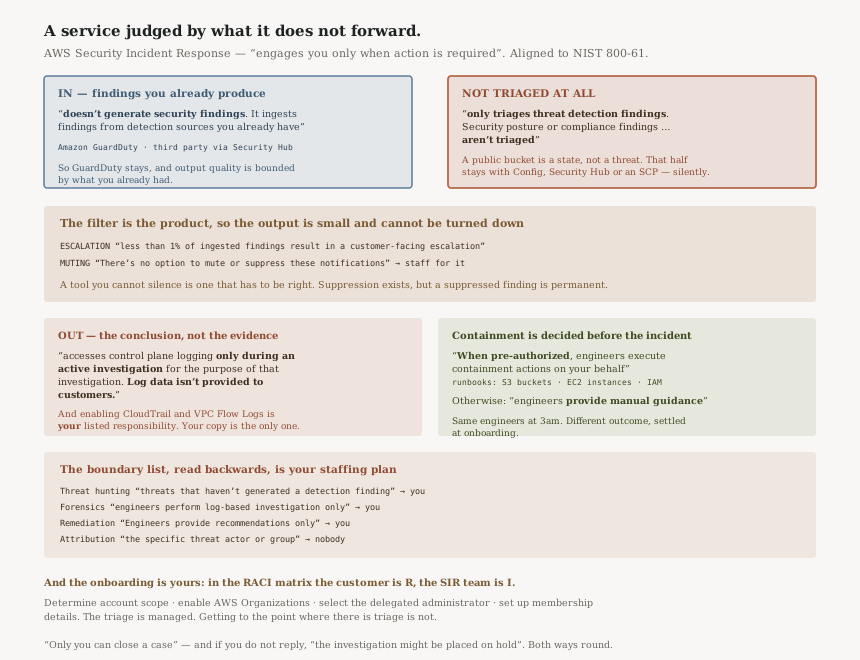
“AWS Security Incident Response doesn't generate security findings. It ingests findings from detection sources you already have (Amazon GuardDuty, third-party tools integrated through AWS Security Hub CSPM) and triages them on your behalf.”
So GuardDuty does not go away, and the quality of what you get out is bounded by the quality of what you already had. Then comes the filter that matters:
“AWS Security Incident Response only triages threat detection findings. Security posture or compliance findings (such as misconfiguration alerts or benchmark violations) aren't triaged because they describe a state about your environment rather than an active threat requiring investigation.”
That reasoning is sound and the consequence is easy to miss. A public bucket is a state, not a threat, so it is outside this service entirely — it belongs to Config, Security Hub or an SCP. If you onboard this expecting your misconfiguration backlog to start being worked, nothing will happen and nothing will tell you nothing is happening.
FixWrite down which of your finding types are threat detections and which are posture. The second list is not covered here, and it is usually the longer one. #82 and the Config side of #43 are where that half lives.
“The service ingests all findings from configured sources but doesn't triage them all equally.” And the number: “Across all customers, less than 1% of ingested findings result in a customer-facing escalation.”
Which makes the alert-fatigue claim concrete rather than rhetorical. It also sets up the corresponding rule, and this one is unusual: “There's no option to mute or suppress these notifications because each one represents a validated concern that requires action.”
A tool you cannot silence is a tool that has to be right. AWS is accepting that constraint deliberately — the whole design is that filtering happens before you, so a mute button on the output would undo the thing you bought. The cost is that an escalation lands on your team whatever else is happening that day.
There is a path to silence, and it is deliberately narrow: “Suppression rules are used sparingly because suppressed findings are permanently excluded from monitoring, whereas triaged findings remain under dynamic evaluation.”
FixStaff the escalation path for a volume you do not control, and treat a suppression request as a permanent decision rather than a tuning knob. AWS puts those rules where you can see them — “You can see suppression rules in the GuardDuty or Security Hub CSPM console” — and “Changes are rolled back upon request”, so they are reviewable.
This is the paragraph to read twice before onboarding:
“Security Incident Response accesses control plane logging only during an active investigation for the purpose of that investigation. Log data isn't provided to customers. Only summaries and conclusions are shared through case notes.”
The access scoping is good practice and the second half is the design consequence. You get the conclusion, not the evidence. For operational purposes that is usually fine — you wanted an answer. For anything where you have to show your working to somebody else, a case note is not a log line, and this service will not hand you one.
It pairs with one of your listed responsibilities: “Enable logging: Enable AWS CloudTrail, Amazon VPC Flow Logs, and other relevant logging. Comprehensive logging reduces investigation timelines.”
So the logging is yours to enable, yours to retain, and the only copy you will ever read. That is not a gap in the service; it is the division of labour the service is built on, and it means your own log retention is the thing standing between you and an unanswerable question later.
FixSet your CloudTrail and VPC Flow Log retention against the questions you may be asked months after a case closes, not against the length of an investigation. The case notes carry the conclusion; the records behind it are only there if you kept them.
Architecture
Findings in from detectors you own, a triage pipeline you do not see, a small number of escalations you cannot mute, and a published boundary list worth reading as a specification.
Two case types, and only one of them starts without you
| Proactive | Reactive — AWS-supported | Reactive — self-managed | |
|---|---|---|---|
| Who opens it | “Created automatically when the triage process identifies a genuine threat” | You do | |
| Engagement | All configured stakeholders notified automatically | “a 15-minute SLO for initial engagement” | “Kept internal to your organization” |
| Setup needed | “No manual configuration… beyond enabling detection sources” | “no limit on the number of reactive cases you can open” | |
| Closure | “Only you can close a case” — AWS can set “Ready to Close” | ||
A self-managed case is the one worth noticing: it is a case the AWS team is not working, held in the same portal with the same fields, and “You can escalate a self-managed case to Security Incident Response Engineering at any time”. That is a useful place to put the incident you are not sure is one.
Containment is a decision you make before the incident
“When pre-authorized, Security Incident Response engineers execute containment actions on your behalf during active incidents. Supported containment actions include runbooks for compromised Amazon S3 buckets, Amazon EC2 instances, and IAM principals.”
And the alternative: “If you haven't pre-authorized containment, engineers provide manual guidance during investigations.”
Same engineers, same investigation, and the difference between somebody acting at 3am and somebody telling you what to do at 3am is settled during onboarding. This is the same shape as the forced remediation setting in #91: AWS declines to act on your resources without prior authorisation, and the default therefore produces advice rather than action.
“The triage process is dynamic. A finding evaluated as expected behavior today can be re-evaluated differently tomorrow if context changes. This is fundamentally different from a static suppression rule. AWS Security Incident Response prefers triage over suppression because it preserves the ability to detect evolving threats.”
Which is the argument for not asking for suppression rules to quiet a noisy detector. A suppressed finding is “permanently excluded”; a triaged one keeps being reconsidered. The noise you are tolerating is the mechanism still working.
The boundary list, read as a staffing plan
AWS publishes an unusually explicit list of what the service is not. Read forwards it manages expectations; read backwards it is a list of things your own team still has to cover.
| Not covered | AWS's description | So who does it |
|---|---|---|
| Threat hunting | “Proactive searching for threats that haven't generated a detection finding” | You. The service is finding-driven, so an attacker who trips no detector is outside it. |
| Forensic disk or endpoint analysis | “Engineers perform log-based investigation only” | You, or a forensics retainer. EC2 Triage collects data; it is not imaging. |
| Recovery and remediation execution | “Engineers provide recommendations only” | You — except for pre-authorised containment runbooks. |
| Attribution | “Identifying the specific threat actor or group behind an incident” | Nobody, usually. Worth saying out loud before an executive asks. |
| Legal and regulatory guidance | “breach notification, regulatory filings, or other legal obligations” | Counsel — who you can add to a case as a watcher. |
| Custom reporting | “Reports outside the standard case notes format” | You, from your own logs, which is the other half of the log-access rule above. |
Membership decides the blast radius of the monitoring
“Only accounts enrolled in your membership are monitored and investigated. You choose coverage at the AWS organization or OU level during enablement. Accounts outside your configured scope aren't monitored.”
Stated plainly, which is the right way to state it. An OU-level scope means a new account's coverage depends on where somebody puts it — the same dependency #91 has, from the other direction.
Why This Architecture Holds Up
Not forwarding findings is the only honest way to sell triage
“It isn't an alert aggregator — unlike services that pass all alerts through to you, it absorbs the vast majority of findings and only escalates the ones that require your action.”
A service that both triaged and forwarded would be selling reassurance rather than labour. The “less than 1%” figure and the absent mute button are the same commitment stated twice: the filtering is the product, so the output has to be small and has to be believed.
Refusing posture findings is the right scope, not a missing feature
“compliance and configuration findings are informational by nature and don't require threat investigation.” Triage asks whether something is happening. A misconfiguration is not an event, so there is nothing for an incident responder to conclude about it that a Config rule has not already said.
Everything else here can be configured at onboarding: scope, containment pre-authorisation, stakeholders, suppression. The evidence rule cannot. “Log data isn't provided to customers.”
So the decision this service forces is one you make in CloudTrail and VPC Flow Logs, before any case exists. The investigation reads your logs and returns a conclusion; whether you can ever reconstruct that conclusion yourself is a retention setting you chose earlier, in a different console.
Making you close the case is a good asymmetry
AWS can move a case to a “Ready to Close” status, but “final closure is always your action”. The party carrying the risk gets the last word. It also means an open case count says something about your own responsiveness, not only about AWS's.
The same logic runs the other way and is worth taking seriously: “If you don't respond, the investigation might be placed on hold.” A managed investigation is not an unattended one.
Key Architecture Decisions
| Decision | Choice | Reasoning |
|---|---|---|
| Finding types | Classify into threat detection and posture before onboarding | Posture findings “aren't triaged”, and nothing reports that. |
| Escalation staffing | Staff for a volume you do not control | There is “no option to mute or suppress these notifications”. |
| Suppression requests | Treat as permanent; review the console list | Suppressed findings are “permanently excluded from monitoring”. |
| Log retention | Set against later questions, not investigation length | “Log data isn't provided to customers.” |
| Containment | Decide pre-authorisation at onboarding | Without it, engineers “provide manual guidance” only. |
| Membership scope | Prefer OU-level, and govern OU placement | “Accounts outside your configured scope aren't monitored.” |
| Third parties | Use watchers and the per-case IAM policy | Each case ships “a pre-populated IAM policy scoped to that case”. |
| Security contact | Keep it current and monitored | Non-response means the investigation “might be placed on hold”. |
| EC2 Triage | Enable it deliberately | It collects data “without requiring direct access to the instance”. |
The audit worth running
Take AWS's boundary list and put a team name next to every row. Threat hunting, forensic analysis, remediation execution, attribution, legal notification, custom reporting. Any row without a name is work this service has told you in writing that it will not do.
Then check your CloudTrail and Flow Log retention against your longest plausible question. The case notes hold the conclusion; the logs behind it are yours and only yours.
Closing Thought
Most managed services are sold on what they give you. This one is better understood by what it keeps: ninety-nine-plus percent of the findings, and all of the log data. Both are deliberate, both are the reason it works, and only one of them has a consequence you have to design for.
The findings it keeps are pure gain — that is the labour you were buying. The logs it keeps are a division of responsibility, and the only way that division goes wrong is quietly: a case closes with a clear conclusion, the retention window you set two years ago expires, and the question somebody asks afterwards has no source left to answer it.
#91 was about a control that outlives its policy while its logging does not. This is a service that reads logging it never returns. Different services, same lesson: the enforcement and the evidence are separate systems, and only one of them is ever your problem by default.
Security & Identity — Resource control policies: what an RCP restricts that an SCP cannot, why only a subset of services honour them, and which principals an RCP does not reach even when it is attached at the organization root.
Official AWS Reference
- What is AWS Security Incident Response? — the service definition and NIST 800-61 alignment, how it works and what it ingests, triage and deduplication with the escalation figure, the log access rule, suppression rules, automated and human investigation including EC2 Triage, proactive and reactive case types with the 15-minute SLO, containment, watchers and case sharing, closure, monitored accounts, the service boundary list and the not-covered table, and your responsibilities
- RACI matrix — who is Responsible, Accountable, Consulted and Informed across pre-onboarding, onboarding and post-deployment configuration
- Getting started — further reading on the onboarding sequence; no claims in this post are drawn from it
- Onboarding guide — further reading on membership setup; no claims in this post are drawn from it
Comments