Business Challenge
#104 governed the shape of tags. #105 measured which resources have none. Both treat tags as metadata — something you report on. Resource Groups is where tags stop being metadata and start being a control surface, because here a tag decides what an automation touches.
The definition is one sentence and every clause in it matters: “A resource group is a collection of AWS resources that are all in the same AWS Region, and that match the criteria specified in the group’s query.”
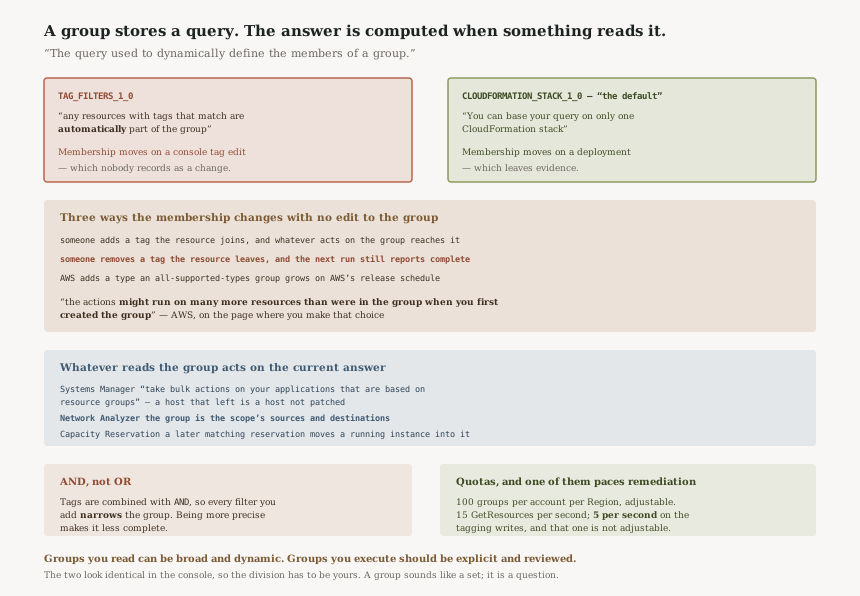
Not the resources you added. The resources that match. CloudFormation's reference for the same object is blunter: “The query used to dynamically define the members of a group.” A group is a saved question, and the answer is computed at the moment something asks.
“The group specifies tag key names and values, and any resources with tags that match are automatically part of the group.”
Read that in reverse, which is the direction that hurts. A resource whose tag stops matching stops being part of the group, automatically. If that group is what Systems Manager patches — “Gather operational insights and take bulk actions on your applications that are based on resource groups” — then removing a tag removes a host from the target set. The group is smaller, and nothing about that is an error condition — the next run simply has fewer targets to act on.
This inverts the usual review model. The automation is in version control and goes through change management. The tag is a text field in a console, editable by anyone holding tagging permissions on the resource, and it is the thing that decides scope. The blast radius of a maintenance window is governed by whichever of the two controls is weaker, and it is not the one in Git.
FixWhere a group drives an action rather than a dashboard, treat its tag keys as part of the automation's interface and protect them accordingly — a tag policy from #104 for shape, and an IAM or service control policy condition on aws:TagKeys for who may change them. A tag that only feeds a cost report needs none of this; a tag that selects patch targets needs all of it.
A group can be built on a query for all supported resource types, and AWS attaches a warning to that choice which is worth quoting in full:
“A resource group based on a query for All supported resource types can add members automatically over time, as new resources are supported by Resource Groups. When you run automations or other bulk tasks on an existing resource group based on All supported resource types, be aware that the actions might run on many more resources than were in the group when you first created the group.”
The scope of your automation is now a function of AWS's release schedule. Nobody in your organisation changes anything; Resource Groups adds support for a resource type; the next run of a bulk task reaches a category of resource that did not exist in the group when the task was written and reviewed.
This is a reasonable default for a console view, where seeing more is the point. It is a poor default for anything that writes, and the two are the same object.
FixEnumerate resource types explicitly in any group that an automation acts on, in the documented AWS::{service}::{resource} form. Keep the all-supported-types query for human browsing and inventory, where new members arriving unannounced is a feature. The distinction is not between important and unimportant groups — it is between groups that are read and groups that are executed.
Two clauses bound a group tightly. Region, from the definition: “all in the same AWS Region”. Account, from the permissions model: “Resource Groups feature permissions are at the account level.” Even nesting stays inside the boundary — “Resource groups can be nested; a resource group can contain existing resource groups in the same region.”
So an estate of 14 accounts operating in 3 Regions does not have a production group. It has 42 of
them: 42 independent queries, each created by a different person at a different time, all called
something like prod, and free to diverge in resource types, tag filters and membership
without any mechanism that compares them.
This is the exact inverse of #105. Resource Explorer aggregates across Regions and accounts, and the risk there is that its answer is quietly too small. Resource Groups cannot aggregate at all, and the risk is that you believe one name refers to one thing.
FixCreate groups from a template rather than by hand — the CloudFormation resource type exists for this, and a group defined in a stack is a group whose query is reviewable. Then audit the query rather than the name: two groups called prod in two Regions are the same group only if their resource type lists and tag filters match, and nothing in the console tells you whether they do.
Architecture
Two query types, two different kinds of drift
| Tag-based | CloudFormation stack-based | |
|---|---|---|
| Type value | TAG_FILTERS_1_0 |
CLOUDFORMATION_STACK_1_0, “the default” |
| Membership follows | Tags, which anyone holding tagging permissions on a resource can change | A stack, which changes through a deployment |
| Scope limit | The resource types you list, plus tag filters | “You can base your query on only one CloudFormation stack” |
| Drift arrives via | A console edit nobody records as a change | A deployment, which is recorded |
The stack-based type is the more conservative of the two and it is the default, which is the right way round. Its membership still moves, but it moves through a mechanism that leaves evidence. A tag-based group's membership moves through an edit that looks like metadata maintenance.
AND, not OR — so a more specific group is a smaller one
“Tag-based queries assign an AND operator to tags, so any resource that matches
the specified resource types and all specified tags is returned by the query.”
Each tag filter you add narrows the result. For a dashboard that is obviously fine. For a patch group
it means the instinct to be precise — adding Environment=prod and
Team=payments and Compliance=pci — produces a group that excludes every
resource missing any one of the three. The resource carrying two of the three tags is not an error and
appears nowhere. It is simply not patched, and the group that was made more careful became less
complete.
What acts on a group, and what that costs when membership moves
| Service | What it does with the group | Consequence of a membership change |
|---|---|---|
| Systems Manager | “take bulk actions on your applications that are based on resource groups” | A host leaves the group and stops being acted on, with nothing in the group itself recording that it did |
| VPC Network Access Analyzer | “You can specify the sources and destinations for your network access requirements by using AWS Resource Groups” | A tag edit changes what a security analysis considers in scope |
| EC2 Capacity Reservations | Instances launch into a group holding reservations | “If you later add a matching capacity reservation to the targeted group, the instance is automatically matched with and moved into the reserved capacity” — a billing change triggered by group membership |
| CloudWatch | “Focus your view to display metrics and alarms from a single resource group” | A dashboard silently narrows; the graph still looks healthy |
| Service Catalog AppRegistry | “that service automatically creates an resource group for that application” | Groups exist that nobody created by hand and nobody is reviewing |
The Network Access Analyzer row is the one worth sitting with. It is a security control whose scope is a query over tags, which means what did we analyse has a different answer depending on when you asked it. The Capacity Reservations row is the one that moves money.
The quotas, and the contrast with #105
“Resource groups per account | Each supported Region: 100”, and this one is adjustable — which matters for the 42-group estate above, because a per-account, per-Region ceiling of 100 is generous for a human and worth checking before a templated rollout starts creating groups programmatically.
The tagging API is the tighter constraint. “Rate of calling the GetResources API
operation | Maximum of 15 calls per second”, and for the write path —
TagResources, UntagResources, GetTagKeys,
GetTagValues — “Maximum of 5 calls per second”, with the note
that these “limits are currently not adjustable using the Service Quotas console”.
So a remediation job that tags the untagged resources found by #105's tag:none query is
paced at 5 calls per second on the write side. That is the practical bridge between the two posts:
finding the gap runs against one quota, closing it runs against a tighter one.
The room you have per resource is “50 user created tags (AWS created tags don’t count
against this limit)”, with keys to “maximum 128 Unicode characters in
UTF-8” and values to “maximum of 256 Unicode characters in UTF-8”. The
query itself carries a “Maximum” of 4096, which bounds how many
resource types you can enumerate before an explicit list stops being practical — the point at
which people reach for all supported types, and inherit the warning in challenge 2.
Why This Architecture Holds Up
A stored list would be wrong faster than a stored query
The alternative design is static membership: you add resources, they stay. In an estate where an Auto Scaling group replaces instances through the day, a static list is stale within the hour and silently excludes every resource created after someone last maintained it. Dynamic membership is what makes a group useful at all, and the failure mode it produces — too many members, or too few — is the price of the thing working.
Single-Region scope matches the resources, not the org chart
Most of what a group contains is regional, and most of what acts on a group is regional. A group that spanned Regions would have to resolve what a bulk action means when half its members sit in a Region the caller is not operating in. Keeping the boundary where AWS keeps every other regional boundary is consistent, even though it is the clause that produces the 42-group problem.
AWS wrote the warning in the right place
The all-supported-types caution is not in a footnote or a blog post — it is on the page listing which resource types work, which is the page you are on when you make that choice. Documenting a risk at the moment of the decision is the correct placement, and it is more than several of the controls in this fortnight of posts managed.
Key Architecture Decisions
| Decision | Choose this | Because |
|---|---|---|
| Group that drives an automation | Enumerate resource types explicitly | All supported types grows with AWS releases — “might run on many more resources than were in the group when you first created the group” |
| Group that drives a dashboard | All supported types is fine, and better | New members arriving unannounced is what you want from a view |
| Protecting the tags a group queries | Condition on aws:TagKeys for the keys that select action targets |
Membership is “automatically” whatever matches, so the tag is the control surface |
| Precision in a tag filter | Add filters deliberately, not defensively | Tags are combined with AND, so each filter shrinks the group |
| One logical grouping across the estate | Define groups in CloudFormation and deploy the same template everywhere | Groups are per-account and per-Region, so the only thing making them equivalent is a shared definition |
| Bulk tag remediation | Pace writes under 5 calls per second | The tagging write quota is not adjustable in the Service Quotas console |
| Choosing between tag-based and stack-based | Stack-based where the boundary really is a deployment | Its membership moves through a recorded change rather than a console edit |
The audit worth running
List your groups and sort them into read and execute. For each group, find what consumes it. A group feeding only a CloudWatch view carries almost no risk from drifting membership. A group named in a maintenance window, an automation document, or a Network Access Scope is a control, and should be treated like one.
Then check which of those execute groups use an all-supported-types query. That combination — a query that grows on AWS's schedule, feeding something that writes — is the specific pairing AWS warns about, and it is the one worth fixing first.
Finally, compare two groups with the same name in two accounts, query to query. Not the member counts, which will legitimately differ. The resource type lists and the tag filters. If those differ, the name is doing work the definition does not support, and every report that aggregates the two is adding up answers to different questions.
Closing Thought
The thread through the last several posts has been controls that are narrower than their names. A tag policy that cannot require a tag. A block that does not revoke. An index that answers completely and partially in the same format. This one is different in kind: the group is not narrower than its name, it is less fixed than its name. A group sounds like a set. It is a question.
That distinction is harmless right up to the moment something acts on it. A view computed fresh is better than a view computed once. An action computed fresh is an action whose scope was decided by whoever last edited a tag — or by an AWS release note.
The practical division is one line long and it resolves nearly all of this: groups you read can be broad and dynamic, groups you execute should be explicit and reviewed. The two look identical in the console, which is why the division has to be yours.
Cost & Governance — AWS Service Catalog AppRegistry: the resource groups it creates on your behalf, what an application boundary means when the service defines it rather than you, and why an inventory you did not author is still an inventory you own.
Official AWS Reference
- What are resource groups? — the definition and its same-Region clause, the two query types, the single-stack limit on CloudFormation stack-based queries, account-level permissions, nesting within a Region, and the
ANDoperator applied to tag-based queries - Resource types you can use with AWS Resource Groups and Tag Editor — that resources with matching tags are automatically part of the group, and the warning that an all-supported-types group adds members over time and may run actions on many more resources than it originally held
- AWS::ResourceGroups::Group ResourceQuery — the query that dynamically defines group members, the
TAG_FILTERS_1_0andCLOUDFORMATION_STACK_1_0type values with the latter as the default, and the query maximum of 4096 - AWS Resource Groups and Tagging endpoints and quotas — 100 resource groups per account in each supported Region and its adjustability, 15
GetResourcescalls per second, 5 calls per second for the tagging write operations and the note that these are not adjustable in the console, 50 user-created tags per resource, and the 128-character key and 256-character value limits - AWS services that work with AWS Resource Groups — Systems Manager bulk actions on groups, Network Access Analyzer using groups as scope sources and destinations, the Capacity Reservation group behaviour where a later matching reservation moves a running instance into reserved capacity, the CloudWatch single-group view, and AppRegistry creating groups automatically
- Build queries and groups in AWS Resource Groups — further reading on query construction; no claims in this post are drawn from it
Comments