Business Challenge
#84 ended on a boundary: “Azure Firewall doesn't apply application rules for inbound connections. So, if you want to filter inbound HTTP/S traffic, use Web Application Firewall.” Every L7 control in that post was egress-only. Inbound HTTP inspection is a different product, and #85 noted that Firewall Manager can centrally manage its policies too.
So this is the inbound half of the perimeter. The complication is that “Azure WAF” is not one deployment:
“Azure Web Application Firewall can be deployed with these Microsoft services: Azure Application Gateway, Azure Application Gateway for Containers, Azure Front Door, Azure Content Delivery Network… Azure Web Application Firewall has features that are customized for each specific service.”
That last clause is doing more work than it looks. The two platforms this post covers do not run the same rule sets, do not support the same actions, and do not resolve overlapping policies the same way. Choosing between them is usually framed as global edge versus regional appliance, which is true and is not the part that will surprise you.
Architecture
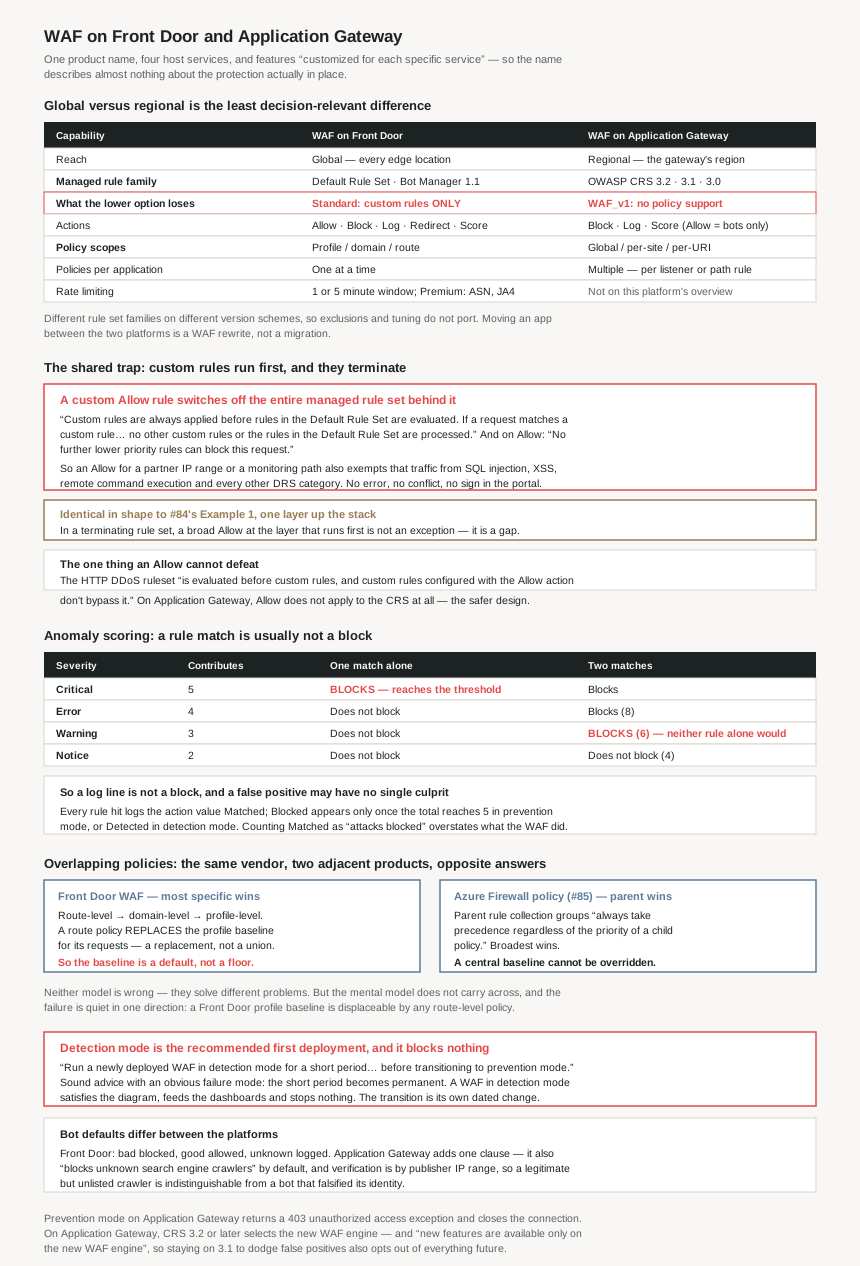
The two platforms side by side
| WAF on Front Door | WAF on Application Gateway | |
|---|---|---|
| Reach | Global — edge locations worldwide, policy replicated to all of them | Regional — the gateway's own region |
| Managed rule family | Default Rule Set (DRS); Bot Manager 1.1 on Premium | OWASP Core Rule Set — CRS 3.2, 3.1, 3.0 |
| What the lower option loses | Front Door Standard: only custom rules — no managed rule sets at all | WAF_v1: no policy support — associations are WAF_v2 only |
| Actions | Allow, Block, Log, Redirect, Anomaly score (DRS 2.0+) | Allow, Block, Log, Anomaly score — Allow is Bot Manager only, no Redirect |
| Policy scopes | Profile / domain / route — most specific wins | Global / per-site / per-URI |
| Policies per application | One at a time | Multiple, per gateway, listener or routing rule |
| Rate limiting | One-minute or five-minute window; Premium groups by country, ASN or JA4 | Not offered on this platform's overview |
| Sites per instance | — | Up to 40 websites using a WAF |
Why This Architecture Holds Up
Because a custom Allow rule switches off the managed rule set behind it
This is the most important behaviour in the product and it is the same shape as the defect #84 found one layer down. Custom rules run first, and rules are terminating:
“Custom rules are always applied before rules in the Default Rule Set are evaluated. If a request matches a custom rule, the corresponding rule action is applied… No other custom rules or the rules in the Default Rule Set are processed.”
And on the Allow action specifically: “The request passes through the WAF and is forwarded to the origin. No further lower priority rules can block this request.”
So a custom rule written to let something through — a partner's IP range, a health-check path, an internal scanner, a country allow list — does not merely exempt that traffic from the rule you were worried about. It exempts it from SQL injection protection, cross-site scripting, remote command execution, protocol attackers and every other DRS category, for as long as the rule exists.
#84's Example 1 was a network rule allowing TCP 80 and 443 that made every FQDN rule unreachable. This is the same mechanism at L7: a broad Allow at a layer that runs first, in a rule set that terminates on match, silently disabling the layer you bought the product for. Neither case errors, logs a conflict, or shows up as a misconfiguration. The lesson transfers exactly — in a terminating rule set, an Allow written at the wrong layer is a hole, not an exception.
There is precisely one documented exception, and it is worth knowing because it is the only thing an Allow cannot defeat:
“The HTTP DDoS ruleset is an exception to this processing order. It's evaluated before custom rules, and custom rules configured with the Allow action don't bypass it.”
Because the cheaper option on each platform is crippled in a different way
Both platforms have a lower tier, and neither is simply a smaller version. On Front Door:
“Azure Web Application Firewall is natively integrated with Azure Front Door Premium with full capabilities. For Azure Front Door Standard, only custom rules are supported.”
Which means a Front Door Standard WAF has no SQL injection protection, no cross-site scripting rules, no bot protection — nothing Azure maintains. It has the rules you write by hand. The entire value proposition of a managed WAF, which is that “Azure manages these rule sets… it updates the rules as needed to protect against new attack signatures”, is Premium-only. “We have a WAF on Front Door” and “we have managed protection” are different statements on this platform, and the tier decides which one is true.
Application Gateway's boundary is drawn on version rather than tier, and it is just as absolute: “Application Gateway has two versions of a web application firewall: WAF_v1 and WAF_v2. WAF policy associations are supported only for WAF_v2.” Since a WAF policy is the object that “contains all of the managed rules, custom rules, exclusions, and other customizations”, and since #85 showed Firewall Manager manages WAF policies centrally, a WAF_v1 gateway is outside all of it.
Because the rule set families are different products with different version numbers
Front Door runs the Default Rule Set; Application Gateway runs the OWASP Core Rule Set, in versions “CRS 3.2, CRS 3.1, and CRS 3.0”. These are not the same lineage with different labels, and the anomaly-score default is keyed to each: on Front Door the Anomaly score action is “the default action… for Default Rule Set 2.0 or later”; on Application Gateway it “is the default for the CRS”.
The consequence is that a WAF configuration does not port between the two platforms, and neither does the tuning. Exclusions, disabled rule IDs and false-positive work are all expressed against a specific rule set version. Moving an application from a regional Application Gateway to a global Front Door is not a migration of the WAF config; it is a rewrite of it.
One version choice on Application Gateway has a consequence beyond the rules themselves:
“When you use CRS 3.2 or later, your web application firewall runs the new WAF engine, which gives you higher performance and an improved set of features. When you use earlier versions of the CRS, your WAF runs on an older engine. New features are available only on the new WAF engine.”
The rule set version is normally treated as a tuning decision — stay on 3.1 because the application was tested against it and 3.2 produces false positives. That is a reasonable instinct and it also silently opts the deployment out of every future WAF feature, because the engine, not just the rule content, is selected by that dropdown.
Because “Allow” does not mean the same thing on the two platforms
Front Door lists five actions and Application Gateway four, which looks like a feature gap. The real difference is narrower and sharper:
“Allow: The request passes through the WAF and is forwarded to the back end. No further lower-priority rules can block this request. These actions apply only to the Bot Manager Rule Set. They don't apply to the CRS.”
So on Application Gateway you cannot write an Allow action against the Core Rule Set at all. The CRS decides matters through anomaly scoring, and the way you exempt traffic from it is an exclusion or a disabled rule, not an Allow. On Front Door, Allow is a general action that terminates evaluation of the Default Rule Set — which is the trap described above. Application Gateway does not have that trap for its managed rules, because the mechanism that creates it is not available there. That is an unusual case of the more restricted platform being the safer default.
The missing Redirect action is the other asymmetry, and the Front Door version has a constraint worth noting: the target “URI specified is a policy-level setting. After configuration, all requests that match the Redirect action are sent to that URI.” One redirect destination per policy, not per rule.
Because anomaly scoring means one rule match usually is not a block
Anomaly scoring is the CRS default and it is the single most misread part of WAF behaviour, because “the rule matched” and “the request was blocked” are different events. “In anomaly scoring mode, traffic that matches any rule isn't immediately blocked when the firewall is in prevention mode.” Instead each match contributes by severity:
| Severity | Contributes | Alone? | Two matches? |
|---|---|---|---|
| Critical | 5 | Blocks — reaches the threshold on its own | Blocks |
| Error | 4 | Does not block | Blocks (8) |
| Warning | 3 | Does not block | Blocks (6) |
| Notice | 2 | Does not block | Does not block (4) |
“There's a threshold of 5 for the anomaly score to block traffic. So, a single Critical rule match is enough… But one Warning rule match only increases the anomaly score by 3, which isn't enough by itself to block the traffic.”
Two consequences follow for anyone reading WAF logs. First, a log line is not a block: “The message that's logged when a WAF rule matches traffic includes the action value Matched… If the total anomaly score of all matched rules is 5 or greater, and the WAF policy is running in prevention mode, the request triggers a mandatory anomaly rule with the action value Blocked.” So you will see far more Matched entries than blocked requests, and counting Matched as attacks blocked overstates what the WAF did.
Second, the dangerous zone is accumulation rather than any single rule. A request that trips two Warning rules is blocked even though neither rule would block it alone — which is exactly the false-positive pattern that gets reported as “the WAF blocked a legitimate request and I cannot find the rule that did it.” There is no such rule. Tuning anomaly scoring means looking at the set of matches, not hunting for a single culprit.
Because the two platforms resolve overlapping policies in opposite directions — and so does Firewall Manager
Front Door documents a clear precedence and it is most-specific-wins: policies attach at “profile-level”, “domain-level” and “route-level”, and “when more than one policy scope applies to a request, Azure Front Door WAF uses the most specific scope: 1. Route-level policy 2. Domain-level policy 3. Profile-level policy.” Microsoft's advice follows from it: “Start with a profile-level baseline policy, and then apply domain-level or route-level policies only where you need different protections.”
Put that next to #85 and the contrast is stark. There, in Azure Firewall policy inheritance, “rule collection groups in the parent policy always take precedence regardless of the priority of a child policy” — broadest wins, and a business unit cannot pre-empt the central baseline. Here, narrowest wins, and a route-level policy overrides the profile-level baseline entirely for the requests it matches.
Azure Firewall policy — the parent always wins. A central baseline cannot be overridden.
Front Door WAF policy — the most specific wins. A route-level policy replaces the profile baseline for its requests.
Neither model is wrong; they are solving different problems. But if the same platform team owns both, the mental model does not carry across, and the failure is quiet in one direction: a central WAF baseline on Front Door is not a floor. It is a default that any route-level policy can displace, and the displacement is not a merge — the most specific policy applies, not the union.
Application Gateway is shaped differently again: it scopes at “the global level, at a per-site level, or at a per-URI level” and supports “multiple policies… associated with an application gateway, with individual listeners, or with path-based routing rules”, whereas a Front Door application “can have only one WAF policy associated with it at a time”.
Because detection mode is the recommended first deployment, and it blocks nothing
Both platforms run in two modes and the distinction is absolute. Detection “only monitors and logs the request and its matched WAF rule to WAF logs. It doesn't take any other actions”, and on Application Gateway “a web application firewall doesn't block incoming requests when it's operating in detection mode.” Prevention blocks, and on Application Gateway the client gets a specific answer: “The attacker receives a ‘403 unauthorized access’ exception, and the connection is closed.”
Microsoft's own deployment advice is to start in detection: “Run a newly deployed WAF in detection mode for a short period in a production environment. This period provides the opportunity to obtain firewall logs and update any exceptions or custom rules before transitioning to prevention mode.”
That is correct advice and it has an obvious failure mode: the short period becomes permanent. A WAF left in detection mode satisfies an architecture diagram, produces logs, appears in Defender for Cloud, and protects nothing. The transition to prevention is the deliverable, and it is a separate change from deploying the WAF — which means it needs its own date, not an intention.
Because the bot rule set has defaults that differ between the platforms
Both platforms classify bots into the same three categories — Bad, Good and Unknown — with signatures Azure “manages and dynamically updates”. The default actions are not quite identical. Front Door: “Bad bots are blocked, good bots are allowed, and unknown bots are logged by default.” Application Gateway: “it blocks malicious bots, allows verified search engine crawlers, blocks unknown search engine crawlers and logs unknown bots by default.”
That extra clause matters for anyone running a site that wants to be indexed by something other than Google or Bing. An unverified crawler claiming to be a search engine is blocked by default on Application Gateway, and the verification is a reverse-lookup of the publisher's IP ranges — so a legitimate but unlisted search engine is indistinguishable from a bad bot that falsified its identity, which is precisely how the Bad category is defined.
The categorisation also inherits a dependency worth naming: both platforms source bad-bot IPs from “the Microsoft Threat Intelligence feed's high confidence IP Indicators of Compromise”, and unknown bots from the “medium confidence” set. The same feed that #84 showed is alert-only on Azure Firewall Basic is here split by confidence level into two different default actions.
Key Architecture Decisions
| Decision | Choose | Because |
|---|---|---|
| Front Door tier, when you want managed protection | Premium — Standard will not do | “For Azure Front Door Standard, only custom rules are supported.” No DRS, no bot protection, nothing Azure maintains. |
| Application Gateway WAF version | WAF_v2 | WAF policy associations are WAF_v2 only, and the policy is the object holding managed rules, custom rules and exclusions — and the one Firewall Manager can manage. |
| CRS version on Application Gateway | CRS 3.2 or later | Earlier versions run the older WAF engine, and “new features are available only on the new WAF engine”. Staying on 3.1 to avoid false positives also opts out of every future feature. |
| Custom rules with the Allow action | Treat every one as a hole in the managed rule set | A custom rule match means “no other custom rules or the rules in the Default Rule Set are processed”. Same trap as #84's Example 1, one layer up. |
| Exempting traffic from managed rules | An exclusion or a disabled rule, not an Allow | An exclusion omits one request attribute from evaluation; an Allow bypasses the whole rule set. On Application Gateway Allow does not apply to the CRS at all, which is the safer design. |
| Reading WAF logs | Count Blocked, not Matched |
Every rule hit logs Matched; the request is only stopped once the anomaly score reaches 5 in prevention mode. Counting matches overstates what the WAF did. |
| Investigating a false positive | Look at the set of matches, not one rule | Two Warning matches total 6 and block, though neither blocks alone. There may be no single culprit rule to find. |
| A central WAF baseline on Front Door | Do not treat the profile policy as a floor | Most specific wins — a route-level policy displaces the profile baseline for its requests, and it is a replacement rather than a union. The opposite of #85's parent-always-wins. |
| Moving an app between the two platforms | Budget a WAF rewrite, not a migration | Different rule set families (DRS vs CRS), different versions, different actions. Exclusions and tuning are expressed against a specific rule set and do not port. |
| Deploying a new WAF | Detection first, with a dated transition to prevention | Microsoft's advice, and detection mode blocks nothing. The short period becomes permanent unless the switch is its own scheduled change. |
| Sites behind one Application Gateway | Up to 40, with per-site policies | One instance hosts up to 40 WAF-using websites, and policies associate per listener or path-based rule, so each site can be configured separately. |
| Rate limiting as a control | Front Door only | One-minute or five-minute windows, and on Premium grouping by country, ASN or JA4 fingerprint. Not offered on the Application Gateway platform overview. |
| If the site needs unlisted crawlers | Review Application Gateway's bot defaults | It blocks unknown search engine crawlers by default, and verification is by publisher IP range, so a legitimate but unlisted crawler looks like a bot that falsified its identity. |
Closing Thought
The framing that gets offered first — global edge versus regional appliance — is true and is the least decision-relevant difference between these two. What actually separates them is that they run different rule set families on different version schemes, support different actions, scope policies differently, and cripple their lower option in two unrelated ways. “We use Azure WAF” describes a product name and almost nothing about the protection in place.
The thing to check today is any custom rule with the Allow action. On Front Door, custom rules run before the Default Rule Set and a match ends evaluation, so an Allow written for a partner IP range or a monitoring path exempts that traffic from SQL injection protection, cross-site scripting and everything else Azure maintains. This is the identical mistake #84 documented as Microsoft's Example 1, one layer up the stack, and it is just as invisible: no error, no conflict, no sign in the portal that the managed rules have stopped applying to part of your traffic. Two posts, two products, one lesson — in a terminating rule set, the layer that runs first is the layer that decides, and a broad Allow there is not an exception but a gap.
The quieter one, worth a calendar entry rather than an audit, is detection mode. Microsoft recommends starting there and the recommendation is sound. But a WAF in detection mode is a logging product: it satisfies the diagram, feeds the dashboards, and stops nothing. The deliverable was never the deployment.
#87 takes the layer below the application one: Azure DDoS Protection and its IP and Network tiers — what the platform does for free, what the paid tiers add, and which one a Front Door application already has.
Official Azure Reference
- Azure WAF on Azure Front Door — the global edge model and policy replication, the Standard and Premium tiers with managed rule sets being Premium-only, the five actions including Redirect and the DRS 2.0 anomaly score default, custom rules processed before managed rule sets and terminating on match, the HTTP DDoS ruleset exception, the profile/domain/route scopes with most-specific-wins precedence, one policy per application, detection and prevention modes, rate limiting windows and Premium grouping keys, the Default Rule Set threat categories, and the three bot categories with their default actions and threat-intelligence confidence levels
- Azure WAF on Azure Application Gateway — the OWASP Core Rule Set basis, WAF_v1 versus WAF_v2 and policy associations being v2-only, the 40-website limit, global/per-site/per-URI scoping, CRS 3.2/3.1/3.0 and the new versus old WAF engine, Allow applying only to Bot Manager and not the CRS, the anomaly scoring severity table and the threshold of 5, the Matched/Blocked/Detected log action values, detection and prevention modes with the 403 response, the detection-first deployment advice, exclusion lists and JSON/XML body inspection, the bot defaults including unknown search engine crawlers, and Firewall Manager integration
- Introduction to Azure Web Application Firewall — the four host services WAF deploys onto, the Content Delivery Network preview status, and the statement that features are customized for each specific service
- WAF DRS and CRS rule groups and rules — the full rule inventory per rule set version, with severities (no claims drawn from it)
- Front Door Default Rule Set rule groups and rules — the DRS rule inventory in full (no claims drawn from it)
- Azure WAF engine — the engine the CRS version selects (no claims drawn from it)
Comments