Business Challenge
A platform team is decommissioning a retired environment. The Terraform run fails on the last step: the project will not delete. The error names a lien.
Liens can be placed automatically — for example when IAM service accounts from one project are attached to resources elsewhere. So a lien is not necessarily something a colleague did; it can be the platform recording that something outside this project still depends on it.
Correct approach
Read origin before assuming a human. A value like compute.googleapis.com means a Google service placed it, and the right response is to find the dependency rather than to remove the lien.
reason and origin are free text of up to 200 characters each, and they are the only record of intent a lien will ever carry. There is no author, no ticket and no expiry — whoever created it had one chance to explain why.
Write the reason for the person who will hit it in two years: what depends on this project, and who to ask. “Do not delete” restates the mechanism and answers nothing.
Deleting a project needs resourcemanager.projects.delete. Removing a lien needs roles/resourcemanager.lienModifier and its resourcemanager.projects.updateLiens permission. Holding the first does not imply the second.
Treat that as the feature rather than the obstacle. It is the whole reason a lien is stronger than careful IAM: the person who can delete cannot quietly clear the thing stopping them.
A lien blocks the project's deletion. It does not protect anything inside the project, so a cleanup script that iterated buckets and datasets emptied a liened project without ever tripping the brake.
Correct approachUse liens for the container and per-resource protections — retention policies, bucket lock, deletion protection — for the contents. They solve different problems and neither substitutes for the other.
The theme running through all four: a lien is a small, specific object with a narrow job, and most trouble comes from expecting it to be a general-purpose “protect this” switch.
Every other control in this phase is something you configure. A lien is that and something the platform applies on your behalf when a cross-project dependency exists. So the skill is symmetric: knowing when to place one, and knowing how to read one you did not place.
Architecture
A lien is a resource, not a flag on the project. It has its own identifier, its own lifecycle, and its own fields — which is what makes it inspectable and, when somebody bothered to fill them in, self-explaining.
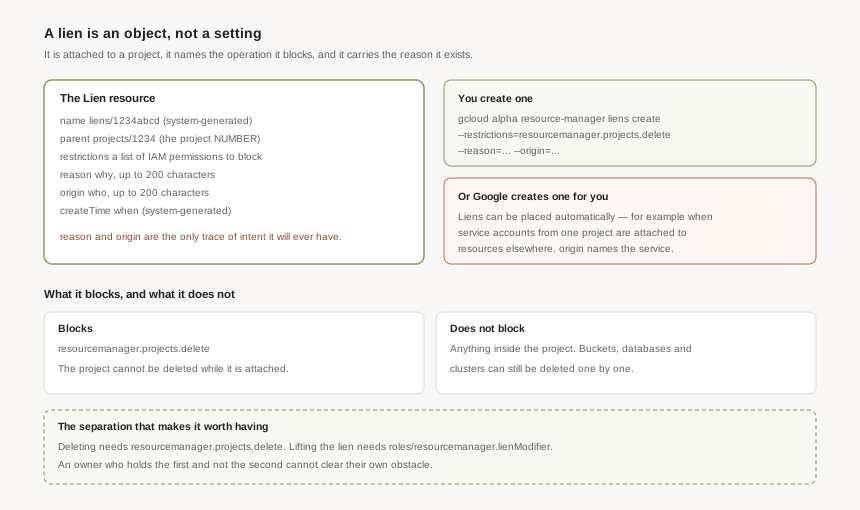
The fields, and which of them you control
The lien resource has six fields worth knowing:
name— a system-generated unique identifier, in the formliens/1234abcd. Output only, and the handle you pass to delete it.parent— a reference to the resource the lien is attached to, in the formprojects/1234. That is the project number, the canonical form from post #5, not the ID you chose.restrictions— the types of operations to be blocked. Each value should correspond to an IAM permission.reason— a concise user-visible string indicating why an action cannot be performed, up to 200 characters.origin— a stable, user-visible string identifying where the lien came from, up to 200 characters. The documented example iscompute.googleapis.com.createTime— output only.
The resource supports exactly four methods: create, delete, get and list. There is no update. A lien is not edited; it is removed and replaced, which means a wrong or unhelpful reason stays wrong until somebody deliberately re-creates the lien.
Creating one
In gcloud it is a single command:
gcloud alpha resource-manager liens create --project=PROJECT_ID --restrictions=resourcemanager.projects.delete --reason=LIEN_REASON --origin=LIEN_ORIGIN
Two things are worth noticing. The command still sits under alpha, which is a reasonable prompt to prefer the API or Terraform for anything you intend to run repeatedly. And --reason and --origin are yours to fill: nothing enforces that they are useful, and nothing will ever ask you to improve them.
Restrictions are a list of permissions, and the useful one is a list of one
The restrictions field is documented generally: the operations to block, each corresponding to an IAM permission. In practice the documented use is a single value, resourcemanager.projects.delete, and that is what blocks project deletion.
It is worth reading the field's generality as a description of the mechanism rather than an invitation. Design against what is documented to work — a lien that stops a project being deleted — rather than against what the shape of the field suggests might be possible.
Why This Architecture Holds Up
The obvious alternative is not to grant resourcemanager.projects.delete to anyone who should not delete production. That is correct and it is not sufficient, for a reason worth being precise about.
IAM answers “is this principal allowed to do this?” A lien answers a different question: “is this operation permitted on this resource at all?” The distinction matters because the people most likely to delete production by accident are exactly the people who legitimately hold delete elsewhere — the platform team, the automation service account, the person doing a decommission this afternoon. Removing the permission breaks their real work; a lien blocks the specific thing without touching what they can do everywhere else.
And because lifting it needs roles/resourcemanager.lienModifier rather than project ownership, the brake is not in the same hand as the accelerator. An owner running a destructive script cannot have their tooling clear the obstacle on the way past.
Not “production” or “do not delete”. Something closer to: “Holds the shared artifact registry consumed by all delivery pipelines; contact platform-team before removing.” That is 108 characters, it says what breaks and who to ask, and it means the person who meets this lien in 2029 does not have to open an investigation to find out whether they are allowed to proceed.
The gap liens do not cover
A lien protects the project. It does not protect the resources inside it, and that asymmetry is where the false sense of safety comes from. A liened project can be emptied — bucket by bucket, instance by instance — while the brake never engages, because none of those operations is resourcemanager.projects.delete.
So a project with a lien and no per-resource protection is protected against exactly one scenario: somebody deleting the whole container. That is a real scenario and worth preventing. It is simply not the same as “this data is safe”, and post #6's argument still stands — back up before you retire anything, because the lien has nothing to say about what happens inside.
Reading a lien you did not place
Because Google places liens automatically for cross-project dependencies, the first move on an unexpected lien is diagnostic rather than administrative:
- List the liens on the project and read
origin. A service name means the platform placed it; a human-written string means somebody on your side did. - If the origin is a Google service, treat the lien as a symptom. Something elsewhere still depends on this project, and removing the lien to force the delete through destroys that dependency rather than resolving it.
- If the origin is yours, the question is whether the reason still holds — which is entirely down to how well it was written.
- Only then remove it, as a deliberate, recorded step by somebody holding
lienModifier.
Key Architecture Decisions
| Decision | Choose this | Because |
|---|---|---|
| Which projects get a lien | Anything whose loss would be an incident | It blocks the one irreversible operation without removing delete permission from people who legitimately need it elsewhere. |
| Who holds lienModifier | Not the same people or automation that routinely delete projects | The value of the control is that the brake is not in the same hand as the accelerator. Granting both to one identity removes the point of it. |
| What to put in reason | What depends on this project, and who to contact | 200 characters, no author, no ticket, no expiry, and no update method. It is the only explanation the lien will ever carry. |
| What to put in origin | The team or system that placed it | It is how the next person distinguishes a lien you placed from one Google placed for a cross-project dependency. |
| An unexpected lien blocking a delete | Read origin first, and treat a service origin as a dependency to resolve | Liens are placed automatically when service accounts from one project are attached elsewhere. Removing it forces through a deletion something still depends on. |
| Protecting data inside a project | Per-resource controls, not the lien | A lien blocks project deletion only. A liened project can still be emptied one resource at a time. |
| Creating liens repeatedly | The API or Terraform rather than the gcloud command | The command is still under gcloud alpha. Anything running on a schedule deserves a more stable interface. |
| Correcting a bad reason | Delete and re-create the lien deliberately | The resource supports create, delete, get and list. There is no update, so a poor reason persists until somebody replaces the whole object. |
parent is projects/1234 — the number, not the ID. Consistent with everything in post #5: the ID is the handle people read, and the number is what the platform records. When you list liens across an estate, expect numbers, and expect to need the mapping back to IDs before any of it is legible.
Closing Thought
Liens are the smallest control in this phase and the one most likely to be met from the wrong side. Most people encounter their first lien not by placing one, but by having a deletion refused by something they did not know existed — which is exactly the moment the reason field either does its job or reveals that nobody took it seriously.
That makes the practical advice unusually simple. Put liens on projects you would be sorry to lose, keep lienModifier away from whoever holds delete, and write the reason as a message to a stranger. The mechanism does the rest, and it does exactly one thing.
#8 moves off the project and onto the resources in it: zonal, regional and global as a property every Google Cloud resource carries, why that property decides more later designs than the service choice does, and what it means when a single API call spans locations.
Comments