A plugin installs a whole role's worth of setup in one step, which is genuinely useful and exactly the kind of packaging that agent tooling has been missing. The part worth understanding before you install one is that the review you do at install time does not stay done.
“An installed plugin stays in sync with the owner's published version, so it updates automatically as the owner republishes.”
Executive summary
“AWS Quick now supports plugins, agents, skills, connectors, and flows built for a specific task, role, or use case”, and the packaging is the point: “Plugins package these capabilities together, so users can install everything a job needs in one step”. At launch, “More than 100 skills and plugins cover everyday productivity, roles such as finance, marketing and legal, industries, and popular business applications”. It is “available in all Regions where AWS Quick is available”.
The documentation adds the shape: “Plugins are bundles of capabilities that work together for a role, team, or task”, holding agents, skills, connectors and flows, and “A plugin can contain up to 50 agents, skills, connectors, and flows”.
Two things decide how this lands in an organisation. The credential model is careful and worth knowing — a shared plugin does not share anyone's access. The update model is the opposite of careful: installed copies track the owner's published version automatically, so what you inspected before installing is not necessarily what runs next week.
What changed
Quick already had the four capability types separately. What is new is the bundle, and the install semantics: “Installing a plugin sets up every capability it contains in one step.”
Creation is conversational on both sides. The announcement: “Builders can also create their own custom plugins for their team, department, or organization. Just describe the job in chat, and Quick assembles the plugin. Then share it for teammates to discover.”
There is also a sensible piece of guidance against over-using it: “If you need only a single capability, add that capability on its own instead of creating a plugin for it.”
Architecture
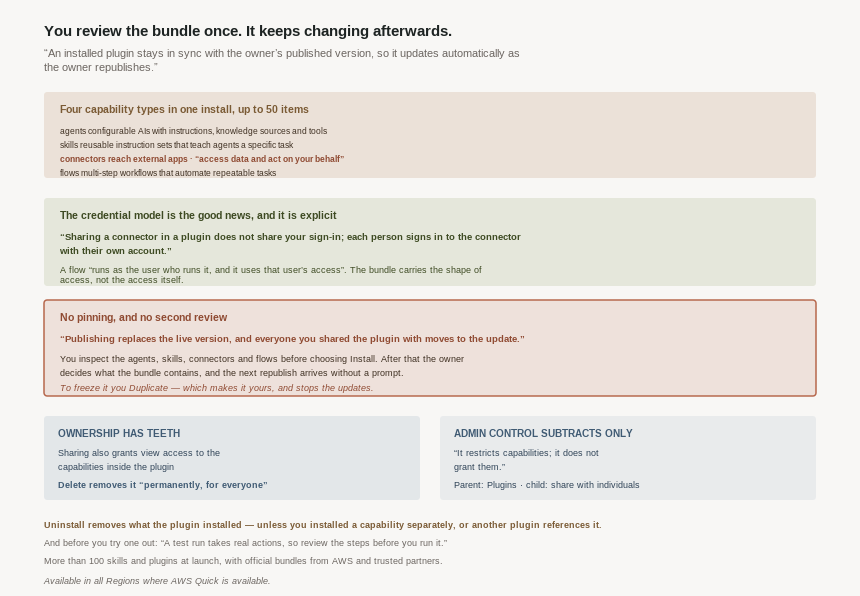
What is in the bundle
| Capability | What it is |
|---|---|
| Agents | “configurable AIs that you give instructions, knowledge sources, and tools” |
| Skills | “reusable instruction sets that teach agents how to complete a specific task” |
| Connectors | “links that let Quick reach external applications and services so that agents can access data and act on your behalf” |
| Flows | “multi-step workflows that automate repeatable tasks” |
The connector line is the one to read twice, because act on your behalf is the whole security surface. A bundle can arrive containing something that writes to an external system.
The credential model, which is better than it sounds
The obvious worry about installable bundles containing connectors is that installing one borrows someone else's access. It does not, and the documentation says so twice.
“Sharing a connector in a plugin does not share your sign-in; each person signs in to the connector with their own account.” And at install: “If the plugin needs a connector, select an existing connector or create one, and then choose Continue to install plugin.”
Flows behave the same way at run time: “A flow runs as the user who runs it, and it uses that user's access.”
So a plugin carries the shape of the access it needs, not the access itself. Installing one makes you supply your own credentials for the systems it touches, which means the blast radius of a shared plugin is bounded by what each installer can already reach. That is the right design, and it is worth knowing because it changes the review question from whose data does this see to what will it do with mine.
The update model, which is not
The install flow invites a review: “Choose the plugin to review the agents, skills, connectors, and flows that it includes”, and then Install. That review covers one moment.
“An installed plugin stays in sync with the owner's published version, so it updates automatically as the owner republishes.” From the owner's side: “Publishing replaces the live version, and everyone you shared the plugin with moves to the update.”
There is no version pinning described, no changelog, and no prompt to re-review. The owner can add a connector, change an agent's instructions, or alter a flow's steps, and every installed copy follows. Combine that with act on your behalf and with flows running as the installing user, and the consequence is specific: a plugin's capability set can grow after you accepted it, and it will use your access when it does.
The documented escape is ownership: “To make a version you can change, duplicate it. Duplicating creates a separate plugin that you own.” A duplicate is yours, which means it stops tracking the original — you have traded automatic updates for a fixed, reviewed version. For a plugin from AWS or a trusted partner, tracking is probably what you want. For one assembled in chat by a colleague and shared account-wide, a duplicate is the conservative choice.
Ownership has consequences in both directions
- Sharing widens visibility. “Sharing a plugin also gives the people you share it with view access to the capabilities inside it.” So sharing a plugin exposes the agent instructions and flow definitions within it, not just the ability to run them.
- Deleting is not local. The owner's Delete action removes the plugin “permanently, for everyone it is shared with”. One person's cleanup is everyone's outage.
- Uninstall is conditional. “Uninstalling a plugin removes the capabilities that it installed, unless you installed a capability separately or another installed plugin references it.” Sensible reference counting, and it means uninstalling does not guarantee a clean slate.
Administrator control subtracts; it does not grant
“Custom permissions is a scope-down policy that an administrator applies at the account, role, or user level to limit the capabilities that people can use. It restricts capabilities; it does not grant them.”
Two levers apply here: “Plugins — restricts access to plugins, including sharing them. This is the parent capability; denying it restricts the plugin's full feature set”, and a child capability covering sharing with individuals.
Worth being clear about what this model does and does not give you. It can stop people using or sharing plugins. It is not an approval queue for plugin contents, and it is not a way to pin versions across an account. Flows have a separate approval path — an administrator can require approval before a flow is shared or published — so the governance primitives exist but are not uniform across capability types.
One line to carry into any trial
“A test run takes real actions, so review the steps before you run it.” There is no dry-run mode described. Trying a flow out is doing the thing.
Business value
The real problem this solves is assembly. A finance or legal workflow needs a connector to the system of record, instructions encoding how the team works, an agent to reason, and a flow to sequence it — and configuring four things correctly is where most internal adoption dies. Shipping them as one installable unit moves the setup cost from every user to one author.
The standardisation argument is the stronger one for a platform team: “Use a plugin when a job needs several capabilities set up together, or when you want to standardize the setup that a team uses.” An official bundle is a way to make the sanctioned path the easy one, which beats documenting the sanctioned path.
And the auto-update behaviour that is a governance concern for untrusted plugins is a genuine operational benefit for your own: fix an agent's instructions once and every installed copy follows, with no migration.
Security considerations
Start with the good part. Because each installer signs in to the connectors with their own account and flows run as the user who runs them, a plugin cannot be a vehicle for borrowing someone else's access. There is no confused-deputy path where installing a colleague's bundle lets it read what they can read.
The risk that remains is the one the credential model does not address: a plugin can act with your access, and what it does can change after you approved it. The combination to think about is an account-wide share, a connector with write capability, and automatic updates. Nothing there is a vulnerability; it is a delegation whose terms are revisable by the other party.
Also note the visibility direction. Sharing grants view access to the capabilities inside the plugin, so agent instructions and flow definitions are readable by recipients. Anything sensitive encoded in a prompt — internal thresholds, naming of systems, escalation contacts — travels with the share.
For a regulated environment, the gap worth raising with AWS is version pinning. The ability to install a reviewed version and stay on it, rather than duplicating and losing updates, is the control this model is missing.
Cost considerations
The announcement states no separate charge for plugins, and they are available in all Regions where Quick is available. The consumption that plugins cause is the thing to watch rather than the plugins themselves: flow runs “count toward your agent hours”, so a bundle that installs a scheduled flow for every member of a team multiplies that team's agent-hour usage by headcount.
Quantity limits are generous enough not to bind in normal use, and are worth knowing for platform planning: up to 50 items in a plugin, and on the flow side “You can own up to 100 flows, and your account can have up to 10,000 flows.”
Operational considerations
Decide now, before anyone shares account-wide, which plugins your organisation tracks and which it duplicates. That decision is the only version control available, and it is easier to make as policy than to retrofit after fifty people have installed something.
Keep an inventory of installed plugins and their owners. Because an owner's Delete removes a plugin for everyone it was shared with, a plugin that a team depends on is a dependency on one person's account.
And treat deterministic steps as the preferable building block where the work is fixed: “Quick writes the code for the step, and the step has no direct internet access.” No direct internet access is a meaningful property for a step handling internal data.
Tradeoffs
| Approach | What you get | What it costs |
|---|---|---|
| Install and track the owner's version | Fixes and improvements arrive with no effort | The capability set can change without review |
| Duplicate, then install your copy | A fixed, reviewed version you control | No updates, and you own the maintenance |
| Install capabilities individually | Review at the granularity of each piece | The assembly cost the plugin exists to remove |
| Restrict plugins via custom permissions | A hard stop on use or sharing | All-or-nothing; it cannot approve contents or pin versions |
Implementation guidance
Start with an official plugin from AWS or a trusted partner, tracked rather than duplicated, so the first thing your users meet is maintained by someone whose republishing you are willing to accept.
For internally authored plugins, make the author a team or platform account rather than an individual, given that Delete is account-wide for everyone it was shared with and ownership is where edit and publish rights live.
Before installing anything shared account-wide, open it and read the connectors it contains. That is the list of external systems it will reach using your sign-in, and it is the only part of the bundle whose consequences extend beyond Quick.
Best practices
- Duplicate rather than track for anything handling regulated data, accepting the loss of updates.
- Review the connector list specifically; it is the bundle's only external reach.
- Own shared plugins from a team identity, because Delete removes them for everyone.
- Prefer deterministic steps where the work is fixed — they have no direct internet access.
- Do not put sensitive details in agent instructions; sharing grants view access to them.
- Treat a test run as production, because it takes real actions.
Who should adopt this and when
Now: teams already using Quick who have assembled the same four-part setup by hand more than twice. The packaging is strictly better than a runbook telling people which pieces to configure.
Now, with a policy: platform teams, who should decide the track-versus-duplicate rule and the ownership convention before plugins proliferate rather than after.
Wait: anyone who needs to demonstrate that a reviewed automation has not changed since review. The duplicate-to-freeze workaround exists, but it is a workaround, and version pinning is the feature this needs.
Key takeaways
The packaging is the right idea, well scoped: “Installing a plugin sets up every capability it contains in one step”, up to 50 items, with sensible advice not to make a plugin for a single capability.
The credential model is careful and should be read before worrying: “Sharing a connector in a plugin does not share your sign-in; each person signs in to the connector with their own account”, and a flow “runs as the user who runs it”.
The update model is the thing to make a decision about: “An installed plugin stays in sync with the owner's published version”, with no pinning and no re-review, and the only way to freeze a version is to duplicate it and give up the updates.
Official AWS references
- AWS Quick now supports plugins to bundle agents, skills, connectors and flows — the announcement: that Quick now supports plugins built for a specific task, role or use case, that plugins package the capabilities together so everything a job needs installs in one step, the more-than-100 skills and plugins at launch across productivity, roles and industries, the named Calendar and Meetings Assistant and Sales Development examples, that builders can describe a job in chat for Quick to assemble a custom plugin and then share it, and availability in all Regions where AWS Quick is available
- Plugins — the definition of a plugin and of its four capability types including connectors acting on your behalf, the limit of 50 items per plugin, the install flow and the connector selection step, that an installed plugin stays in sync with the owner's published version and that publishing moves everyone to the update, that each installer signs in to connectors with their own account and sharing does not share a sign-in, that sharing grants view access to the capabilities inside, duplicating as the way to own a changeable version, the owner and viewer roles, that Delete removes the plugin permanently for everyone, the conditional behaviour of uninstall, the guidance against making a plugin for a single capability, and the custom permissions scope-down model with its parent Plugins capability
- Flows — that a flow runs as the user who runs it and uses that user's access, that a test run takes real actions, that deterministic steps have code written by Quick and no direct internet access, the flow ownership limits of 100 per user and 10,000 per account, that flow runs count toward agent hours, and the administrator approval path for sharing or publishing a flow
- Work with integrations in AWS Quick — further reading on connectors, data access integrations and knowledge bases as the three integration types; no claims in this post are drawn from it
- Custom permissions — further reading on how administrators configure scope-down profiles and how precedence resolves across account, role and user levels; no claims in this post are drawn from it
- Teach agents with skills — further reading on the skill format that plugins bundle; no claims in this post are drawn from it
Comments