Business Challenge
The previous post, #61, covered the arithmetic: five addresses gone from every subnet, a hard floor on how small a subnet can be, five address ranges Azure refuses outright. This post is the planning half, and it starts with a question most people get backwards.
Ask an engineer what they are afraid of when sizing a VNet, and the answer is almost always running out. So they oversize. They take a /16 for a workload that will hold forty machines, because a renumbering exercise in two years sounds worse than some wasted space today.
That fear is aimed at the wrong failure. Growth has been a solved problem for a while:
“You can resize the address space of Azure virtual networks that are peered without incurring any downtime on the currently peered address space.”
You can widen a prefix, add new ranges, or delete ranges, on a live VNet, with peerings in place, and the Cloud Adoption Framework says the same thing in planning language: “You can add address space after you create a virtual network. This process doesn’t need an outage if the virtual network is already connected to another virtual network via virtual network peering.”
The thing that actually destroys address plans has no such escape hatch. Two business units each took 10.1.0.0/16. An acquisition arrives carrying 10.0.0.0/8 in its on-premises estate. A spoke needs to peer with a hub it was never meant to reach. In every one of those cases the answer is the same, and it is not a feature flag:
“Overlapping IP address spaces across on-premises and Azure regions creates major contention challenges.”
| Question | Answer | Cost of getting it wrong on day one |
|---|---|---|
| Can I make this VNet bigger later? | Yes — live, no downtime, peerings intact | A portal change and a peering resync |
| Can I make this VNet smaller later? | Yes, if the space is empty | Move or delete the resources in that range first |
| Can I resolve an overlap later? | No — not within peering | Renumber an estate, or change the topology |
Planning effort should follow the third row. It usually follows the first.
So the advice that matters is not “size generously”. It is the pair of recommendations the CAF puts first: “Plan for non-overlapping IP address spaces across Azure regions and on-premises locations in advance” and — pointedly, given the habit above — “Don’t create large virtual networks like /16. It ensures that IP address space isn’t wasted.”
Those two sit together for a reason. Oversizing is not a neutral hedge. Every address you hoard in one VNet is an address that cannot be made unique somewhere else, and uniqueness is the resource that has no recovery path.
Architecture
One reversible axis, one irreversible axis, and two topologies for when the irreversible one runs out.
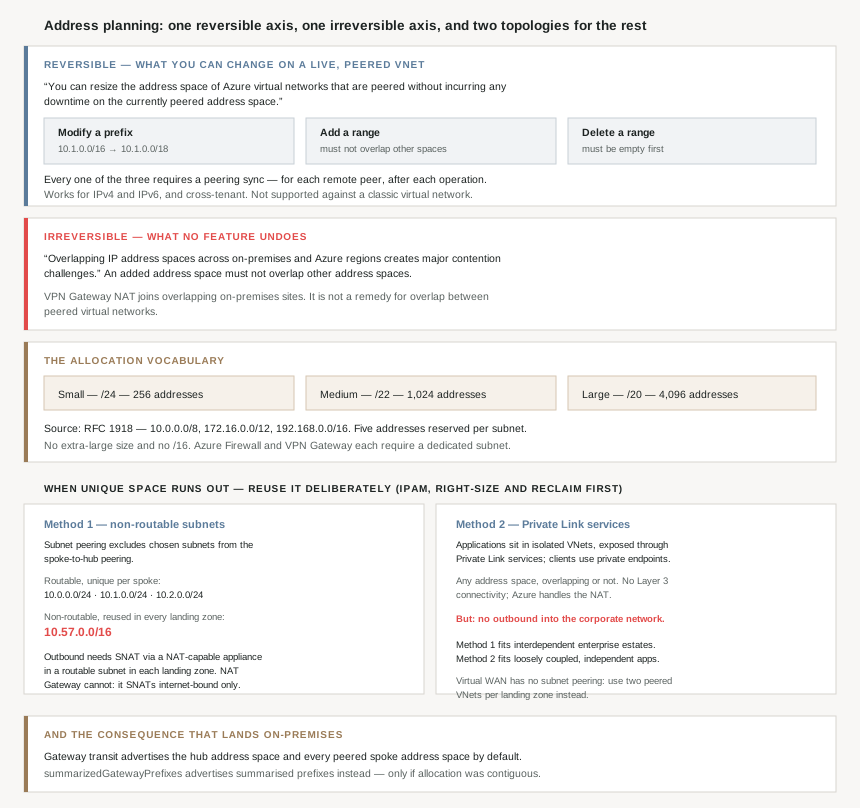
Three things you can do to a live, peered address space
The resize feature is specific about what it covers, and all three operations are things people assume require a rebuild:
| Operation | Example from the docs | Catch |
|---|---|---|
| Widen or narrow an existing range | “change 10.1.0.0/16 to 10.1.0.0/18” |
Requires a peering sync |
| Add a range | A second, discontiguous block on the same VNet | “ensure that it doesn’t overlap other address spaces” |
| Delete a range | Reclaiming space from a decommissioned tier | “Before you can delete an address space, it must be empty” |
The sync is the part that bites, because it is manual and it is per-peer: “When you update the address space for a virtual network, you need to sync the virtual network peer for each remote peered virtual network.” On a hub with forty spokes that is forty sync operations, and until each one runs, that peer does not know the new space exists. There is also an ordering instruction worth following literally: “We recommend that you run sync after every resize address space operation instead of performing multiple resizing operations and then running the sync operation.”
Two further details that remove common objections. It works across tenant boundaries — “Resizing of address space is supported cross-tenant” — and it covers both protocols, since “Resizing works for both IPv4 and IPv6 address spaces.” The one documented exclusion is a legacy shape: the feature “doesn’t support scenarios where the virtual network to be updated is peered with a classic virtual network.”
A sizing vocabulary that is deliberately coarse
Once growth is cheap, sizing stops being a precision exercise and becomes a vending problem: how does a platform team hand out space without negotiating every request? The CAF’s answer is three sizes and nothing else.
| Size | Prefix | Addresses | Usable after Azure’s five, per subnet |
|---|---|---|---|
| Small | /24 | 256 | 251 in a single subnet |
| Medium | /22 | 1,024 | e.g. four /24s, 251 each |
| Large | /20 | 4,096 | e.g. sixteen /24s |
Note what is absent: there is no extra-large, and no /16. The largest size on the menu is a /20, which is one sixteenth of the /16 people reach for by default. And the stated purpose of the menu is not tidiness, it is self-service — “you could adopt T-shirt sizing to make it easy for workload teams to describe their needs”, with the process designed to “support requesting different sizes based on the needs of the individual workload landing zones.”
Sizing also has to absorb two taxes from #61. Azure “reserves five IP addresses within each subnet” and you must “factor in those addresses when you’re sizing virtual networks and encompassed subnets” — per subnet, so a VNet split into eight subnets loses forty addresses before anything deploys. And some space is not yours to allocate freely at all: “Some Azure services require dedicated subnets. These services include Azure Firewall and Azure VPN Gateway.”
Where the plan lives, and why a spreadsheet is a known failure mode
A T-shirt menu only prevents overlap if something tracks what has been handed out. The CAF is direct that the options run from “a basic Excel-based inventory” up to enterprise IPAM products, and equally direct about what the tool must do: “Your IPAM tool should have an API for reserving non-overlapping IP address spaces to support an Infrastructure as Code (IaC) approach”, because that is what lets allocation join the subscription vending process instead of being a ticket.
There is a first-party option that costs nothing to evaluate: “Azure IPAM is a lightweight solution built on the Azure platform. It automatically discovers IP address utilization within your Azure tenant” — which also means it can tell you what your current overlap situation actually is, rather than what the spreadsheet believes.
Two structural rules go with it. Organise the space so it can be summarised later: “Create a systematic arrangement for your IP address spaces by structuring them according to Azure regions and workload archetypes.” And close the loop at the other end, because an address plan that only ever allocates is a plan with a slow leak: “The decommissioning process for workloads should include the removal of IP address spaces that are no longer used, which can later be repurposed for upcoming new workloads.”
Why This Architecture Holds Up
Because the reversible problem has a feature and the irreversible one has a topology
Every other constraint in this post can be traded against something. Overlap cannot. There is exactly one NAT mechanism in the planning guidance, and it is carefully scoped: “Azure VPN Gateway can connect overlapping, on-premises sites with overlapping IP address spaces through network address translation (NAT) capability.” On-premises sites. It is not a way to peer two overlapping VNets, and reading it as one is how an overlap gets discovered late.
So the decision a platform team is really making on day one is not how big each VNet is. It is whether anything in the estate is capable of handing out a duplicate range — and if the answer is “a spreadsheet and good intentions”, the answer is yes.
Because “don’t create a /16” and “use a few large VNets” are both real advice
#61 ended on a genuine tension in Microsoft’s own guidance, and address planning is where it has to be resolved. The best-practices page prefers a few large virtual networks over many small ones; the planning page says “Don’t create large virtual networks like /16.”
They are not in conflict once you notice they are answering different questions. The first is about management overhead within a subscription — do not split one workload across six VNets for no reason. The second is about waste across the estate — do not take a /16 for that one workload. The resolution is the T-shirt menu: few VNets per landing zone, each sized from a short list, allocated from a tracked pool. Which is also why the CAF adds the blunt one: “Don’t create virtual networks without planning the required address space in advance.”
And one habit to drop outright, because it borrows someone else’s addresses to solve your own shortage: “Don’t use public IP addresses for virtual networks, especially if the public IP addresses don’t belong to your organization.” Azure will let you. The internet will not care that you did until something in it needs to reach the real owner of that range.
Because when unique space runs out, the answer is to stop allocating unique space
This is the part of the subject that is genuinely architectural, and it inverts the usual instinct. The starting position is plain: corporate networks draw on “10.0.0.0/8, 172.16.0.0/12, and 192.168.0.0/16”, which on-premises “provide enough IP addresses to meet the requirements of even the largest networks” — and then: “In the cloud, large networks are easy to build… it’s important to adopt more conservative address management practices and treat IPv4 addresses as a limited resource.”
Microsoft’s order of operations is IPAM first — “centrally track address use and allocate unique, nonoverlapping address spaces. Right-size virtual networks and subnets, and reclaim unused address ranges when you decommission workloads” — and only then one of two topologies that “intentionally reuse the same IPv4 address blocks in multiple virtual networks”.
| Method 1 — non-routable subnets | Method 2 — Private Link services | |
|---|---|---|
| Mechanism | Subnet peering excludes chosen subnets from the spoke-to-hub peering | Applications live in isolated VNets, exposed through Private Link services |
| What gets reused | The same non-routable range in every landing zone | Any address space at all, overlapping the corporate network if you like |
| Inbound from the estate | Routable subnets only | Via private endpoints only |
| Outbound to the estate | Yes, through SNAT | No — not without another Private Link service |
| Fits | “traditional enterprise environments where multiple systems and applications depend on each other” | “loosely coupled environments where applications operate independently” |
Method 1 is worth seeing concretely, because the numbers make the idea obvious. In Microsoft’s example the hub and each spoke hold unique routable ranges — 10.0.0.0/24, 10.1.0.0/24, 10.2.0.0/24 — while “the range 10.57.0.0/16 serves as the non-routable address space”, and because those subnets are excluded from the peering, “non-routable subnets in different workload landing zone spokes can have the same or overlapping address ranges within 10.57.0.0/16.” A whole /16 of back-end capacity, allocated once, reused in every landing zone. The routable allocation per spoke drops to a /24.
Method 2 goes further and drops the Layer 3 relationship entirely: “clients in a virtual network can consume applications in a different virtual network without configuring Layer-3 connectivity… The two virtual networks can use overlapping IP address ranges. Azure transparently handles the required NAT logic.” This is the one mechanism in the whole subject that makes an overlap survivable — and it does so by refusing to route between the two networks at all.
Because reusing address space costs you an appliance in every landing zone
Non-routable space is not free, and the bill is architectural rather than numeric. Back-end components still need DNS, domain controllers, logging and backup, so: “When resources in non-routable subnets need to initiate connections to endpoints outside their landing zone, those connections must use Source NAT (SNAT) behind a routable IP address. Therefore, you must deploy a NAT-capable NVA in a routable subnet in each landing zone.”
The obvious candidate does not qualify, and this is the sentence to read before designing anything: “You can’t use Azure NAT Gateway because it only supports SNAT for internet-bound traffic.” So it is Azure Firewall or a marketplace NVA, each with its own costs:
- Azure Firewall needs its own space in the routable block — “Deploy Azure Firewall in its own reserved subnet named AzureFirewallSubnet, which must use a routable address space” — so the scheme you adopted to save addresses immediately spends some back.
- The cheapest SKU may not fit: “Basic supports up to 250 Mbps but doesn’t include DNS proxy, custom DNS, network-level FQDN filtering, or threat-intelligence deny mode.”
- Some workloads are simply not candidates for non-routable placement: “We recommend that you deploy Windows Server Active Directory domain controllers to routable subnets”, because DC-to-DC communication over NAT “hasn’t been tested and isn’t supported.”
- And if the estate is on Virtual WAN, the mechanism changes shape: “Azure Virtual WAN doesn’t support subnet peering”, so Method 1 becomes two peered VNets per landing zone — one routable and attached to the hub, one non-routable and attached only to its sibling.
None of that makes the method wrong. It makes it a decision with a price, taken when unique space has genuinely run short — not a default.
Because a flat plan turns into somebody else’s routing table
Here is the consequence of address planning that almost never appears in the plan itself. With gateway transit in a hub-and-spoke, “Azure VPN Gateway and ExpressRoute Gateway can advertise a large number of prefixes to on-premises because the default behavior is to advertise the address space of the hub and the address spaces of peered virtual networks.”
Every spoke you add puts its prefixes into the on-premises routing table. There is a control for it — “you can configure advertised gateway prefixes on the gateway virtual network by using the summarizedGatewayPrefixes property”, which advertises summarised prefixes and suppresses the covered spoke ranges — but summarisation only works if the allocation was contiguous in the first place. That is the real payoff of the “structure by region and workload archetype” rule: a tidy plan can be expressed as a handful of routes, and a plan assembled range-by-range cannot be expressed as anything shorter than itself. (One scoping note: the property “only affects virtual networks with a gateway subnet.”)
Because the peering limits arrive before the address limits do
Worth knowing while sizing a topology: past a certain spoke count the connectivity model changes product. Azure Virtual Network Manager connectivity configurations let you “create a hub-and-spoke topology with up to 1,000 spoke virtual networks connected to a hub, or create a mesh connected group containing up to 3,000 virtual networks that can communicate directly with one another” — explicitly framed as scaling “beyond traditional virtual network peering limits.”
A mesh of 3,000 VNets is also the clearest argument for the T-shirt menu. At that count, the difference between handing out /20s and handing out /16s is the difference between a plan that fits inside 10.0.0.0/8 and one that does not.
Because IPv6 is a planning answer, not just a modernisation one
The CAF offers it in exactly those terms: “For environments that have limited availability of private IP addresses, consider using IPv6. Virtual networks can be IPv4-only or dual stack IPv4+IPv6.” Dual stack, note — IPv4 cannot be switched off. It relieves pressure on the scarce space rather than replacing it, which makes it a complement to the two methods above rather than an alternative.
Key Architecture Decisions
| Decision point | Choose | Because |
|---|---|---|
| Sizing a new workload VNet | Smallest T-shirt size that fits | Growth is a live, zero-downtime operation. |
Reaching for a /16 “to be safe” |
Don’t | Don't create large virtual networks like /16. |
| Largest size on the self-service menu | /20 — 4,096 addresses |
That is where the CAF's T-shirt sizes stop. |
| Where the allocation record lives | An IPAM tool with an API | IaC and subscription vending need to call it. |
| Evaluating IPAM options | Start with Azure IPAM | It discovers current utilisation in the tenant. |
| How ranges are organised | By region, then workload archetype | Only contiguous plans can be summarised later. |
| After a resize on a peered VNet | Sync every remote peer, immediately | Sync is manual, per-peer, and per-operation. |
| Several resizes to do | Sync after each one | Microsoft advises against batching then syncing. |
| Deleting an address range | Empty it first | A range in use cannot be removed. |
| Hoping to NAT around a VNet overlap | Don’t plan on it | VPN Gateway NAT addresses on-premises sites. |
| Running short of unique private space | IPAM, right-size and reclaim first | That is Microsoft's stated order of operations. |
| Interdependent enterprise workloads, space exhausted | Method 1 — non-routable subnets | It keeps full connectivity inside the landing zone. |
| Independent applications, space exhausted | Method 2 — Private Link services | Overlapping ranges are tolerated outright. |
| Outbound from non-routable subnets | SNAT via Azure Firewall or an NVA | NAT Gateway only SNATs internet-bound traffic. |
| Placing domain controllers | Routable subnets | DC-to-DC over NAT is not a supported path. |
| Method 1 on a Virtual WAN estate | Two peered VNets per landing zone | Virtual WAN does not support subnet peering. |
| Gateway transit advertising every spoke | Set summarizedGatewayPrefixes |
The default advertises hub plus all peer spaces. |
| Scaling past peering limits | Virtual Network Manager | Up to 1,000 spokes, or a 3,000-VNet mesh. |
| Private space genuinely scarce | Add IPv6, dual stack | IPv4 cannot be disabled, but pressure drops. |
| Borrowing public ranges internally | Don’t | Especially ranges your organisation doesn't own. |
Closing Thought
The received wisdom on Azure address planning is “size generously, because renumbering is painful”. Half of that is now wrong and the other half aims at the wrong risk. Resizing a peered VNet is a documented, zero-downtime operation covering widen, add and delete; the only real friction is a per-peer sync you have to remember to run. Generosity, meanwhile, is not free — it consumes the one thing with no recovery path, which is uniqueness.
That is the asymmetry worth designing around. Undersize a VNet and you widen a prefix and sync some peerings. Duplicate a range and the options are renumbering an estate, or rebuilding the topology so the two halves never route to each other. The planning effort belongs where the irreversibility is, and in practice that means less time in a subnet calculator and more time making sure a second team cannot be handed 10.1.0.0/16 because nothing in the process knows the first team has it.
And the most interesting thing in the whole subject is what Microsoft recommends when the arithmetic finally fails. Not a bigger block, and not a renumbering project: a topology that reuses the same addresses deliberately, in every landing zone, with the uniqueness confined to the thin routable layer that actually needs to be reachable. 10.57.0.0/16 in that worked example is not an allocation. It is the same /16, over and over, and it works precisely because the peering was taught to leave it out. Address planning that survives growth and peering is less about predicting how much space you will need, and more about shrinking the part of the estate where the answer has to be unique.
#63 goes down a level, into the subnets themselves: subnet delegation and service injection — what it means to hand a subnet to a PaaS service, what Azure puts in it, and why some services need a subnet of their own while others are content with a shared one.
Official Azure Reference
- Cloud Adoption Framework — Plan for IP addressing: the non-overlap recommendations, the “don’t create a
/16” rule, the T-shirt sizes, and the IPAM tooling guidance - Azure Virtual Network peering overview — resizing a peered address space, gateway transit and
summarizedGatewayPrefixes, subnet peering, and the Virtual Network Manager scale figures - Prevent IPv4 exhaustion in Azure — the two address-reuse topologies, the
10.57.0.0/16worked example, and the SNAT requirements that come with them - Update the address space for a peered virtual network — the three resize operations, the per-peer sync requirement, and the empty-before-delete rule
- How to configure subnet peering — the checks and limitations to evaluate before adopting Method 1 (no claims drawn from it)
Comments