AWS shipped an AI/ML skill that lets a coding agent “select, train, optimize and deploy models on Amazon SageMaker AI”. Two sentences in that announcement matter more than the capability list, and neither is the headline.
The first is a deprecation. The second is a billing note that tells you what the agent can actually do.
Executive summary
The AWS AI/ML skill is “now a core skill in the Agent Toolkit for AWS, so it works alongside the toolkit's other AWS skills like EC2, Bedrock, and more”, and it is “pre-installed into SageMaker Studio JupyterLab for use with Kiro or your coding agent of choice”.
Buried in the middle: “The toolkit is now the single, supported integration point, replacing the previous AWS Labs skills and plugins, with a consistent and easy install and update path.” If you have AWS Labs skills or plugins wired into a workflow, that is a migration notice.
And the pricing line is the one to read as an architecture statement: “available at no additional charge; you pay only for the AWS resources your agents use.” The agent provisions billable infrastructure.
What changed
| Capability area | What AWS says it covers |
|---|---|
| Inference optimization | “optimize deployed models for latency, throughput, and cost” |
| Model customization | “end-to-end guided fine-tuning workflows, from use case definition through training, evaluation and deployment” |
| Serverful training | “for both traditional ML and generative AI” |
| MLflow | “experiment tracking and model lifecycle management” |
| JumpStart | “deploy pre-built JumpStart models and get guided recommendations on the right model for the use case” |
| Processing jobs | “data preparation and ETL on managed compute” |
Read that list as a permission requirement rather than a feature list. Training, deploying, running processing jobs and optimising endpoints are all mutating operations on managed compute. The agent is not reading documentation at you; it is making things.
Architecture
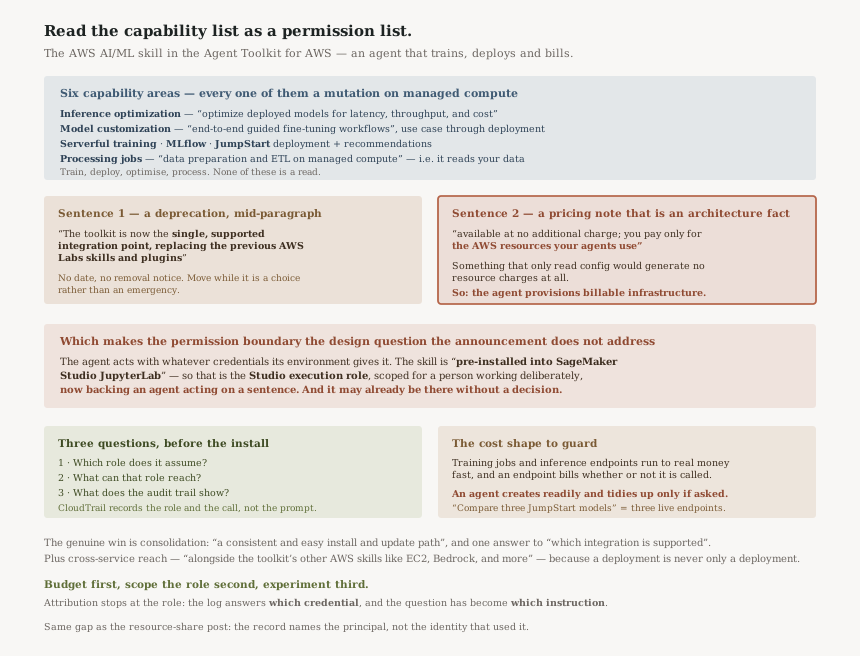
The architectural fact is in the pricing sentence. Something that only read configuration would generate no resource charges at all; “you pay only for the AWS resources your agents use” says the agent creates things that cost money.
Which makes the permission boundary the question the announcement does not address. The agent acts with whatever credentials its environment gives it. In SageMaker Studio JupyterLab, where the skill arrives “pre-installed”, that is the Studio execution role — a role scoped for a human working deliberately, now backing an agent acting on a sentence.
Business value
Real, and the consolidation is a large part of it. “a consistent and easy install and update path” is doing unglamorous work: the previous arrangement of separate AWS Labs skills and plugins meant several things to install, several to update, and no single answer to "which one is supported".
The cross-service framing is the other half: “while working across the rest of your AWS environment”, alongside “EC2, Bedrock, and more”. A model deployment is rarely only a model deployment — it is a role, an endpoint, a VPC decision and a bucket — and an agent that can only see SageMaker would stall at the first of those.
“Guided recommendations on the right model for the use case” is the capability most likely to earn its place day to day. Choosing from the JumpStart catalogue is a research task with a poor signal-to-noise ratio, and it is exactly the kind of thing worth asking rather than reading.
Security considerations
This is the section the announcement leaves empty, and the capability list fills in by implication.
An agent that can run “processing jobs” for “data preparation and ETL on managed compute” is an agent that reads your data. An agent that can perform “end-to-end guided fine-tuning workflows” is an agent that can train a model on it. Neither is a criticism — that is the job — and both mean the execution role's data access is now exercised by something acting on an instruction in English.
Three things worth settling before it is installed rather than after:
- Which role does it assume? In Studio it is the execution role. Elsewhere it is whatever the agent's host provides, and that is frequently a developer's own credentials.
- What can that role reach? A role carrying a broad managed policy gives an agent the same breadth.
- What does the audit trail show? CloudTrail records the role and the API call. It does not record the sentence that caused it, so attribution stops at the role.
That last point is the one that generalises. It is the same gap as #80, where the owner sees the principal a share names rather than the identity that uses it: the log answers which credential, and the interesting question has become which instruction.
Cost considerations
“Available at no additional charge” for the skill. The resources are another matter, and the shape of the risk is specific: training jobs and inference endpoints are among the few AWS costs that can run to real money quickly, and an endpoint left deployed bills continuously whether anyone calls it or not.
An agent is very good at creating things and has no particular instinct for tidying up. A conversation that deploys three JumpStart models to compare them leaves three endpoints running unless somebody removes them.
So a budget with an alert is not optional overhead here. This is the same argument as #50: a total budget nothing escapes is worth more than per-item precision, because the thing you are guarding against is spend you did not anticipate.
Operational considerations
The migration is the operational item. “replacing the previous AWS Labs skills and plugins” means existing installations are on a path AWS has stopped calling supported. The announcement gives no date and no removal notice, so this is a "move when convenient, but know you have moved off the supported path if you do not" rather than an emergency.
The pre-installation in Studio JupyterLab is convenient and worth knowing about explicitly: the capability appears in an environment your team already uses, without anybody deciding to install it. If your controls assumed the agent tooling was opt-in, that assumption needs rechecking.
Tradeoffs
| Choice | Gains | Costs |
|---|---|---|
| Adopt the toolkit skill | One supported integration point, one update path, cross-service reach | An agent with mutating SageMaker permissions in your environment |
| Stay on AWS Labs skills | Nothing to change today | Explicitly described as replaced; divergence grows from here |
| Use it in Studio as pre-installed | Zero setup | It inherits the Studio execution role, which was scoped for a person |
| Give it a narrow purpose-built role | A real boundary on what a prompt can cause | Work to define, and it will refuse things mid-conversation |
Implementation guidance
- Decide the role before the install, not after the first surprising bill. Scope it to the SageMaker actions the work needs rather than attaching a broad managed policy.
- Put a budget with an alert on the account before anyone deploys a model through it.
- Check whether Studio JupyterLab users already have it. It is pre-installed, so the answer may be yes without a decision having been taken.
- Inventory AWS Labs skills and plugins and plan the move to the toolkit while it is a choice.
- Review CloudTrail for the execution role after the first week, specifically for endpoints and training jobs created.
- Agree a teardown habit. Comparing models leaves endpoints behind, and nothing in the workflow prompts for their removal.
Best practices
- Read a capability list as a permission list. Train, deploy, optimise and process are all mutations on billable compute.
- Do not let a convenience default set your blast radius. Pre-installed in Studio means the execution role is the boundary unless you chose otherwise.
- Budget first, experiment second, with endpoints specifically in mind.
- Treat "replacing the previous" as a dated statement even when no date is given, and move before the gap becomes a problem.
- Accept that attribution stops at the role. If you need to know which instruction caused an action, that record has to be kept by the agent's host.
Who should adopt this and when
Now, if you already run SageMaker and use a coding agent. The consolidation alone justifies it, and the JumpStart recommendation capability is a genuine time-saver.
Now, if you have AWS Labs skills installed — this is the supported path, and moving while it is unforced is cheaper than moving later.
After a role review, if your Studio execution role is broad. Pre-installation means the capability is present; the role decides what it can do with it.
Not a reason to adopt SageMaker, if you are not already there. This improves a workflow; it does not change the platform decision.
Key takeaways
- The AWS AI/ML skill is “now a core skill in the Agent Toolkit for AWS”, covering inference optimization, model customization, serverful training, MLflow, JumpStart and processing jobs.
- It replaces the previous AWS Labs skills and plugins — a migration notice carried in the middle of a feature announcement.
- “you pay only for the AWS resources your agents use” — the agent provisions billable infrastructure, which makes the execution role the real control.
- It is “pre-installed into SageMaker Studio JupyterLab”, so it may already be present without a decision.
- CloudTrail attributes actions to the role, not to the instruction that prompted them.
Official AWS references
- Bring deep SageMaker AI expertise to your coding agent with the AWS AI/ML skill in the Agent Toolkit for AWS — the capability areas and what each covers, the replacement of the previous AWS Labs skills and plugins, the Studio JupyterLab pre-installation, and the pricing statement
- What is Amazon SageMaker AI — further reading on the underlying service; no claims in this post are drawn from it
Comments