Business Challenge
Here is what the last six posts have accumulated between a packet and a virtual machine. A subnet NSG and a NIC NSG, evaluated in opposite orders depending on direction. Six default rules at the bottom of each. Service tags whose contents Microsoft maintains and which widen when the topology changes. Application security groups that make individual rules apply to some interfaces and not others. Virtual Network Manager admin rules that can decide a flow before any NSG rule is read.
No blade shows you the result of all that. Reading the rule list tells you what was configured; it does not tell you what will happen. So this post is the two tools that do, and the first thing to be clear about is that they are not alternatives — they answer different questions.
| Effective security rules | IP flow verify | |
|---|---|---|
| Question it answers | What rules are in force on this interface? | Would this specific packet get through? |
| Shape of the answer | The aggregated rule set | “Access denied” or “Access allowed”, plus the rule name |
| Covers admin rules | No — NSGs only | Yes |
| Protocols | All, as written | TCP and UDP only |
| Where it lives | The network interface | Network Watcher |
The definition of the first is the one worth memorising, because it is the only object on the platform that corresponds to what actually applies:
“The effective security rules applied to a network interface are an aggregation of the rules that exist in the NSG associated to a network interface, and the subnet the network interface is in.”
And the reason you need an aggregation rather than two lists is stated plainly in the same paragraph: “Rules in different NSGs can sometimes conflict with each other and affect a VM’s network connectivity.”
Architecture
An aggregated view with a per-interface scope, a packet simulator with a narrower remit, and one field that settles an argument from two posts ago.
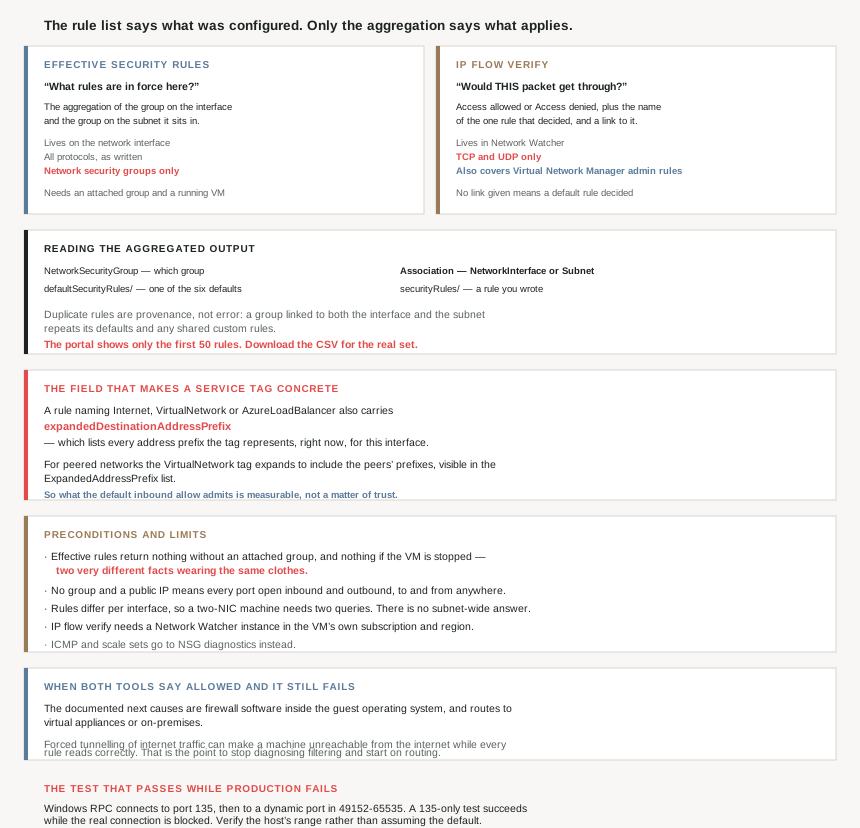
How to read the aggregated output
Three fields, and the second one is the one people skip past: “NetworkSecurityGroup: The ID of the network security group. Association: Indicates whether the network security group is linked to a NetworkInterface or Subnet. EffectiveSecurityRules”.
Without Association you cannot tell which level a rule came from, and after #64 that is the difference between a rule that must be matched by another one and a rule that stands alone. The rule names carry the other half of the provenance: “Rule names prefaced with defaultSecurityRules/ are default security rules that exist in every NSG. Rule names prefaced with securityRules/ are user created rules.”
Two reading hazards. The output repeats itself by design — “Duplicate rules appear in the output when an NSG is linked to both the network interface and the subnet. Default rules and any custom rules shared between the NSGs cause these duplicates” — so a rule appearing twice is provenance, not a misconfiguration. And the portal truncates: “only the first 50 rules are shown. To download a .csv file that contains all of the rules, select Download.” On any estate with a real rule set, the portal view is a sample.
The field that makes a service tag concrete
This is the part I would put in front of anyone who read #65 and wanted to check it rather than believe it. Service tags stop being opaque in this output:
“Rules that specify a service tag, such as Internet, VirtualNetwork, and AzureLoadBalancer… also have values for the expandedDestinationAddressPrefix property. The expandedDestinationAddressPrefix property lists all address prefixes represented by the service tag.”
And the troubleshooting note attached to it confirms #65's central claim from the other direction, with the tool to verify it: “For peered virtual networks, by default, the VIRTUAL_NETWORK service tag automatically expands to include prefixes for peered virtual networks. To troubleshoot any issues related to virtual network peering, you can view the prefixes in the ExpandedAddressPrefix list.”
So the widening described in #65 is not an inference from a documentation sentence. It is observable: query the effective rules, read the expanded prefix list on AllowVNetInBound, and count what your estate has quietly admitted. That is a ten-minute audit worth running once on any VNet that has acquired a peering since it was designed.
IP flow verify, and what it names
The other tool simulates rather than lists. “IP flow verify… check[s] if a packet is allowed or denied to or from an Azure virtual machine based on the configured security and admin rules.” Its scope is wider than the effective-rules view in exactly one respect, and it is the respect #64 flagged as able to make a correct NSG irrelevant:
“IP flow verify looks at the rules of all network security groups applied to a virtual machine’s network interface, whether the network security group is associated to the virtual machine’s subnet or network interface. It additionally, looks at the Azure Virtual Network Manager rules applied to the virtual network of the virtual machine.”
Six inputs — “traffic direction, protocol, local IP, remote IP, local port, and remote port” — which is the five-tuple from #64 plus direction, because direction selects which evaluation order applies.
The output is the thing worth reaching for: “IP flow verify returns Access denied or Access allowed, the name of the security rule that denies or allows the traffic, and the network security group with a link to it.” Not a rule set to interpret — the one rule that decided.
With one tell that is useful rather than annoying: “It doesn’t provide a link if a default security rule is denying or allowing the traffic.” A missing link means a default decided, which means nothing you wrote was reached.
Where each tool stops
| Limit | What to use instead |
|---|---|
| “IP flow verify only tests TCP and UDP rules” | “To test ICMP traffic rules, use NSG diagnostics” |
| “only tests security and admin rules applied to a virtual machine’s network interface” | “To test rules applied to virtual machine scale sets, use NSG diagnostics” |
| “You must have a Network Watcher instance in the Azure subscription and region of the virtual machine” | Enable it per region before you need it |
| Effective rules need an NSG and a running VM | Nothing — see the precondition note below |
That ICMP exclusion is the one that catches people mid-incident, because the first instinct in a connectivity problem is to ping something. A ping result tells you nothing that IP flow verify can corroborate.
Why This Architecture Holds Up
Because the only true view is per-interface, which means there is no estate-wide answer
The aggregation is scoped to one network interface, and the documentation is explicit that this is not a formality: “The effective security rules can be different for each network interface… When troubleshooting, run the command for each network interface.”
Combine that with #66 — where membership decides whether a rule applies at all — and the consequence is structural. There is no screen, report or query that tells you the security posture of a subnet. There is only a per-interface answer, repeated. Which is why the design choices in #64 and #66 matter so much: the simpler the attachment model, the fewer interfaces whose answers can diverge.
Because the preconditions mean the tool is unavailable exactly when things are worst
Both tools have requirements that fail in the situations you most want them. Effective rules: “Azure only shows effective security rules for a network interface when an NSG is associated with the VM’s network interface or subnet. Additionally, the VM must be in the running state.”
A stopped VM returns nothing. A VM with no NSG anywhere returns nothing — and that second case is not benign, because it is the configuration with the widest exposure: “If the network interface or subnet lacks an associated NSG, all ports remain open for inbound and outbound access when a VM has a public IP address. This configuration allows unrestricted access to and from anywhere.”
So an empty result is two very different facts wearing the same clothes: either nothing filters this machine, or the machine is not running. Worth checking which before concluding anything, and worth noting that the most dangerous configuration on the platform is the one the diagnostic tool has nothing to say about.
IP flow verify has a prerequisite with a lead time: “You must have a Network Watcher instance in the Azure subscription and region of the virtual machine.” Per region, per subscription. That is a landing-zone decision rather than an incident-time one, and discovering it during an outage costs the thing you were trying to save.
Because the tooling turns #65 from a claim into a measurement
Worth restating as a procedure, because it is the most actionable thing in this post. #65 argued that AllowVNetInBound admits every peered VNet and every connected on-premises range, on the strength of the VirtualNetwork tag definition. ExpandedAddressPrefix makes that auditable: the expansion is printed, per rule, for the interface you ask about.
The gap between “the documentation says this tag is broad” and “here are the 47 prefixes my default rule currently admits” is the difference between an argument and a finding. One is a thing to discuss in a design review; the other goes in a ticket.
Because when neither tool finds it, the cause is outside the NSG — and the docs name where
The most useful paragraph for an actual incident is the one about exhausting the network-security explanation: “If there are no security rules causing a VM’s network connectivity to fail, the problem might be due to: Firewall software running within the VM’s operating system… Routes configured for virtual appliances or on-premises traffic.”
And the specific routing trap, which is the one that produces a machine you cannot reach from the internet while every NSG rule looks correct: “Internet traffic can be redirected to your on-premises network via forced-tunneling. If you force tunnel internet traffic to a virtual appliance, or on-premises, you might not be able to connect to the VM from the internet.”
This is the right place to stop diagnosing filtering and start diagnosing routing, and knowing that boundary exists is most of the value. Two tools say “allowed”, the connection still fails, and the answer is a route table or a guest firewall — neither of which any NSG view will ever mention.
Because the worked scenario is the default rule, and that is the common case
Microsoft's example is deliberately mundane: port 80 from the internet fails. The answer is not a misconfigured custom rule, it is the platform's starting posture. “The rule named defaultSecurityRules/DenyAllInBound is what’s preventing inbound communication to the VM over port 80… No other rule with a higher priority (lower number) allows port 80 inbound.”
The fix is one rule — “Allow-HTTP-All… Destination port ranges 80, Protocol TCP, Action Allow, Priority 100” — with the caveat that falls straight out of #64's reversed order: “If NSGs are associated with both the network interface and the subnet, create the same rule in both NSGs.”
And in the middle of a troubleshooting article, the same architectural advice as #64 and #66, arrived at from the diagnostic end: “To ease administration and communication problems, we recommend that you associate an NSG to a subnet, rather than individual network interfaces. If VMs within a subnet need different security rules, you can make the network interfaces members of an application security group.” Three posts, three contexts, one recommendation.
Because one protocol pattern will pass your test and fail in production
A specific case worth knowing, since it is the kind of thing a single-port test certifies as working. Windows management over WMI and DCOM runs on RPC: “The client first connects to the RPC Endpoint Mapper on TCP port 135. The endpoint mapper then directs the client to a dynamically allocated TCP port… the dynamic TCP range is 49152-65535.”
Which produces a false pass, and the documentation says so: “Both rules are required because a TCP 135-only test can succeed while the subsequent dynamic RPC connection is blocked.” An IP flow verify against 135 returns Access allowed, the management tool still fails, and nothing is wrong with your diagnosis except the port you chose to test.
The accompanying instruction is also good practice generally: “Verify the configured range on the target Windows VM before creating the rule; if the host uses a customized range, use that verified range instead of assuming 49152-65535.”
Key Architecture Decisions
| Decision point | Choose | Because |
|---|---|---|
| “What applies to this machine?” | Effective security rules | It is the aggregation of both levels. |
| “Why was this packet dropped?” | IP flow verify | It names the one rule that decided. |
| Suspecting a Virtual Network Manager admin rule | IP flow verify, not effective rules | Only it covers admin rules. |
| Diagnosing with ping | Use NSG diagnostics | IP flow verify tests TCP and UDP only. |
| Diagnosing a scale set | Use NSG diagnostics | IP flow verify covers NIC rules only. |
| Enabling Network Watcher | Per region, in advance | It must exist in the VM's subscription and region. |
| An empty effective-rules result | Check for a stopped VM and a missing NSG | Both return nothing, and mean opposite things. |
| A VM with a public IP and no NSG | Attach an NSG to the subnet | All ports are open to and from anywhere. |
| A VM with two network interfaces | Query each one | Effective rules can differ per interface. |
| Reading the portal's rule list | Download the CSV | The portal shows only the first 50 rules. |
| A rule appearing twice | Read Association |
Duplicates mean both levels carry it. |
| Telling a default from your own rule | Read the name prefix | defaultSecurityRules/ versus securityRules/. |
| No NSG link in the IP flow verify result | A default decided it | No link is given for default rules. |
| Auditing what a service tag admits | Read ExpandedAddressPrefix |
It lists every prefix the tag represents. |
| Checking what a peering widened | Same field, on the VNet default rule | The tag expands to include peered prefixes. |
| Both tools say allowed, it still fails | Guest firewall, then routes | Those are the documented next causes. |
| Unreachable from the internet, rules correct | Check for forced tunnelling | It redirects internet traffic on-premises. |
| Testing Windows management connectivity | Test the dynamic range, not just 135 | A 135-only test passes while RPC is blocked. |
| Writing the RPC dynamic rule | Verify the host's range first | Don't assume the 49152-65535 default. |
| Different rules for VMs in one subnet | Subnet NSG plus ASG membership | Microsoft's recommendation over per-NIC NSGs. |
Closing Thought
The honest summary of the last seven posts is that Azure network security has no single source of truth by design, and the tooling exists to assemble one on request. A subnet group and an interface group, evaluated in opposite orders, with six defaults underneath, service tags whose contents move, group membership deciding which rules apply, and admin rules above all of it. Every one of those is a reasonable feature. Together they mean that reading configuration cannot tell you what will happen.
So the discipline is to stop trying. Effective security rules for “what is in force”, IP flow verify for “what happens to this packet”, and a clear idea of where both stop — no ICMP, no scale sets, nothing about guest firewalls, nothing about routes. The failure mode worth guarding against is not misreading the tools; it is trusting a rule list that was never the answer.
And the single most useful thing in either tool is a field nobody mentions. ExpandedAddressPrefix prints what a service tag actually contains, right now, for this interface. Every argument in #65 about how far AllowVNetInBound reaches is settled by reading it once. If you take one action from this series so far, it is that: query the effective rules on something in a peered VNet, look at the expanded prefixes on the default inbound allow, and find out what your estate has been admitting since the day someone added a peering.
#68 moves from filtering to the way out: default outbound access, why Azure gave every VM internet egress it never asked for, and what the retirement of that behaviour means for anything deployed without an explicit outbound path.
Official Azure Reference
- Diagnose a virtual machine network traffic filter problem — the definition of effective security rules, the output fields and name prefixes, the 50-rule portal cap, the expanded service-tag prefixes, the preconditions, and the non-NSG causes
- IP flow verify overview — the six inputs, what the result names, the missing-link tell for default rules, and the TCP/UDP and network-interface limits
- NSG diagnostics overview — the tool to use for ICMP and for virtual machine scale sets (no claims drawn from it)
- Diagnose a virtual machine network traffic routing problem — where to go when filtering is ruled out (no claims drawn from it)
Comments