Business Challenge
#64 showed the six rules Azure writes into every NSG and left them as the floor of the priority stack. This post is about what they actually say, because five of the six are read correctly and one is not.
Here they are, and on the face of it they are unremarkable:
| Priority | Inbound | Outbound |
|---|---|---|
65000 | AllowVNetInBound — VirtualNetwork → VirtualNetwork | AllowVnetOutBound — VirtualNetwork → VirtualNetwork |
65001 | AllowAzureLoadBalancerInBound — AzureLoadBalancer → 0.0.0.0/0 | AllowInternetOutBound — 0.0.0.0/0 → Internet |
65500 | DenyAllInbound | DenyAllOutBound |
Read that as English and it says: machines in my virtual network can talk to each other, the load balancer can reach them, everything else inbound is denied; outbound they can talk to each other and to the internet, and nothing else. That is the mental model nearly everyone carries, and it is wrong in one specific and consequential way.
The three capitalised words are not descriptions. “VirtualNetwork, AzureLoadBalancer, and Internet are service tags rather than IP addresses.” And the definition of the first one is the whole post:
VirtualNetwork actually covers
“The virtual network address space (all IP address ranges defined for the virtual network), all connected on-premises address spaces, peered virtual networks, virtual networks connected to a virtual network gateway, the virtual IP address of the host, and address prefixes used on user-defined routes. This tag might also contain default routes.”
So AllowVNetInBound is not a rule about your virtual network. It is a rule about everything your virtual network is attached to: every spoke you peered in #62, the datacentre on the other end of the ExpressRoute circuit, every VNet reachable through the gateway, and whatever ranges happen to appear in your route tables.
Which reframes what that default is doing. On a greenfield VNet with no peerings and no gateway, “allow VirtualNetwork” and “allow my subnet neighbours” are the same set, so the rule behaves exactly as people expect and nothing teaches them otherwise. The two sets diverge the moment a peering is created — and the rule silently widens with it, in a group nobody edited.
Architecture
Six rules, three tags, and one definition that decides how much of your estate the defaults admit.
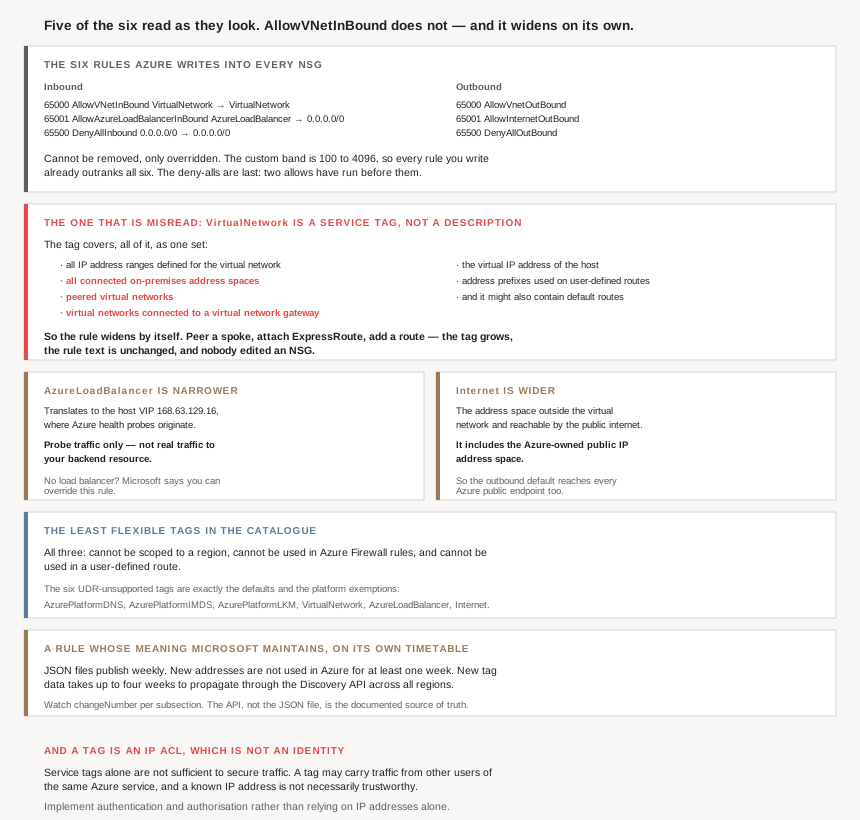
AllowVNetInBound does not — and it widens on its own.Where the numbers sit, and why
The priorities are not arbitrary. Your own rules live in a band that stops well short of them — “A number between 100 and 4096” — while the defaults are numbered 65000, 65001 and 65500, and the reason is stated outright: “Azure default security rules are given the lowest priority (highest number) to ensure your custom rules are always processed first.”
That gap is the mechanism by which you are expected to take control. “You can’t remove the default rules, but you can override them by creating rules with higher priorities.” Every rule you write already outranks all six, so overriding a default is not a special operation — it is the normal one.
AzureLoadBalancer is narrower than it reads
The second inbound default looks like it admits load-balanced traffic. It does not. “The Azure infrastructure load balancer. The tag translates to the virtual IP address of the host (168.63.129.16) where the Azure health probes originate.”
And then the sentence that settles it: “This only includes probe traffic, not real traffic to your backend resource. If you’re not using Azure Load Balancer, you can override this rule.”
Two things follow. Real client traffic arriving via a load balancer is matched on the original client's address, not on this tag — so a rule allowing AzureLoadBalancer is not what makes a load-balanced application reachable. And the one default Microsoft explicitly invites you to remove is this one, on any workload with no load balancer in front of it.
It is also the same address #61 flagged as unusable in a VNet and #64 flagged as carrying exempt platform traffic: 168.63.129.16 is where DHCP, DNS, IMDS and health monitoring come from. Three posts, three roles, one address worth recognising on sight.
Internet includes Azure's own public space
The outbound default at 65001 sends traffic to the Internet tag, defined as “The IP address space that’s outside the virtual network and reachable by the public internet. The address range includes the Azure-owned public IP address space.”
So the default permits outbound reach not only to the public internet but to Azure's own public endpoints — every storage account, every SQL endpoint, every other tenant's public frontend. That is the thing a deny-all-outbound is usually written to stop, and it is worth knowing that the default permits it before deciding the default is harmless.
The deny-alls are the only rules doing the protecting
DenyAllInbound and DenyAllOutBound both sit at 65500, both “0.0.0.0/0” to “0.0.0.0/0”, both protocol Any — where “Any encompasses TCP, UDP, and ICMP” and “0.0.0.0/0… represents all IP addresses”.
They are last, which is correct and also the point: everything above them has already been allowed. The inbound posture of a fresh NSG is not “deny by default”. It is “allow the entire connected estate and the health prober, then deny”. The deny only governs what the two allows did not already cover.
Why This Architecture Holds Up
Because the default inbound allow grows without anyone editing it
This is the one to take away. A tag is live: “Microsoft manages the address prefixes encompassed by the service tag and automatically updates the service tag as addresses change”, and when you name one in a rule “The service tag automatically includes all current and future IP address ranges used by that service.”
Apply that to VirtualNetwork and the consequence is structural rather than administrative. Peer a new spoke and AllowVNetInBound starts admitting it. Attach an ExpressRoute circuit and it starts admitting the on-premises estate behind it. Add a user-defined route and its prefixes join the tag. Nobody changed an NSG; the NSG changed meaning because the topology did.
Which makes the default a reasonable fit for a flat single-VNet deployment and a poor one for the hub-and-spoke topology every post since #62 has been building towards. If the intent is that a spoke's workload tier accepts traffic from the hub and from nothing else, that intent needs a rule in the 100–4096 band that says so. Leaving the default in place says the opposite.
Because these three tags are the least flexible ones in the catalogue
Most service tags can be narrowed and reused. These cannot, and the restrictions stack up:
| Capability | Typical tag | VirtualNetwork, AzureLoadBalancer, Internet |
|---|---|---|
| Regional scoping | Yes — “Storage.WestUS narrows the range” | No |
| Usable in Azure Firewall rules | Yes | No |
| Usable in a user-defined route | Yes | No — all three are on the unsupported list |
That third row catches people building routing alongside filtering: the unsupported set is “AzurePlatformDNS, AzurePlatformIMDS, AzurePlatformLKM, VirtualNetwork, AzureLoadBalancer and Internet”. The six tags that appear in the default rules and the platform exemptions are precisely the six you cannot put in a route table.
Because tag contents change on a schedule you do not control
If a rule's meaning is maintained by Microsoft, the maintenance timetable is part of your design. Three figures matter:
| Timing | What it means for you |
|---|---|
| “updated and published weekly” | The JSON download is a weekly snapshot, not live |
| “aren’t used in Azure for at least one week” | Your grace period to update anything tracking the ranges |
| “up to four weeks… to propagate in the API results” | The API and the JSON file can legitimately disagree |
The one-week delay is deliberate and generous — it “gives you time to update any systems that might need to track the IP addresses associated with service tags” — and it only helps if something is actually watching. The mechanism for that is in the file: “you can detect updates from one publication to the next by noting increased changeNumber values… Each subsection… has its own changeNumber.”
And for anyone writing that automation, the docs pick a winner between the two sources: use “the API data as the source of truth for available Service Tags as it might be different than the JSON downloadable file.”
Because a tag is an IP access control list, and that is a weaker thing than it looks
Microsoft is unusually direct about the limits of its own convenience feature. The warning sits at the top of the service tags page: “While Service Tags simplify the ability to enable IP-based Access Control Lists (ACLs), Service Tags alone aren’t sufficient to secure traffic without considering the nature of the service and the traffic it sends.”
The reasoning is worth reading in full, because it is about tenancy rather than spoofing: “The IP prefixes and Service Tag for a Service might have traffic and users beyond the service itself. If an Azure service permits Customer Controllable Destinations, the customer is inadvertently allowing traffic controlled by other users of the same Azure service.” Allowing a service's tag can mean allowing another tenant who is also using that service.
The same logic is why AzureCloud is a trap rather than a shortcut: “In most scenarios, we don’t recommend allowing traffic from all Azure IPs since IPs used by other Azure customers are included as part of the service tag.”
Azure does defend the layer it can — “integrated DDoS protection… Resource Public Key Infrastructure (RPKI)… RPKI protects Microsoft networks to ensure no one else tries to announce the Microsoft IP space on the Internet” — but the conclusion is still that the address is not the authority: “A known IP Address doesn’t necessarily mean it’s safe or trustworthy… It’s always a best practice to implement authentication/authorization for traffic rather than relying on IP addresses alone.”
Because a service endpoint quietly edits your route table to match a tag
One connection back to #63 that is easy to miss, and it closes a loop: “If you implement a virtual network service endpoint for a service, such as Azure Storage or Azure SQL Database, Azure adds a route to a virtual network subnet for the service. The address prefixes in the route are the same address prefixes, or CIDR ranges, as those of the corresponding service tag.”
So turning on a service endpoint writes tag-shaped prefixes into your routing. And since VirtualNetwork includes “address prefixes used on user-defined routes”, routing and filtering here are not independent layers — a change to one can move the other.
Key Architecture Decisions
| Decision point | Choose | Because |
|---|---|---|
Reading AllowVNetInBound as “my VNet” |
Don’t | The tag spans peerings, gateways and on-premises. |
| A spoke that should accept hub traffic only | Write an explicit rule under 4096 | The default admits the whole connected estate. |
| Auditing NSGs after adding a peering | Re-read what the defaults now permit | The tag widened; no rule was edited. |
| Overriding a default rule | Just write the rule | Any priority in 100–4096 already outranks them. |
| Trying to delete a default | Override instead | The six cannot be removed. |
| A workload with no Azure Load Balancer | Override AllowAzureLoadBalancerInBound |
Microsoft explicitly says you can. |
| Expecting that rule to admit client traffic | It doesn’t | Probe traffic only, from 168.63.129.16. |
Assuming Internet excludes Azure |
It includes Azure public space | The tag covers Azure-owned public IPs. |
| Describing a fresh NSG as deny-by-default | Don’t — two allows come first | The deny-alls are last at 65500. |
| Scoping these three tags to a region | Not possible | None of the three supports regional scope. |
| Using them in a UDR | Not possible | All three are on the unsupported list. |
| Using them in Azure Firewall rules | Not possible | None of the three is usable there. |
| Tracking what a tag contains | Watch changeNumber per subsection |
It increments on every revision. |
| API or JSON as the reference | The Discovery API | Microsoft names it the source of truth. |
| Reacting to a tag range change | You have at least a week | New addresses aren't used for at least one week. |
| API and JSON disagreeing | Expect it for up to four weeks | That is the documented propagation time. |
Allowing AzureCloud inbound |
Don’t, in most scenarios | It includes other Azure customers' IPs. |
| Treating a tag allow as a trust boundary | Add authentication | A tag may carry other tenants' traffic. |
| Relying on IP identity alone | Validate in the application too | A known IP is not necessarily trustworthy. |
| Enabling a service endpoint | Expect a route to appear | Azure adds one with the tag's prefixes. |
Closing Thought
The six default rules are the most-read and least-examined configuration in Azure networking. They appear in every NSG, in every screenshot, in every tutorial, and they are almost always described in the same four words: allow the VNet, deny the rest. That description is accurate for exactly one topology — a single virtual network with no peerings and no gateway — which is the topology nobody ends up with.
What makes it worth a post of its own is that the rule does not change when the estate does. There is no edit, no diff, no deployment. AllowVNetInBound says VirtualNetwork on the day the VNet is created and it still says VirtualNetwork after the first peering, after the ExpressRoute circuit, after the tenth spoke. The text is identical and the set it denotes has grown to include a datacentre. A reviewer reading the NSG a year later sees the same rule the architect saw and draws a different conclusion without knowing it.
Which is the argument for writing the rule you mean rather than inheriting the one you were given. The priority band between 100 and 4096 exists for this; every rule in it outranks all six defaults, so stating an intent costs one rule and no special handling. And it is worth taking Microsoft's own framing seriously while doing it: a service tag is an IP access control list, an IP access control list is a filter rather than an identity, and the address a packet arrives from was never the thing you wanted to trust.
#66 covers Application Security Groups — how to write a rule about a role rather than an address range, and why that turns out to be the thing that makes NSG rules survive a redeployment.
Official Azure Reference
- Azure service tags overview — the definitions of
VirtualNetwork,AzureLoadBalancerandInternet, the regional and Azure Firewall columns, the UDR-unsupported list, and the publication and propagation timings - Azure network security groups overview — the six default rules with their priorities, the 100–4096 band, and why the defaults are numbered above it
- What is an IP based access control list? — why service tags are not sufficient on their own, the other-tenant traffic problem, and the recommendation to authenticate rather than trust an address
- How network security groups filter network traffic — further reading on the evaluation order the defaults sit at the bottom of (no claims drawn from it)
Comments