Business Challenge
#62 established that peering requires non-overlapping address space and used that to argue for disciplined allocation. This post is about the peering itself: what it is as a resource, what global peering changes, and the part nobody models until the invoice arrives.
Start with the cost, because it is the least intuitive thing here. Most cloud networking charges egress and lets ingress in free. Peering does not:
“There’s no charge for creating a virtual network peering connection. Data transfer across peering connections is charged.”
“There’s a nominal charge for ingress and egress traffic that utilizes a virtual network peering.”
So a byte crossing a peering is metered twice conceptually — once leaving one virtual network and once arriving in the other. The resource is free; the traffic is not, in both directions.
Now apply that to the topology every one of these posts has been building. In hub-and-spoke, spoke-to-spoke traffic does not go spoke-to-spoke — peering is not transitive, so it goes spoke → hub → spoke. That is two peering crossings for one logical conversation, each charged in both directions.
And the billing detail that is easiest to get wrong has a correction notice attached to it, which is worth quoting in full because it tells you the old answer is still circulating:
“Traffic to the gateway (ingress or egress) in the peered virtual network incurs virtual network peering charges on the spoke virtual network…”
“A previous version of this document stated that virtual network peering charges wouldn’t apply on the spoke virtual network (or nongateway virtual network) with gateway transit. It now reflects accurate pricing per the pricing page.”
If a cost model for a hub-and-spoke estate was built from the older documentation, it under-counts. That is a rare thing to find stated so plainly in vendor docs, and it is the single most useful sentence in this post for anyone with a spreadsheet.
Architecture
Two links rather than one, four settings per side, and a non-transitivity that shapes both the topology and the bill.
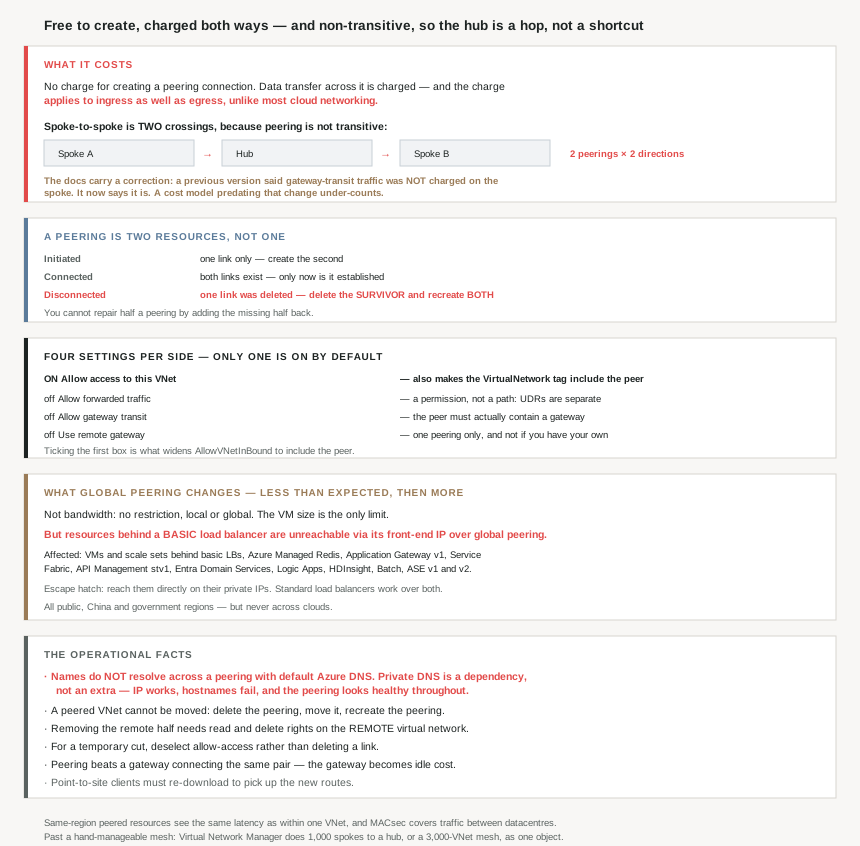
A peering is two resources, and the states tell you which half is missing
The thing most often described as “a peering” is a pair. “When you peer two virtual networks created through Resource Manager, a peering must be configured for each virtual network in the peering.”
| State | Meaning |
|---|---|
| Initiated | “you created only one link. You must create a bidirectional link” |
| Connected | Both links exist — “not successfully established until… both… is Connected” |
| Disconnected | One link was deleted — and the repair is not what you would guess |
That third row is the operational trap: “If your virtual network peering connection is in a Disconnected state, one of the links that you created was deleted. To re-establish a peering connection, you need to delete the remaining link and re-create both.”
You cannot repair half a peering by adding the missing half back. The surviving link has to go first. Which sits oddly beside the portal's behaviour — “When you delete a virtual network peering from a virtual network, the peering from the remote virtual network is also deleted” — so a portal delete removes both and leaves nothing to clean up, while an API or template delete of one side produces the Disconnected state that needs manual repair.
Four settings per side, and only one is on by default
| Setting | Default | What it does |
|---|---|---|
| Allow access to this VNet | On | The basic reachability. Also makes the VirtualNetwork service tag include the peer |
| Allow forwarded traffic | Off | Accept traffic that originated elsewhere and was forwarded |
| Allow gateway transit | Off | Let the peer use this VNet's gateway |
| Use remote gateway | Off | Use the peer's gateway instead of your own |
The first one is where #65 comes back: “The VirtualNetwork service tag for network security groups includes the virtual network and peered virtual network when this setting is selected.” So ticking the default box is what widens AllowVNetInBound to include the peer. The mechanism #65 described from the tag's side is this checkbox from the peering's side.
Two constraints on the gateway settings. “This option can be enabled in only one of the peered virtual networks’ peerings” — so a spoke can borrow exactly one remote gateway. And “You can’t use remote gateways if you already have a gateway configured in your virtual network”, which makes it an either/or rather than a fallback.
One clarification on forwarded traffic that saves a debugging session: enabling it “allows the forwarded traffic through the peering, it doesn’t create any user-defined routes or network virtual appliances. User-defined routes and network virtual appliances are created separately.” It is a permission, not a path.
What global peering actually changes
Less than people expect on performance, and more than expected on compatibility. Bandwidth is not the difference: “Virtual network peering, whether local or global, does not impose any bandwidth restrictions. Bandwidth is limited only by the VM or the compute resource.”
The real difference is a load balancer restriction with a long blast radius: “If the two virtual networks in two regions are peered over global virtual network peering, you can’t connect to resources that are behind a basic load balancer through the front-end IP of the load balancer. This restriction doesn’t exist for a standard load balancer.”
The affected list is longer than “VMs behind a basic load balancer”, because many managed services sit on one:
| Unreachable via front-end IP over global peering |
|---|
| VMs and scale sets behind basic load balancers · Azure Managed Redis · Application Gateway v1 · Service Fabric · API Management stv1 · Microsoft Entra Domain Services · Logic Apps · HDInsight · Batch · App Service Environment v1 and v2 |
With a useful escape hatch: “you can use global virtual network peering to reach the resources directly through their private virtual network IPs, if permitted.” The front door is blocked; the address still works.
That list is also #69 arriving from a different direction. Several entries are v1 or Basic-era services, and the Basic load balancer underneath them is the same retired SKU. Global peering is one more thing the Basic tier quietly cannot do.
Why This Architecture Holds Up
Because non-transitivity is a cost structure, not just a routing fact
Every discussion of peering mentions that it is not transitive. “Transitive peering is not supported. You must manually peer VNetA to VNetC.” Usually that is framed as a connectivity limitation. It is also a billing multiplier.
Two spokes that need to talk have exactly two options, and they cost differently:
| Option | Peering crossings per conversation | Cost of the topology |
|---|---|---|
| Route through the hub | Two (spoke→hub, hub→spoke) | Double the data transfer, one peering per spoke |
| Peer the spokes directly | One | Half the transfer, but n(n−1)/2 peerings to manage |
So the hub-and-spoke topology that everything since #62 has been building is the administratively cheap option and the data-transfer expensive one. For low-volume control traffic that is obviously right. For two spokes exchanging bulk data continuously, a direct peering between them halves the transfer cost and the only price is one more peering to keep track of.
Which is a real design decision rather than a default, and it is invisible in any diagram — both topologies draw the same.
Because the scale ceiling changes which product you are using
Direct spoke-to-spoke peering scales quadratically, and at some point the mesh stops being manageable by hand. That is the point where #62's note becomes relevant again: Virtual Network Manager connectivity configurations allow “up to 1,000 spoke virtual networks connected to a hub, or… a mesh connected group containing up to 3,000 virtual networks that can communicate directly with one another.”
A 3,000-VNet mesh managed as individual peerings is not a thing anyone does; as a connectivity configuration it is one object. So the honest framing is that hand-managed peering has a practical ceiling well below the platform's, and crossing it means adopting a different management product rather than adding more peerings.
Because name resolution does not come with it
The most common surprise after a successful peering, and it has nothing to do with routing: “You can’t resolve names in peered virtual networks using default Azure name resolution. To resolve names in other virtual networks, you must use Azure Private DNS or a custom DNS server.”
So two peered VNets reach each other perfectly by IP and cannot resolve each other's hostnames. The peering is Connected, the NSGs allow it, a ping to the address works, and the application still fails because it resolves names. Azure's built-in resolution is per-virtual-network and peering does not extend it.
That makes Private DNS a dependency of the topology rather than an optional extra — something to plan alongside the peering, not after someone reports a failure.
Because the lifecycle constraints bite during reorganisations
Two facts that only matter when something moves, which is exactly when nobody has read the docs:
“You can’t move a virtual network while it’s part of a peering. To move a virtual network to a different resource group or subscription, first delete the peering, then move the virtual network, and finally recreate the peering.”
So a subscription reorganisation of a hub-and-spoke estate means tearing down and rebuilding every peering on the VNet being moved, with an outage across each. And the permissions needed are not only on your own side: “You must have Network Contributor or the custom roles of… read and… delete assigned to the remote virtual network to remove the remote virtual network peering.”
Cross-subscription peerings therefore need cross-subscription rights to dismantle cleanly. A team that could create a peering (because someone handed them a resource ID) may not be able to remove both halves of it, which is how Disconnected states get left behind.
Because there is a gentler lever than deleting
Worth knowing before anyone deletes a peering to test a theory: “If you want virtual networks to communicate sometimes, but not always, rather than deleting a peering, deselect the Allow traffic to remote virtual network setting… You might find disabling and enabling network access easier than deleting and recreating peerings.”
Given that deletion of one side produces a Disconnected state requiring both to be rebuilt, toggling the access flag is strictly safer for a temporary cut. One caveat if Application Gateway is in the path: “Application Gateways that don’t have Network Isolation enabled don’t allow traffic to be sent between peered VNETs when Allow traffic to remote virtual network is disabled.”
Because peering silently wins against a gateway
If two virtual networks are joined twice — once by peering and once by a gateway connection — there is no load balancing or failover between them: “When virtual networks are connected through both peering and a gateway, traffic between the virtual networks flows through the peering configuration, rather than the gateway.”
That is the same shape as the NAT gateway precedence from #70: adding one mechanism quietly demotes another that is still configured and still billed. A VNet-to-VNet gateway left in place after a peering is added is paying for a path nothing uses.
And one client-side detail that produces a mysterious partial outage: “Point-to-Site VPN clients must be downloaded again after virtual network peering is successfully configured to ensure the new routes are downloaded to the client.” Existing VPN users keep the old route table until they re-download, so the peering works for everyone except them.
Because two things you might worry about are already handled
Worth stating so they do not become design work. Latency inside a region is not a consideration: “Resources in peered virtual networks in the same region can communicate with each other with the same latency as if they were within the same virtual network.”
And encryption in transit is not something to add: “When Azure traffic moves between datacenters… the underlying network hardware uses MACsec data-link layer encryption… This encryption applies to virtual network peering traffic.” Which is a reasonable answer to the compliance question about global peering crossing physical distance, and one of the few places where the platform-level control is sufficient on its own.
Key Architecture Decisions
| Decision point | Choose | Because |
|---|---|---|
| Modelling peering cost | Charge both directions | Ingress and egress are both billed. |
| A cost model built from older docs | Rebuild it | Gateway-transit spoke charges were corrected. |
| Two spokes exchanging bulk data | Peer them directly | Via the hub is two crossings, not one. |
| Two spokes exchanging control traffic | Route through the hub | Fewer peerings to manage, volume is trivial. |
| A mesh growing past a few dozen VNets | Virtual Network Manager | Up to 1,000 spokes or a 3,000-VNet mesh as one object. |
| A peering stuck in Initiated | Create the second link | Only one side exists. |
| A peering in Disconnected | Delete the survivor, recreate both | You can't re-add the missing half. |
| Temporarily cutting a peering | Deselect allow-access, don’t delete | Deletion risks the Disconnected repair path. |
| Hostnames failing across a peering | Azure Private DNS or custom DNS | Default Azure resolution doesn't cross peerings. |
| Expecting forwarded-traffic to route | Add the UDRs separately | The setting is a permission, not a path. |
| A spoke needing a hub gateway | Use remote gateway, on one peering only | It can be enabled on exactly one. |
| A spoke that already has its own gateway | It can’t borrow a remote one | The two are mutually exclusive. |
| Reaching a service behind a basic load balancer globally | Use its private IP, or upgrade the LB | The front-end IP is unreachable over global peering. |
| Global peering for Entra Domain Services, HDInsight, Batch | Check the basic-LB list first | All three are on it. |
| Worrying about global peering bandwidth | Don’t | No restriction; the VM size is the limit. |
| Worrying about encryption across regions | Don’t | MACsec applies to peering traffic between datacentres. |
| Moving a peered VNet between subscriptions | Delete, move, recreate | A peered VNet cannot be moved. |
| Dismantling a cross-subscription peering | Get rights on the remote VNet first | Removing the remote half needs them. |
| Peering across Entra tenants | Supported | Different tenants are explicitly allowed. |
| Peering across clouds | Not possible | Public cannot peer to national clouds. |
| A gateway connection alongside a peering | Remove the gateway path | Traffic uses the peering; the gateway is idle cost. |
| Point-to-site users after adding a peering | Have them re-download the client | Otherwise they keep the old routes. |
Closing Thought
Peering is the cheapest-looking object in Azure networking. There is no gateway to size, no SKU to pick, no throughput tier, no per-hour charge for the connection itself, and the setup is two clicks on each side. That is all true, and it is why the cost question gets skipped.
The bill comes from the shape of the topology rather than the resource. Both directions of every byte are charged, and because peering is not transitive, the standard hub-and-spoke design routes spoke-to-spoke conversations across two peerings instead of one. Nothing in the portal or the diagram shows you that you are paying twice; the only way to see it is to know that the hub is a hop and not a shortcut. For most traffic that is the right trade against managing a quadratic mesh. For two spokes moving bulk data between them, it is a direct peering waiting to be created.
And the detail I would keep is the correction notice. Microsoft's own documentation previously said spoke virtual networks were not charged for gateway-transit traffic, and now says they are. Anyone whose cost model predates that change has a number that was correct when they wrote it and is wrong now — which is a useful reminder that a sourced figure has a date attached, and the source can move.
#72 puts the three ways of joining networks side by side — peering, VPN gateway and ExpressRoute — and works out which questions actually decide between them, rather than comparing feature lists.
Official Azure Reference
- Create, change, or delete virtual network peering — the four settings and their defaults, the requirements and constraints, the permissions including the remote-side rights, and the ingress-and-egress charge
- Azure Virtual Network FAQ — the peering states and their repairs, non-transitivity, the global peering basic load balancer list, the bandwidth and encryption answers, and the cost question
- Virtual network peering overview — the gateway transit charging and its correction notice, the Virtual Network Manager scale figures, and address space resizing across a peering
- What is Azure Private DNS? — the dependency peering creates for name resolution (no claims drawn from it)
Comments