Business Challenge
#78 made an appliance the next hop for a route table, #77 put that appliance in a hub where every spoke depends on it, and #79 pointed the default route at it so nothing can leave without passing through. Each of those posts treated the appliance as a fixed point. This one asks what happens when it stops.
The answer is not “use a bigger VM”, and Microsoft says so in a sentence that quietly disposes of the most common objection:
“The NVA instances might shut down even if you configure them with Azure Premium SSDs, which provide a single-instance service-level agreement… Highly available applications require at least two NVAs.”
So the question is never whether to run two appliances. It is how the platform decides which of them a packet reaches, and that is a design choice with four documented answers — a load balancer, Azure Route Server, Gateway Load Balancer, or a dynamic public IP address with user-defined routes rewritten by API call.
Two pieces of scope are worth noting before anything else, because both connect directly to earlier posts. The guidance is explicitly hub-and-spoke: “It doesn't cover Azure Virtual WAN because it has more prescriptive guidelines for NVA deployment.” That is the polite form of the four-name appliance allowlist #82 ended on — in Virtual WAN the pattern is chosen for you. And the designs here are not only for third-party boxes: “Azure-native NVAs, such as Azure Firewall and Azure Application Gateway, use the designs explained later in this article.” Which means #77's observation that Azure Firewall performs SNAT on internet-bound traffic was not a quirk of that product. It was this article's first design requirement, showing through.
Architecture
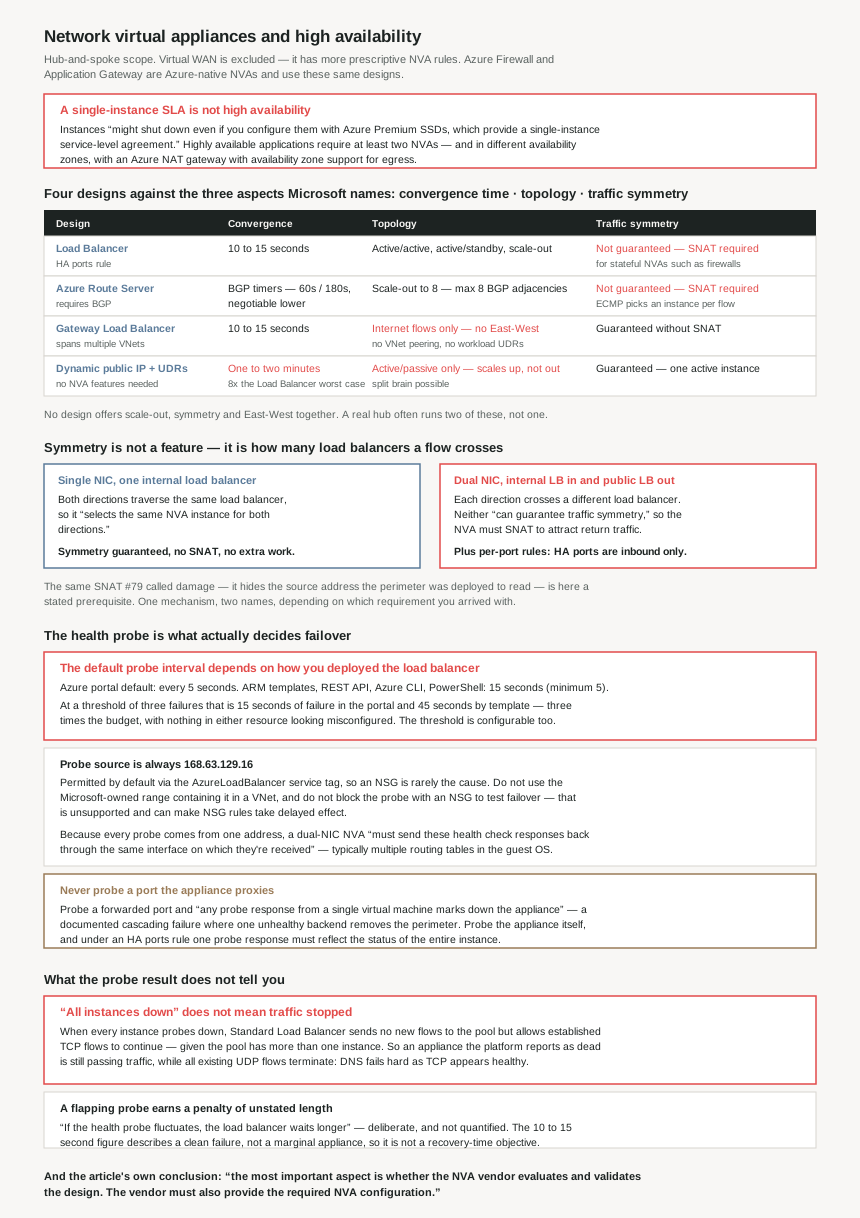
Microsoft names the three aspects to compare, and they are worth quoting because they are not the three most people would pick: “convergence time… topology support… traffic symmetry.” Throughput is not on the list. Neither is cost. The decision is about how fast the platform notices a failure, which traffic directions the design can carry, and whether a stateful appliance will see both halves of a conversation.
The four designs against the three factors
| Design | Convergence | Topology | Traffic symmetry | Needs from the appliance |
|---|---|---|---|---|
| Load Balancer | 10 to 15 seconds | Active/active, active/standby, scale-out | Not guaranteed — SNAT required for stateful appliances | A health probe endpoint; multiple OS routing tables if dual-NIC |
| Azure Route Server | BGP timers — 60s keepalive, 180s holdtime by default, negotiable lower | Active/active, active/standby, scale-out to eight instances | Not guaranteed — ECMP picks per flow, so SNAT required | BGP support |
| Gateway Load Balancer | 10 to 15 seconds | Internet flows only — no East-West; spans multiple VNets | Guaranteed without SNAT | Gateway Load Balancer support |
| Dynamic public IP + UDRs | One to two minutes | Active/passive only, scale-up not scale-out | Guaranteed — only one instance is ever active | Nothing special; any appliance |
Read down the symmetry column and the shape of the decision appears. Two of the four designs make you SNAT, one avoids SNAT by only ever running one appliance, and exactly one gives you symmetry and scale-out together — and that one cannot carry traffic between two Azure virtual machines.
Why This Architecture Holds Up
Because traffic symmetry is what you are actually choosing
A firewall that sees a SYN but not the matching SYN-ACK drops the connection it was meant to permit. Microsoft states the constraint without hedging: “The internal and public Azure load balancers can't guarantee traffic symmetry, so the NVA instances must perform SNAT to attract return traffic… Most stateful NVAs, such as firewalls, require traffic symmetry.”
But that is not a blanket property of load balancers, and the distinction is the most useful thing on the page:
| Appliance shape | Path in and out | Symmetry |
|---|---|---|
| Single NIC, one internal load balancer | Both directions traverse the same load balancer | Guaranteed, free. “When both directions of a traffic flow traverse the same load balancer, the load balancer selects the same NVA instance for both directions.” |
| Dual NIC, internal LB inbound and public LB outbound | Each direction crosses a different load balancer | SNAT mandatory. Neither balancer knows what the other chose. |
So symmetry is not bought with a feature. It is a consequence of how many load balancers a flow crosses. One, and the hash does the work for you; two, and you are back to SNAT.
Which lands exactly where #79 did, from the opposite direction. There, Azure Firewall's SNAT of internet-bound traffic was a problem — it hid the source address the perimeter had been deployed to read. Here the same SNAT is the solution, and it is mandatory. It is one mechanism with two names depending on which requirement you brought to it, and you cannot have both: an appliance that preserves the client address across two load balancers is an appliance that will drop asymmetric flows.
Because the 10-to-15-second figure assumes you used the portal
The convergence claim is specific: “Load Balancer sends health probes every five seconds, and it takes three failed probes to declare a back-end instance out of service. It usually takes 10 to 15 seconds.” Five seconds times three failures is fifteen seconds, so the arithmetic holds and the figure looks like a property of the service.
It is a property of the default, and the default is not one number. From the Load Balancer health probe reference:
“The health probe attempts to check the configured health probe port every 5 seconds by default in the Azure portal, but you can set it to another value. When you deploy through ARM templates, the REST API, the Azure CLI, or PowerShell, the default interval is 15 seconds (minimum 5 seconds).”
Fifteen is three times five. At a threshold of three failures, the same design takes 15 seconds to converge when built in the portal and 45 seconds when built by template — and nothing in either deployment looks misconfigured.
This is the kind of difference that survives a review. The architecture document quotes the portal number; the infrastructure-as-code pipeline that actually builds production uses the other one. Both are documented defaults, the resulting load balancers are identical in every field a reviewer would read, and the failover budget is three times larger in the one that ships. If a runbook promises sub-twenty-second failover, the probe interval is an explicit value in the template, not a default to inherit.
The threshold is not fixed either. “The probe threshold value is the number of times a health probe will need to succeed or fail consecutively… if the probe threshold is configured to 2, the probe will need to receive 2 consecutive responses before a backend instance begins to receive traffic.” The “three failed probes” in the architecture guide is an example, not a constant, so both inputs to the convergence figure are yours to set.
Because a flapping appliance gets a penalty of unstated length
One line in the probe reference has no number attached to it at all, and it is the one that will confuse an incident review: “If the health probe fluctuates, the load balancer waits longer before it puts the backend endpoint back in the healthy state. This extra wait time protects the user and the infrastructure and is an intentional policy.”
So the 10-to-15-second convergence describes a clean failure. An appliance that is marginal rather than dead — a firewall under memory pressure, a licence check timing out intermittently — recovers on a schedule the documentation declines to quantify. That it is deliberate is useful to know; that it is unbounded in the text means you cannot put it in a recovery-time objective.
Because “all instances down” does not mean traffic stopped
The failure mode worth rehearsing is not one appliance failing. It is both. And the behaviour is counterintuitive:
| State | TCP | UDP |
|---|---|---|
| One instance probes down | New connections succeed to the remaining healthy endpoint; established connections to the failed one continue | Existing flows move to another healthy instance |
| All instances probe down | No new flows to the pool, but Standard Load Balancer allows established TCP flows to continue — given that the pool has more than one instance | All existing UDP flows terminate |
Read the TCP cell again. When every appliance in the pool has failed its probe, the load balancer reports the back end as entirely unhealthy and existing TCP connections keep flowing through it. An appliance the platform believes is dead is still passing established traffic, while new connections are refused — which is exactly the symptom set that gets diagnosed as a networking problem rather than an appliance problem. Meanwhile every UDP flow has already been cut, so DNS and anything else datagram-based fails hard in the same instant that TCP appears fine.
The conditional at the end of that quote is not decoration. The behaviour holds given that a backend pool has more than one backend instance — so the single appliance this post opened by ruling out does not merely lack redundancy. It also loses the graceful-drain behaviour that a pool of two gets for free.
Because probing the wrong port turns one backend failure into an outage
The probe reference contains a warning written specifically about appliances, and it describes a cascading failure rather than a misconfiguration:
“If you probe the same port used to translate or proxy requests to the other virtual machines behind the appliance, any probe response from a single virtual machine marks down the appliance. This configuration can lead to a cascading failure of the application… The trigger can be an intermittent probe failure… Probe the health of the appliance itself.”
The mechanism is worth spelling out. Probe port 443 on a firewall that forwards 443 to a web tier, and the probe is no longer measuring the firewall — it is measuring whichever backend VM the firewall happened to forward it to. One unhealthy web server marks down the appliance, which removes every flow for every application behind it. The blast radius inverts: a single application instance takes out the perimeter.
And the probe reference's advice here is the same as the architecture guide's overall conclusion: “Consult your application vendor for the appropriate health signal.” Which port represents the health of an appliance is not something the Azure documentation can answer.
Because a dual-NIC appliance has to be told how to answer the probe
Two independent Microsoft pages make the same point, which is usually a sign it causes real support cases. The architecture guide: “Load Balancer always uses the same IP address as the source for the health checks, which is 168.63.129.16… The NVA must send these health check responses back through the same interface on which they're received. This process typically requires multiple routing tables in an OS, because destination-based routing sends the replies through the same NIC.” And the probe reference: “If you have multiple interfaces configured in your virtual machine, ensure you respond to the probe on the interface you received it on. You may need to source network address translate this address in the VM on a per interface basis.”
The cause is that every probe comes from one address regardless of which NIC it arrives on. A guest OS routing table keyed on destination has no way to distinguish them, so it sends every reply out of whichever interface owns the route to 168.63.129.16. Replies that leave the wrong interface are not seen as replies, the instance is marked down, and the appliance is healthy throughout.
That single probe address is worth two further notes. It is permitted by default — “the AzureLoadBalancer service tag identifies this source IP address in your network security groups and permits health probe traffic by default” — so this failure does not usually come from an NSG. And the address constrains your addressing plan: “Don't configure your virtual network with the Microsoft owned IP address range that contains 168.63.129.16. The configuration collides with the IP address of the health probe.” There is also a documented trap in the other direction: blocking the probe with an NSG rule “is an unsupported scenario and can cause the NSG rules to take delayed effect” — so the obvious way to test a failover is the one way you should not.
One more constraint follows from the HA ports rule the design depends on: “All ports are load balanced and a single health probe response must reflect the status of the entire instance.” Every TCP and UDP port the appliance carries is decided by one probe answer. There is no partial health.
Because HA ports only work in one direction
The internal load balancer gets the convenient rule: “configured with high availability ports rules so that every TCP and UDP port is redirected.” The public one does not, and the reason is a property of the feature rather than an omission: “High availability ports are for inbound traffic, so each TCP and UDP port needs to be opened in a dedicated load-balancing rule.”
So an appliance fronting inbound traffic is configured once, and the same appliance publishing services outbound is configured per port, by hand, forever. That asymmetry is the operational cost of the dual-NIC design, on top of the SNAT it already requires — and it is the thing that makes a single-NIC appliance behind one internal load balancer the design to prefer where the appliance supports it.
Because Route Server caps the cluster at eight, and renegotiates the timers #80 could not
The Route Server design is the one for appliances that already speak BGP, and its ceiling comes straight from the service: “Route Server supports a maximum of eight BGP adjacencies” — so eight is the cluster limit, not a quota to raise. Within it, failover is expressed in routing rather than probes: “In an active/active configuration, all NVAs advertise the same routes. In an active/standby configuration, one NVA advertises routes with a shorter Autonomous System (AS) path.”
Symmetry is not free here either, and the reason differs from the load balancer case: “If two or more routes are programmed… they use equal-cost multipath routing to choose one of the NVA instances for every traffic flow. Therefore, you must include SNAT in this design if you require traffic symmetry.” ECMP selects per flow and nothing coordinates the two directions, so a stateful appliance is back to translating. Which is why the article's recommendation for this design is specific about the appliance type: it suits “stateless NVAs such as SD-WAN or IPsec appliances”, where symmetry was never required.
There is one genuine improvement on #80 here. The timers are the same numbers — “keepalive timers set to 60 seconds and holdtime timers set to 180 seconds” — but the behaviour is not. On an Azure VPN gateway those values are fixed. With Route Server, “the NVAs can negotiate lower timers during the BGP adjacency establishment.” That is the first mechanism in this series that lets you detect a dead peer faster than three minutes, and it comes with its own warning attached: “You can cause BGP instability if you set these timers too low.” Paired with the flapping penalty above, the two failure modes of tuning for speed are now both documented.
Because the design that solves symmetry cannot do East-West
Gateway Load Balancer reads like the answer to everything the first two designs cost you. “Traffic symmetry is guaranteed without SNAT”, convergence is the same “quick… 10 to 15 seconds”, the same appliances can “inspect traffic to and from multiple virtual networks”, and it removes two things every earlier post in this series spent effort on: “Removes the requirement for virtual network peering… Removes the need for UDRs in the workload virtual network.”
That last pair is a real reversal. #77 was built on peering and #78 on user-defined routes; this design needs neither, which also means the per-spoke route table drift #78 described stops being a thing you maintain.
Then one sentence removes it from most of the problems this series has posed:
“This solution supports flows to and from the internet and doesn't support East-West flows… East-West traffic between Azure virtual machines can't use Gateway Load Balancer.”
Every inspection requirement that was ever justified by segmentation — spoke-to-spoke, branch-to-spoke, the private traffic policy #82 existed to express — is East-West. So Gateway Load Balancer is not a better version of the Load Balancer design; it is a different scope. It belongs at the internet edge, usually alongside one of the others doing the internal work, which means the realistic answer to “which pattern” is frequently two patterns.
Because the no-requirements option costs a minute and risks split brain
The fourth design is the one you reach for when the appliance supports none of the above: “This solution doesn't require any special feature from the NVA, so any network virtual appliance can be used.” Failover is performed by API call — remap the public IP, rewrite the user-defined routes — and the bill arrives in three parts.
It is slow. The documented convergence is “one to two minutes”, because “these API calls can take several minutes”. Against the Load Balancer design's 15 seconds at worst, two minutes is eight times the failover budget. It does not scale: “valid only for active/passive designs”, so capacity is bought by making the one active appliance bigger. And it can be wrong in both directions at once — “split brain scenarios might be possible if the connectivity between both appliances fails and both appliances think that the other instance is down.”
Split brain is the one to weigh properly, because it is not a slower failover — it is two appliances each believing they own the route table, in a design whose failover mechanism is rewriting the route table. Nothing in the other three designs has that property, because in all three the platform, not the appliance, decides who is active.
Because the documentation's own recommendation is not a pattern
Having set out four designs and three comparison axes, the article declines to pick one, and what it says instead is the most actionable line on the page:
“The most important aspect is whether the NVA vendor evaluates and validates the design. The vendor must also provide the required NVA configuration.”
That is not a deflection. Three of the four designs need something from inside the appliance that Azure cannot supply: the multiple OS routing tables for dual-NIC probe replies, the SNAT policy that attracts return traffic, the BGP configuration with its AS path weighting. A pattern the vendor has not validated is a pattern where those pieces are yours to invent, on a device whose configuration syntax is not documented by Microsoft and whose support contract is the reason you bought it.
And one recommendation applies to all four, which is easy to lose among the differences: “deploy NVA instances in multiple availability zones”, with “an Azure NAT gateway with availability zone support” for egress. Two appliances in one zone satisfy the two-NVA rule and share a failure domain.
Key Architecture Decisions
| Decision | Choose | Because |
|---|---|---|
| How many appliance instances | At least two, in different availability zones | A Premium SSD single-instance SLA does not make an appliance highly available — instances “might shut down” regardless. Two in one zone share a failure domain, and a pool of one also forfeits the established-flow behaviour a pool of two gets. |
| Appliance NIC count | Single NIC behind one internal load balancer, where the product supports it | Symmetry comes free because both directions cross the same load balancer and hash to the same instance. Dual NIC means SNAT, multiple guest routing tables for probe replies, and per-port rules on the public load balancer. |
| Pattern for East-West inspection | Load Balancer, or Route Server if the appliance is stateless | Gateway Load Balancer is excluded by definition — it “doesn't support East-West flows”. Spoke-to-spoke and branch-to-spoke inspection are East-West, so this is most segmentation requirements. |
| Pattern for internet edge inspection | Gateway Load Balancer | The only design that guarantees symmetry without SNAT, and it drops both the peering requirement and the workload UDRs. Expect to run it alongside another pattern rather than instead of one. |
| Pattern for a scale-out BGP appliance | Route Server, up to eight instances | Eight BGP adjacencies is the hard ceiling. Suits SD-WAN and IPsec appliances, where ECMP choosing an instance per flow does not matter because symmetry was never required. |
| Pattern when the appliance supports nothing | Dynamic public IP and UDRs — last resort | Eight times the failover time, active/passive only, scale-up not scale-out, and the only design that can split brain. Acceptable when the alternative is no redundancy; not a design to choose on its merits. |
| Health probe interval | Set it explicitly in the template | The portal defaults to 5 seconds and templates, REST, the CLI and PowerShell default to 15 — three times longer. At a threshold of three that is 45 seconds instead of 15, with nothing in the resource looking wrong. |
| Health probe port | A port the appliance answers itself, never one it proxies | Probing a forwarded port measures a backend VM instead of the appliance, so one unhealthy application instance marks down the perimeter — a documented cascading failure. Ask the vendor which signal represents appliance health. |
| Testing failover | Stop the listener or the instance, not an NSG rule against the probe | Blocking the probe IP or port with an NSG is “an unsupported scenario” that can make NSG rules “take delayed effect”, so the test misreports what it is measuring. |
| Recovery-time objective | Budget for more than the documented convergence | 10 to 15 seconds describes a clean failure at the portal default. A flapping probe earns a deliberately longer wait of unstated length, and the template default triples the detection window before that. |
| Virtual network addressing | Exclude the Microsoft range containing 168.63.129.16 |
Using it collides with the health probe source address and fails the scenario. The AzureLoadBalancer service tag already permits the probe, so NSGs are rarely the cause of a probe failure. |
| Where the design comes from | The appliance vendor's validated reference | Microsoft's own conclusion. Three of the four designs need appliance-side configuration — guest routing tables, SNAT policy, AS path weighting — that Azure documentation cannot specify. |
Closing Thought
The four designs look like a menu and behave like a matrix with one empty cell. Load Balancer scales out but needs SNAT. Route Server scales out to eight but needs SNAT. Gateway Load Balancer needs no SNAT but cannot see East-West traffic. The dynamic IP design needs nothing from the appliance and gives you one appliance at a time. Nothing in the list gives you scale-out, symmetry and East-West together, which is why a real hub often runs two of these patterns rather than choosing between them.
The thread running back through #79 is SNAT, and this post is where it stops being a side effect. There it was damage — the firewall hid the source address the perimeter existed to inspect. Here it is a prerequisite, stated twice, for two of the four designs. Same translation, same lost client address, and whether it reads as a defect or a requirement depends only on which document you came in through. An architecture that needs both the client address and asymmetric-safe stateful inspection is asking for something no design on this page provides.
The detail I would actually check first on an existing deployment, though, is the probe interval. Everything else here is a design choice someone made deliberately and can defend. The probe interval is a default, it differs by a factor of three depending on whether the load balancer was clicked or deployed, and the 10-to-15-second convergence figure that ends up in the disaster recovery document comes from the Azure portal. If production is built by pipeline — and it should be — the number in the document is one that was never true of the thing that shipped.
#84 takes the Azure-native appliance these designs already apply to: Azure Firewall — its SKUs, how rules are evaluated, and the policy hierarchy that decides which rule wins.
Official Azure Reference
- Deploy highly available NVAs — the four designs and the three comparison aspects, the two-NVA requirement against the single-instance SLA, the Virtual WAN exclusion, HA ports inbound-only behaviour, the symmetry and SNAT rules for single and dual NIC appliances, the 10 to 15 second convergence, the
168.63.129.16probe source and same-interface reply requirement, the eight BGP adjacency ceiling, Route Server timers and negotiation, Gateway Load Balancer's guarantees and its East-West exclusion, and the dynamic public IP design's convergence, split brain and scale limits - Azure Load Balancer health probes — the portal and template default probe intervals and the minimum, the probe threshold, all-instances-down behaviour for TCP and UDP, the flapping penalty, the proxied-port cascading failure warning, the multiple-interface reply rule, the HA ports single-response requirement, probe timeouts and failure conditions, the unsupported ports, the
AzureLoadBalancerservice tag, and the NSG delayed-effect warning - High availability ports overview — the internal load balancer rule the Load Balancer design depends on, in full (no claims drawn from it)
- Gateway Load Balancer overview — the chained appliance model behind the symmetry guarantee (no claims drawn from it)
- Azure Route Server overview — the BGP peering service the Route Server design is built on (no claims drawn from it)
- What is IP address 168.63.129.16 — the platform address the health probe shares with other host services (no claims drawn from it)
Comments