Business Challenge
A platform team has been deploying the same Bicep file for a year. It builds a standard application stack, it runs in three regions, and it has never once failed for a reason anybody had to think about. Then they add a fourth region and the deployment stops with:
NoRegisteredProviderFound: No registered resource provider found for location westus3 and API version 2024-03-01 for type sites.
The first theory is an Azure outage, because the same template worked an hour ago in a different region. The second is a quota problem, because that is what "not found for location" sounds like. Both are wrong, and both cost an hour.
What has actually happened is that this subscription has never used that provider in that region — and registration, the thing that grants a subscription the right to call a provider at all, is completed region by region. Nobody on the team had met the concept, because for a year every deployment path they used registered providers silently on their behalf.
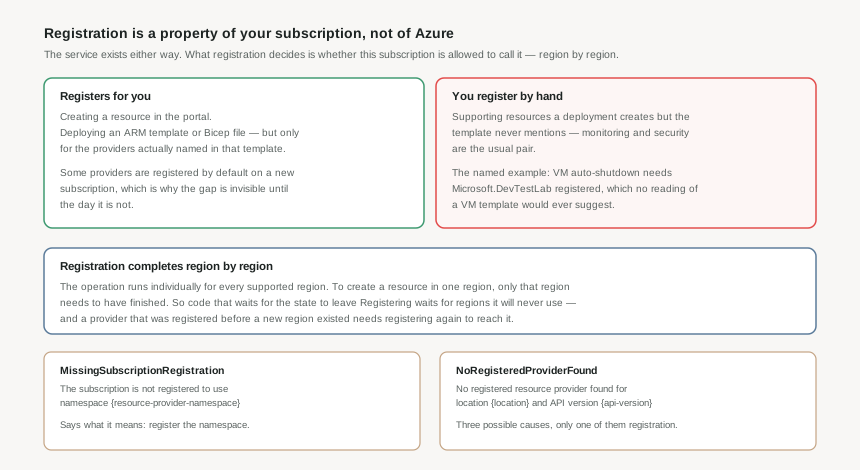
MissingSubscriptionRegistration says "the subscription is not registered to use namespace X", which tells you what to do. NoRegisteredProviderFound is the one that costs time, because it has three documented causes — the provider is not registered, the API version is not supported for that type, or the location is not supported for that type — and the message shape is identical for all three.
Architecture
A resource provider is a set of REST operations supporting one Azure service. Key Vault is Microsoft.KeyVault; the operations it defines are how vaults, secrets, keys and certificates are managed. Every resource type is named for the provider that owns it, in the form {resource-provider}/{resource-type} — so a key vault is Microsoft.KeyVault/vaults.
That naming is not cosmetic. It is the seam along which Azure is actually assembled: Resource Manager, from #3, is a router, and the provider is what it routes to. Every ARM template type string, every RBAC action, every policy alias begins with a provider namespace, because that is the unit the platform is built from.
Registration is subscription state
Registering a provider "configures your subscription to work with" it. The service exists regardless; what registration decides is whether this subscription may call it. Two consequences worth holding on to:
- It is not global. A provider registered in one subscription says nothing about the next one, which is why a template that works in dev can fail in prod with nothing else different.
- It is not free of side effects. Registering a provider adds an application to your Microsoft Entra tenant — typically added by the Windows Azure Service Management API. Register everything speculatively and unfamiliar apps appear in the directory, which is a genuine reason not to.
Region by region, not all at once
This is the part that produces the confusing failure. Registration runs individually for each supported region, and creating a resource in a region only requires that region to have finished. So the state Registering does not mean "not usable yet" — it means some regions are ready and others are still going.
Microsoft's guidance follows from that: application code should not block resource creation while a provider is in the registering state. Pipelines that poll until the state reads Registered are waiting for regions they will never deploy to. And a provider registered before a region existed does not automatically reach it — you register again to pick up locations added since.
What registers for you, and what does not
Some providers are registered by default on a new subscription. The portal typically registers a provider when you create a resource through it. Deploying an ARM template or Bicep file registers the providers defined in that template.
The gap is the last clause. A deployment often creates supporting resources the template never mentions — monitoring and security are the common pair — and those providers are not registered for you. The documented example is worth memorising because nothing about it is guessable: enabling auto-shutdown on a virtual machine requires Microsoft.DevTestLab to be registered. No reading of a VM template would suggest that a lab provider is involved.
Why This Architecture Holds Up
The obvious reaction to all of this is to register every provider in every subscription on day one and never think about it again. Microsoft explicitly advises against it, and the reasoning is more interesting than convenience.
An unregistered provider cannot be used — including by someone who should not be using it. The documentation puts it plainly: a malicious user cannot use unregistered resource providers. Registration is therefore a coarse but real capability boundary. A subscription with only the providers its workloads need is a subscription where a compromised credential has a smaller catalogue of services to reach for.
The second argument is the directory clutter mentioned above. Every registration adds an app to the tenant, and a tenant full of apps nobody recognises makes the genuine anomaly harder to spot.
Registering is easy and reversible-looking; unregistering is neither. You cannot unregister a provider while any resource type from it still exists in the subscription. So the decision is effectively one-way for as long as anything is using it — which is an argument for deliberateness at the start rather than a cleanup project later.
Reading the failure correctly
When a deployment fails on NoRegisteredProviderFound, the message names a location, an API version and a type. Work through the three causes in that order:
- Is the provider registered in this subscription? Check the namespace, not the resource type.
- Is the API version supported for this type? The template pins a version; providers retire old ones.
- Is the location supported for this type? Resource Manager runs everywhere, but individual resource types do not — and a subscription can carry limits that exclude regions the type otherwise supports.
The error message itself suggests supported locations and API versions, which is the fastest way to tell cause 1 from causes 2 and 3: if it lists your region and version among the supported ones, registration is your problem.
Key Architecture Decisions
| Decision | Choose this | Because |
|---|---|---|
| Which providers to register | Only the ones a workload in that subscription actually uses | An unregistered provider cannot be used by anyone, including an attacker with valid credentials. Registration is a capability boundary, not paperwork. |
| When to register | Explicitly, as part of subscription provisioning, for the known set | Relying on silent auto-registration works until a deployment needs a provider its template never names. Then it fails in whatever environment you meet that case in first. |
| Pipelines that register | Do not wait for the state to become Registered | Registration completes per region, and the target region may be ready long before the rest. Blocking on the aggregate state is waiting for regions you will not deploy to. |
| Adding a new region | Re-register the providers you need there | A provider registered before that region existed does not reach it. This is the specific cause of the fails-only-in-the-new-region deployment. |
| Who can register | Treat it as a Contributor-level platform action | It needs /register/action, which Contributor and Owner include. A Reader debugging the failure cannot fix it, which is worth knowing before the escalation. |
| Reading a provider error | Check whether the message lists your region and API version as supported | It separates a registration problem from an API-version or location problem in one step, and the three have nothing in common but the error text. |
Closing Thought
Resource providers are the least visible structural idea in Azure, precisely because the common paths hide them so well. You can build for a year without registering anything by hand, and then lose an afternoon the first time a deployment needs a provider that no template names.
The useful habit is to treat the provider list as part of a subscription's configuration — decided when the subscription is created, reviewed when a region is added, and kept as short as the workloads allow.
#5 stays with the provider and looks at resource types and API versions: why a template pins a version, what changes when a provider ships a new one, and why the version in your template is a dependency you are choosing whether or not you think about it.
Comments