Business Challenge
The last two posts were about address space in the abstract: what Azure takes from every subnet, and how to hand out ranges that survive a merger. This one is about what happens when you give a subnet away.
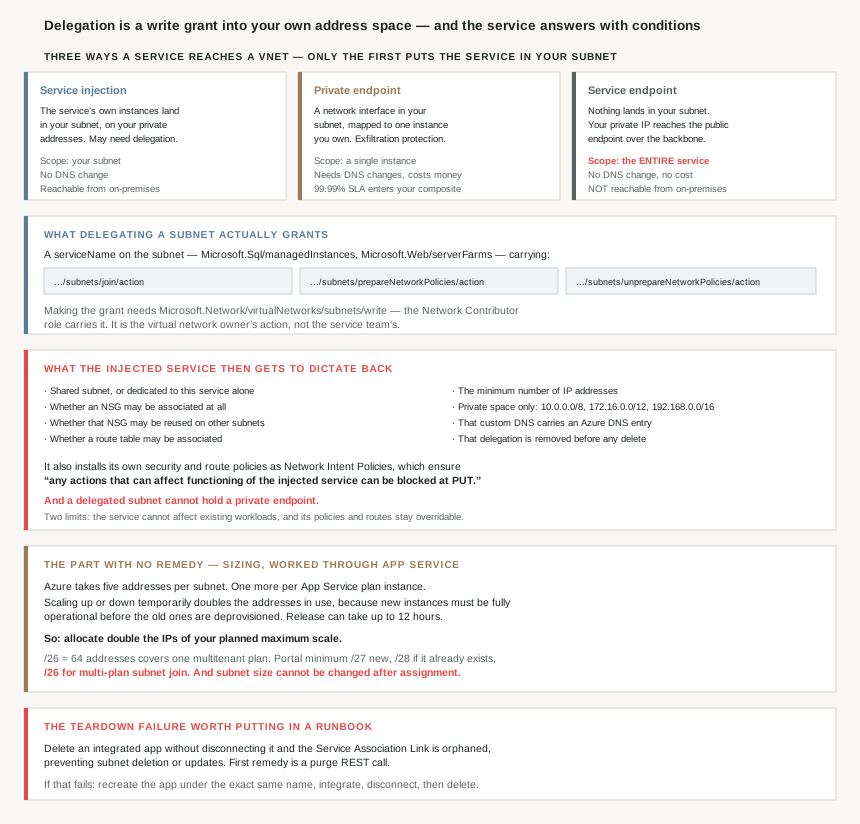
There are three ways an Azure service can be reached privately from a virtual network, and they are routinely confused with each other because all three are described as “putting the service in your VNet”. Only one of them actually does that:
| Service injection | Private endpoint | Service endpoint | |
|---|---|---|---|
| What lands in your subnet | The service’s own instances | A network interface for one instance | Nothing |
| Scope | Your subnet | “Individual instance” you own | “Entire service” — every customer’s |
| DNS changes | — | Yes | No |
| Reachable from on-premises | Yes | Yes | No |
| Costs money | Service pricing | Yes | No |
| Affects your composite SLA | — | Yes — “99.99% SLA” | No |
That third column is the one people get wrong, and the documentation is blunt about it: “Service endpoints apply to all instances of the target service. For example, all SQL Server instances of Azure customers, not just the customer’s instance.” Microsoft’s own recommendation is to prefer Private Link, which “provides built-in data-exfiltration protection, and maps services to private IPs in your own network.”
Injection is the first column, and delegation is the mechanism that authorises it. Here is the definition worth reading twice, because every surprise in this post follows from it:
“Subnet delegation… gives explicit permissions to services to create service-specific resources in the subnet using a unique identifier when deploying the service.”
Not a label. Not a reservation. A grant of write access into your own address space, made by you, to a service.
Architecture
A permission, a set of conditions the service imposes back on you, and a sizing problem that cannot be fixed later.
What the grant actually contains
A delegation is a serviceName on the subnet — Microsoft.Sql/managedInstances, Microsoft.Web/serverFarms — and the API response shows the actions it carries:
| Action | What it lets the service do |
|---|---|
…/subnets/join/action | Attach its instances to the subnet |
…/subnets/prepareNetworkPolicies/action | Install the Network Intent Policies it needs |
…/subnets/unprepareNetworkPolicies/action | Remove them again |
Making the grant is itself a privileged operation: “you need the following permission: Microsoft.Network/virtualNetworks/subnets/write. The built-in Network Contributor role also contains the necessary permissions.” So delegation sits with the network owner, which the overview states as a principle: “Subnet delegation is an exercise that the virtual network owners need to perform… The Azure Service in turn deploys the instances into this subnet.”
The conditions the service imposes back
This is the half that surprises people. Having been given the subnet, the service gets to constrain what you may do with it, and the list is long. “Each Azure service defines their own deployment model, where they can define what properties they do or don’t support in a delegated subnet.” Those properties include:
- Whether the subnet is shared with other services and VMs, or “only supports a dedicated subnet with only instances of this service in it”.
- Whether an NSG may be associated at all — and separately, whether that same NSG “can be also associated with any other subnet”.
- Whether a route table may be associated, and whether that route table may be reused elsewhere.
- The “minimum number of IP Addresses in the delegated subnet”.
- That the space comes from “Private IP Address space (
10.0.0.0/8,192.168.0.0/16,172.16.0.0/12)”. - That “the custom DNS configuration has an Azure DNS entry”.
- That “delegation to be removed before the subnet or virtual network can be deleted”.
And one hard exclusion that catches architectures built on private endpoints as a default: a delegated subnet “Can’t be used with a private endpoint… As a consequence, private endpoint network policies shouldn’t be configured in these subnets.” You cannot have both models in one subnet.
On top of the properties, the service installs policy: “Security policies: Collection of security rules required for a given service to work” and “Route policies: Collection of routes required for a given service to work.” The enforcement mechanism is the interesting part — a Network Intent Policy “ensures any actions that can affect functioning of the injected service can be blocked at PUT.” Not reverted later. Rejected when you try.
Two reassurances, and they are narrower than they look
The overview closes with a section on what delegation does not do, and both lines are worth holding onto precisely:
- “Azure services can inject instances into customer subnets, but can’t affect the existing workloads.”
- “The policies or routes that these services apply are flexible and overridden by the customer.”
So the service cannot reach into your running VMs, and its routes are not immutable. But neither line rescues you from the property constraints above, which are enforced at write time and are not negotiable per-subnet. The distinction is between policy (yours to override) and deployment model (the service’s to declare).
Dedicated or shared, and who decides
“‘Dedicated’ implies that only service specific resources can be deployed in this subnet and can’t be combined with customer VM/VMSSs.” The split across the catalogue is not intuitive, so it is worth knowing which way each service falls before drawing a subnet plan:
| Dedicated subnet required | Not required (but recommended) |
|---|---|
| Azure Firewall, Azure Bastion, Azure Route Server, VPN Gateway, ExpressRoute Gateway, SQL Managed Instance, MySQL and PostgreSQL Flexible Server, Redis, API Management, Web Apps, App Service Environment, Container Apps, Container Instances, Azure Functions, NetApp Files, Dedicated HSM, Logic Apps | AKS, Azure Databricks, Azure HDInsight, Azure Batch — “as a best practice, it’s recommended to have these services in a dedicated subnet, but it’s not a mandatory requirement imposed by the service” |
Rather than memorising that, note the pointer the docs give for automating it: “A comprehensive list of services that are using the delegated subnet model can be obtained via the Available Delegations API.” That is the thing to query from a landing-zone pipeline, because the list changes.
Why This Architecture Holds Up
Because the subnet size is decided here and cannot be revisited
#62 made the case that growth is cheap: you can resize a VNet’s address space live. That does not extend to a subnet handed to an injected service. The App Service documentation states the constraint flatly — “subnet size can’t be changed after assignment” — and then shows why the number is larger than anyone guesses.
| Consumer | Addresses |
|---|---|
| Azure’s own reservation | “the Azure subnet consumes five IPs from the start” |
| Each plan instance | One each — “scale your app to four instances, then four addresses are used” |
| Scaling up or down | “temporarily doubled while the scale operation completes” |
| Platform upgrades | “need free IP addresses to ensure upgrades can happen without interruptions” |
| Release lag after scaling | “in rare cases, this operation can be up to 12 hours” |
The reason the doubling matters is given explicitly: “The new instances need to be fully operational before the existing instances are deprovisioned.” So peak consumption is not your instance count; it is roughly twice your instance count, for as long as a scale operation plus a release lag takes. Hence the recommendation, which reads like over-provisioning until you have seen the above: “we recommend allocating double the IPs of your planned maximum scale.”
The concrete numbers are a useful calibration. “A /26 with 64 addresses cover the maximum scale of a single multitenant App Service plan.” The portal minimum is “/27… If the subnet already exists before integrating through the portal, you can use a /28 subnet”, and the hard floor is “an unused subnet that’s an IPv4 /28 block or larger”. Join several plans to one subnet and the floor rises: “to use MPSJ a minimum size of /26 subnet is required.”
Set against #62’s T-shirt sizes, that is worth sitting with. A /26 is a quarter of the smallest size on that menu, consumed by one App Service plan.
Because one service turns address planning into a collision problem
This is the detail I did not expect, and it connects directly back to the previous post. For Windows apps, “an outbound connection through virtual network integration fails if the destination IP address matches an infrastructure IP address of the App Service worker hosting the app. Windows treats the destination as a local address instead of routing the connection through the virtual network.”
So there is a set of ranges inside 10.0.0.0/8 and 172.16.0.0/12 that your destination subnets must avoid — not the delegated subnet, the ones holding the resources your app calls. The instruction is explicit: “consider the subnets that contain resources your app needs to reach, not just the dedicated integration subnet.” And the caveat on the published table is the part that makes this an architecture concern rather than a lookup: “These ranges describe current infrastructure allocations and can change… ‘Not listed’ means no range is provided in this table, not a guarantee that no range is used.”
A documented list that may change, affecting ranges you chose years earlier, is an argument for the IPAM discipline in #62 rather than for memorising a table.
Because the integration is a link, and links get orphaned
The operational failure mode here is specific and worth knowing before it happens. “When an App Service is integrated with a virtual network, a Service Association Link (SAL) is created. If the App Service is deleted without properly disconnecting the virtual network, the SAL might remain orphaned, preventing subnet deletion or updates.”
The remedy escalates in a way that tells you how tightly the service is bound to the subnet. First a purge REST call against purgeUnusedVirtualNetworkIntegration. If that fails, “a subnet delegation ‘Microsoft.Web/serverFarms’ might remain assigned to your subnet”, and the documented fix is to rebuild the thing you deleted: “Re-create the App Service plan and app (it’s mandatory to use the exact same web app name as before)”, configure the integration, disconnect it, then delete.
Recreating a deleted application under its original name purely to release a subnet is not a step anyone plans for. The design rule it implies is simple and cheap: disconnect integrations before deleting apps, and put that in the teardown runbook rather than discovering it during one.
Because the NSG you attach does not behave the way an NSG normally does
On an injected subnet the usual mental model of a security group partly dissolves. For App Service integration, “inbound rules in an NSG don’t apply to your app… Virtual network integration affects only outbound traffic from your app”, and ordering is settled rather than negotiable: “An NSG that you apply to your integration subnet is in effect regardless of any route tables applied to your integration subnet.”
There are also platform flows you must not block, which is exactly the class of rule that gets written out of a tightened NSG and then takes a day to find:
| Flow | Requirement |
|---|---|
| Network health checks | “Azure uses UDP port 30,000 to do network health checks” |
| Inter-instance traffic | “uses ports 20,000 to 30,000 on both TCP and UDP… open both inbound and outbound” |
| Functions content share | “allow traffic to port 443 and 445” |
The health-check one is the kind of detail that justifies reading a service’s own networking page even after reading the generic delegation page: blocking it “doesn’t directly affect your app, but it’s more difficult for Azure support to detect and troubleshoot network related issues.” A rule whose only cost is losing supportability is a rule nobody notices writing.
Because the thing you are injecting is not a VM, even though it has an address
Worth keeping clear about what is actually in the subnet. For App Service, “virtual network integration works by mounting virtual interfaces to the worker roles with addresses in the delegated subnet. The virtual interfaces used aren’t resources customers have direct access to.” You will not find them in the portal as NICs. They consume your addresses and obey your NSG, and that is the whole of your relationship with them.
That also explains a constraint that otherwise looks arbitrary: an App Service plan gets “two virtual interfaces per worker… an App Service plan can have virtual network integrations with up to two subnets/virtual networks”, while “an app can only have a single virtual network integration at a given time.” The limit is a property of the worker, not of the network.
One piece of good news in the pricing, which is unusual enough to state: “The virtual network integration feature has no extra charge for use beyond the App Service plan pricing tier charges.” Compare the private endpoint column in the opening table, where the cost and the composite-SLA effect are both real.
Key Architecture Decisions
| Decision point | Choose | Because |
|---|---|---|
| Reaching one PaaS instance privately | Private endpoint | Scoped to the instance; has exfiltration protection. |
| Thinking a service endpoint isolates your instance | It does not | It applies to all instances of the target service. |
| Needing private access from on-premises | Private endpoint or injection | Service endpoints are not reachable from on-premises. |
| Who performs the delegation | The virtual network owner | It needs subnets/write, i.e. Network Contributor. |
| Expecting to add a private endpoint to a delegated subnet | Don’t — use another subnet | A delegated subnet can't be used with a private endpoint. |
| Sizing a delegated subnet | Double the planned maximum scale | Scale operations temporarily double address use. |
| Sizing for one multitenant App Service plan | /26, 64 addresses |
That covers its documented maximum scale. |
| Joining several plans to one subnet | /26 or larger, same subscription |
Multi plan subnet join requires it. |
| Hoping to grow the subnet later | Plan not to | Subnet size can't be changed after assignment. |
| Choosing destination subnet ranges for a Windows app | Avoid the worker infrastructure ranges | A matching destination IP is treated as local and fails. |
| Relying on the published worker range table | Treat it as current, not permanent | Microsoft states the ranges can change. |
| Deleting an integrated app | Disconnect the integration first | An orphaned SAL blocks subnet delete and update. |
| Deleting a VNet holding an injected service | Remove the integration and delegation first | Both are documented prerequisites. |
| Tightening an NSG on an integration subnet | Keep 20,000–30,000, UDP 30,000, 443 and 445 | They carry inter-instance, health and content-share flows. |
| Writing inbound NSG rules for an integrated app | Don’t bother | Integration is outbound only; inbound rules don't apply. |
| Expecting NSG and UDR to interact | The NSG applies regardless | Route tables don't override it on that subnet. |
| Discovering which services need delegation | Query the Available Delegations API | The catalogue changes; a hardcoded list rots. |
| Putting VMs alongside an injected service | Check the dedicated column first | Dedicated means service resources only. |
| AKS, Databricks, HDInsight, Batch | Give them a dedicated subnet anyway | Recommended, though not enforced. |
| Budgeting for VNet integration on App Service | Nothing extra | No charge beyond the plan tier. |
Closing Thought
Subnet delegation looks like metadata. It is a dropdown on a subnet blade, it has no cost, and nothing visibly changes when you set it. What it actually is, in the documentation’s own words, is a grant of “explicit permissions to services to create service-specific resources in the subnet” — and the service answers that grant with conditions of its own, enforced at write time by a policy that blocks your PUT rather than warning you.
The two halves are easy to read separately and are only dangerous together. Delegation is phrased as something you do to a subnet; the long list of properties the service may dictate is phrased as something the service does for its own stability. Put them side by side and the real shape appears: once delegated, a subnet is no longer general-purpose infrastructure. It may not be able to host a private endpoint, its NSG may not be shareable, its size is fixed for life, and it has to be un-delegated before the VNet containing it can be deleted.
Which makes the sizing arithmetic the thing to get right on day one, because it is the only part with no remedy at all. Five addresses to Azure, one per instance, double that during any scale operation, plus headroom for platform upgrades, plus up to twelve hours before released addresses come back. A /26 for one App Service plan is not generous; it is the documented figure for its maximum scale. Everything else in this post can be worked around. A subnet that is one bit too small has to be rebuilt, and whatever was injected into it has to be rebuilt too.
#64 starts on the control that has been referenced in every post since #61 without being explained: Network Security Groups — how rules are written, and the evaluation order that decides which one actually wins.
Official Azure Reference
- Subnet delegation in Azure Virtual Network — what delegation is, the properties an injected service may dictate, Network Intent Policies, and the two limits on what delegation does not do
- Azure Virtual Network integration for service network isolation — the three integration models compared, the dedicated-subnet column per service, and the Available Delegations API
- Integrate your app with an Azure virtual network — the subnet sizing arithmetic, the Windows worker range collision, the platform ports, and the orphaned Service Association Link remedy
- Add or remove subnet delegation — the permission required, the actions a delegation carries, and the portal, PowerShell and CLI forms
- What is Azure Private Link? — further reading on the model Microsoft recommends in preference to service endpoints (no claims drawn from it)
Comments