Business Challenge
The previous post established that a VPC network is a global container holding no addresses of its own, and deferred the one decision you make when you create it: its subnet creation mode. That decision has a strong default and a reassuring name. Auto mode sounds like the beginner setting that saves typing, and custom mode sounds like the one you graduate to when you need something unusual. The documentation is blunter than that: however, custom mode VPC networks are more flexible and are better suited to production, and, as an explicit callout, we recommend that you use custom mode VPC networks in production.
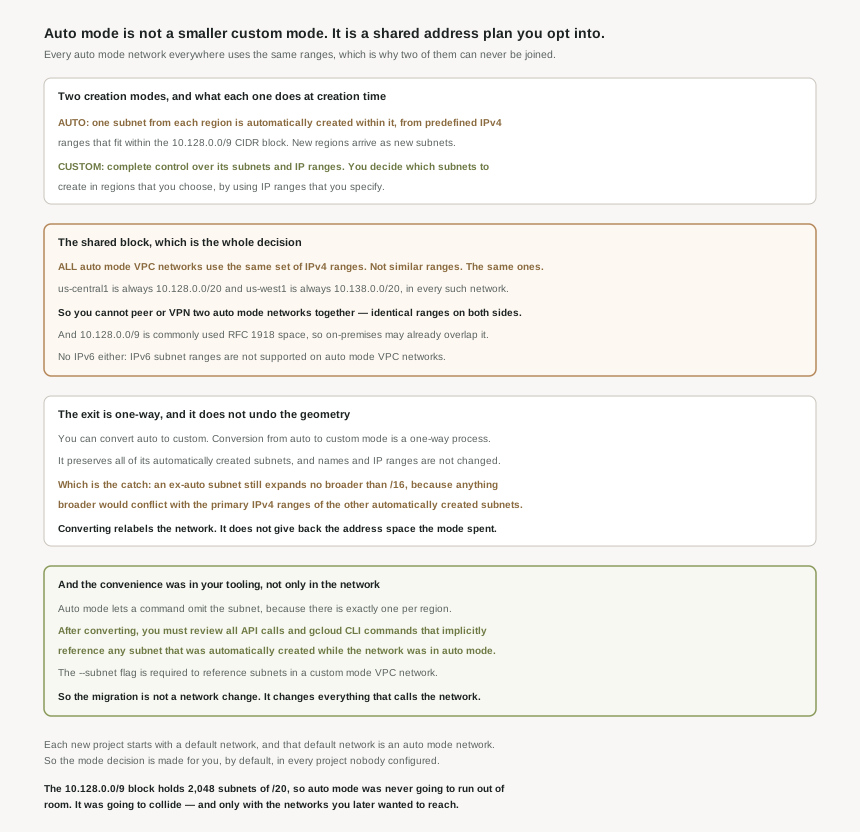
The reason is not flexibility in the abstract. Auto mode assigns subnet ranges from a fixed table, and all auto mode VPC networks use the same set of IPv4 ranges — not a similar scheme, the identical ranges, in every auto mode network in every project in every organisation. Three consequences follow mechanically, and one of them cannot be worked around after the fact.
You can convert, and the conversion is advertised in the gentlest possible terms: it preserves all of its automatically created subnets and any subnets you have added, and subnet names and IP ranges are not changed. Nothing moves. But conversion from auto to custom mode is a one-way process, and — the part that matters — it does not return the address space the mode already spent. The ranges it created stay exactly where they are, and the geometry they imply stays with them.
Correct approachTreat the mode as a decision made once, at creation, for the life of the network. Converting later changes the label and the future behaviour; it does not undo the past allocations, and those allocations are the entire cost.
Not if both are auto mode. Because the subnets of every auto mode VPC network use the same predefined range of IP addresses, you can't connect auto mode VPC networks to one another by using VPC Network Peering or Cloud VPN. This is not a quota, a feature gap or a support limitation that may lift later. Both networks believe us-central1 is 10.128.0.0/20; there is no routing decision available that resolves that.
If two networks might ever need to reach each other — and in an organisation with more than one project, that is most of them — at least one has to have been custom mode from the start. Converting both to custom mode afterwards does not help, because the colliding ranges are preserved by the conversion.
Somebody chose it by not choosing. By default, a default network and supporting resources are automatically created when creating a Project resource, and the default network is an auto mode VPC network with pre-populated IPv4 firewall rules. Every project created without deliberate intervention carries an auto mode network holding a subnet in every region, drawn from the shared table.
Correct approachEnforce the organization policy constraint that removes the default. It is a boolean: this boolean constraint skips the creation of the default network and related resources during Google Cloud Platform Project resource creation where this constraint is enforced. Set it at the organization node, and the mode becomes a decision again instead of an inheritance.
Architecture
The two modes differ in exactly one behaviour — whether subnets appear without being asked for — and every other difference is downstream of that one.
| Behaviour | Auto mode | Custom mode |
|---|---|---|
| At creation | One subnet from each region is automatically created within it. | No subnets. You decide which subnets to create in regions that you choose by using IP ranges that you specify. |
| Range selection | From a predefined table, all inside 10.128.0.0/9. |
Yours. Complete control over its subnets and IP ranges. |
| When Google adds a region | New subnets in those regions are automatically added, using a range from that block. | Nothing happens until you act. |
| Range uniqueness across networks | None. All auto mode VPC networks use the same set of IPv4 ranges. | Whatever your addressing plan says. |
| Peering or VPN to another auto mode network | Not possible — identical ranges on both sides. | Possible, subject to your plan avoiding overlap. |
| IPv6 subnets | Not supported on auto mode VPC networks. | You can create subnets with IPv6 address ranges in a custom mode VPC network. |
| Deleting an unwanted subnet | You cannot delete any of the automatically created subnets. | Normal operation. |
| Changing your mind | Convert to custom, once, in one direction. | Custom mode VPC networks cannot be changed to auto mode VPC networks. |
The shared table is the whole decision
Every auto mode subnet is a /20, assigned per region from one published table: us-central1 is 10.128.0.0/20, us-west1 is 10.138.0.0/20, and so on through every region Google operates. The usable addresses in the first of those run 10.128.0.2 to 10.128.15.253, which is the four-address reservation from the last post showing up in practice — there are four unusable IP addresses in every primary IPv4 subnet range.
It is worth being precise about what is scarce here, because the intuitive worry is the wrong one. A /9 holds 8,388,608 addresses and a /20 holds 4,096, so 10.128.0.0/9 has room for 2,048 auto mode subnets — against a few dozen regions today, with unused portions of 10.128.0.0/9 explicitly reserved for future Google Cloud use. Auto mode is not going to exhaust its block. The problem was never exhaustion. It is that the block is shared, and the collisions it produces are precisely with the networks you later want to reach.
Those collisions come in two kinds. Inside Google Cloud, two auto mode networks cannot be joined at all. Outside it, because the auto mode 10.128.0.0/9 CIDR range is part of the commonly used RFC 1918 address space, networks outside of Google Cloud might use an overlapping CIDR range — so a Cloud VPN or Interconnect to a corporate network that happens to use 10.128.0.0/9 space is a renumbering project on one side or the other.
Automatic growth is a liability, not a feature
The behaviour that gives auto mode its name is the one the documentation warns about most concretely. Having new subnets automatically created as new regions become available could overlap with IP addresses used by manually created subnets or static routes, or could interfere with your overall network planning.
That is a real and slightly uncomfortable mechanism: a Google product launch adds address space to your network, in a region you have never used, with a range you did not pick, and it will be inside 10.128.0.0/9. If you have manually added subnets to that auto mode network — which is allowed, since you can add more subnets manually to auto mode VPC networks in regions that you choose by using IP ranges outside of 10.128.0.0/9 — the guidance to keep them outside that block is the thing stopping a future region from landing on top of them.
The same automatic growth is wired into the firewall. The predefined ingress rule that comes with the network specifies the source range 10.128.0.0/9, which contains current and future IPv4 ranges for subnets in an auto mode network. So the default allow rule is scoped not to the subnets that exist but to every subnet the mode might ever create. That is internally consistent, and it means a new region arrives already inside the permitted source range.
The conversion, and what it does not convert
The exit exists and is a single operation. Conversion from auto to custom mode is a one-way process, after which auto mode VPC networks that have been converted to custom mode operate as if they had been created in custom mode. It unlocks what you would expect: you can now delete the subnets you never wanted, since you can convert an auto mode VPC network to a custom mode VPC network and then delete any unused automatically created subnets.
But "operate as if they had been created in custom mode" is true of the network and not of its subnets, and the documentation says so in a parenthesis that is easy to read past. When expanding an automatically created subnet’s IPv4 range, the broadest prefix available is /16 — and that limit applies to such a subnet in an auto mode network or in a custom mode VPC network that was previously an auto mode VPC network, because anything broader would conflict with the primary IPv4 ranges of the other automatically created subnets.
The ceiling follows the subnet, not the network. A network converted to custom mode still contains subnets packed into a /20 grid, and the neighbours in that grid are what cap the expansion. Converting changes the mode; it does not re-plan the addresses. Post #65 takes subnet expansion on its own terms, including what else cannot be undone.
Why This Architecture Holds Up
Up to this point the mode reads as an addressing question, and the fix reads as a renumbering exercise. There is a second cost that is easier to miss and usually larger, because it lives outside the network entirely.
In an auto mode network there is exactly one subnet per region, so a command that names a region has already named a subnet. That implicitness is the actual convenience of auto mode — not fewer subnets to create, but fewer arguments to pass. Tooling written against such a network therefore tends not to mention subnets at all.
After converting, you must review all API calls and gcloud CLI commands that implicitly reference any subnet that was automatically created while the network was in auto mode. Those API calls and commands will need to be modified so that they reference the subnet explicitly, and for commands carrying a subnet flag, that flag is required to reference subnets in a custom mode VPC network.
So the migration is not a network change with a tooling footnote. The network change is the single operation; the work is in every Terraform module, deployment script, instance template and runbook that assumed a region implied a subnet. None of that is visible when you plan the conversion, and all of it is visible the first time something runs afterwards.
Where auto mode is genuinely the right answer
The documentation does not treat auto mode as a mistake, and it is worth stating the cases plainly rather than implying there are none. Auto mode suits a network where having a subnet in every region is useful and where the predefined ranges do not collide with anything — a self-contained sandbox, a short-lived evaluation project, a training environment, anything that will never be peered and never be reached from on-premises. In that setting the shared table costs nothing, because nothing on the other side of it exists.
The test is not sophistication or scale. It is connectivity: will this network ever need to reach another network. If the answer is yes or unknown, the mode is decided. If it is a confident no, auto mode saves real setup work and the warnings above are all inapplicable. The failure mode is answering "no" about an environment that later turns out to matter, which is how a sandbox becomes the thing nobody can peer.
IPv6, which is a hard gate rather than a trade-off
Subnets with IPv6 address ranges are not supported on auto mode VPC networks, including the default network, and you can create subnets with IPv6 address ranges in a custom mode VPC network. The default network also arrives half-configured in this respect: the default network does not have pre-populated IPv6 firewall rules, unlike its IPv4 rules. If dual-stack or IPv6-only is anywhere in the plan, the mode question is already answered and nothing else in this post needs weighing.
Key Architecture Decisions
The decisions here are unusually lopsided for this series. Most architecture choices trade one property against another; this one mostly trades setup effort against reversibility, and the effort is small.
| If this is true | Choose | Because |
|---|---|---|
| Production, or anything that outlives a quarter | Custom mode | Production networks should be planned in advance, and custom mode is the documented recommendation. |
| This network may be peered or VPN-joined, ever | Custom mode | Two auto mode networks cannot be joined, and conversion preserves the colliding ranges. |
| Connectivity to on-premises is planned | Custom mode | 10.128.0.0/9 is common RFC 1918 space and may already be in use on the other side. |
| IPv6 is anywhere in the roadmap | Custom mode | Auto mode does not support IPv6 subnet ranges at all. |
| You want control over which regions exist in the network | Custom mode | Auto mode adds regions on Google’s schedule, not yours. |
| Isolated sandbox, never connected to anything | Auto mode is fine | The shared range table costs nothing when nothing is on the other side of it. |
| Any new project, regardless of the above | Enforce the skip-default-network constraint | Otherwise an auto mode network exists before anyone has decided anything. |
The one to look at today
List the networks in the organisation and check the subnet creation mode on each. For every one in auto mode, ask the single question that decides whether it matters: does anything need to reach it. Then look at whether compute.skipDefaultNetworkCreation is enforced anywhere above those projects. If it is not, the inventory you just took is a snapshot — the next project created will add another auto mode network to it, and the one after that, each holding the same ranges as the last.
Closing Thought
The thing that makes this decision worth a whole post is not its difficulty. Custom mode takes a few more minutes and an addressing plan you needed anyway, and the documentation tells you to use it in plain language. The decision is only hard because of where it sits: before anything exists, when nothing is yet known about what the network will have to reach, and with a default already chosen on your behalf by project creation.
That shape recurs. The useful habit it suggests is to ask, of any default, not whether it is reasonable now but whether leaving it is reversible later — and to read the reversal procedure before relying on its existence. The conversion here is real, documented, and a single operation, which is exactly why it reads as a safety net. Reading it properly shows it keeps every range it created, keeps the expansion ceiling those ranges imply, and hands you a review of every command that referenced the network implicitly. It is a relabelling with a migration attached, and the only cheap moment to avoid needing it has already passed by the time you are looking for it.
#63 moves from the mode to the plan it obliges you to have: subnet design and primary IP ranges — how to size them, and what the sizing commits you to.
Comments