Business Challenge
#75 ended on a dependency: five of the six Firewall Insights are only as complete as Firewall Rules Logging was, so the obvious conclusion is to turn logging on everywhere and be done with it. This post is the reason that is a decision rather than a default.
The feature itself is modest and well-scoped. Firewall policy rules logging lets you audit, verify, and analyze the effects of your firewall policy rules, and you enable firewall policy rules logging individually for each firewall policy rule whose connections you need to log. When a rule matches, Google Cloud creates an entry called a connection record each time the rule allows or denies traffic. Three things about that sentence are load-bearing: connection, record, and which rule is doing the matching.
You will not. There are two formats with opposite gaps. The legacy one cannot see the modern metadata: VPC firewall rules logging is a legacy format and doesn't support logging for advanced Cloud NGFW metadata fields — among them source_secure_tag, source_fqdn and destination_threat_intelligence. The modern one cannot see the legacy metadata: firewall policy rules don't support logging for legacy metadata fields, specifically source_tag , target_tag , source_service_account , and target_service_accounts.
Decide what you need to be able to query before deciding where a rule lives. If your detection logic keys on network tags, moving that rule into a policy makes the tag disappear from its logs. If it keys on secure tags or FQDNs, leaving the rule as a VPC firewall rule does the same in reverse.
Not for anything already running. If you enable logging for a firewall policy rule that matches existing TCP or UDP connections, log entries are not generated for those active connections, and recovery is slow: logging for these connections begins only after they have been idle for at least 10 minutes. A long-lived database connection or a persistent gRPC channel can stay invisible indefinitely.
Correct approachTreat enabling logging as the start of a warm-up, not as a switch. Expect the first window to under-report precisely the busiest, longest-lived flows, which is the opposite of what you would assume. Pair it with the separate note that after you create a firewall policy rule or enable logging on an existing rule, you might observe some delay before log entries appear, and that initial log entries might be missing some rule details.
Not for these. Cloud Logging's storage price applies except for vended network logs, and firewall logs are exactly that: vended logs include VPC Flow Logs, Firewall Rules Logging, and Cloud NAT logs. The headline first 50 GiB/project/month belongs to the other row. And storage is only the second charge — these logs are also subject to Network telemetry pricing.
Correct approachPrice it as two line items per gibibyte from the first gibibyte, and do not plan to escape the first one by routing the logs elsewhere. If you send and then exclude your logs from Cloud Logging, the Network Telemetry charges apply.
Architecture
One feature, two formats, a connection-oriented record, a cap, and two charges.
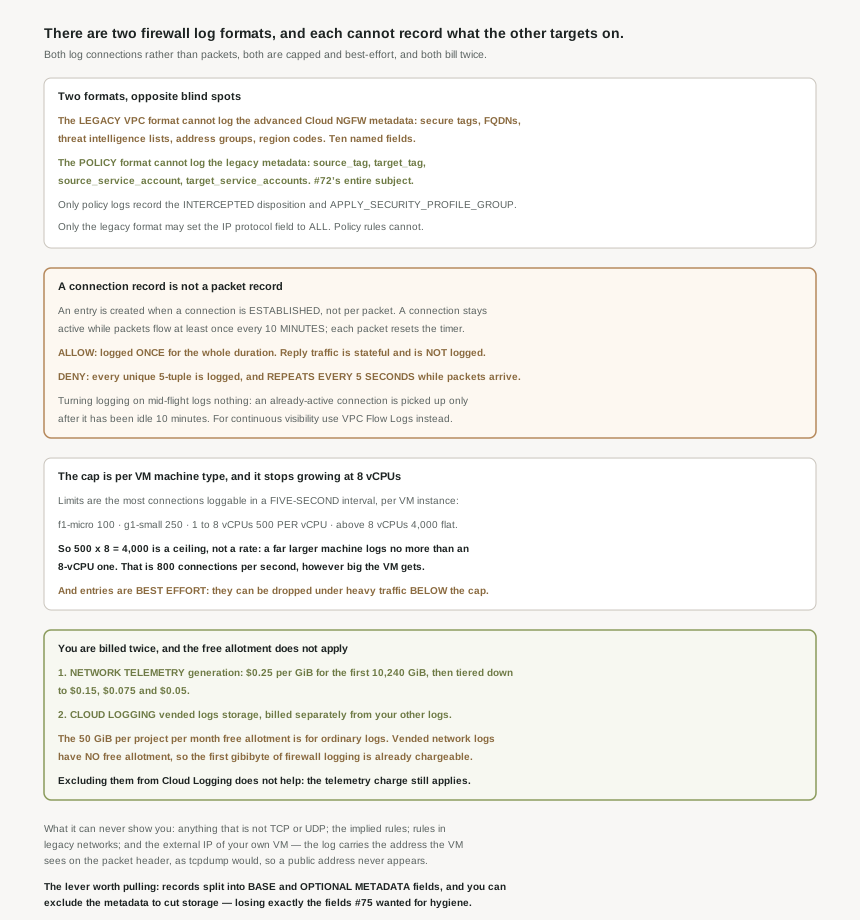
A connection record is not a packet record
This is the single most useful thing to internalise, because it decides what a count means. Firewall policy rules logging are created when a connection is established, not for every individual packet. Liveness is defined by an idle timer: a connection remains active as long as packets are exchanged at least once every 10 minutes, and each new packet resets the idle timer. The consequence is stated outright — therefore, a continuous stream of traffic generates only one log entry for its entire duration.
So a log count is a count of flows, not of volume, and a busy service can produce fewer entries than an idle one that reconnects constantly. The documentation points you elsewhere for the other question: if you need continuous visibility into active, long-lived streams without idle periods, use VPC Flow Logs, which is #77's subject and a genuinely different instrument.
Allow and deny then behave asymmetrically, and the asymmetry runs the opposite way to intuition. For allow, an allowed connection is logged only once, and the entry is not repeated even if the connection endures, because firewall rules are stateful, reply traffic is allowed automatically and is not logged. For deny, each dropped packet corresponding to a unique 5-tuple is logged as a failed attempt, and the log entry repeats every 5 seconds as long as packets are observed for that denied connection.
Permitted traffic is cheap to log: one entry per flow, with the return direction free. Blocked traffic is expensive: an entry per unique 5-tuple, repeating every five seconds for as long as the packets keep coming. A single deny rule facing the internet can therefore out-produce every allow rule in the project combined, and the loudest thing on your bill is the traffic you successfully stopped. That is a good reason to log a broad deny rule deliberately and briefly rather than permanently.
The two formats, and what neither can see
The mirror-image blind spots are worth laying out properly, because the series has now spent five posts on the targeting attributes that each format drops.
| Legacy VPC firewall rule logs | Cloud NGFW policy rule logs | |
|---|---|---|
| Network tags, service accounts | Logged | Not supported |
| Secure tags, FQDNs, threat intelligence lists, address groups, region codes | Not supported | Logged |
IP protocol field set to ALL |
Supports setting the IP protocol field to ALL | Can't be set to ALL |
INTERCEPTED disposition, APPLY_SECURITY_PROFILE_GROUP action |
No | Only these logs can record them |
| Scope | Only legacy VPC firewall rules operating within a regular VPC network | Hierarchical, global, regional and regional system policies |
The first two rows are the ones that will cost somebody a detection rule. #72 was entirely about choosing between network tags and service accounts for targeting; #73 and #74 established that policies use secure tags instead. The log formats inherit that split exactly, so a migration from VPC rules into a policy silently changes which identity fields your queries and alerts can reference. Nothing warns you — the rule works, the traffic flows, and the field is simply absent from the new entries.
The ALL row is a smaller trap with the same shape. A legacy rule logging all protocols cannot be reproduced as a policy rule, because policy rules must enumerate protocols; combined with the fact that firewall policy rules logging only records TCP and UDP connections either way, "log everything" is not available in either format.
One behaviour is specific to the Layer 7 action from #74. When a rule uses apply_security_profile_group, the logging behavior shifts from connection-based to session-based logic — one high-level entry per intercepted session rather than per connection — and it comes with an honest caveat: Cloud NGFW doesn't capture logs of all sessions. The documentation is explicit that this affects logging only, not inspection.
What cannot be logged at all
Three gaps are structural rather than configurable. Protocol first: only TCP and UDP, so ICMP, ESP and everything else leaves no firewall log entry, which is the same constraint that made #75's insights blind to those rules. Second, the implied rules: logging is not supported for implied deny ingress and implied allow egress rules in a regular VPC network, so the two rules from #71 that catch everything nothing else matched are precisely the two you cannot observe. Third, VPC firewall rules logging is not supported for rules in legacy networks.
There is also a quieter one in the field definitions that catches people debugging external traffic. For the connection's addresses, the external IP address is not shown even if it was used in making the connection, because logging shows the IP address of the VM as the VM sees it on the packet header, the same as if you ran tcpdump on the VM. So you cannot pivot on your own VM's public address; you get the internal or alias address every time.
Why This Architecture Holds Up
Two quantitative sections, and they pull in opposite directions: the cap limits how much you can get, and the price is what you pay for what you do get.
The cap stops growing at eight vCPUs
The maximum number of connections that can be logged per VM instance depends on its machine type, and the unit is unusual: connection logging limits are expressed as the maximum number of connections that can be logged in a five-second interval. The table is short.
| Instance machine type | Maximum connections logged in a 5-second interval |
|---|---|
f1-micro |
100 connections |
g1-small |
250 connections |
| Machine types with 1–8 vCPUs | 500 connections per vCPU |
| Machine types with more than 8 vCPUs | 4,000 (500×8) connections |
Read the last two rows together and the shape appears: the per-vCPU rate applies only up to eight vCPUs, and above that the number is frozen at 500 times 8, which is 4,000. Expressed per second that is 800 connections, and it does not improve no matter how large the instance gets. A machine many times bigger than an eight-vCPU one has the same logging ceiling, so per-vCPU logging capacity falls away steadily as you scale up — exactly on the hosts most likely to be handling the connection volume you wanted to observe.
And the ceiling is not a guarantee of anything below it. Firewall log entries are created on a best effort basis, and specifically: it is possible for entries to not be logged during periods of heavy traffic, even if the maximum number of logged connections for a machine type has not been reached.
Yesterday's post established that the overly permissive insights under-report when logging was not enabled for the whole observation period. This adds a second, independent source of the same bias: even with logging on throughout, entries can be dropped under load and are hard-capped per VM. Both errors point the same way — traffic that happened and was not recorded — so a rule can look unused because the evidence was dropped, not because the traffic was absent. "No hits" has now failed to mean "no traffic" for three distinct reasons.
Two charges, no free allotment
The first charge is for generating the logs. Network Vended Logs generate charges, and the tiers for VPC Flow Logs, Firewall Rules Logging and Cloud NAT logging together run 0 gibibyte to 10,240 gibibyte $0.25, then 10,240 gibibyte to 30,720 gibibyte $0.15, a further tier, and finally 51,200 gibibyte and above $0.05.
The second charge is for keeping them. Network Telemetry logs are charged as Vended Logs in Cloud Logging Storage, and that is a separate row on the Cloud Logging price list from ordinary logs: $0.25/GiB; One-time charge for streaming network telemetry logs into log bucket storage for indexing, querying, and analysis, against $0.50/GiB; One-time charge for streaming logs into log bucket storage for indexing, querying, and analysis for everything else. Both rates include up to 30 days of storage in log buckets, and if you store your logs in Cloud Logging, Network Telemetry logs are billed separately from other logs, under the Cloud Logging Vended Logs Storage.
So in the first tier a gibibyte of firewall logs costs the $0.25 generation charge plus the $0.25 vended storage charge: $0.50 per GiB all in, which is the same number as the ordinary Cloud Logging rate rather than half of it. The halved storage rate is not a discount once you add the charge that only these logs attract.
And the free allotment does not apply. The $0.50 row is for logging storage except for vended network logs, and it is that row which carries first 50 GiB/project/month. The vended row has no allotment, so firewall logging is chargeable from the first gibibyte, in a project where 50 GiB of application logs would have cost nothing.
Two further details decide whether you can engineer around it, and mostly you cannot. The Networking Telemetry charges apply to all Network Telemetry logs irrespective of the destination, including the default option of storing these logs in Cloud Logging, and the exclusion route is closed explicitly: if you send and then exclude your logs from Cloud Logging, the Network Telemetry charges apply. An exclusion filter saves the storage charge and not the generation charge. Beyond 30 days there is a third, smaller charge: $0.01 per GiB per month for logs retained more than 30 days.
The one real lever
Since you cannot avoid the charges by routing, the control that remains is volume, and the format gives you a handle on it. Firewall log records consist of base fields, which are the core fields of every log record, and an optional metadata fields — and then, plainly: to reduce storage costs, you can exclude metadata fields.
The base fields are the ones you cannot lose: the 5-tuple, the rule reference and priority, the direction, and the disposition, which indicates whether the connection was ALLOWED , DENIED , or INTERCEPTED. The metadata is where the context lives — VM details, VPC details, the remote endpoint, remote location, and in the rule details the source and destination ranges, the secure tags, the region codes, the FQDNs, the threat intelligence lists and the address groups.
Which means the cost lever and the analytical value are the same fields. Excluding metadata is the right call for a high-volume deny rule whose entries you only ever count; it is the wrong call for the rules you expect to investigate, because the attributes #75 wanted for hygiene work are exactly the optional ones. This is a per-purpose decision, not a global setting, and the useful discipline is to ask what query you intend to run before you decide which fields to keep.
Two smaller facts round out the cost picture. There are no storage charges for logs stored in the Required log bucket — but that bucket holds audit logs, not these, and firewall configuration changes are a separate stream from firewall traffic logs. And in a Shared VPC setup the entry spans both projects deliberately: the instance details give you the service project, since in a Shared VPC configuration, project_id corresponds to that of the service project, while the VPC details give you the host project, where project_id corresponds to that of the host project. Useful for #79 and #80, and useful immediately for working out whose budget the logs land on. One last omission worth knowing: when a rule targets an internal load balancer, when the target of a firewall rule is one of these load balancers, the instance field is omitted.
Key Architecture Decisions
| Situation | Decision | Because |
|---|---|---|
| Detection logic keys on network tags or service accounts | Keep that rule as a VPC firewall rule, or rewrite the logic first | Policy rule logs do not support those legacy metadata fields. |
| Detection logic keys on secure tags, FQDNs or threat intelligence | The rule must live in a policy | The legacy VPC log format does not support those fields. |
| Logging a broad internet-facing deny rule | Enable it deliberately and for a bounded period | Deny logs repeat every 5 seconds per unique 5-tuple; allow logs are one per flow. |
| Just enabled logging and the volume looks low | Wait, and do not conclude anything about long-lived flows | Active connections are picked up only after 10 minutes idle. |
| Needing continuous visibility into a long-lived stream | VPC Flow Logs, not firewall logs | One connection produces one entry for its whole duration. |
| Observing a high-connection-rate host | Do not assume a bigger machine type raises the ceiling | Above 8 vCPUs the limit is flat at 4,000 per 5-second interval. |
| Treating "no hits" as "no traffic" | Do not | Entries are best effort and can be dropped under load below the cap. |
| Needing to see ICMP, ESP or the implied rules | Another instrument entirely | Only TCP and UDP are recorded, and implied rules cannot be logged. |
| Budgeting for logging | Two charges per gibibyte from the first gibibyte | Generation plus vended storage, and the 50 GiB allotment excludes vended logs. |
| Trying to cut cost with an exclusion filter | Expect to save the storage charge only | The telemetry charge applies irrespective of destination. |
| High-volume rules you only ever count | Exclude the optional metadata fields | It is the one supported volume reduction, and counting needs only base fields. |
| Rules you expect to investigate | Keep the metadata | The optional fields are precisely the attributes rule-hygiene work needs. |
The one to look at today
Find every rule in the project that has logging enabled, and sort them into two groups: the ones whose entries you have actually queried in the last quarter, and the ones nobody has read. The second group is pure cost, charged twice per gibibyte with no free allotment, and for broad deny rules it can be the larger share of the volume. Then, for the first group, check that the fields your queries reference are available in the format that rule's logs are written in — because if a rule moved into a policy at some point, the query may be silently matching nothing.
Closing Thought
The thing I did not expect from this one is how precisely the log formats mirror the targeting split the series has been tracking since #72. Network tags and service accounts on one side, secure tags and FQDNs on the other; and the logs do not merely prefer one, they cannot represent the other at all. So the choice of where a rule lives is also a choice about what you will be able to ask afterwards, and that second consequence arrives months later, in a query that quietly returns nothing.
The other thing is the direction of every error here. Logging starts late on active connections, caps out per VM, stays flat above eight vCPUs, and is best-effort even under the cap. Every one of those omits records rather than inventing them, and every one of them lands on exactly the busy, long-lived, high-volume traffic you most wanted to see. Sixteen posts into this block, that is the sharpest version yet of a pattern that keeps recurring: the mechanism is honest about its limits in the documentation, the interface shows you a number, and the number is a floor being read as a total.
#77 takes the instrument this post kept deferring to: VPC Flow Logs, their sampling and aggregation, and what they cost — the other half of the vended-logs bill.
Official Google Cloud Reference
- Firewall policy rules logging overview
- VPC firewall rules logging overview
- Firewall policy rules logging format
- VPC firewall rules logging format
- VPC quotas and limits
- VPC network pricing
- Google Cloud Observability pricing
- Manage firewall policy rules logging
- Manage VPC firewall rules logging
- Firewall policy rules logging examples
- Cloud NGFW audit logging
- VPC Flow Logs overview
Comments