Business Challenge
#103 left us with a survivor: HTTP(S) traffic, external clients, backends in more than one region. This is that load balancer. The Application Load Balancer is a proxy-based Layer 7 load balancer that lets you run and scale your services, and the external mode load balances traffic coming from clients on the internet.
It is almost always drawn as a single box with an IP address on it. That drawing is the source of most operational surprises, because the documentation opens with the opposite: the global external Application Load Balancers are implemented by many proxies called Google Front Ends (GFEs). There isn't just a single proxy.
The load balancer's address never appears at the backend. The source IP address for packets, as seen by the backends, is not the Google Cloud external IP address of the load balancer. In other words, there are two TCP connections. Client to GFE is one; GFE to backend is another, with a source from Google's GFE ranges.
Correct approachAllow the documented GFE ranges, not the load balancer address — and expect more than one source, because depending on where your clients are, multiple GFEs can initiate HTTP(S) connections to your backends. Worth noting that the path itself is not yours either: Google Cloud uses special routes not defined in your VPC network to route packets between GFEs and backends, so you will not find that traffic in your route table.
There is no fault. To ensure that traffic is load balanced evenly, the load balancer periodically closes long-lived client connections. Specifically: for example, a connection is closed when an active client connection reaches a maximum age of 60 minutes.
Correct approachTreat reconnection as normal operation rather than an incident, and check that your client library handles the signal rather than treating it as an error. The close is deliberate and polite: the GFE closes the client connection between requests either by sending a Connection: close response header followed by a FIN ACK packet (for HTTP/1.1) or by issuing an HTTP/2 or HTTP/3 GOAWAY frame after completing a response. And in-flight work is safe — this behavior doesn't interfere with any active requests or responses, including upgraded WebSocket connections.
Not available as a load balancer setting. When HTTPS is used, modern clients default to HTTP/2. This is controlled on the client, not on the HTTPS load balancer, and the documentation closes the door explicitly: you cannot disable HTTP/2 by making a configuration change on the load balancer.
Correct approach
Fix it at one of the two ends you do control. The client side is possible per-caller — the documentation's own example is curl --http1.1 — but that does not scale to the public internet. The durable answer is the backend protocol, which is a backend service setting: the GFE speaks to your backend over HTTP, HTTPS or HTTP/2 independently of what the client negotiated, and for HTTP or HTTPS connections, the HTTP version used is HTTP 1.1. So a backend that cannot cope with HTTP/2 can be served over HTTP/1.1 while clients keep using HTTP/2 to the front door.
Architecture
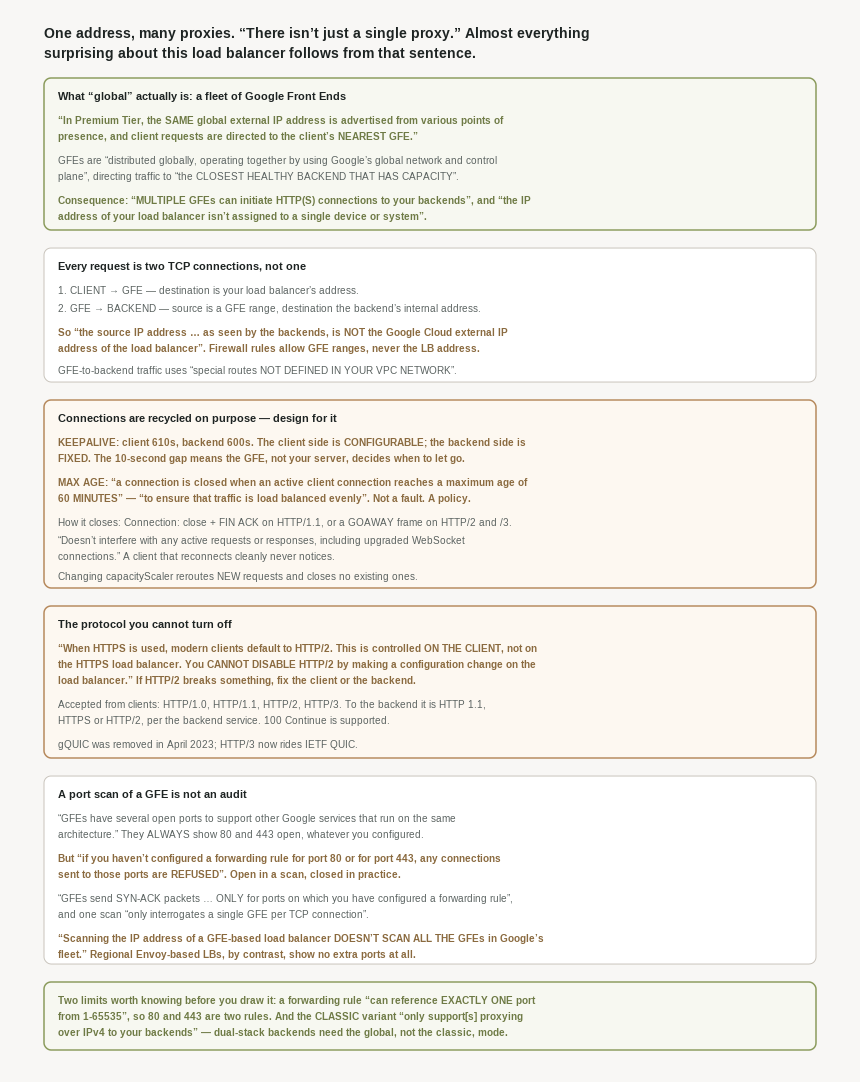
A fleet of proxies behind one advertised address, and five consequences.
What "global" actually is
Not a load balancer in a special region. A property of how one address is announced: in Premium Tier, the same global external IP address is advertised from various points of presence, and client requests are directed to the client's nearest GFE.
Those front ends are a coordinated fleet — global external Application Load Balancers and classic Application Load Balancers use GFEs that are distributed globally, operating together by using Google's global network and control plane — and the routing decision is made with capacity in mind, not just distance: GFEs offer multi-region load balancing in the Premium tier, directing traffic to the closest healthy backend that has capacity and terminating HTTP(S) traffic as close as possible to your users.
Two words in that sentence carry weight. Healthy means health checks decide eligibility, which is #107's subject. Has capacity means a nearer backend at its limit is skipped in favour of a further one — so "closest" is a preference, not a rule, and a latency anomaly can be a capacity signal rather than a network one.
There is also a tier dependency worth stating, because it changes what the product is: in the Standard Network Service Tier, this load balancer can distribute traffic to backends in a single region only. The global behaviour is a Premium Tier behaviour. #103's note that global external products are Premium-only is the same fact seen from the other side.
The external Application Load Balancer is not one engine. External Application Load Balancers are implemented using Google Front Ends (GFEs) or managed proxies, and the split is by mode: GFEs for global and classic, while global external Application Load Balancers and regional external Application Load Balancers use the open source Envoy proxy software to enable advanced traffic management capabilities.
So the global mode uses both — GFEs at the edge, with Envoy providing the advanced traffic management that classic lacks. That is the practical reason to prefer global over classic beyond scope, and it is why #103's one-way scheme rule matters: it is possible to attach EXTERNAL_MANAGED backend services to EXTERNAL forwarding rules. However, EXTERNAL backend services cannot be attached to EXTERNAL_MANAGED forwarding rules.
The keepalive asymmetry, and why it is the right way round
Two timeouts govern connection reuse, and only one is yours. The GFE uses a client HTTP keepalive timeout of 610 seconds and a default backend keepalive timeout value of 600 seconds, and you can update the client HTTP keepalive timeout but the backend keepalive timeout value is fixed.
The ten-second gap is not an accident. The client-side timeout exceeds the backend-side one, so under normal operation the GFE-to-backend connection expires first and the GFE handles it, rather than the client discovering a dead connection mid-request. Raise the client keepalive and you widen that margin; the backend side stays where it is whatever you do.
One clarification the documentation volunteers, because the two get conflated constantly: though closely related, an HTTP keepalive and a TCP idle timeout are not the same thing.
| Behaviour | Value | Yours to change? |
|---|---|---|
| Client HTTP keepalive timeout | 610 seconds | Yes |
| Backend keepalive timeout | 600 seconds | No — fixed |
| Maximum age of an active client connection | 60 minutes | No |
| Request and response timeout | backend service timeout | Yes |
One more behaviour belongs in that table by absence. Changing backend capacity does not disturb live traffic: adjusting the capacity scaler affects how GFEs route new requests, but doesn't by itself cause GFEs to close existing client connections. Draining a backend by lowering its capacity is therefore a gradual operation, not an abrupt one — which is the behaviour you want, and the opposite of what #101 found for Cloud NAT, where reducing an allocation severs everything immediately.
The protocols, and the one you do not control
On the client side the load balancer is permissive: clients can communicate with the load balancer by using the HTTP/1.0, HTTP/1.1, HTTP/2, or HTTP/3 protocol, and external Application Load Balancers support the HTTP/1.1 100 Continue response.
HTTP/3 has settled on the standard: Google QUIC (also known as gQUIC) support was removed in April 2023 in favor of HTTP/3 over IETF QUIC. If any internal documentation still mentions gQUIC, it predates that change by years.
The classic mode lags in two specific ways worth checking before choosing it. On addressing: client IPv6 requests are terminated at the load balancing layer and then proxied over IPv4 or IPv6 (provided the backends are configured as dual-stack) connections to your backends — but note that classic load balancers only support proxying over IPv4 to your backends. And on cleartext HTTP/2 to the backend: H2C is not supported on classic Application Load Balancers.
This section of the documentation exists because the result misleads auditors in both directions, and it is worth having to hand when someone brings you a scan report.
GFEs have several open ports to support other Google services that run on the same architecture. GFE-based load balancers always show ports 80 and 443 as open (along with any other port you've configured in your load balancer's forwarding rules) — yet if you haven't configured a forwarding rule for port 80 or for port 443, any connections sent to those ports are refused. Open in the scan, closed in practice.
The negative result is equally weak. GFEs send SYN-ACK packets in response to SYN probes only for ports on which you have configured a forwarding rule, and because the address is shared across a fleet, scanning the IP address of a GFE-based load balancer doesn't scan all the GFEs in Google's fleet. One scan interrogates one front end per TCP connection.
The clean comparison: conversely, regional external Application Load Balancers are implemented using Envoy proxies and don't show extra open ports during a scan. If a compliance regime requires a clean scan as evidence, that difference may matter more than any feature in the comparison table.
Why This Architecture Holds Up
There isn't just a single proxy. Take that seriously and the rest stops being a list of quirks.
Backends cannot see the client, because the proxy that received the request is not the one your backend talks to — hence two TCP connections and GFE source ranges. Several sources appear at once, because clients in different places land on different front ends. The address cannot be scanned meaningfully, because the IP address of your load balancer isn't assigned to a single device or system. Connections get recycled, because even distribution across a fleet requires periodically re-deciding which front end and which backend a client uses. And "closest healthy backend that has capacity" is a fleet-wide decision no single proxy could make.
Which also explains what you give up. There is no instance to log into, no single process to restart, no interface counter to read. Everything you can observe is what the control plane chooses to expose, and the mental model that survives contact with it is "a globally advertised service I configure declaratively", not "a load balancer I operate".
Stop drawing it as a box with an IP address. Draw it as an advertised address with a fleet behind it.
Then the firewall rule is obviously a range and not an address. The hourly reconnect is obviously a policy and not a fault. The port scan is obviously inconclusive. The HTTP/2 request obviously belongs at the client or the backend. And the 610-versus-600 asymmetry is obviously deliberate, because something has to expire first and it should be the hop the platform controls.
Every one of those is a question I have seen asked, and all of them dissolve at the diagram rather than at the documentation.
One constraint for the frontend design
Easy to miss in the table and annoying to discover late: a forwarding rule can reference exactly one port from 1-65535. Serving both HTTP and HTTPS is therefore two forwarding rules against the same address, not one rule with two ports — which is also why the port-scan section has to talk about 80 and 443 separately.
And the compliance escape hatch from #103 remains available here, phrased as a positive recommendation: some workloads with regulatory or compliance requirements require that network configurations and traffic termination reside in a specific region. If that is your situation, the global mode's great strength — terminating as close to the user as possible — is precisely the thing you cannot have.
Key Architecture Decisions
| Situation | Decision | Because |
|---|---|---|
| Writing backend firewall rules | Allow the GFE ranges, not the load balancer address | Backends never see the load balancer's external address. |
| Looking for GFE-to-backend traffic in route tables | It is not there | Special routes not defined in your VPC network carry it. |
| Connections dropping roughly hourly | Expected; handle reconnection | Active client connections are closed at 60 minutes. |
| Client treats Connection: close or GOAWAY as an error | Fix the client | That is how the load balancer signals a planned close. |
| Worried an hourly close breaks a WebSocket | It does not | Active requests and upgraded WebSockets are unaffected. |
| Draining a backend | Lower the capacity scaler | It reroutes new requests without closing existing ones. |
| Tuning keepalive | Only the client side is adjustable | The backend keepalive timeout is fixed at 600 seconds. |
| Equating HTTP keepalive with TCP idle timeout | They are different things | The documentation says so explicitly. |
| Wanting HTTP/2 disabled | Change the client or the backend protocol | It cannot be disabled on the load balancer. |
| Backend cannot handle HTTP/2 | Set the backend service protocol to HTTP/1.1 | Backend protocol is independent of what clients negotiate. |
| Anything referencing gQUIC | Out of date | gQUIC was removed in April 2023. |
| Dual-stack backends | Global mode, not classic | Classic proxies to backends over IPv4 only. |
| Needing H2C to the backend | Not on classic | H2C is unsupported there. |
| Serving HTTP and HTTPS | Two forwarding rules | A rule references exactly one port. |
| An auditor presents a port scan | Explain why it is inconclusive both ways | 80 and 443 show open yet refuse; one scan hits one GFE. |
| A compliance regime wants a clean scan | Regional Envoy-based is the one that gives it | It shows no extra open ports. |
| Budget forces Standard Tier | You lose multi-region entirely | Standard Tier serves backends in one region only. |
| Jurisdictional TLS-termination requirement | Regional external, not global | Global terminates as close to the user as possible. |
The one to look at today
Check two things. First, what your backend firewall rules actually allow — if any rule names the load balancer's external address, it is doing nothing, and whatever is working is working for another reason. Second, how your longest-lived clients behave at the hour mark: if the logs show errors rather than reconnections at roughly 60-minute intervals, the load balancer is behaving correctly and the client is not.
Closing Thought
The documentation does something unusual in the port-scan section: it argues against a piece of evidence someone will eventually put in front of you, and explains why both the positive and the negative reading are wrong. Ports 80 and 443 appear open whether or not you use them, and connections to them are refused if you have not configured a rule. The scan cannot cover the fleet because the address is not a device. That is three paragraphs spent dismantling a report rather than describing a feature, which tells you how often the report arrives.
It is the same lesson this whole networking block keeps producing, in a new costume. The instrument is not measuring what its name implies — #102's "Port usage" metric, #98's working-but-NXDOMAIN private zone, and now a port scan that reports open ports which refuse traffic. The fix each time is not a better tool but a correct model of the thing being measured.
#105 takes the regional pair — regional external and internal Application Load Balancers — where the proxy is Envoy rather than a Google Front End, and the proxy-only subnet from #103 stops being a prerequisite and becomes part of the data path.
Official Google Cloud Reference
- Request distribution for external Application Load Balancers
- Application Load Balancer overview
- External Application Load Balancer overview
- Global external Application Load Balancer failover
- Firewall rules for load balancers
- Traffic management for global external Application Load Balancers
- Backend services overview
- Forwarding rules overview
- URL map concepts
- SSL certificates overview
- Choose a load balancer
- Load balancer feature comparison
Comments