Business Challenge
#103 ended on evidence: flow logs are the record of what actually talked to what. This post is the control that evidence is supposed to demonstrate, and the reason it needs its own post is that segmentation in Azure is not one mechanism. It is three, owned by different people, and an auditor's question is almost never “is there a rule?” It is “who could remove that rule, and would anyone know?”
Start from the default, because the default is the thing a design has to overcome. Every network security group Azure creates carries AllowVNetInBound at priority 65000 and AllowVnetOutBound at 65000, with DenyAllInbound and DenyAllOutBound only at 65500. Those cannot be removed, only overridden by higher-priority rules.
A virtual network is flat until somebody makes it otherwise
The VirtualNetwork service tag covers the whole address space, including peered networks. So the shipped default is that everything inside can reach everything else inside, on every port, in both directions. Segmentation is not a tightening of Azure's defaults — it is a reversal of them.
And the inherited AllowInternetOutBound at 65001 means unrestricted egress is also the default, which is the half most compliance regimes care about most.
The documentation is unusually honest about why the obvious answer — have the central team own all the NSGs — does not work: “operational overhead is high as admins need to manage each NSG, as the number of NSGs increases, the burden increases.” And the opposite, letting teams own them, means “the central governance team can't enforce critical security rules, such as blocking risky ports”, with teams that “might also misconfigure or forget to attach NSGs.” Even the middle road fails: NSGs created by Azure Policy still leave the position that “the central governance team still can't enforce the standard security rules, since NSG owners in teams can still modify them.”
Architecture
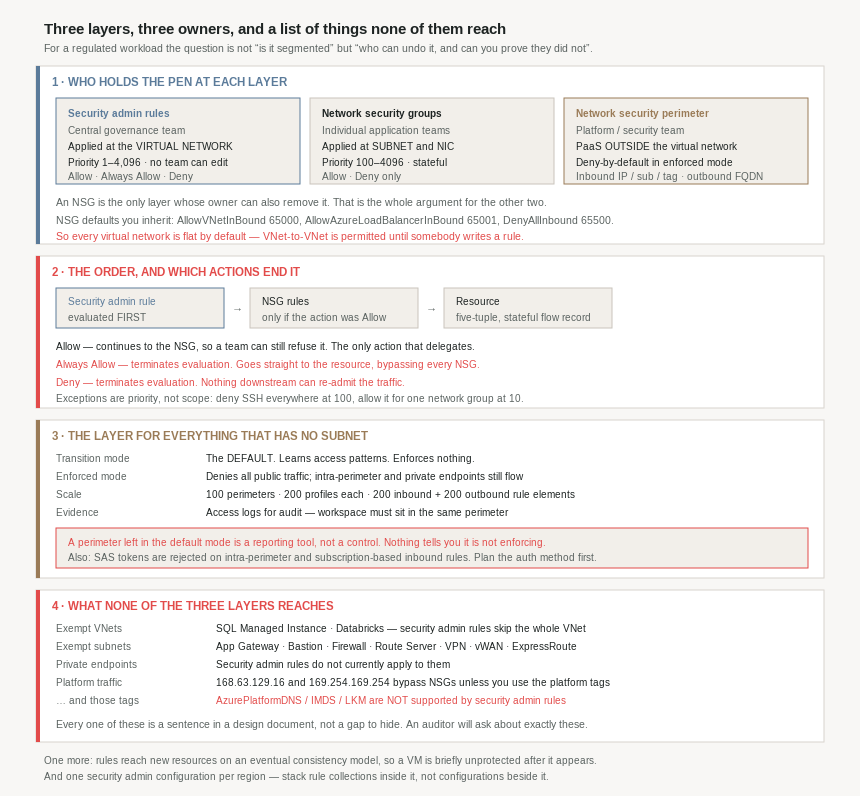
Three layers, three owners
| Rule type | Target audience | Applied on | Evaluation order | Action types |
|---|---|---|---|---|
| Security admin rules | Network admins, central governance team | Virtual networks | Higher priority | Allow, Deny, Always Allow |
| Network security group rules | Individual teams | Subnets, NICs | Lower priority, after security admin rules | Allow, Deny |
| Network security perimeter | Platform or security team | PaaS resources outside any virtual network | Independent — a different plane | Allow rules against a deny-by-default |
The first two rows are Microsoft's own comparison; the third is the one people forget, and it covers the resources that have no subnet to attach an NSG to. That split is the whole design: an NSG is the only layer whose owner can also delete it, which is precisely why a regulated workload cannot rest on NSGs alone.
Why This Architecture Holds Up
Because two of the three actions end the conversation
Security admin rules are evaluated before NSGs, and what happens next depends entirely on which of three actions fired:
| Action | What happens | Can a team override it? |
|---|---|---|
| Allow | “Evaluated first, followed by network security group rules” — so the NSG still gets a say | Yes — a team can still deny it |
| Always Allow | Traffic “goes directly to the resource and terminates further (and possibly conflicting) evaluation by NSG rules” | No — every NSG is bypassed |
| Deny | “The traffic stops without being delivered to the destination” | No — nothing can re-admit it |
Allow is the only action that delegates. That makes it the right default for a guard rail you want teams to be able to tighten but not loosen. Always Allow is the dangerous one, and not because it is permissive — because it is permissive past a control an application team believes they own. A team that writes a deny rule and watches traffic arrive anyway has no local way to discover why.
For a regulated workload, that is an argument for writing down which rules are Always Allow and why, as a short, reviewed list. It is the only mechanism in Azure networking that silently defeats a correctly written NSG.
Because exceptions are expressed as priority, not as scope
The documented pattern for “block SSH everywhere except for one team” is instructive, because it is not what most people reach for. You do not scope the deny rule to exclude the exception. You write both rules and let priority settle it: a rule denying inbound SSH for the ALL network group at priority 100, and a rule allowing inbound SSH for the App network group at priority 10. “Because 10 is smaller than 100, the allow rule for the App network group is evaluated before the deny rule that applies to every virtual network.”
Two consequences follow, and both are good for an audit. The deny rule stays universal in its text, so nobody has to maintain an exclusion list inside it. And the exception is a separate, higher-priority object with its own name, scope and history — so “show me every exception to the SSH policy” is a query rather than an archaeology exercise. Priority ranges from 1 to 4,096, so there is plenty of room to reserve bands by purpose.
One constraint shapes how you lay this out: “You can deploy only one security admin configuration to a region.” The documented remedy is to create multiple rule collections inside one configuration rather than multiple configurations. So the configuration is a singleton per region and the rule collection is your unit of organisation.
Because the perimeter covers what has no subnet — and ships switched off
Network security perimeter is the newer piece and the one that closes the real gap: a Key Vault, a storage account or a Log Analytics workspace lives outside your virtual network, so there is no NIC to attach an NSG to. The perimeter “creates logical network boundaries around your platform-as-a-service (PaaS) resources”, and in enforced mode denies all public traffic by default while leaving intra-perimeter traffic and private endpoints flowing without explicit rules. It reached general availability across all Azure public cloud regions plus five Government regions.
Transition mode is the default, and it enforces nothing
The two access modes are transition mode — “formerly Learning mode”, the “default access mode”, which “helps network administrators understand the existing access patterns” — and enforced mode, which is “set by the administrator”.
So a perimeter created and populated and never switched over is a reporting tool wearing the name of a control. The resources are associated, the rules are written, the portal looks complete, and nothing is being blocked. If your evidence pack says “PaaS resources are inside a network security perimeter”, the sentence that matters is the one naming the mode.
Three more things to settle before enforced mode, because each one is discovered painfully:
- SAS tokens stop working on two paths. “Intra-perimeter traffic and inbound access rules that are subscription-based don't support authentication via shared access signature (SAS) token” — such requests “are rejected and display an authentication error.” Any component authenticating to storage with a SAS has to move to another method first. This is the same class of surprise as the packet-capture SAS dependency in #102.
- Sentinel and Backup are exclusions, not hurdles. Perimeters “aren't supported for Log Analytics workspaces enabled for Microsoft Sentinel”, and enabling one “automatically disables analytic rules” — a segmentation control that silently turns off your detections. Likewise “Azure Backup isn't supported for Storage Accounts enabled with network security perimeter.”
- Names have to be short. Associations are named
{resourceName}-{perimeter-guid}against an 80-character ceiling, so “resources names would have to be limited to 44 characters” — a naming-standard change, discovered at association time.
The scale ceilings are generous but worth knowing before designing a profile-per-application scheme: 100 perimeters per subscription and 200 profiles per perimeter as recommended limits — 20,000 profiles in total — with a hard limit of 200 rule elements inbound and 200 outbound per profile, so 400 in all, and 1,000 associated PaaS resources per perimeter.
Because the gaps are specific, and an auditor will find them
This is the part that belongs in a design document rather than being quietly hoped over. Security admin rules do not reach everything, and the exclusions are named:
| What | Scope of the gap |
|---|---|
| Azure SQL Managed Instance, Azure Databricks | Rules “skip this virtual network” entirely — a form exists to request application |
| App Gateway, Bastion, Firewall, Route Server, VPN Gateway, Virtual WAN, ExpressRoute Gateway | Rules don't apply at the subnet level; other subnets in the same VNet are unaffected |
| Private endpoints | “Security admin rules don't apply to private endpoints that fall under the scope of a managed virtual network” |
Platform traffic on 168.63.129.16 and 169.254.169.254 | DHCP, DNS, IMDS and health monitoring “aren't subject to the configured network security groups” by default |
AzurePlatformDNS, AzurePlatformIMDS, AzurePlatformLKM | The tags that would let you block platform traffic are the three security admin rules don't support |
That last row is the sharpest, and it is a genuine asymmetry: those three service tags exist so an NSG can deny platform DNS, IMDS and licensing traffic — and security admin rules, the layer a central team cannot have overridden, cannot express them. If blocking IMDS is a requirement, it has to live in an NSG, which means it lives somewhere a team can remove.
There is also a partial exclusion worth designing around rather than fighting: for a virtual network containing one of the network-intent-policy services, setting AllowRulesOnly means “only Allow rules in your security configuration are applied to this virtual network” while “Deny rules aren't applied.” Half a guard rail, declared deliberately, beats a full one you believe in wrongly. And where two network managers disagree on that setting, “the setting of the network manager instance with the highest scope is used.”
Because enforcement is eventually consistent
“When you deploy security admin rules, the eventual consistency model is used… If you add resources to a virtual network that has security admin rules applied, those resources eventually receive the same security admin rules with a delay.”
The guarantee is strong and it is not instantaneous. A newly created VM is covered shortly after it appears, which for most estates is fine and for a few is a finding. If the control has to hold at the instant of creation, the NSG on the subnet is the thing that does it — subnet NSGs apply to a NIC the moment it joins. The two layers are complementary here rather than redundant: the NSG covers the first seconds, the security admin rule covers the lifetime and the forgetfulness.
One related NSG behaviour matters during a tightening exercise: “New or updated rules in a network security group apply exclusively to new connections, leaving existing connections unaffected.” Deploying a deny rule does not sever what is already established — so a segmentation cutover does not prove itself until the existing sessions turn over, and the flow logs from #103 are how you confirm it actually happened.
Key Architecture Decisions
| Decision | Do this | Because |
|---|---|---|
| Baseline deny for high-risk ports | Security admin rule, not Azure Policy | Policy-created NSGs can still be modified by their owners; admin rules cannot. |
| Default action for a guard rail | Deny for prohibitions, Allow for permissions | Allow is the only action that lets a team tighten further. |
Reaching for Always Allow | Keep a short reviewed list of them | It is the one mechanism that silently defeats a correct NSG. |
| Granting an exception | Higher-priority rule on a narrower network group | The universal deny keeps its text; the exception becomes an auditable object. |
| Organising rules in a region | Rule collections inside one configuration | Only one security admin configuration can be deployed per region. |
| PaaS with no subnet | Network security perimeter | There is no NIC to attach an NSG to; the perimeter is the only equivalent. |
| New perimeter | Transition mode first, then switch | Transition is the default and enforces nothing; nothing warns you. |
| Anything authenticating with a SAS token | Change the auth method before enforced mode | SAS is rejected on intra-perimeter and subscription-based inbound rules. |
| Sentinel workspace, or a backed-up storage account | Keep it out of the perimeter | A perimeter disables Sentinel analytic rules; Backup is unsupported. |
| Blocking IMDS or platform DNS | NSG, and accept the ownership risk | Security admin rules don't support the three AzurePlatform service tags. |
| VNet with SQL MI or Databricks | Declare it, consider AllowRulesOnly | Rules otherwise skip the whole virtual network; half a rail, stated, beats a false one. |
| Control must hold at instant of creation | Subnet NSG as well | Security admin rules reach new resources on an eventual consistency model. |
| Proving a cutover worked | Flow logs, after sessions turn over | New NSG rules don't sever established connections. |
Closing Thought
Every segmentation discussion I have been in eventually turns into an argument about trust, dressed up as an argument about rules. The central team does not trust application teams to keep a deny rule; the application teams do not trust a rule they cannot see or change. Azure's answer is not to pick a winner. It is to give the two groups different objects with a fixed precedence between them, so the guard rail and the local tuning can both be true at once.
What makes that work for a regulated workload is not the enforcement. It is that the layers are legible: a deny is at a known priority, an exception is a named higher-priority rule, an Always Allow is a short list somebody signed, and a perimeter's mode is a field you can read. The control you can describe in one sentence to an auditor is worth more than the stricter one nobody can explain.
The one line to take away
Write prohibitions as Deny security admin rules and permissions as Allow, keep Always Allow rare and reviewed, and never leave a network security perimeter in the mode it was created in.
Next in the series: Bastion — SKUs, the native client, and shareable links. Which is the same theme at a smaller scale: how administrative access gets in once the segmentation holds.
Official Azure Reference
- Security admin rules in Azure Virtual Network Manager — the scope and target audience against NSGs, the virtual-network-level application, the 1 to 4,096 priority range, the three actions and which terminate evaluation, the one-configuration-per-region constraint, the eventual consistency model, the private endpoint exclusion, the twenty high-risk ports, the virtual-network and subnet-level nonapplication lists, the AllowRulesOnly field and highest-scope precedence, and the supported protocols and unsupported platform service tags
- What is a network security perimeter — the logical boundary around PaaS resources, general availability across public and five Government regions, the six components, transition and enforced access modes, the deny-by-default behaviour and private endpoint allowance, the inbound and outbound access rule types, the SAS token rejection, network identifiers, the full scale limits, the five services still in public preview, the Sentinel and Azure Backup exclusions, the 44-character naming consequence, the logging region requirement, and the log aggregation note
- Azure network security groups overview — the 100 to 4096 priority range and first-match processing, the six default rules with their priorities, the five-tuple evaluation and stateful flow records, the new-connections-only behaviour, the supported protocols and the portal's ESP and AH gap, augmented rules and their service tag restriction, the platform host IP addresses and the three AzurePlatform tags that override them, the Key Management Service port, the load-balanced pool source behaviour, and the port 25 rules by subscription type
- Virtual network enforcement with security admin rules — the three enforcement models and the specific failure of each, the statement that admin rules work with rather than override NSGs, the worked SSH exception at priorities 100 and 10, what teams can and cannot modify afterwards, and dynamic membership for network groups
- Network groups in Azure Virtual Network Manager — the grouping construct security admin configurations are applied to (no claims drawn from it)
- Application security groups — the application-shaped alternative to IP-based NSG rules within a team's own scope (no claims drawn from it)
Comments