Business Challenge
Every post from #31 to #56 has been about granting access deliberately, and every one of them left the same residue: roles that were right once and are wider than they need to be now. Role recommendations help you identify and remove excess permissions from your principals — so this is the service that cleans up after the rest of the series. It works. The reason it needs a post rather than a paragraph is that its inputs are narrower than its output suggests, and that matters most for the cases you would least like to break.
Mostly true, and Google will not claim more than that. We will never recommend a role that excludes permissions that a principal has used in the last 90 days — but then, plainly: we cannot guarantee that our recommendations will never cause breaking changes in access, and it is possible that applying a recommendation will result in a principal being unable to access a resource that they need.
Correct approachAutomate the bulk, but gate the rest. Require manual review for recommendations touching a large number of permissions or a role you care about, which is exactly what the guidance suggests.
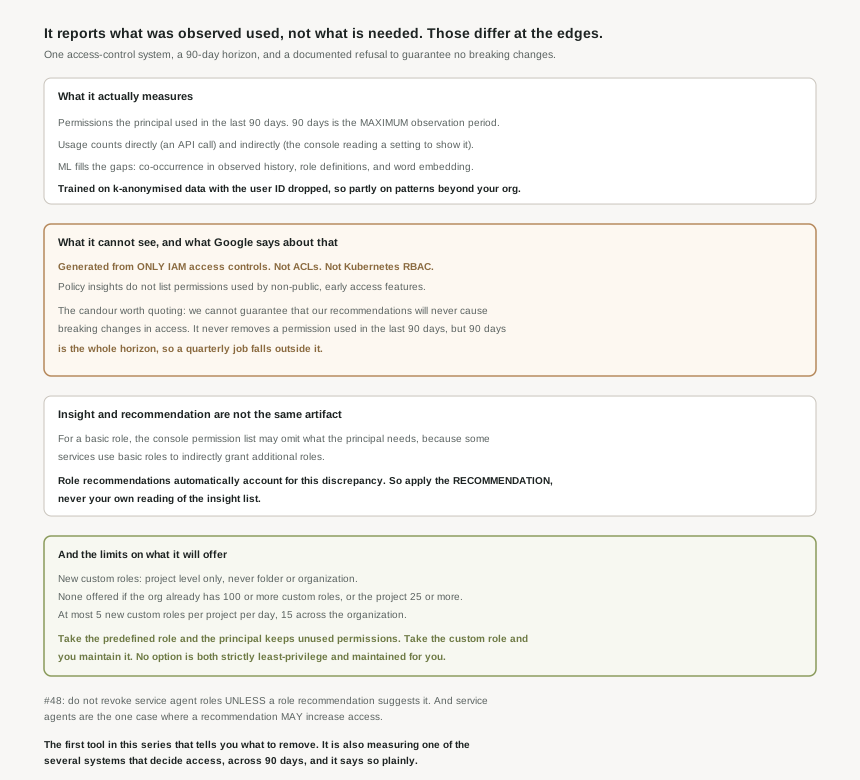
It says the permission was not used in the window, through IAM. Role recommendations are generated based on only IAM access controls, and they do not take into account other kinds of access controls, like access control lists (ACLs) and Kubernetes role-based access control (RBAC). If a GKE estate or a bucket ACL is carrying part of your access model, the recommender is blind to that part.
Correct approachBefore a cleanup pass, write down which access-control systems you actually use. Where more than one is in play, treat recommendations as a candidate list rather than a verdict.
It is the ceiling, not a parameter you can raise: the maximum observation period for role recommendations is 90 days. So a quarter-end process, an annual audit export, or a disaster-recovery runbook exercised twice a year is outside the horizon by construction.
Correct approachKeep a list of the jobs that run less often than quarterly, and exclude their principals from automated application. They are the population the window cannot cover.
Not for basic roles. Policy insights might not list all of the permissions that a principal needs, partly because they do not list permissions used by non-public, early access features, and partly because some services use basic roles to indirectly grant additional roles. The important half: role recommendations automatically account for this discrepancy.
Correct approachApply the recommendation, not your own subtraction from the insight list. The insight is diagnostic; the recommendation is the safe artifact.
Architecture
There are two objects and the distinction between them is the single most useful thing in this post. A policy insight is a finding about usage — policy insights are ML-based findings about a principal and its permission usage. A role recommendation is a proposed change, derived from an insight, that suggests removing or replacing a role.
How usage is counted, which is broader than it first looks
The recommender compares a principal’s total permissions against the permissions that the principal used in the last 90 days, and "used" is generous in two useful ways. Directly, by calling an API that requires the permission. Indirectly, by doing something in the console that reads as well as writes — editing a VM also displays its current settings, so compute.instances.get counts as used. And a detail worth knowing if you build tooling: when you call the testIamPermissions method for a resource, you effectively use all of the permissions that you are testing. A permission-probing script therefore marks everything it probes as used, which will quietly protect exactly the permissions you were trying to assess.
The machine learning, and what it is trained on
Pure observation would be too aggressive, so the recommender uses machine learning to identify permissions in a principal’s current roles that they are likely to need despite not having used them recently. Three signals: common co-occurrence patterns in the observed history, the domain knowledge encoded in predefined role definitions, and semantic similarity — the model also uses word embedding to calculate how semantically similar the permissions are, so bigquery.datasets.get and bigquery.tables.list sit close together.
The part I did not expect, and which Google states openly, is where the training data comes from. The pipeline is k-anonymised: we drop all personally identifiable information (PII) such as the user ID related to each permission usage pattern, and then drop patterns that are not frequent enough across Google Cloud. So the model’s sense of "these permissions go together" is informed by aggregate, de-identified patterns beyond your own organisation. That is a reasonable design and a genuine benefit — it is why a new project gets sensible suggestions at all — but it is worth knowing that the safety margin protecting your principals is partly derived from how other people use Google Cloud.
The observation period is configurable in one direction only
Two periods, easily conflated. The maximum is fixed at 90 days. The minimum — how long it waits before saying anything — is adjustable: by default, the minimum observation period is 90 days, but, for project-level role recommendations, you can manually set it to 30 days or 60 days. Shorten it and you get answers sooner, with the stated trade that the accuracy of the recommendations might be affected. And for a recently granted role, the observation period is the length of time since the role was granted, which means a role granted last week is assessed on a week of evidence.
Note the asymmetry: you can make the window shorter and less reliable, never longer and more reliable. Also that you can only edit how role recommendations are generated for projects — folder and organisation recommendations run on the defaults.
Why This Architecture Holds Up
None of the above is an argument against using it. It is the most valuable cleanup tool in this part of the platform, and the guidance on sequencing is good enough to follow as written.
The priority order, which maps onto earlier posts exactly
For the initial pass, the recommended priorities are worth reading as a summary of this whole series:
- Service accounts first, because by default, all default service accounts are granted the highly permissive Editor role on projects. That is #46 and #48 restated as a remediation queue, and it is where the volume is.
- Privilege-escalation paths next. Roles that let principals act as a service account —
iam.serviceAccounts.actAs— or get and set allow policies, because those let a principal escalate themselves. #55’s observation aboutsetIamPolicy, now as a finding you can sort by. - Lateral movement. Lateral movement is when a service account in one project has permission to impersonate a service account in another project, which can chain across projects. The recommender flags these specifically, and it is the one class of finding that a single-project review will never surface.
- Then by priority level, and check across projects — a principal over-granted in one is usually over-granted in several.
After that, we recommend that you check your recommendations at least once a week. Weekly is the right cadence for the same reason #52 preferred expiry to revocation: little and often turns a cleanup project into a habit.
On automation, the documentation does something unusual: it states the limit of its own guarantee. We cannot guarantee that our recommendations will never cause breaking changes in access — it is possible that applying a recommendation will result in a principal being unable to access a resource that they need. That is not a disclaimer to skim; it is the sentence that determines your rollout design. The guarantee you do get is narrower and precise: it will never remove a permission used in the last 90 days, and the ML adds a margin on top. Everything outside 90 days, outside IAM, or inside a non-public feature sits outside the guarantee. So: automate the long tail, and require review where a recommendation touches many permissions or a role you would not want to re-grant under pressure.
The custom role trade-off, stated without salesmanship
When replacing a role, the recommender offers predefined roles or an existing custom role, and may offer to create a new project-level custom role containing only the recommended permissions. The documentation sets out the trade honestly on both sides. Take the predefined role and the principal continues to have at least a few permissions, and potentially a large number of permissions, that they have not used. Take the custom role and you are responsible for maintaining and updating the custom roles for your projects, where a predefined role is updated by Google as services change.
There is no option that is both strictly least-privilege and maintained for you. That is a real fork, and the right answer depends on whether you have anybody to own custom roles — which is an organisational question, not a technical one.
The caps on new custom roles are worth knowing before you plan a programme around them. They are offered only for roles granted on a project — the IAM recommender recommends new custom roles only for roles granted on a project, not folders or organisations. None are offered if your organization already has 100 or more custom roles or your project already has 25 or more custom roles. And the rate is bounded: the IAM recommender recommends no more than 5 new custom roles per day in each project, and no more than 15 new custom roles across the entire organization. A large estate cannot be custom-roled in a sprint.
Normally the direction of travel is one-way: a role recommendation never suggests a change that increases a principal’s level of access. The exception is named explicitly — except in the case of recommendations for service agents. Which closes a loop. #48 quoted the instruction not to revoke service agent roles unless a role recommendation suggests it, making the recommender the one authority licensed to touch them. Here we learn that for those same principals the recommender may also suggest adding access. Both make sense: Google manages those agents and knows what they need. But it means the recommender is not purely a reduction tool, and a pipeline that auto-applies everything on the assumption that access only ever narrows is making an assumption the documentation does not support.
One implementation note that will bite an automation
If you drive this through the API, read the field names carefully: to identify the resource, use the operation.resource field, because other fields, such as the name field, will not always represent the resource that the recommendation is for. That is the kind of detail that produces an automation which applies the right change to the wrong project, and it is one line in a best-practices page.
Key Architecture Decisions
| Decision | Choose this | Because |
|---|---|---|
| Acting on a finding | Apply the recommendation, not the insight list | The insight list can omit permissions; the recommendation accounts for that. |
| Estates using GKE RBAC or bucket ACLs | Treat recommendations as candidates | Only IAM access controls are considered. |
| Principals running infrequent jobs | Exclude from auto-apply | The window is capped at 90 days. |
| Minimum observation period | Leave at 90 unless you need speed | Shortening it may reduce accuracy. |
| Initial cleanup order | Service accounts, escalation paths, lateral movement | Default service accounts hold Editor by default. |
| Ongoing cadence | Weekly review | It keeps each pass small. |
| Replacement role type | Custom if you have an owner, predefined if not | Custom is tighter; predefined is maintained by Google. |
| Planning a custom-role programme | Check the caps first | 5 per project per day, 15 per org, and none past 25 or 100 existing. |
| Auto-applying everything | Do not | Breaking changes are possible, and service agents may gain access. |
| Identifying the target in automation | operation.resource | The name field is not reliably the resource. |
The one to look at today
Open the recommendations for one project and sort for anything attached to a default service account. That is where the Editor grants from #46 are, it is the largest single reduction available in most estates, and a service account is the easiest principal to assess because its usage is a program rather than a person — no holidays, no vacations, no occasional manual task. If you want one safe win from this post, it is that: the recommender is at its most reliable precisely where the over-granting is worst.
Closing Thought
This is a good service and an unusually honest set of documents. It states its window, names the access-control systems it ignores, explains its ML signals, admits that its training data is aggregated across customers, declines to guarantee that applying its advice is non-breaking, and tells you which field to read in the API. Compared with the tone most products take about machine-learning features, that is close to exemplary, and it is what makes the tool safe to use — not because it is always right, but because you can tell where it might not be.
The pattern across twenty-seven posts holds here too, with the sign flipped. Everywhere else the surprise was a layer underneath answering a narrower question than its name implied. Here the narrowing is stated on the page, in the first paragraph of each section, and the only way to be caught out is not to read it. Which is the most useful thing this block of the series has taught me: the architecture is usually sound and usually documented, the failures live in the gap between what a feature is called and what the page says it does, and closing that gap is a reading problem before it is an engineering one.
#58 widens the lens from one recommender to the toolkit around it: Policy Intelligence and access insights — Policy Analyzer, Policy Simulator, and answering "who can do what" before rather than after you change it.
Comments