Business Challenge
A DNS server policy lets you configure which DNS servers to use when resolving domain names for your Google Cloud resources, and a DNS server policy specifies inbound DNS forwarding, outbound DNS forwarding, or both. One resource, one command, one API object.
That shared packaging hides a very large difference in consequence. An inbound DNS server policy permits inbound DNS forwarding, while an outbound DNS server policy is one way to implement outbound DNS forwarding — and while those read as symmetrical, they are not. Inbound adds a way for someone to ask Cloud DNS a question. Outbound changes what answers every question your own VMs ask.
Documented, and stated twice. Use of alternative name servers disables the resolution of many Cloud DNS features, and can also affect the resolution of public DNS queries, depending on the configuration of the alternative name servers. The overview page is blunter about what "many features" means: when using an alternative name server, VMs in your VPC network are no longer able to resolve records in Cloud DNS private zones, forwarding zones, peering zones, or Compute Engine internal DNS zones.
So the private zones from #98, the forwarding and peering zones from #99, and Compute Engine's automatic VM names all stop resolving at once. Cloud DNS sends all queries to the alternative name servers unless the queries are matched by a Google Kubernetes Engine cluster-scoped response policy or GKE cluster-scoped private zone. That exception is the only survivor.
Correct approachUse a forwarding zone instead, almost always. A forwarding zone claims one suffix; an outbound policy claims the whole namespace. Reach for the policy only when you genuinely mean "my resolver answers for everything, including names Google would have answered for" — and when you do, the alternative name servers must be authoritative or recursive for all of it, your internal VM names included.
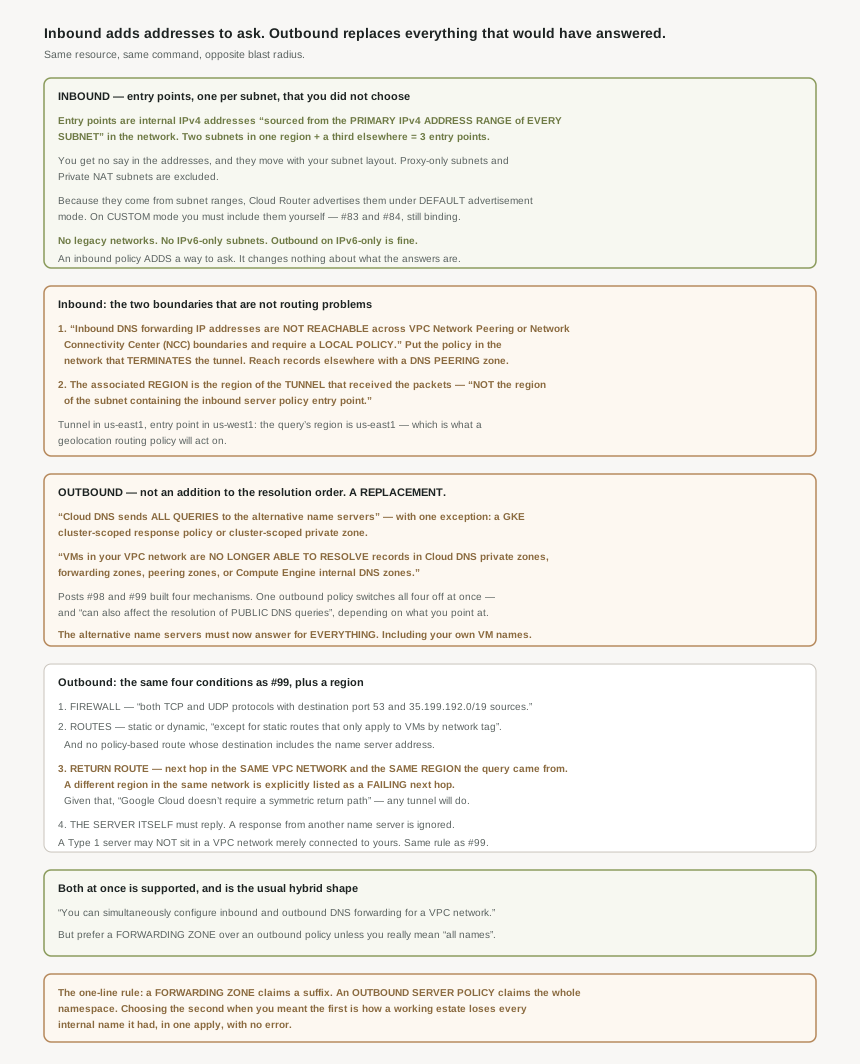
Check which network the policy is in, because this is a documented boundary rather than a routing failure: inbound DNS forwarding IP addresses are not reachable across VPC Network Peering or Network Connectivity Center (NCC) boundaries and require a local policy.
Correct approachPut the policy where the hybrid connection terminates — create the inbound DNS forwarding policy directly in the VPC network that receives the queries from your hybrid connection — which is also the standing recommendation: Google recommends creating an inbound server policy in the VPC network that connects to your on-premises network. Then reach anything in other networks the way #99 established: to resolve records located in a peered VPC network, create a DNS peering zone in the local VPC network that targets the remote network.
Because the region attributed to the query is not the one you would guess. The associated region for a DNS query is always the region that contains the Cloud VPN tunnel, Cloud Interconnect VLAN attachment, or network interface of the Router appliance that receives the packets for the DNS query, not the region of the subnet containing the inbound server policy entry point.
The worked example makes it concrete: packets entering through a tunnel in us-east1 and sent to an entry point in us-west1 mean the associated region for the DNS query is us-east1. And it matters only in one situation, which the page names — the associated region for a DNS query is important if you use geolocation routing policies.
Align the two: as a best practice, send DNS queries to the IPv4 address of an inbound server policy entry point in the same region as the Cloud VPN tunnel, Cloud Interconnect VLAN attachment, or Router appliance. Which means the resolver address configured on an on-premises host is a regional decision, not an arbitrary pick from the list.
Architecture
The same API object, in two directions, with nothing in common but the word "policy".
Inbound: addresses you do not choose
The reason an inbound policy works at all is that it materialises real addresses inside your network. When you create an inbound server policy, Cloud DNS creates inbound server policy entry points in the VPC network to which the server policy is applied, and those are internal IPv4 addresses sourced from the primary IPv4 address range of every subnet in the applicable VPC network, excluding subnets with a specific purpose — proxy-only subnets and the subnets Private NAT uses.
The count follows your subnet layout rather than anything you configure. The documentation's example is a network with two subnets in one region and a third in another, where Cloud DNS uses a total of three IPv4 addresses as inbound server policy entry points, one per subnet. Two plus one is three; add a subnet tomorrow and there is a fourth.
Being subnet addresses has one convenient consequence and one trap. The convenience: because inbound server policy entry point IP addresses are taken from the primary IPv4 address ranges of subnets, Cloud Routers advertise those IP addresses when the Border Gateway Protocol (BGP) session for a Cloud VPN tunnel, Cloud Interconnect VLAN attachment, or Router appliance is configured to use the Cloud Router default advertisement mode. With default advertisement, they reach on-premises for free.
The trap is #84 again: an estate on custom advertisement mode advertises exactly what it lists, so the entry points have to be added deliberately — either by advertising subnet ranges alongside the custom prefixes, or by naming the entry point addresses themselves.
Two platform limits are worth knowing before designing around this. You can't use inbound server policies with legacy networks because these policies require VPC networks. And the IPv6 story is asymmetric: IPv6-only VPC subnets don't support inbound DNS server policies, while however, you can configure outbound DNS server policies for your IPv6-only VM instances.
An inbound policy changes no answer. It adds addresses that accept queries, and those queries are then resolved by the same VPC resolution order from #98 — same private zones, same longest-suffix matching, same NXDOMAIN behaviour. An on-premises host querying an entry point gets exactly what a VM in that network would get.
Which is why it is the safe half of this post and the outbound half is not. Inbound is additive and reversible; outbound is a substitution.
Outbound: a replacement, not an addition
You can modify the Cloud DNS name resolution order of a VPC network by creating an outbound server policy that specifies a list of alternative name servers. The word is "modify", and the resolution-order page shows what that modification is: step one. If the VPC network has an outbound server policy, Google Cloud forwards the query to one of the alternative name servers defined in that policy to complete the name resolution process.
"To complete" is the operative phrase. There is no step two. Everything #98 and #99 described sits below this entry and is never consulted.
| Mechanism | Without an outbound policy | With one |
|---|---|---|
| GKE cluster-scoped response policy or private zone | Checked first | Still checked first |
| VPC-scoped private zones (#98) | Checked by longest suffix | Not consulted |
| Forwarding zones (#99) | Checked by longest suffix | Not consulted |
| Peering zones (#99) | Checked by longest suffix | Not consulted |
| Compute Engine internal DNS names | Checked | Not consulted |
| Public DNS | Last resort | Only if your resolver does it |
That last row deserves emphasis, because it is where an outbound policy breaks things nobody associated with DNS at all. Package installs, API calls, certificate validation and metadata lookups all depend on public resolution, and after an outbound policy they depend on the alternative name server's willingness to recurse. The documentation's hedge — can also affect the resolution of public DNS queries, depending on the configuration of the alternative name servers — is doing a lot of work.
Outbound: the same plumbing as #99, plus a region
Alternative name servers are reached exactly as forwarding targets are, with the same four conditions and the same source range. The firewall: the effective firewall configuration must allow both TCP and UDP protocols with destination port 53 and 35.199.192.0/19 sources — a /19, so 8,192 addresses, and the same range every customer's forwarded queries arrive from. The routes: static routes except for static routes that only apply to VMs by network tag, plus dynamic routes — and one extra caution that does not appear in the forwarding-zone page, ensure you haven't created any policy-based routes whose destinations include Type 1 alternative name server IP addresses.
The reply rule is identical: Cloud DNS requires that each alternative name server send response packets back to the Cloud DNS IP address in 35.199.192.0/19 from which the query originated, and Cloud DNS ignores responses if they come from an unexpected IP address source. As does the network-boundary rule: a Type 1 alternative name server cannot be located in a VPC network that's connected to the VPC network with the outbound server policy.
The return path is where this page is stricter than #99's, and more precise. Your on-premises network must have routes for the 35.199.192.0/19 destination whose next hops are Cloud VPN tunnels, Cloud Interconnect VLAN attachments, or Cloud Routers located in the same VPC network and region from which Cloud DNS sends the query. Same network and same region. The failure list spells out the third case explicitly: next hops in the same VPC network but in a region that is different from the region where the queries originated.
And then a genuine relaxation, which is worth knowing because it saves an argument with a network team: as long as the next hops meet those network and region requirements, Google Cloud doesn't require a symmetric return path. The reply does not have to come back through the tunnel the query went out on — any tunnel in the right network and region will do.
Pointing an outbound policy at a public resolver changes the plumbing completely. Cloud DNS sends packets whose sources match the Google Public DNS source ranges to Type 3 alternative name servers, and it does not rely on any routes within the VPC network to which the outbound server policy applies.
No firewall rule, no route, no return path to arrange — and also no 35.199.192.0/19, so a rule written for the private case does nothing here. The three target types are not variations on a theme; they are three different network paths wearing one configuration field.
Both at once
The two halves are independent and combine: you can simultaneously configure inbound and outbound DNS forwarding for a VPC network. That is the standard hybrid shape, and the overview names the payoff — bi-directional forwarding lets VMs in your VPC network resolve records in an on-premises network or in a network hosted by a different cloud provider.
In practice the recommended version of "both" is an inbound policy plus a forwarding zone, not an inbound policy plus an outbound policy. You get resolution in both directions without surrendering the namespace. The outbound policy earns its place only when the corporate resolver really is meant to be the single source of truth for every name a VM looks up.
Why This Architecture Holds Up
They are packaged together because they are the two ends of one question: which servers participate in resolution for this network. Inbound answers it from outside — who may send queries in. Outbound answers it from inside — where do queries go. From the API's point of view that is one policy with two optional halves.
From an operator's point of view they could hardly be less alike, and the asymmetry is worth naming because the shared noun hides it. An inbound policy is additive: it creates addresses, changes no answer, and removing it removes only the ability to ask. An outbound policy is substitutive: it changes every answer in the network and removing it restores them. The first is a connectivity feature. The second is an architectural commitment.
A forwarding zone claims a suffix. An outbound server policy claims the namespace.
Both forward queries to a name server you run, and the configuration effort is similar, which is exactly why the wrong one gets chosen. The question to ask before applying either is not "where should these queries go" but "which names am I taking responsibility for" — and the honest answer is nearly always a suffix.
Choosing the policy when you meant the zone is how an estate loses every internal name it had, in one apply, with no error. Choosing the zone when you meant the policy costs you one extra zone.
One hundred posts in
This is the hundredth post in the series and the twenty-first consecutive one on networking, which was not planned and is the most honest thing I can say about Google Cloud networking: it is where the depth is. The block that started at #80 with Shared VPC ends here, and the single idea that has recurred most is not a product. It is that configuration success and behavioural success are different events — a default route that exports and is ignored, a public zone that is authoritative and unreachable, a private zone that resolves and returns NXDOMAIN, a forwarding target that is pingable and unusable, and now a policy that applies cleanly and silently disables four other features.
Every one of those is documented. None of them produces an error.
Key Architecture Decisions
| Situation | Decision | Because |
|---|---|---|
| You want VMs to use the corporate resolver for some names | Forwarding zone, not an outbound policy | An outbound policy disables private, forwarding and peering zones. |
| You genuinely want one resolver for every name | Outbound policy, and make it authoritative for everything | Even Compute Engine internal names stop resolving. |
| Running GKE and considering an outbound policy | Cluster-scoped resources survive; nothing else does | They are the documented exception to "all queries". |
| On-premises hosts need to query Cloud DNS | Inbound policy in the network terminating the tunnel | Entry points are unreachable across peering and NCC. |
| Records live in a different VPC network | Add a DNS peering zone locally | That is the documented remedy for the boundary. |
| Using custom BGP advertisement mode | Advertise the entry points deliberately | Only default mode advertises them automatically. |
| Telling on-premises hosts which resolver to use | Pick the entry point in the tunnel's region | Query region follows the tunnel, not the entry point. |
| Using geolocation routing policies | Region alignment stops being cosmetic | The page names this as the case where it matters. |
| Adding a subnet to a network with an inbound policy | Expect another entry point | There is one per subnet, from its primary range. |
| Running a legacy network | Inbound policies are unavailable | They require VPC networks. |
| IPv6-only subnets | Outbound only | Inbound policies are not supported there. |
| Writing the on-premises return route | Next hop in the same network and the same region | A different region is explicitly a failing next hop. |
| Asked to guarantee a symmetric path | Not required | Any next hop meeting network and region rules works. |
| Pointing at a public resolver | No VPC routes or firewall rules apply | Type 3 uses public routing and Google Public DNS ranges. |
| Policy-based routes in the network | Check none match the name server address | The page calls this out specifically for Type 1. |
The one to look at today
List the DNS server policies on every VPC network you own and check whether any carries alternative name servers. If one does, that network has no working private zones, forwarding zones, peering zones or internal VM names — whether or not anyone intended that, and whether or not those zones still exist in the console looking healthy. Then ask whether a forwarding zone would have done the job, because it usually would have.
Closing Thought
The thing worth taking from this post is a habit rather than a fact: when two features arrive in one resource, check whether they share a blast radius as well as a schema. Here they emphatically do not. One creates addresses and changes nothing; the other changes everything and creates nothing. The API gives you no hint, the console gives you no warning, and the only thing standing between the two is a sentence in the documentation that reads like a footnote.
It is a fitting end to twenty-one posts of networking. Almost nothing in this block failed loudly. What it failed at, repeatedly, was telling you that it had succeeded at something other than what you meant.
#101 leaves name resolution for address translation: Cloud NAT, and how ports are actually allocated — the mechanism behind a failure mode that looks like packet loss and is arithmetic.
Official Google Cloud Reference
- DNS server policies overview
- Apply DNS server policies
- Name resolution order
- Cloud DNS overview
- DNS zones overview
- Create a forwarding zone
- Outbound endpoints overview
- Configure DNS64
- Configure routing policies and health checks
- Best practices for Cloud DNS
- Cloud DNS troubleshooting
- Cloud DNS quotas and limits
Comments