Business Challenge
The five services before this one all sat in the data path. #95 forwarded packets, #97 terminated connections, #99 cached responses at the edge. Traffic Manager does none of that.
“Traffic Manager works at the DNS level… Clients connect to the selected endpoint directly. Traffic Manager isn't a proxy or a gateway. Traffic Manager doesn't see the traffic passing between the client and the service.”
Every property of this service follows from that one sentence. It costs almost nothing because it handles no bytes. It works with any protocol because it never inspects one. It can route between Azure, another cloud and a datacentre because an endpoint is just a name. And it has a hard limit nothing can engineer around:
“Because Traffic Manager works at the DNS level, it cannot influence existing connections to any endpoint… Traffic Manager directs new connections to available endpoints. Other endpoints might continue to receive traffic via existing connections until those sessions are terminated.”
So failover here is not a redirection, it is an expiry. The speed of it is set by DNS caching you do not control, and the documentation says so plainly: applications “should limit the session duration used with each endpoint” if they want traffic to drain.
Architecture
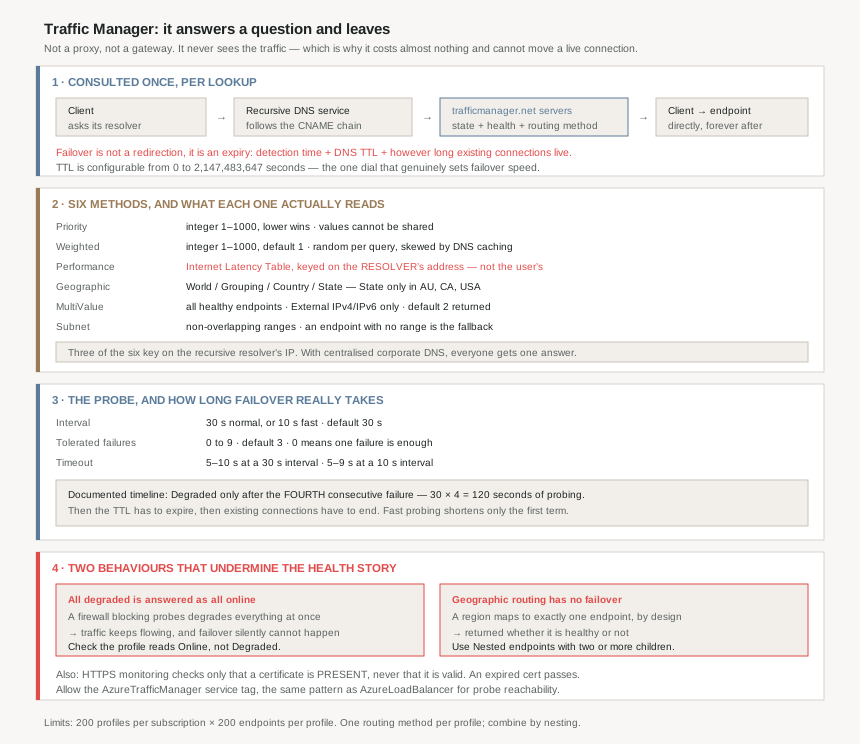
The six methods, and what each actually reads
| Method | Keys on | The detail that matters |
|---|---|---|
| Priority | An integer 1–1000 | Lower wins; endpoints “can't share priority values” |
| Weighted | An integer 1–1000, default 1 | Random per query, proportional — and distorted by DNS caching |
| Performance | The Internet Latency Table | Measures latency, not distance; reads the resolver's IP |
| Geographic | Region of the query source | One region maps to exactly one endpoint — no failover |
| MultiValue | Returns all healthy endpoints | External IPv4/IPv6 endpoints only; default 2 returned |
| Subnet | Source address ranges | Non-overlapping; an endpoint with no range is the fallback |
Only one method applies per profile, though “changes are applied within one minute without any downtime” and methods combine through nested profiles. That nesting is not a nicety — three separate recommendations in the documentation resolve to it, and two of them exist to patch holes in the methods themselves.
Three methods read the resolver, not the user
Performance, Geographic and Subnet all claim to route by where the request came from. All three actually read where the recursive DNS service came from:
“Traffic Manager doesn't receive DNS queries directly from clients. Instead, DNS queries come from the recursive DNS service that the clients use. Traffic Manager uses the IP address of the recursive DNS service to determine the closest endpoint, not the client's IP address. This IP address serves as a good proxy for the client.”
This is the same mechanism #99 found in Front Door, where PoP selection falls back to the resolver's location. The difference is that there it was a documented caveat on one decision; here it is the entire basis of three of the six routing methods. An estate whose users all resolve through one central corporate resolver gets one answer for everybody, in every geography.
Why This Architecture Holds Up
Because failover takes longer than the probe settings suggest
The documented timeline uses a 30-second interval, 3 tolerated failures and a 10-second timeout, and the endpoint is marked Degraded “after a fourth consecutive failure” — roughly 120 seconds of probing. Only then does the DNS side begin:
“previous DNS responses that include this endpoint might still be cached by recursive DNS servers and DNS clients. Clients continue to use the endpoint until the DNS cache expires.”
So the real time-to-failover is detection plus TTL plus however long existing connections live. Fast probing at 10 seconds cuts the first term to a third; it does nothing to the other two. And the TTL range is enormous — “as low as 0 seconds and as high as 2,147,483,647 seconds” — so this is the one dial that genuinely decides failover speed, at the cost of query volume against the name servers.
Because all-degraded means all-healthy
“When all eligible endpoints have a degraded status. Traffic Manager makes a ‘best effort’ attempt and responds as if all the Degraded status endpoints actually are in an online state… The consequence of this behavior is that if Traffic Manager health checks are not configured correctly, it might appear from the traffic routing as though Traffic Manager is working properly. However, in this case, endpoint failover cannot happen.”
This is the sharpest failure in the service, because it is silent and it inverts the usual signal. An NSG or firewall that blocks the probe IPs, or a wrong monitoring port, degrades every endpoint at once — and the profile keeps answering queries, keeps distributing traffic, and keeps looking correct. The named causes are exactly the mundane ones: “An access control list [ACL] blocking the Traffic Manager health checks. An improper configuration of the monitoring port or protocol.”
The documentation gives the one check that distinguishes the two states: “It is important to check that the profile shows an Online status, not a Degraded status.” Traffic flowing is not evidence. Profile status is.
The remedy belongs in the same place as every other probe-reachability problem in this series: allow the AzureTrafficManager service tag, which is the documented recommendation and the same pattern as AzureLoadBalancer in #95.
Because geographic routing has no failover at all
“A geographic region can be mapped only to one endpoint… Since a region can be mapped only to one endpoint, Traffic Manager returns a response whether the endpoint is healthy or not.”
The opening promise of the routing documentation is that “All Traffic Manager profiles include health monitoring and automatic failover of endpoints”. Geographic routing is the exception, and it is an exception by design rather than by defect: unambiguous geographic boundaries are the whole point of the method, and a failover would violate them.
Which is why the documentation's recommendation here is unusually strong — it “strongly recommend[s]” pairing geographic routing with Nested endpoints whose child profiles hold at least two endpoints each. The nesting restores failover inside a region without breaking the one-region-one-endpoint rule at the top.
Two more geographic behaviours produce silence rather than an error. A match on a Stopped endpoint returns NODATA and “makes up no further lookups higher in the geographic region hierarchy” — so the World catch-all does not save you. And a query from an unmapped region also returns NODATA. Both argue for the same thing: always assign World to something.
Because weighted distribution is only as good as your resolver diversity
Weighted routing picks randomly per DNS query in proportion to weights. The caveat is about who is asking:
“When the number of clients and recursive DNS servers is large, traffic distribution works as expected. However, when the number of clients or recursive DNS servers is small, caching can significantly skew the traffic distribution.”
The named cases are the ones where weighted routing is most tempting: development and test environments, application-to-application communication, and “applications aimed at a narrow user base that shares a common recursive DNS infrastructure (for example, employees of a company connecting through a proxy)”. A canary release weighted 95/5 behind one corporate resolver is not a 5% canary; it is a coin flip that stays flipped for the TTL.
The documentation is candid that this is not an Azure problem: “These DNS caching effects are common to all DNS-based traffic routing systems.” If it matters, the answer is a different routing layer, not a different weight.
Because the probe settings interact in ways the UI does not show
| Setting | Range | Default |
|---|---|---|
| Probing interval | 30 s (normal) or 10 s (fast) | 30 s |
| Tolerated failures | 0 to 9 — 0 means one failure is enough | 3 |
| Timeout, 30 s interval | 5 to 10 s | 10 s |
| Timeout, 10 s interval | 5 to 9 s | 9 s |
| Custom header pairs | up to 8 | — |
| Expected status code ranges | up to 8 | 200 |
The timeout range depends on the interval you chose, which is the sort of coupling that is obvious in a table and invisible in a form. And the probe count is not what the interval implies: “Traffic Manager probes from multiple locations… That's why endpoints are receiving health probes from Traffic Manager with a higher frequency than the setting used for Probing Interval.” An origin sized for one probe every 30 seconds will see considerably more.
Two consequences for how you read health. Aggregation is by average, and “the status should only be a concern if less than 50% (0.5) of probes publish an up status”. And monitoring settings are per profile, not per endpoint — “All endpoints in a Traffic Manager profile share monitoring settings” — so differing per-endpoint checks is a third reason to reach for nested profiles.
Because the health check is weaker than it looks
Two details worth knowing before trusting HTTPS monitoring. “HTTPS monitoring doesn't verify whether your TLS/SSL certificate is valid, it only checks that the certificate is present.” An expired certificate passes the health check and fails every real client.
And the success condition is narrow: anything outside the configured ranges is a failure, “including a different 2xx code, or a 301/302 redirect”. A health endpoint that starts returning 204, or an HTTP-to-HTTPS redirect added at the front door, degrades the endpoint without the application changing.
There is also a class of endpoint this cannot monitor at all: “Traffic Manager isn't designed to probe endpoints that resolve to addresses within private, non-routable, or Microsoft-internal network spaces”, and those “must be configured as Always serve traffic endpoints” — which means no health-based failover whatsoever.
Key Architecture Decisions
| Decision | Choice | Why |
|---|---|---|
| Using Traffic Manager for fast failover | Only with a short TTL and short sessions | Time to failover is detection plus TTL plus existing connection lifetime, and DNS-level routing cannot move a live connection. |
| Judging profile health by traffic flowing | Check the profile shows Online, not Degraded | When every endpoint is degraded Traffic Manager answers as if all were online, so a fully broken profile looks healthy while failover cannot happen. |
| Firewalls in front of monitored endpoints | Allow the AzureTrafficManager service tag |
An ACL blocking probes is a named cause of the all-degraded state, which is the failure that hides itself. |
| Geographic routing | Pair with Nested endpoints holding two or more children | A region maps to exactly one endpoint and is returned healthy or not; nesting restores failover without breaking the boundary. |
| Geographic coverage | Always map World to something |
An unmapped region returns NODATA, and a Stopped match returns NODATA without climbing the hierarchy. |
| Weighted routing for canary releases | Not behind a small set of resolvers | Few clients or resolvers skew the distribution badly, and the named examples are dev/test, app-to-app and corporate proxy users. |
| Expecting Performance routing to follow the user | It follows the resolver | Three of six methods read the recursive DNS service's address, not the client's. |
| HTTPS health checks as certificate monitoring | They are not | HTTPS monitoring checks only that a certificate is present, never that it is valid. |
| Health endpoints returning 204 or a redirect | Add the code to the expected ranges | Anything outside the configured ranges fails, including other 2xx codes and 301/302. |
| Different monitoring per endpoint | Nested profiles | All endpoints in a profile share one set of monitoring settings. |
| Private or non-routable endpoints | Accept no failover, or front them with something routable | They must be Always serve traffic, which disables health checks entirely. |
| Apex domain on a Traffic Manager profile | Azure DNS alias records | DNS standards forbid a CNAME at the apex, and alias records are the documented workaround. |
Closing Thought
One hundred posts into this series, Traffic Manager is a useful place to stop and notice what the cheap option actually costs. It is the only global balancing service here that adds no latency, handles any protocol, spans any cloud, and bills almost nothing — because it does the minimum possible thing: answer a question and leave.
Everything awkward about it is the bill for that. It cannot fail over a live connection, because it was never in it. Its distribution is approximate, because DNS answers are cached by machines it does not own. It routes by resolver rather than user, because the resolver is the only thing that ever talks to it. And its most dangerous behaviour — answering as if everything is healthy when everything is broken — exists because the alternative, returning nothing, would be worse for a service whose only job is to return something.
Three of the six routing methods make their decision from the IP address of a recursive DNS resolver. That address is a proxy for the user, and the documentation says as much, twice. In an estate with centralised DNS it is a very bad proxy — and nothing in the traffic will tell you, because the routing will look consistent and deliberate the whole time.
Which sets up the only question left in this sequence: four services that all balance traffic, with overlapping names and non-overlapping mechanics. What actually decides which one a workload needs.
Official Azure Reference
- Azure Traffic Manager endpoint monitoring — probe protocols and the HTTPS certificate caveat, the interval, tolerance and timeout ranges with their defaults, the endpoint and profile status tables, the failover timeline, the all-degraded best-effort behaviour and its consequences, multi-location probing, and the Always serve traffic rules
- Traffic Manager routing methods — all six methods, the priority and weight ranges, the Internet Latency Table and the resolver-as-proxy statement, the geographic granularity levels and the one-region-one-endpoint rule with its NODATA cases, MultiValue's endpoint-type restriction and Subnet's fallback behaviour
- How Azure Traffic Manager works — the DNS-level model and the not-a-proxy statement, the eight-step resolution sequence, the TTL range and its caching trade-off, the tenant ownership rule for profile names, and the apex-domain limitation
- Azure subscription and service limits — the Traffic Manager profile and endpoint limits and the default throttling limits per operation
- Nested Traffic Manager profiles — the mechanism three separate recommendations in this post resolve to, for further reading (no claims drawn from it)
- Traffic Manager FAQ — the detail behind several behaviours referenced above, for further reading (no claims drawn from it)
Comments